Free digital forensics tools are programs investigators use to find and read traces left on computers.
This guide is for students, career changers and home lab learners who keep seeing the names Autopsy, Volatility and Velociraptor. It explains what each one looks at, in plain words, and how to practise safely.
In short
- Autopsy looks at stored files, including deleted ones and web history.
- Volatility looks at a saved copy of a computer's working memory.
- Velociraptor collects evidence from many computers at once, across a network.
- Investigators work on a copy, never the original, and beginners practise on their own lab machines or practice files.
What you will learn
- Explain what Autopsy, Volatility and Velociraptor each do in one sentence.
- Spot which tool fits a question, such as "what was running?" or "what was deleted?".
- Check that you are working on a copy and on data you are allowed to examine.
- Plan a first safe practice session in a home lab.
- Exact copy of a drive (disk image)
- a file that holds every bit of a storage drive, so it can be studied without touching the original.
- Working memory (RAM)
- the short-term memory a computer uses while it is switched on. It is lost when the power goes.
- Clues (evidence)
- files, records and settings that show what happened on a computer.
What are free digital forensics tools?
Think of a garage that looks after a fleet of vans. The mechanic has one tool that reads a van's service records and one that checks the engine while it runs. A third tool reports on every van in the fleet from the office.
Digital forensics tools split the work in a similar way. Digital forensics means collecting and studying clues from computers to work out what happened. One tool reads what is stored on a drive. Another reads what was in working memory. A third gathers clues from many computers at once.
The three free tools beginners meet most often match those jobs. Autopsy reads stored files. Volatility reads memory. Velociraptor gathers clues across a network.
Where the comparison stops working: a mechanic can lift the bonnet and look. An investigator tries not to touch the original computer at all, because even opening a file can change the clues. So the tools usually work on a copy.
Why does it matter?
When something goes wrong on a computer, someone has to find out what happened, and these tools help them do it. They are also the names you will see in job adverts, courses and practice challenges.
If you are a student or career changer
What could happen: you learn tool names from videos but cannot say which question each one answers.
Check this: for each tool, write one line on what it looks at and what it cannot see.
If you are building a home lab
What could happen: you point a tool at a family laptop or a friend's phone and read private data you had no right to see.
Check this: practise only on machines you own and set up for the lab, or on practice files made for learners.
If you are new to an IT or help desk job
What could happen: you restart or clean a suspect laptop "to help", and the clues in its memory are lost.
Check this: ask your team who to call before you touch a computer that may have been attacked.
What does it look like?
Here is a made-up case card, the kind of note a learner might keep for a practice exercise. It shows which tool answers which question.
Example only. All values are made up.
PRACTICE CASE CARD: lab-laptop-01 (my own lab machine)
Question 1: Which files were deleted on Tuesday?   tool: Autopsy      (1)
Question 2: Which programs were running at 14:00?  tool: Volatility   (2)
Question 3: Did the same file appear on 5 lab PCs? tool: Velociraptor (3)
Source: disk image lab01-FAKE.img, memory file lab01-FAKE.mem
Fingerprint of image checked before and after:     0000-EXAMPLE    (4)
- Autopsy searches a disk image for stored and deleted files.
- Volatility reads a memory file to list programs that were running when it was saved.
- Velociraptor can ask many computers the same question at once.
- In a real file, this line would contain a long fingerprint (a hash) that proves the copy did not change during the work.
Why this is risky: without a card like this, it is easy to open the original drive. It is also easy to mix up files or forget what you checked.
The safer way: write the question first, then pick the tool. Work only on copies, record a fingerprint of each copy, and note every step you take.[7]
How does it work?
Most investigations follow the same broad steps. A US government guide describes them as collecting, examining, analysing and reporting.[7]
- Save the fragile clues first. Memory changes fast and is lost at power off, so it is usually saved before the drive. A long-standing internet guide on evidence lists memory well before disk in its order of collection.[8]
- Make a copy. The drive is copied bit by bit into a disk image, and the work happens on that copy. The same guide warns against running programs on the original that change file details.[8]
- Read the memory copy with Volatility. It pulls clues out of a memory file without running on the computer being investigated.[3] Its guides cover memory from Windows, Linux and macOS computers.[4]
- Read the disk copy with Autopsy. Autopsy is a point-and-click front end to The Sleuth Kit, a set of command-line forensics tools. It can search keywords, show a timeline of events, pull out web history and recover some deleted files.[1]
- Look wider with Velociraptor. A small program called an agent runs on each computer and stays connected to a server. Investigators can then ask many computers for the same clues at once.[5] Where no agent can be installed, it can build a one-off collector that saves results into a zip file.[6]
- Write it up. The findings go into a report that someone else could check and repeat.[7]
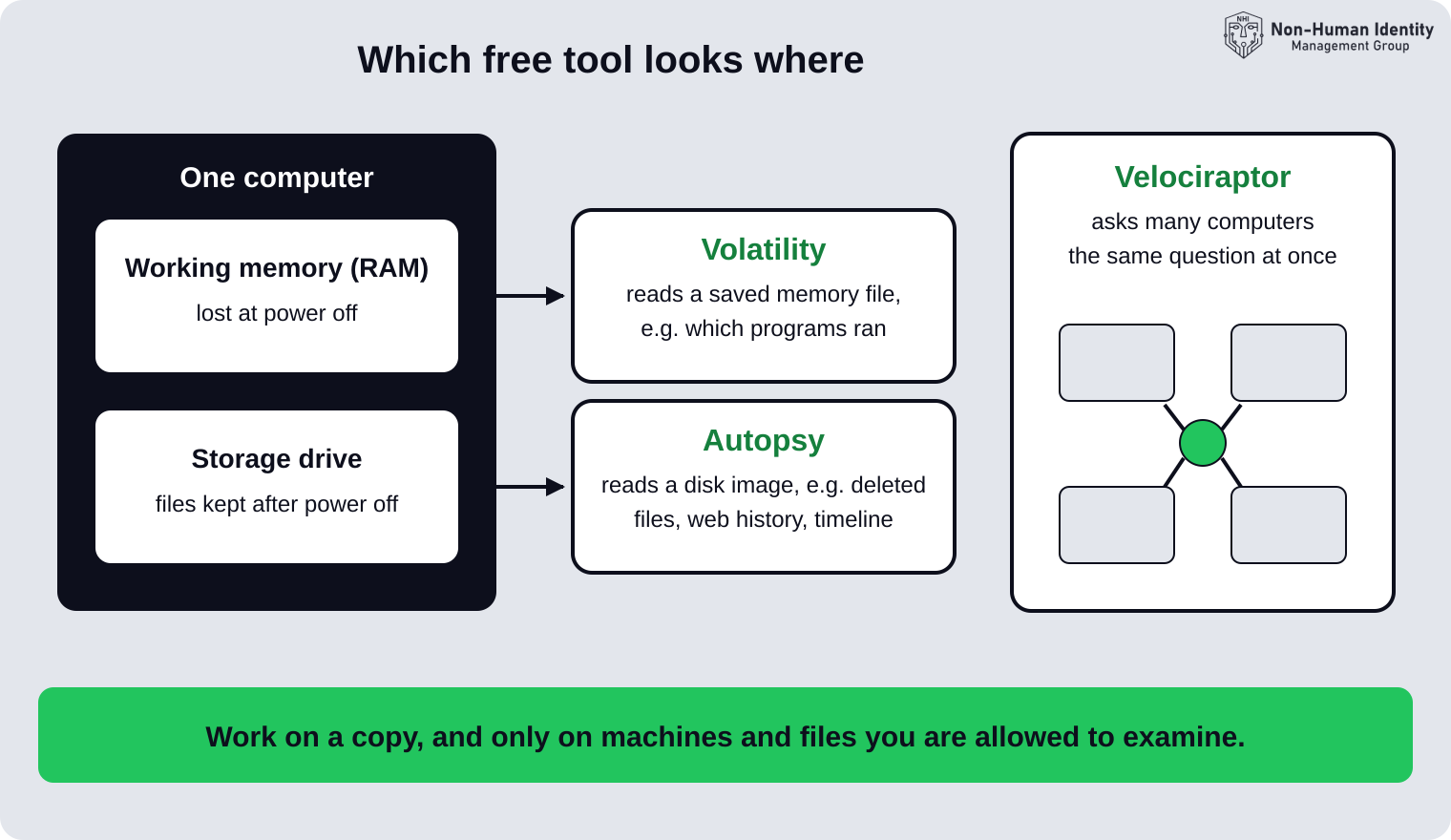
All three tools are free to download. Autopsy and Velociraptor describe themselves as open source.[2][5] Volatility 3 is released by the Volatility Foundation under its own licence, so read its terms before using it at work.[3]
A worked example
Ivo Dube is studying for a career in cyber security. He wants to try the tools he keeps reading about, without breaking any rules.
He sets up two old laptops of his own as a lab, with no personal files on them. On one, he creates a few test documents, visits some websites and deletes two of the files.
His tutor, Vida Bergmann, gives him one rule: "Write your question before you open a tool." So Ivo writes three questions on a case card.
First, he saves a copy of the laptop's memory while it is still running. He opens that memory file in Volatility and lists the programs that were running. He spots the web browser and a text editor, which matches what he did.
Next, he makes a disk image of the same laptop. He records its fingerprint, then opens the copy in Autopsy. Autopsy shows his web history and finds one of the two deleted files. The other one cannot be recovered, because new data has already been written over that space.
Last, he installs the Velociraptor agent on both lab laptops. He asks both machines whether a test file exists. One says yes and one says no, which is what he expected.
At the end, he checks the image fingerprint again. It matches, so his copy did not change. He writes a one-page report and shows it to Vida. She asks him to add the time of each step, so another person could repeat his work.
Myths and mistakes
| What people think | What is true |
|---|---|
| One free tool can do everything. | Each tool looks at a different place. Investigators often use several together. |
| Deleted files can always be recovered. | Some can, but space that has been reused may hold nothing useful. |
| Turning a hacked computer off protects the evidence. | Switching off loses what was in memory. Ask an investigator first. |
| It is fine to practise on a friend's laptop if they will not mind. | Use only machines you own and set up for the lab, or practice files made for learners. |
| Free means not good enough for real cases. | Free tools are used in real investigations, but the skill is in the method, not the tool. |
What can I do this week?
- Write one line on what each of the three tools looks at.
- Set up a spare computer as a lab with no personal data. A virtual machine (a computer that runs inside your computer) also works.
- Get one tool from its own site only. Read its first steps page.
- Try a practice task from a beginner capture the flag game.
- Start a notebook: question, tool, time, what you found.
Checklist
- I know which question each tool answers.
- I practise only on machines I own and set up for the lab, or on practice files made for learners.
- I work on a copy, never the original.
- I record a fingerprint of each copy before and after I work on it.
- I save memory before I switch a machine off.
- I download tools only from their official sites.
- I note every step so someone else could repeat it.
Common questions
Which free forensics tool should a beginner learn first?
Many beginners start with Autopsy, because it has a point-and-click screen and works on stored files, which are easy to picture. Volatility comes next, once you are comfortable typing commands. Velociraptor makes most sense after you understand single computers well.
Is it legal to use digital forensics tools?
Yes, the tools themselves are legal and widely used. What matters is whose data you look at. Use them only on your own lab machines, practice files or systems you are clearly authorised to examine. See Computer Misuse Laws for Beginners.
What is the difference between Autopsy and The Sleuth Kit?
Autopsy is the point-and-click program and The Sleuth Kit is the set of command-line tools underneath it. Autopsy makes those tools easier to use and adds features such as timelines and keyword search.
Why does memory matter so much?
Memory shows what was happening when the copy was saved, such as running programs and open network connections. Some harmful programs leave few traces on the drive. Memory is lost at power off, so it is usually saved first.
Do I need a powerful computer to practise?
Not to start. A spare laptop or a virtual machine is enough for small practice files. Bigger disk images and memory files need more storage space and patience, so begin with small examples and grow from there.
Where next?
Ready for the detail? Read the practitioner guide: Open Source DFIR Tools Landscape Guide. It goes further into more tools, how teams deploy them safely and how to choose between them.
Also useful:
- Autopsy and The Sleuth Kit Guide
- Memory Forensics Guide
- Digital Forensics for Beginners
- Cyber Security Home Labs for Beginners
- Capture the Flag and Hacking Labs for Beginners
Related NHI Mgmt Group resources: Disk Imaging and Forensic Acquisition Guide · Forensic Timeline Analysis Guide · Building a Cybersecurity Home Lab Guide
Key terms
- Digital forensics
- Collecting, protecting, studying and presenting clues from computers so they can support an investigation.
- Disk image
- A bit-for-bit copy of a storage drive, including space that looks empty.
- Memory forensics
- Studying a copy of a computer's working memory to see what was running.
- Volatile data
- Clues held in temporary memory that disappear when the power goes.
- Order of volatility
- Collecting the clues that disappear fastest first.
- Hash
- A fingerprint worked out from data, used to show that a copy has not changed.
- Timeline analysis
- Putting events in time order to understand what happened and when.
- Home lab
- A personal practice setup, kept apart from real work systems, for learning safely.
Sources and further reading
- Autopsy. The Sleuth Kit. https://www.sleuthkit.org/autopsy/, accessed 28 Nov 2026.
- Autopsy Digital Forensics. Sleuth Kit Labs. https://www.autopsy.com/, accessed 28 Nov 2026.
- Volatility 3 (project page and licence). Volatility Foundation, GitHub. https://github.com/volatilityfoundation/volatility3, accessed 28 Nov 2026.
- Volatility 3 documentation. Volatility Foundation. https://volatility3.readthedocs.io/en/latest/, accessed 28 Nov 2026.
- Velociraptor overview. Velociraptor documentation. https://docs.velociraptor.app/docs/overview/, accessed 28 Nov 2026.
- Offline collections. Velociraptor documentation. https://docs.velociraptor.app/docs/deployment/offline_collections/, accessed 28 Nov 2026.
- SP 800-86, Guide to Integrating Forensic Techniques into Incident Response. NIST, August 2006. https://csrc.nist.gov/pubs/sp/800/86/final.
- RFC 3227, Guidelines for Evidence Collection and Archiving. IETF, February 2002. https://www.rfc-editor.org/rfc/rfc3227.