Computer misuse laws make it a crime to get into or damage computers without permission.
This guide is for anyone curious about hacking, starting out in security, or wondering where the line is. You do not need to be a hacker to be affected: logging in to someone else's account without their say can be an offence too.
In short
- In the UK, getting into a computer, account or data you know you are not allowed to reach is a crime.
- Permission is what matters. An unlocked system is not the same as permission.
- Ethical hackers work with written permission from the owner, and stay inside agreed limits.
- If you stumble on a security flaw, stop and report it through the owner's official route.
What you will learn
- Explain what computer misuse laws are for in one sentence.
- Spot the difference between allowed testing and illegal access.
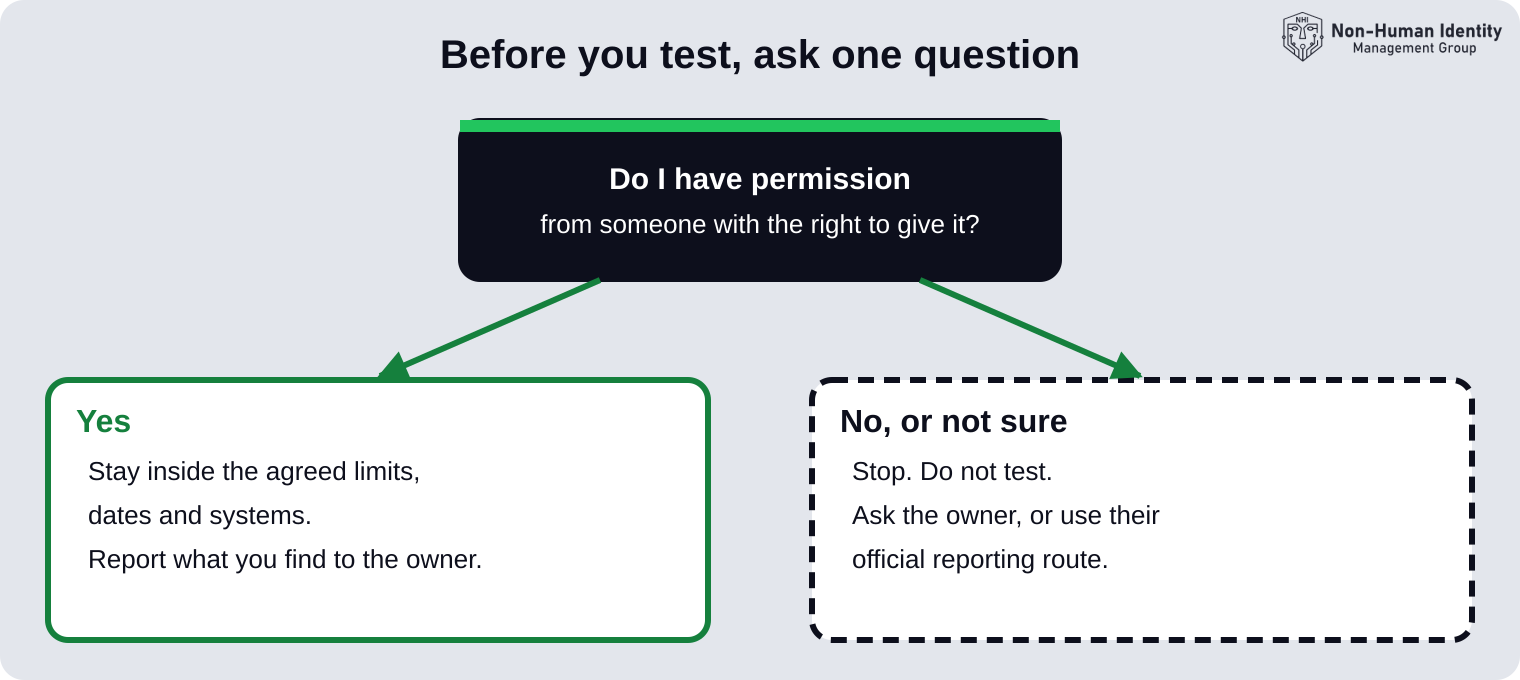
- Check what permission you have before you test anything.
- Ask the right questions before you take on security work.
Status: correct as at 28 November 2026, based on the Computer Misuse Act 1990 on legislation.gov.uk (shown as up to date with changes in force on or before 23 November 2026). Laws change; check the official text.
This guide explains the topic in general terms and is not legal advice.
- Without permission (unauthorised access)
- getting into a computer, account or data that the owner has not allowed you to use.
- Allowed hacking (ethical hacking)
- testing a system's security with the owner's written permission, to find and fix weak spots.
What are computer misuse laws?
Think of walking into a stranger's house because the front door was unlocked. The open door does not make it your house. Computer misuse laws apply the same idea to computers, accounts and data.
In the UK, the main law is the Computer Misuse Act 1990. It makes it a crime to get a computer to give you access to programs or data when you know you are not allowed.[1] It also covers harming how a computer works, and making or supplying tools meant for these crimes.[2]
Other countries have their own laws. The United States has a federal law on computer fraud and abuse, and many other countries have similar rules.
Where the comparison stops working: you can see a front door. Online, the limits of what you may use are not always clear, so it is safer to ask before you look.
Why does it matter?
The same action can be a paid job or a crime. The difference is usually whether the owner said yes.
If you are learning to hack
What could happen: you try your new skills on a real website and commit an offence without meaning to cause harm.
Check this: practise only on your own kit or on training sites built for it.
If you use a work computer
What could happen: you look at records your job does not need, such as a friend's file, and break the law.
Check this: only open data your role needs, and ask if you are unsure.
If you find a security flaw
What could happen: you keep poking to prove it, and go further than you were allowed.
Check this: stop, write down what you saw, and use the owner's reporting route.
Next: Bug Bounties and Vulnerability Disclosure for Beginners
If you hire security testers
What could happen: vague permission leaves testers and your firm unsure what is allowed.
Check this: agree in writing what may be tested, when, and by whom.
What does it look like?
Example only. All values are made up.
AM I ALLOWED? Quick check before you test
[ ] I own this system, or                       (1)
[ ] The owner said yes in writing (EXAMPLE-0000)  (2)
[ ] The test is inside the agreed limits          (3)
[ ] It is inside the agreed dates and times
[ ] I am not using someone else's login           (4)
[ ] I know who to tell if I find something        (5)
Any box empty? Stop and ask first.
- Your own laptop or home lab is the safest place to practise.
- Permission from someone who has the right to give it. In a real file, this line would point to the signed agreement.
- Limits say which systems and which kinds of test are allowed.
- Using a password you found or guessed is still access without permission.
- A named contact, so a finding goes to the right person.
Why this is risky: "I was only looking" or "it was not locked" does not turn access into allowed access.
The safer way: get written permission first, stay inside it, and report what you find to the owner.
How does it work?
This is a plain view of the UK law so you can stay on the right side of it.
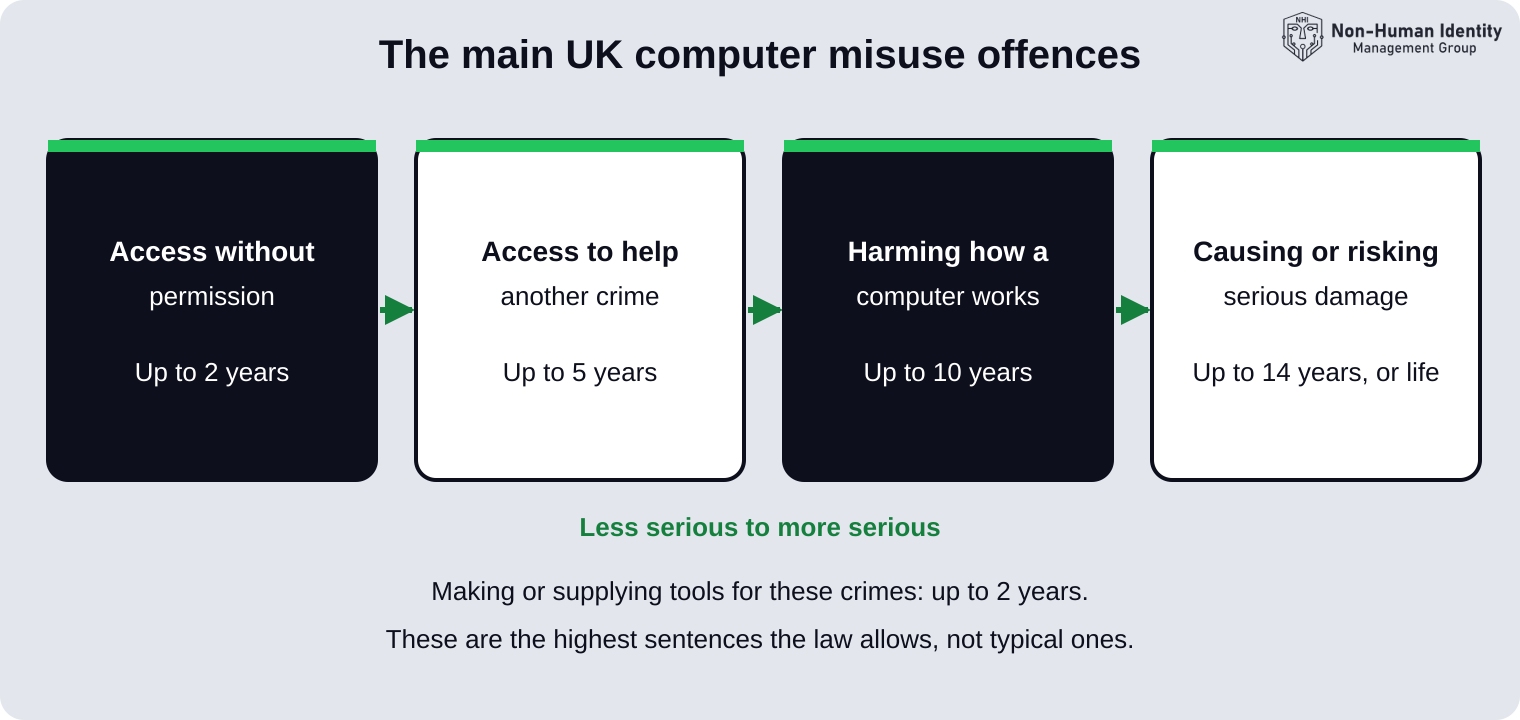
- Access without permission. It is an offence to make a computer give you access you know you are not allowed.[1]
- Access to commit another crime. It is a more serious offence if you get in to help with another crime, such as fraud.[2]
- Harming a computer. Acts meant to impair a computer, or done not caring if they do, are offences. This can include flooding a website with traffic.[2]
- Serious damage. A separate offence covers acts that cause, or risk, serious damage, for example to vital services.[2]
- Hacking tools. Making, supplying or getting tools for use in these crimes is an offence. Owning a tool alone is not enough; the intent matters.[2]
At work, the limits of your access matter. Prosecutors look at whether the employer made those limits clear, for example in contracts or instructions.[2]
In the United States, the Justice Department said in 2022 that good-faith security research should not be charged under its federal hacking law. That means testing done to find and fix flaws, in a way that avoids harm.[3] This is a charging policy, not a change to the law, and it does not cover research used to threaten or extort.
A worked example
This story is made up to show how it can happen.
Yusra Ibrahim is a computing student in Manchester. She has been learning about web security in her spare time, using practice sites built for training.
One evening she books a gym class on a local leisure centre's website. She notices the booking page address ends in a number. She wonders what would happen if she changed it. Would she see someone else's booking?
She stops before she tries. Her course covered this. Changing the number to view other people's data would be using the site in a way the owner had not allowed. Curiosity is not permission.
Instead, Yusra looks for a security contact on the website. She finds a page called "report a security issue". She writes a short, polite message. It says what she noticed, which page it was on, and that she did not test it further.
A week later the leisure centre replies. Their web supplier checked the page and found a real problem with how bookings were protected. They fixed it and thanked her.
Yusra asks her tutor how to do this kind of work properly. The tutor points her to bug bounty schemes, where firms give clear, written permission to test set systems.
What made the difference: Yusra reported what she noticed instead of testing it to prove she was right.
Myths and mistakes
| What people think | What is true |
|---|---|
| If it is not password protected, I am allowed in. | The question is whether you know you are not allowed. An unlocked system is not permission.[1] |
| It is fine if I do not change or steal anything. | Just getting in without permission can be an offence on its own in the UK.[2] |
| Owning hacking tools is illegal. | Many security tools are used every day by defenders. The UK offence turns on making, supplying or getting them for use in a crime.[2] |
| A verbal "go ahead" from a friend in IT is enough. | Get written permission from someone with the right to give it, with clear limits. |
| If I am attacked, I can hack back. | Breaking into an attacker's systems is still access without permission. Keep evidence and report it to the police instead. |
What can I do this week?
- Set up a small practice lab on your own computer, or sign up to a legal training site.
- Read the "report a security issue" page of one service you use, so you know how it works.
- At work, check which systems your job allows you to use, and ask about any grey areas.
- If you test for others, ask for a written scope before any work starts.
Checklist
- I only practise on systems I own or that are built for training.
- I have written permission before I test anyone else's system.
- I know the limits, dates and systems in that permission.
- I never use someone else's login, even if I find it.
- At work, I only open data my role needs.
- If I spot a flaw, I stop and report it through the owner's route.
- I keep a note of what I did and when.
Common questions
Is all hacking illegal?
No. Hacking with the owner's permission is legal and is a normal job. Penetration testers and bug bounty hunters do it every day. What the law targets is access or harm without permission, so the written agreement is what separates the two.
Can I get in trouble for reading a colleague's files at work?
Yes, it is possible. UK prosecutors have used the law against staff who looked at data they knew they were not allowed to see. Whether it applies often depends on how clearly the employer set the limits of each role.[2]
What should I do if I find a security flaw by accident?
Stop and do not dig further. Write down what you saw and when. Then look for the owner's security contact or reporting page and send a short, factual message. Do not share the flaw publicly or demand payment.
Does a bug bounty make testing legal?
Mostly, yes, inside its rules. A bug bounty is written permission to test set systems in set ways. Testing outside those rules, such as other systems or banned methods, falls outside the permission. Read the rules fully before you start.
Do these laws apply if I am in a different country?
Often, yes. The UK law covers cases with a strong link to the UK. For example, the computer was in the UK, or the person acted from the UK. Most countries have their own hacking laws too. The practitioner guide compares several of them.[4]
Where next?
Ready for the detail? Read the practitioner guide: Computer Misuse and Anti-Hacking Laws Guide. It goes further into how UK, US, EU and international laws compare, what counts as authorisation, and working rules for testers and responders.
Also useful:
- UK Computer Misuse Act Guide
- Penetration Testing for Beginners
- Bug Bounties and Vulnerability Disclosure for Beginners
- Bug Bounty Hunter for Beginners
Related NHI Mgmt Group resources: Insider Threats for Beginners · Cyber Incident Reporting for Beginners · Acceptable Use Policies for Beginners
Key terms
- Getting into a computer, account or data that you know the owner has not allowed you to use.
- Ethical hacking
- Testing a system's security with the owner's permission, to find weak spots so they can be fixed.
- Penetration testing
- A planned, allowed test attack on a system, done within agreed limits.
- Vulnerability disclosure policy
- An organisation's published rules for how people can report security flaws to it.
- Bug bounty programme
- A scheme where an organisation lets people test set systems and may reward valid findings.
- Malware
- Software made to harm a computer or the people who use it.
Sources and further reading
- Computer Misuse Act 1990, section 1 (unauthorised access to computer material). UK Parliament, legislation.gov.uk. https://www.legislation.gov.uk/ukpga/1990/18/section/1, accessed 28 Nov 2026. Full Act: https://www.legislation.gov.uk/ukpga/1990/18/contents.
- Computer Misuse Act: legal guidance (offences under sections 1, 2, 3, 3ZA and 3A, maximum sentences, employee authority). Crown Prosecution Service (CPS), updated 3 August 2023. https://www.cps.gov.uk/legal-guidance/computer-misuse-act, accessed 28 Nov 2026.
- Department of Justice Announces New Policy for Charging Cases under the Computer Fraud and Abuse Act. US Department of Justice, Office of Public Affairs, 19 May 2022. https://www.justice.gov/archives/opa/pr/department-justice-announces-new-policy-charging-cases-under-computer-fraud-and-abuse-act, accessed 28 Nov 2026.
- Computer Misuse Act 1990, section 5 (significant links with domestic jurisdiction). UK Parliament, legislation.gov.uk. https://www.legislation.gov.uk/ukpga/1990/18/section/5, accessed 28 Nov 2026.