Golden SAML is an attack where someone steals a signing key and forges sign-in notes that cloud apps trust.
This guide is for new IT staff, students and managers who want to understand a well-known attack in plain words. You do not need to run the systems yourself to be affected: if your staff sign in once to reach many cloud apps, those apps trust a signing key somewhere.
In short
- With single sign-on, one sign-in service writes a signed note that tells cloud apps who you are.
- If an attacker steals the key that signs those notes, they can write notes for any user.
- Cloud apps may accept the forged notes, and a password reset alone does not remove the access.
- Guard the sign-in service as one of your most important systems, and watch it closely.
What you will learn
- Explain Golden SAML in one sentence.
- Explain why a stolen signing key is worse than a stolen password.
- Spot the signs that a sign-in note may be forged.
- Ask how your sign-in service and its key are protected.
- Signed sign-in note (SAML token)
- a message from a sign-in service that tells an app who you are, sealed so the app can trust it.
- Sign-in service (identity provider)
- the system that checks who you are and writes the signed notes.
- Signing key (token-signing certificate)
- the secret the sign-in service uses to seal each note.
What is Golden SAML?
Think of a signed letter of introduction. An office checks who you are, writes a letter and stamps it with its official seal. Other offices trust the letter because of the seal.
Now imagine a thief steals the seal itself. They can write a letter for anyone, with any job title, and stamp it. The other offices see a real seal and let them in.
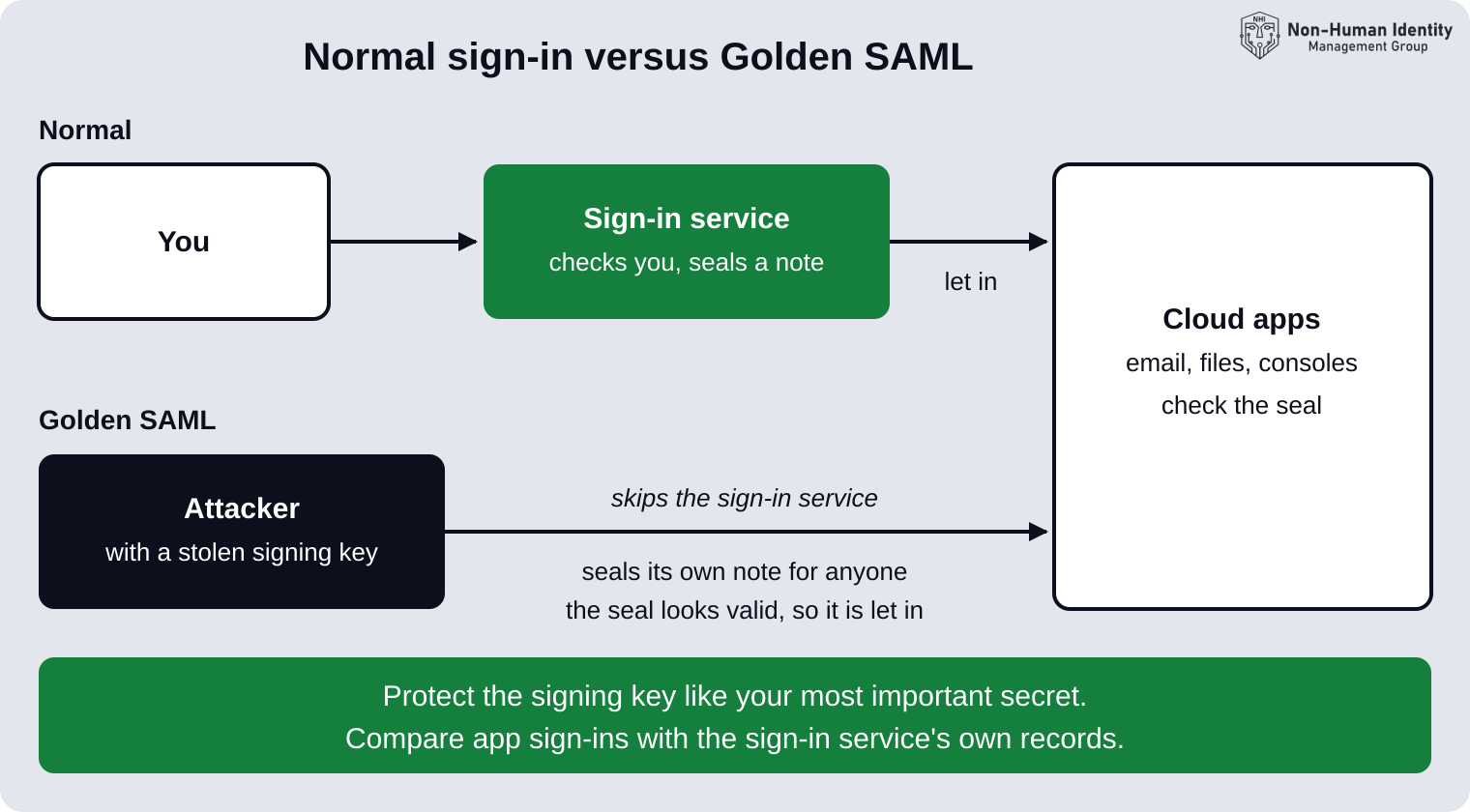
That is Golden SAML. SAML is a common way for one sign-in service to tell many apps who you are, so you sign in once. The sign-in service seals each note with a private signing key. An attacker who steals that key can forge notes for any user, with any level of access.[1]
The key is a non-human credential. It belongs to the sign-in service, not to any person, yet it can speak for every person.
Where the comparison stops working: a stolen seal leaves a gap on the desk. A copied signing key leaves the original in place, so the theft can go unnoticed.
Why does it matter?
A forged note can let an attacker act as any user in any app that trusts the sign-in service. That can include email, files and cloud consoles. Government guidance warns the access survives a password reset, and may bypass multi-factor checks in some set-ups.[2] A public record of attack methods notes that attackers used forged tokens in the SolarWinds compromise.[1]
If you are new to IT work
What could happen: someone gets admin rights on the sign-in server and quietly copies its signing key.
Check this: ask who has admin rights on your sign-in service, and whether that list is short.
Next: SAML for Beginners
If you manage a team or a business
What could happen: an attacker reads senior staff email for weeks, and changing passwords does not lock them out.
Check this: ask whether your sign-in service is treated as one of your most protected systems.
If you are studying security
What could happen: you study password theft but miss that a signing key can stand in for every password at once.
Check this: read how the SolarWinds attackers used forged tokens.
What does it look like?
A real SAML note is written in a computer format called XML. Here is a made-up, plain-English view of the main parts.
Example only. All values are made up.
Sign-in note for:  mail.example.com
Issued by:         sts.example.invalid           (1)
User:              [email protected]           (2)
Role:              Global administrator           (3)
Valid until:       30 days from now               (4)
Sealed with:       EXAMPLE-signing-key-0000       (5)
- The sign-in service that the app trusts.
- In a real message, this line would contain the person the app should treat you as.
- The level of access claimed. A forger can claim any level.
- MITRE says a SAML note lasts one hour by default. A forger can choose a much longer life.
- The seal. If the signing key was stolen, this seal is genuine, so it passes the check.
Why this is risky: the app checks the seal, and the seal is genuine. It has no way to know the note was written by a thief.[1]
The safer way: protect the signing key and the sign-in server closely. Compare app sign-ins with the sign-in service's own records. A note the service has no record of writing is a warning sign.[2]
How does it work?
Here is a simple version. It leaves out the technical detail on purpose.[1][2]
- The normal path. You sign in to your company's sign-in service, often a Microsoft server called AD FS. It writes a sealed note, and the cloud app lets you in.
- The break-in. An attacker first gets admin control of the sign-in server, often after a different attack.
- The theft. They copy the signing key, plus what they need to unlock it.
- The forgery. On their own machine, they write notes for any user they choose, and seal them with the stolen key.
- The way in. Cloud apps check the seal, see it is valid, and let the attacker in as that user.
Government guidance compares it to a forged master ticket on an office network, but aimed at cloud services instead.[2] MITRE notes another route: with enough rights, an attacker can add a new trusted sign-in service of their own.[1]
The main defences follow from this. Treat the sign-in servers like the most important servers you have. Keep admin access to a small group using secure admin computers.[2] Microsoft suggests a hardware security module, a locked hardware box for keys, as an option to protect signing keys. It also advises alerts on any change to federation settings.[3] After a suspected theft, guidance says to replace the signing key twice in quick succession, so notes sealed with the old key stop being trusted.[2]
A worked example
Gita Engel runs IT security at Linden Row Insurance, a fictional firm with 400 staff. Staff sign in once and then reach email, files and the claims app. A sign-in server in the office writes the sealed notes.
During a review, Gita reads about Golden SAML. She remembers the stolen seal on the letter of introduction. She asks one question: who could steal our seal?
Her colleague Dario Abara checks the sign-in server. He finds eleven people with admin rights. Several use the same computers they use for email and web browsing.
Gita makes a short plan. Dario cuts the admin list to three people, who now use separate admin computers. They move the server into the group of systems with the tightest controls. They turn on full logging and send the records to their monitoring tool.
Next, they set up a simple check. Each day, the tool compares sign-ins seen by the cloud apps with notes the sign-in server says it wrote. Any sign-in with no matching record raises an alert.
Gita also writes a short emergency step. If they ever suspect the key was copied, they will replace it twice in quick succession, then review who signed in since.
Six months later, an alert fires. It turns out to be a test account set up wrongly. Gita is relieved, and glad the check works.
Myths and mistakes
| What people think | What is true |
|---|---|
| Resetting everyone's password will lock the attacker out. | Forged notes do not need passwords. Government guidance says the access can survive a password reset.[2] |
| Multi-factor sign-in always stops it. | In some set-ups the cloud app trusts the sign-in service to have done that check, so a forged note can skip it.[2] |
| Golden SAML is a way in from the internet. | Attackers usually need admin control of the sign-in server first. It is how they stay in and spread. |
| The signing key is just a certificate the IT team renews. | It is a credential that can speak for every user. Guard it like your most important secret. |
| Replacing the key once is enough. | Guidance says to replace it twice in quick succession after a suspected theft.[2] |
What can I do this week?
- Find out which sign-in service your cloud apps trust, and who runs it.
- Ask who has admin rights on it, and cut the list where you can.
- Check that its records go to a place where someone reviews them.
- Ask whether there is a written plan to replace the signing key in an emergency.
Checklist
- The sign-in service is on the list of your most protected systems.
- Only a few named people have admin rights on it.
- Those people use separate, secure admin computers.
- Full logging is on, and records are kept somewhere central.
- Someone is alerted when federation settings change.
- App sign-ins can be compared with the sign-in service's own records.
- There is a tested plan to replace the signing key twice after a suspected theft.
Common questions
Why is it called Golden SAML?
The name borrows from an older attack called a Golden Ticket, where a forged master ticket opens a whole Windows network. Golden SAML does a similar thing for cloud apps that trust SAML notes. The stolen signing key acts like a master key for every user.
Is Golden SAML a flaw in SAML itself?
Not really. SAML works as designed: apps trust notes sealed with the right key. The attack works because the key was stolen. That is why protecting the sign-in server and its key matters more than changing the standard.
Does moving to a cloud sign-in service help?
It can reduce the risk, because the signing key no longer sits on a server in your office. Many firms move from AD FS to a cloud service for this reason. The cloud service still needs strong admin controls and careful monitoring.
How would we know if it happened to us?
Look for sign-ins to cloud apps with no matching record at the sign-in service. Also watch for odd note lifetimes, new trusted sign-in services and exports of the signing key. Government guidance lists the event records to collect.
What was the SolarWinds link?
In the SolarWinds compromise, attackers who were already inside some networks used stolen SAML signing certificates to create tokens. MITRE records this in its public list of attack methods. Read our case study for the wider story.
Where next?
Ready for the detail? Read the practitioner guide: Golden SAML and Federation Trust Abuse Defence Guide. It goes further into the event records to watch, how to harden AD FS and how to recover after a suspected theft.
Also useful:
- SAML for Beginners
- Tiered Administration for Beginners
- AD FS Security Guide
- AD FS to Entra ID Migration
- How to Detect New Federated Domains and IdP Trusts
Related NHI Mgmt Group resources: SolarWinds Supply Chain Compromise: How SUNBURST, Forged SAML Tokens and Hijacked App Identities Reached 18,000 Customers[1] · Federation and Trust Relationships Guide · Active Directory Attacks for Beginners
Key terms
- Golden SAML
- An attack where someone steals the key that seals SAML notes and forges notes that apps accept.
- SAML
- A standard way for a sign-in service to send apps a signed note saying who you are.
- SAML assertion
- The signed note itself, carrying who you are and what you may do.
- Identity provider
- The sign-in service that checks who you are and writes the signed notes.
- SAML signing certificate
- The key material a sign-in service uses to seal its notes so apps can trust them.
- Federation trust
- A setting that tells one system to accept sign-ins vouched for by another.
- Tier 0
- The small set of systems that, if taken over, could control everything else.
Sources and further reading
- Forge Web Credentials: SAML Tokens, technique T1606.002. MITRE ATT&CK, MITRE. https://attack.mitre.org/techniques/T1606/002/, accessed 28 Nov 2026.
- Detecting and mitigating Active Directory compromises (Golden SAML section). Australian Signals Directorate's Australian Cyber Security Centre with CISA, NSA, the Canadian Centre for Cyber Security, NCSC-UK and NCSC-NZ, first published September 2024, updated September 2026. https://www.cyber.gov.au/sites/default/files/2026-11/Detecting%20and%20mitigating%20Active%20Directory%20compromises%20%28September%202026%29.pdf, accessed 28 Nov 2026.
- Best practices for securing AD FS and Web Application Proxy. Microsoft Learn, Microsoft. https://learn.microsoft.com/en-us/windows-server/identity/ad-fs/deployment/best-practices-securing-ad-fs, accessed 28 Nov 2026.