Tiered administration splits admin accounts into layers, so a break-in at one layer cannot easily climb higher.
This guide is for people new to running Windows networks, IT students and anyone who has heard the term "Tier 0". If your business has a central sign-in system, such as Active Directory, the way admins log in to it affects every account you have.
In short
- Systems are sorted into layers by how much they control. The top layer, Tier 0, controls everyone's sign-in.
- Each admin gets a separate account for each layer, plus a normal account for email and the web.
- The key rule: a powerful admin account is never typed into a less trusted computer.
- This makes it much harder for an attacker on one laptop to take over the whole network.
What you will learn
- Explain what Tier 0, Tier 1 and Tier 2 mean in plain words.
- Spot an admin habit that breaks the layers.
- Check whether your own admin accounts are kept separate.
- Ask the right questions before you log in to a powerful system.
- Most trusted layer (Tier 0)
- the systems and accounts that control sign-in and permissions for everyone.
- Admin's sign-in details (credentials)
- the username, password or token that proves an admin may act.
- Dedicated admin computer (PAW)
- a locked-down computer used only for admin work, never for email or browsing.
What is tiered administration?
Think of a hospital operating theatre. Staff change into clean clothes before they go in. They do not wear those clothes in the street and then walk back into surgery.
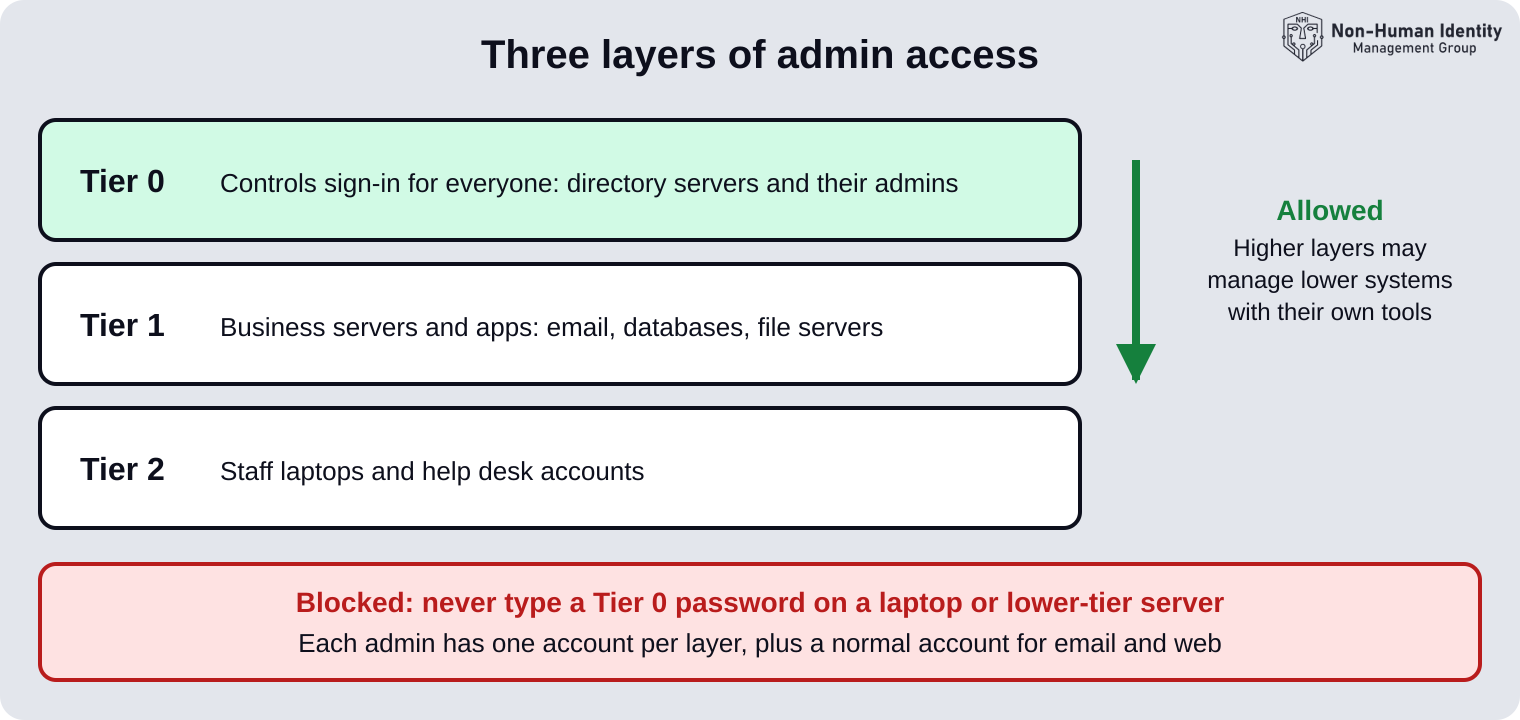
Tiered administration works the same way for admin accounts. Systems are sorted into layers, called tiers, by how much damage a break-in could do. Admins keep a separate account for each tier and use it only there.
Microsoft's model has three tiers.[1]
- Tier 0 is the top layer. It holds the systems that control sign-in for the whole business, such as the main directory servers, and the accounts that manage them.
- Tier 1 holds business servers and apps, such as email servers, databases and file servers.
- Tier 2 holds staff laptops and desktops, and the help desk accounts that support them.
Where the comparison stops working: dirty clothes are easy to see. A stolen admin password leaves no stain, so nobody may notice it has been copied.
Why does it matter?
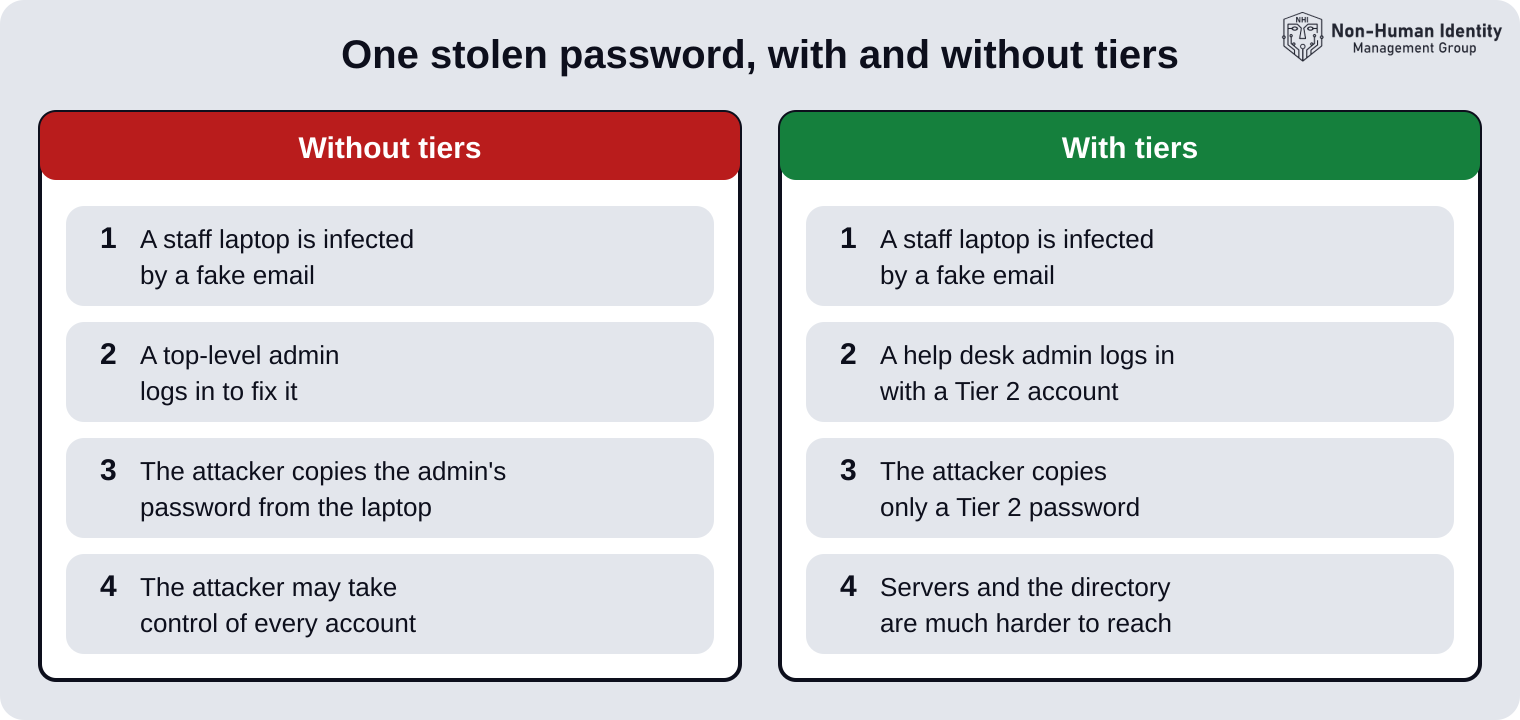
Attackers often get in through one ordinary laptop. Then they hunt for admin passwords left on it. Cyber agencies from six countries warn about this. If a powerful account is used on a less trusted computer, it can be stolen and used to climb higher.[4]
If you are new to IT support
What could happen: you log in to an infected laptop with a top admin account, and the account is copied.
Check this: use your help desk account for laptops, and keep your top-level account for its own layer.
If you run a small business
What could happen: your IT person reads email as the top admin. One bad link could then reach everything.
Check this: ask whether admins have separate accounts for admin work and for email.
If you are studying for an IT job
What could happen: you learn on one account that can do everything, and take that habit to work.
Check this: practise with one account per layer in your home lab.
What does it look like?
Here is a made-up list of one admin's accounts, before and after tiering.
Example only. All values are made up.
BEFORE: one account does everything
jana.example     email, web, laptops, servers, directory   (1)

AFTER: one account per layer
jana.example     email and web only                        (2)
jana-t2.example  help desk: staff laptops                  (3)
jana-t1.example  business servers and apps
jana-t0.example  directory only, from the admin computer   (4)
- In a real file, this line would show one account that reads email and also controls every system.
- The everyday account has no admin rights at all.
- Each admin account works only inside its own layer.
- The top-level account is used only from a dedicated admin computer.
Why this is risky: in the "before" list, one bad link in an email can hand an attacker the whole network.
The safer way: each layer has its own account. A break-in at the bottom layer finds only bottom-layer access.
How does it work?
- Sort systems into layers. List what controls sign-in and permissions for everyone. That is Tier 0. Business servers go in Tier 1, and staff devices in Tier 2.[1]
- Give each admin one account per layer. Microsoft says an account or group should work in a single tier, because reusing it across tiers breaks the boundary.[1] Email and web browsing happen on a normal account with no admin rights.
- Never type a higher account into a lower computer. This is the core rule. Microsoft warns that typing a higher-tier password on a lower-tier computer exposes it to that computer.[1]
- Use a dedicated admin computer for the top layer. A privileged access workstation (a locked-down computer used only for admin work) blocks email and web browsing, the most common way in for phishing.[3]
- Keep few people at the top, and watch them. Give admins only the rights they need, take access away when it is not needed, and record admin activity.[5]
Microsoft now describes a wider version called the enterprise access model. It stretches the same idea to cloud services. Tier 0 becomes the "control plane", meaning the systems that control access across the business.[2] The six agencies also point to this newer model.[4]
A worked example
Jana Dube has just joined Alder Vets, a fictional group of five vet surgeries, as its second IT person. Her manager, Soren Abara, gives her a list of accounts to check.
She finds that Soren uses one account for everything. It reads his email, fixes laptops at the front desk and manages the main directory. The surgeries' booking server uses the same account too.
Jana thinks of the operating theatre. Soren's powerful account goes everywhere, so anything it touches could carry it off.
She draws three layers on a whiteboard. The directory servers go at the top. The booking and file servers go in the middle. Staff laptops go at the bottom.
Soren agrees to a plan. He and Jana each get a normal account for email, a laptop support account, a server account and a top-level account. The top-level accounts are used only from one locked-down admin computer in the office.
The booking server gets its own service account with only the rights it needs. Jana also checks who sits in the top-level admin groups and removes two old accounts from staff who have left.
A month later, a receptionist's laptop opens a fake invoice. Jana fixes it with her laptop support account. Her review finds nothing to suggest the attacker reached the servers. Tiers lower the risk, so she still resets the receptionist's password and checks the records.
Myths and mistakes
| What people think | What is true |
|---|---|
| Tiering is only for big companies. | Any business with a central sign-in system can separate admin accounts. Start with the top layer. |
| A strong password makes one admin account safe enough. | A strong password can still be copied from an infected computer. Separation limits what the copy can reach. |
| Separate accounts are enough on their own. | Not if the top-level account is still typed into ordinary laptops. The login rule matters most. |
| Backup and monitoring tools are not Tier 0. | Microsoft lists tools that manage Tier 0 systems, such as backup and patching, as Tier 0 too. |
| Once set up, tiers look after themselves. | New servers, tools and admins arrive. Check group members and login rules regularly. |
What can I do this week?
- List who is in your most powerful admin groups, and remove anyone who does not need it.
- Check whether any admin reads email or browses the web on an admin account.
- Write down which systems control sign-in for everyone. That is your Tier 0 list.
- Ask for a separate everyday account if you only have an admin one.
- Read the practitioner guide before changing any login rules on live systems.
Checklist
- We have a written list of Tier 0 systems and accounts.
- Every admin has a normal account with no admin rights for email and web.
- Each admin account works in only one tier.
- Top-level accounts are not used to sign in to staff laptops or business servers.
- Top-level admin work happens from a dedicated admin computer.
- The top-level admin groups hold as few people as possible.
- Admin activity is recorded and checked.
- Admin group members are reviewed on a regular schedule.
Common questions
What is Tier 0?
Tier 0 is the most trusted layer. It holds the systems and accounts that control sign-in and permissions for everyone, such as directory servers and their admins. Microsoft also counts the tools that run those systems, like backup tools. If Tier 0 falls, the rest can follow.
Why do admins need more than one account?
Separate accounts limit the damage from one stolen password. If your everyday account opens a bad link, the attacker gets only that account. Your admin accounts were never used on that computer, so they are much harder to copy from it.
Is tiering only for Active Directory?
No. The idea started with Active Directory, but Microsoft's enterprise access model applies it to cloud services and apps too. The same habit works anywhere: keep the accounts that control everyone's access apart from daily work.
Is tiered administration the same as least privilege?
They work together. Least privilege means each account has only the rights it needs. Tiering adds a second rule: powerful accounts stay inside their own layer and are not used on less trusted computers. You need both.
Do I need a separate computer for admin work?
For the top layer, it is strongly recommended. A dedicated admin computer with no email or web browsing removes the most common way attackers get in. For lower layers, many organisations use separate accounts and controlled admin tools instead.
Where next?
Ready for the detail? Read the practitioner guide: Tiered Administration and Enterprise Access Model Guide. It goes further into defining the control plane, login restriction settings, the Protected Users group and a phased rollout plan.
Also useful:
- Privileged Access Workstations Guide
- Active Directory Tiering vs Red Forest
- Active Directory for Beginners
- Least Privilege for Beginners
Related NHI Mgmt Group resources: Active Directory Security Checklist · Break-Glass Accounts for Beginners · Just-in-Time Access for Beginners
Key terms
- Tier 0 asset
- A system or account with the highest trust, such as a directory server or a top-level admin account.
- Privileged account
- An account with more power than a normal user, such as the right to change settings or other accounts.
- Domain admin
- A top-level admin account that can control the whole Active Directory domain.
- Privileged access workstation
- A locked-down computer used only for admin work, with no email or web browsing.
- Control plane
- The systems used to manage access and settings across the business; in Microsoft's newer model it replaces Tier 0.
- Credential theft
- Stealing passwords, tokens or other sign-in details so an attacker can act as someone else.
- Least privilege
- Giving each person or program only the access its job needs, for only as long as needed.
Sources and further reading
- Active Directory Domain Services tier model. Microsoft Learn, Windows Server documentation. https://learn.microsoft.com/en-us/windows-server/identity/ad-ds/tier-model, accessed 28 Nov 2026.
- Enterprise access model. Microsoft Learn, privileged access documentation. https://learn.microsoft.com/en-us/security/privileged-access-workstations/privileged-access-access-model, accessed 28 Nov 2026.
- Privileged access devices. Microsoft Learn, privileged access documentation. https://learn.microsoft.com/en-us/security/privileged-access-workstations/privileged-access-devices, accessed 28 Nov 2026.
- Detecting and Mitigating Active Directory Compromises. Australian Signals Directorate, CISA, NSA, Canadian Centre for Cyber Security, NCSC-NZ and NCSC-UK, September 2024. https://media.defense.gov/2024/Sep/25/2003553985/-1/-1/0/CTR-Detecting-and-Mitigating-AD-Compromises.PDF, accessed 28 Nov 2026.
- Secure system administration. National Cyber Security Centre (UK). https://www.ncsc.gov.uk/collection/secure-system-administration, accessed 28 Nov 2026.