Hacked account recovery means getting back into an account someone else took over, then shutting them out.
This guide is for anyone who thinks someone has got into their email, social media or shopping account. You do not need any technical skill: the steps use the normal settings every account has.
In short
- Use the provider's own recovery page to get back in. Do not pay anyone who offers to recover it for you.
- Change the password, then sign out every other device and app.
- Check what the intruder may have left behind: forwarding rules, new recovery details and unknown devices.
- Turn on a second sign-in step, warn your contacts and check your bank for payments you did not make.
What you will learn
- Spot the signs that an account has been taken over.
- Follow the steps to get back in and lock the intruder out.
- Check the settings an intruder often changes.
- Explain why a second sign-in step helps keep them out.
- Getting back in (account recovery)
- the provider's process for proving the account is yours when you cannot sign in.
- Back-up contact details (recovery email and phone)
- the email address and phone number the provider uses to reach you if you are locked out.
- Second sign-in step (two-step verification)
- an extra check, such as a code from an app, as well as your password.
What is hacked account recovery?
Think of getting your stolen car back. It is a relief, but a careful owner also checks for a spare key or a tracker the thief may have hidden. Recovering a hacked account works the same way.
First you prove to the provider that the account is yours, using its account recovery page. Then you change the password so the old one no longer works.
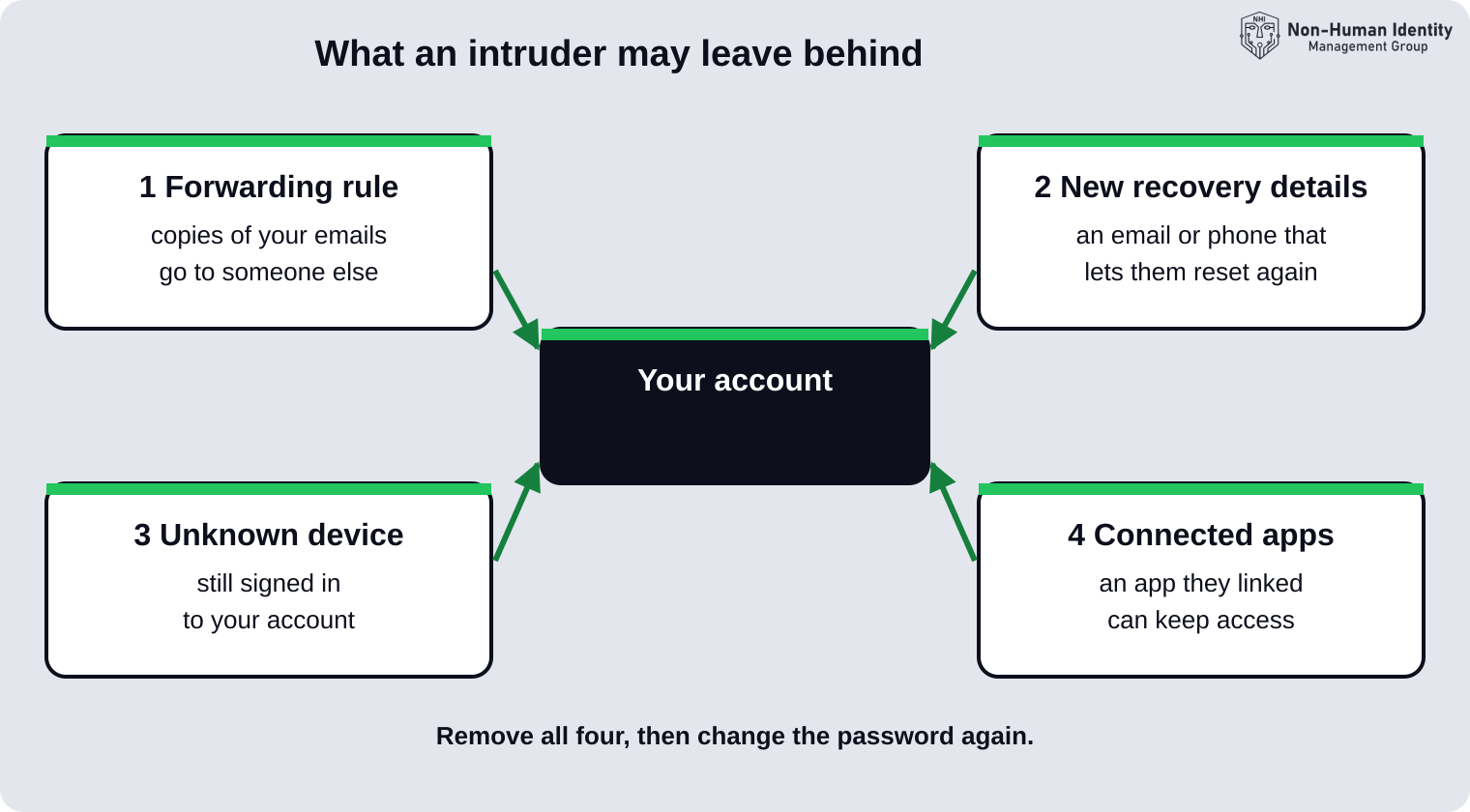
After that, you look for anything the intruder set up to get back in. That might be a new recovery email or phone number. It might be a rule that quietly copies your emails to someone else. Removing these is what keeps the intruder out.
Where the comparison stops working: a stolen car is usually in one place. An intruder in your email may also reach accounts that send password resets to that email. So you may need to check more than one account.
Why does it matter?
A hacked account can be used to send scams to people who trust you. It can also be used to buy things or reset your other passwords. Your email account matters most, because it can unlock many others.
If your email account was hacked
What could happen: the intruder uses "forgot password" on your other accounts, and the reset emails go to an inbox they can read.
Check this: look for forwarding rules and recovery details you did not set up.
If your social media account was hacked
What could happen: friends get messages from "you" asking for money or sharing a link.
Check this: tell friends through another channel to ignore recent messages from your account.
If you run a small business
What could happen: a hacked work email sends fake invoices to customers or changes bank details on bills.
Check this: after recovery, tell customers to confirm any change of bank details by phone.
What does it look like?
Example only. All values are made up.
FakeMail settings
Recovery email:  [email protected]      (1)
Recovery phone:  +00 0000 000000             (2)
Forwarding:      ON, to [email protected] (3)
Signed-in devices:
  Your phone      Leeds          today
  Unknown laptop  far away       2 days ago  (4)
- A recovery email address you do not recognise.
- A recovery phone number that is not yours.
- A rule sending copies of your emails elsewhere. In a real screen, this line would show the intruder's address.
- A device you do not own, still signed in.
Why this is risky: each of these lets the intruder get back in, or keep reading your mail, even after you change your password.
The safer way: remove anything you do not recognise, sign out every other device, then change your password again.
How does it work?
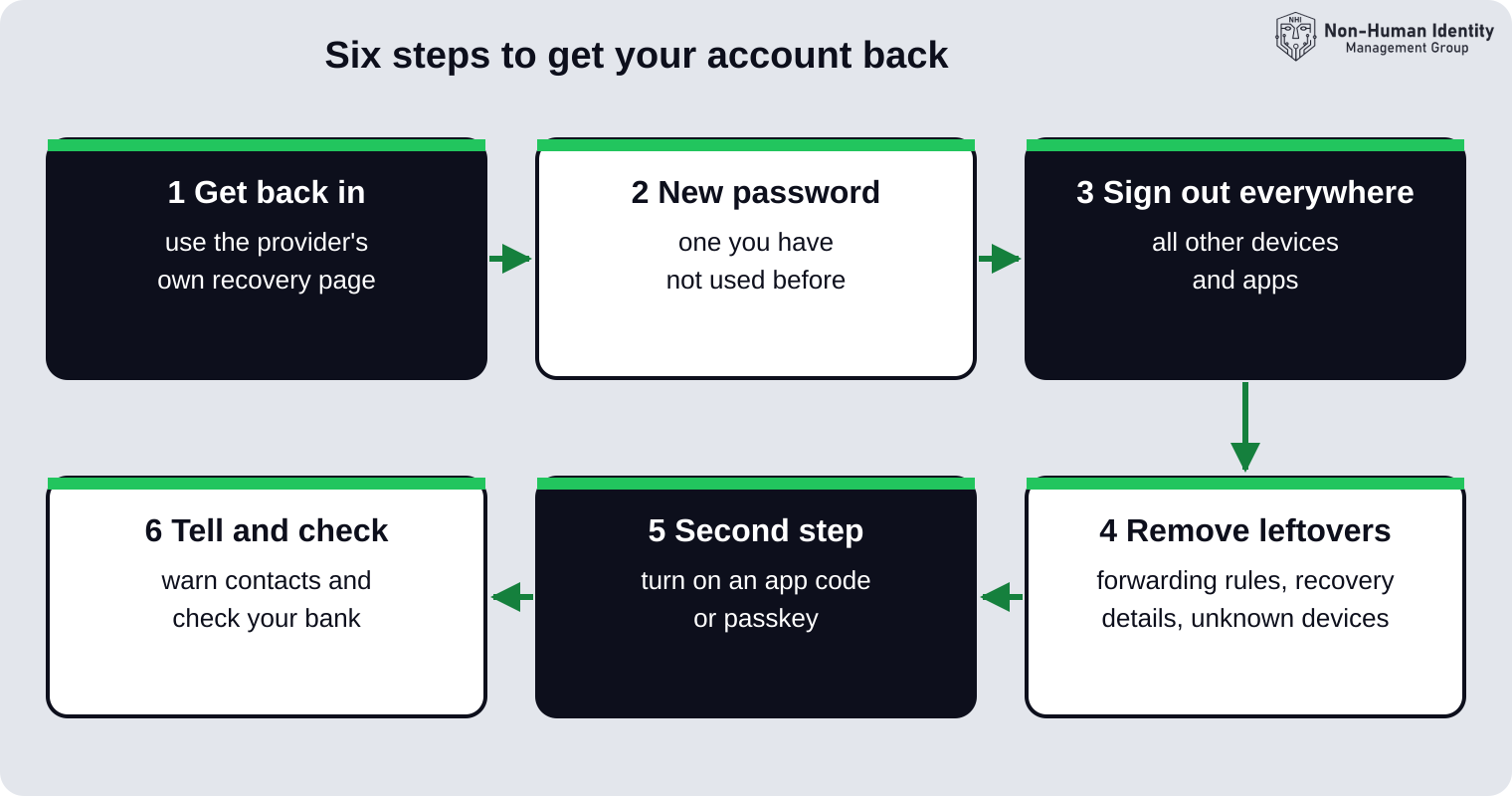
These are the usual recovery steps. The UK and US government advice pages list the same core steps.[1][2]
- Get back in. Go to the provider's official help or recovery page and follow its steps. If your computer may have harmful software on it, run a security scan first.[2]
- Lock the door. Change the password to a new one you have not used elsewhere. Change it on any other account that used the same password.[1]
- Sign out everywhere. Use the account settings to sign out all other devices and apps. Anyone else will then be asked for the new password.[1]
- Remove what they left. Delete forwarding rules you did not set up. Check that the recovery email and phone are yours. Remove unknown devices.[2][3]
- Add a second step. Turn on two-step verification, so a stolen password on its own is not enough to get in.[1]
- Tell people and check money. Warn your contacts. Check your bank and shopping accounts for things you did not do.[1]
If the provider's recovery steps do not work, use only its official help pages. People who promise to recover accounts for a fee may be running a second scam.
A worked example
This story is made up to show how it can happen.
Owen Price is a plumber in Cardiff. On Monday morning he cannot sign in to his email. A friend texts him: "Did you just ask me for money?"
Owen goes to his email provider's recovery page on his laptop. It asks for a code sent to his phone. His recovery phone number is still his own, so he gets back in.
He chooses a new password he has never used before. Then he finds the option to sign out of all other devices and uses it.
Next he looks through his settings. He finds a forwarding rule he never made, sending copies of his emails to an address he does not know. He deletes it. The recovery email has also been changed, so he puts his own back.
Owen used the same old password for his online shop account. He changes that one too. He turns on two-step verification with an authenticator app on his email.
He posts a short message on social media asking friends to ignore recent emails from him. He checks his bank app and finds nothing unusual. He makes a note to check again over the next few weeks.
What made the difference: Owen did not stop once he was back in. Removing the forwarding rule and fixing the recovery email closed the doors the intruder had left open.
Myths and mistakes
| What people think | What to do instead |
|---|---|
| Once I change the password, the intruder is out. | Also sign out every other device and remove anything they added, such as forwarding rules and recovery details.[1][2] |
| Someone online offered to get my account back for a fee. | Use only the provider's own recovery pages. Paid "recovery" offers can be another scam. |
| Only the hacked account needs a new password. | Change it on every account that used the same password.[1] |
| My friends will know the strange messages were not from me. | Tell them directly, and ask them not to click links or send money.[2] |
| A second sign-in step is too much hassle. | It means a stolen password on its own is not enough to get in. Many apps make it a quick tap. |
What can I do this week?
- Check that the back-up email and phone on your main email account are still yours.
- Look for forwarding rules and signed-in devices you do not recognise.
- Turn on a second sign-in step for your email and social media.
- Give each important account its own password. A password manager can help.
- Keep any back-up codes your provider gives you in a safe place, away from your phone.
Checklist
- I use the provider's own recovery page, not links from messages or paid helpers.
- I have changed the password, and any other password that was the same.
- I have signed out all other devices and apps.
- I have removed forwarding rules and connected apps I did not set up.
- The recovery email and phone number are mine.
- Two-step verification is turned on.
- I have warned my contacts and checked my bank.
Common questions
What should I do first if my account is hacked?
Go to the provider's official help or recovery page and follow its steps to get back in. If you are still signed in on any device, change the password straight away from there, then sign out all other devices.
What if the intruder changed my recovery email and phone?
Keep using the provider's recovery page. It may ask questions about the account, such as old passwords or when you opened it. Google, for example, asks you to answer as best you can. Use only official help pages, never paid "recovery" services.[3]
Do I need to report a hacked account?
Report it to the provider through its help pages. If you have lost money, tell your bank too. Then report it to Report Fraud in England, Wales and Northern Ireland, or to Police Scotland.[1][4]
How did they get in?
Often through a password that leaked from another site, a fake sign-in page, or harmful software on a device. You may never know for sure. That is why a new, unique password, updated devices and a second sign-in step all help.[1]
How do I know the intruder is gone?
Good signs are no new sign-in alerts and no unknown devices in your settings. You should also see no new forwarding rules and no strange sent messages. Check again over the next few weeks, because some changes only show later.
Where next?
Ready for the detail? Read the practitioner guide: Hacked Social Media or Email Account Recovery Guide. It goes further into checking accounts connected to the hacked one, the full clean-up checklist and choosing your protection after recovery.
Also useful:
- Account Takeover for Beginners
- Multi-Factor Authentication for Beginners
- Password Security for Beginners
- SIM Swap Fraud for Beginners
Related NHI Mgmt Group resources: Account Takeover Response Playbook · MFA backup codes and recovery codes guide · Passkeys for Everyone Guide
Key terms
- Account takeover
- When someone else gets into your account and uses it as if they were you.
- Account recovery
- The process a provider uses to give you back access when you cannot sign in normally.
- Two-step verification
- Asking for a second check, such as a code from an app, as well as your password.
- Recovery code
- A one-off back-up code that lets you sign in if you lose your usual second step.
- Session
- The signed-in state that keeps a device logged in to your account until you sign out.
- Password reuse
- Using the same password on more than one site, so one leak can open several accounts.
- Phishing
- A fake message that tries to trick you into giving away passwords, codes or money.
Sources and further reading
- Recovering a hacked account. National Cyber Security Centre (NCSC), published 17 December 2018, reviewed 24 August 2022. https://www.ncsc.gov.uk/guidance/recovering-a-hacked-account, accessed 28 Nov 2026.
- How To Recover Your Hacked Email or Social Media Account. US Federal Trade Commission (FTC), Consumer Advice. https://consumer.ftc.gov/articles/how-recover-your-hacked-email-or-social-media-account, accessed 28 Nov 2026.
- Secure a hacked or compromised Google Account. Google Account Help. https://support.google.com/accounts/answer/6294825, accessed 28 Nov 2026.
- Report Fraud service goes live. Report Fraud (City of London Police), 4 December 2025. https://www.reportfraud.police.uk/news/report-fraud-service-goes-live/, accessed 27 Nov 2026.