Hybrid identity means one work account that works both on office systems and in cloud services.
This guide is for anyone who has heard their firm "syncs" accounts to Microsoft 365 and wants to know what that means. If your office still has its own servers, a fault there can affect who gets into email and files in the cloud.
In short
- Many firms keep staff accounts in Active Directory, an office directory, and copy them to the cloud.
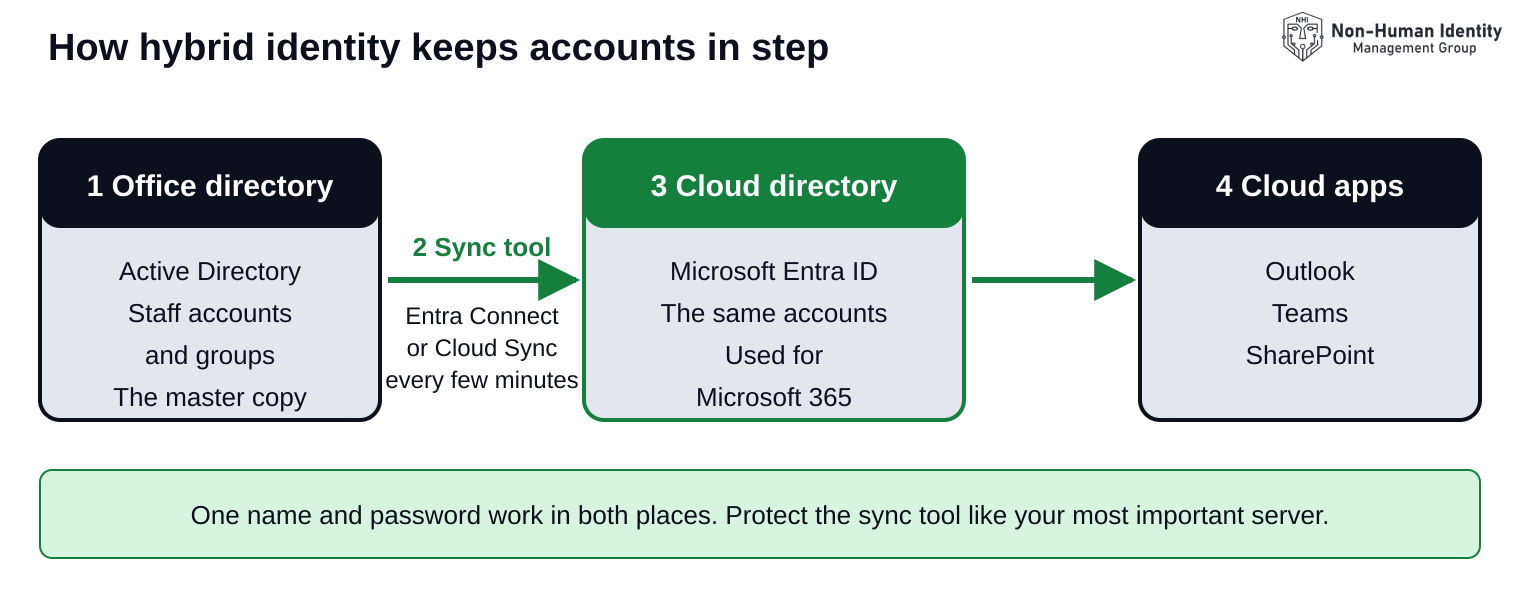
- A sync tool copies the accounts every few minutes, so people use one name and password in both places.
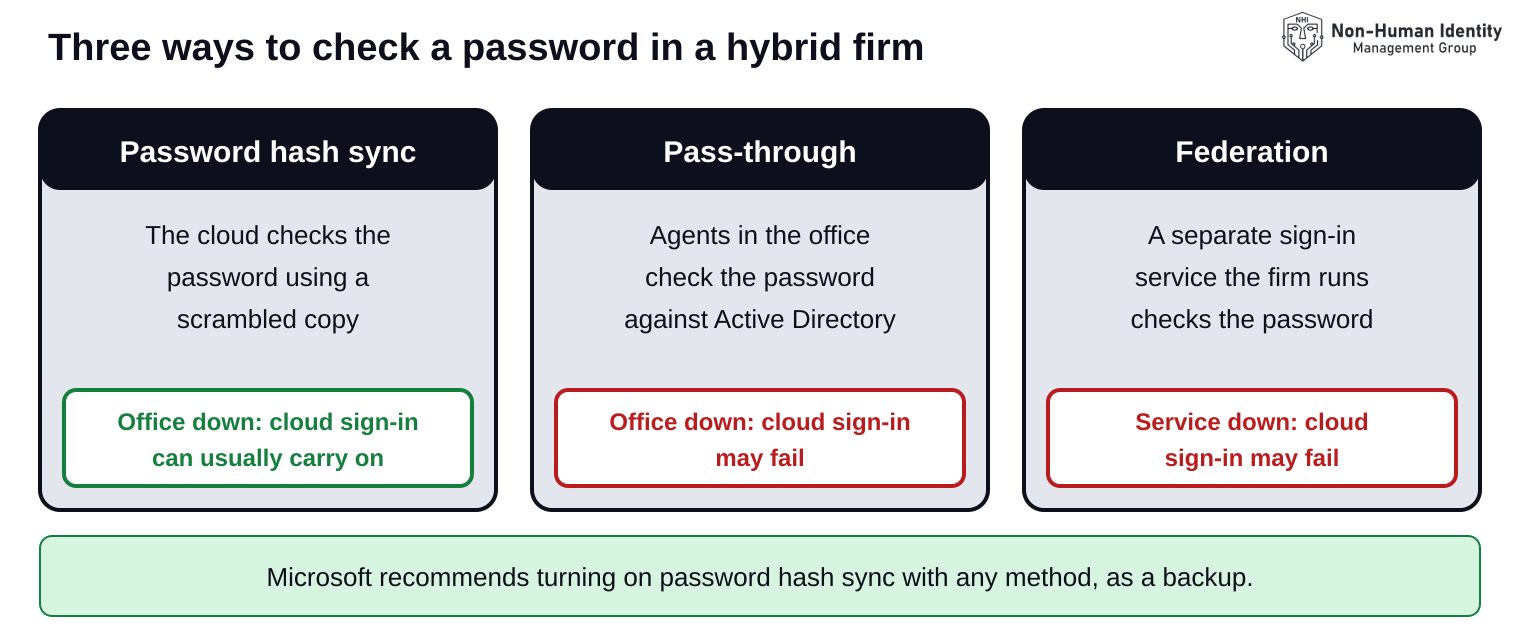
- There are three main ways to check passwords: in the cloud, in the office, or through a separate sign-in service.
- The sync server and its accounts are very powerful, so protect them like your most important systems.
What you will learn
- Explain what hybrid identity is and why firms use it.
- Describe how a change in the office reaches the cloud.
- Spot the three ways a hybrid firm can check passwords.
- Ask who looks after the sync server and its accounts.
- Office directory (Active Directory)
- the list of staff accounts and groups kept on the firm's own servers.
- Copying across (sync)
- keeping the cloud list of accounts matched to the office list.
- Cloud directory (Entra ID)
- Microsoft's cloud list of accounts, used to sign in to Microsoft 365.
This is an independent guide from NHI Mgmt Group, based on Microsoft's public documentation as of November 2026. It is not sponsored or reviewed by Microsoft. Product features change, so confirm settings against Microsoft's current documentation.
What is hybrid identity?
Think of a school with a paper register in the office. Each morning, someone copies any changes to the online class list. Pupils then appear in both places, with the same name.
Hybrid identity works in a similar way. Microsoft describes it as one common user identity for signing in and getting access, wherever the resource is.[1] Most firms that use it run Active Directory in the office and Microsoft Entra ID in the cloud.
Two jobs keep the lists matched. Provisioning means creating, updating and removing accounts when rules say so. Synchronisation means checking that cloud details match the office ones.[1]
The office list is usually the master copy, or source of truth. You change a person in the office, and the change flows to the cloud.
Where the comparison stops working: a register is copied once a day. Microsoft's sync tools check for changes every couple of minutes, and they can also send some details back the other way.
Why does it matter?
Hybrid identity is convenient, but it links two worlds. Microsoft warns that if attackers take over the office side, the trust links can help them reach the cloud too.[7]
If you work in an office with its own servers
What could happen: your password is changed in the office, and the cloud usually follows a few minutes later.
Check this: after a password change, sign out of Outlook and Teams and back in with the new one.
If you run or manage the business
What could happen: an office server failure stops staff signing in to email, if the cloud depends on it.
Check this: ask your IT supplier whether cloud sign-in would still work if the office servers were down.
If you are new to IT work
What could happen: someone signs in to the sync server with a normal account and is tricked, and the attacker can then change cloud users.
Check this: treat the sync server like a domain controller, with only a few admins.
What does it look like?
Here is a made-up summary of the kind an IT supplier might write about a small firm's set-up.
Example only. All values are made up.
Office directory:  corp.example.invalid (Active Directory)
Cloud tenant:      example.onmicrosoft.com
Sync tool:         Entra Connect, server SYNC-EXAMPLE-01   (1)
Sign-in method:    Pass-through authentication              (2)
Backup method:     Password hash sync: Off                  (3)
Admins synced:     Yes, 3 office admins hold cloud roles    (4)
Sync accounts:     2, owner unknown                         (5)
- The server that copies accounts to the cloud. In a real file, this line would contain the server name.
- Passwords are checked by agents in the office, not in the cloud.
- No backup. If the office goes down, cloud sign-in may fail too.
- Office accounts hold top cloud roles, so an office break-in could reach the cloud.
- The tool's own service accounts, with nobody named to look after them.
Why this is risky: the cloud depends on the office for sign-in. Office admin accounts can also run the cloud, and nobody owns the sync accounts.
The safer way: turn on password hash sync, as Microsoft recommends. Use separate cloud-only accounts for cloud admin roles, and name an owner for the sync server and its accounts.
How does it work?
Here is what happens when a new person joins a hybrid firm:
- Create the account in the office. IT adds the person to Active Directory, with a username and password.
- The sync tool spots the change. Microsoft offers two tools. Entra Connect runs on a server in the office. Cloud Sync uses a small program, called an agent, with its settings kept in the cloud.[2][3]
- The account appears in the cloud. The tool creates a matching account in Entra ID. Cloud Sync runs every two minutes.[3]
- The person signs in. They use the same name and password for office PCs and for Microsoft 365.
- Changes keep flowing. When IT changes or disables the office account, the sync tool passes the change on at its next run.
There are three main ways to check a password at sign-in. Microsoft explains them as follows.[4]
- Password hash sync: a scrambled form of the password is copied to the cloud, and the cloud checks sign-ins itself. A hash is a one-way scramble that cannot be turned back into the password.[5]
- Pass-through authentication: the cloud passes the sign-in to small agents in the office, which check it against Active Directory.
- Federation: the cloud hands sign-in to a separate service, such as Active Directory Federation Services (AD FS), that the firm runs.
Microsoft recommends turning on password hash sync whichever method you choose. It says firms that already had it were back online within hours after big office outages, while others took weeks.[4]
The sync tool also uses its own accounts to read the office directory and write to the cloud.[8] These are service accounts, a kind of non-human identity (NHI). An NHI is a digital identity that represents a machine, application or service, so it can connect to systems without a person. These accounts need a named owner, like any other powerful account.
A worked example
Farah Jovanovic manages the office at Birchfield Opticians, a made-up chain of four shops with 45 staff. The firm has an office server running Active Directory, and staff use Microsoft 365.
One Monday, the office server room loses power. Staff in the shops cannot open Outlook or Teams. Farah is puzzled, because email lives in the cloud.
She calls Zane Yilmaz, the firm's IT supplier. Zane explains that sign-ins use pass-through authentication. The cloud asks agents in the office to check each password. With the office down, no agent can answer.
Once power is back, Zane suggests changes. He turns on password hash sync as a backup, as Microsoft recommends. He notes that switching over is a manual step for pass-through set-ups, so he writes it into the outage plan.[4]
Zane also finds that two office admin accounts hold top cloud roles. Microsoft advises using cloud-only accounts for those roles.[7] He creates separate cloud admin accounts and removes the roles from the synced ones.
Last, he limits who can sign in to the sync server and names himself as owner of its service accounts. Farah adds a yearly check of the set-up to her calendar. The firm is not immune to outages, but one dead server should no longer lock everyone out.
Myths and mistakes
| What people think | What is true |
|---|---|
| Password hash sync sends our passwords to Microsoft. | Microsoft says the plain password is not sent. The tool sends a hash of a hash, which cannot be turned back.[5] |
| If email is in the cloud, office outages cannot affect it. | With pass-through or federation, cloud sign-in may depend on office systems.[4] |
| The sync server is just another office server. | Microsoft says to treat it as one of your most critical systems, because whoever controls it can change cloud users.[6] |
| Admins can use their synced office account for cloud admin work. | Microsoft recommends cloud-only accounts for cloud admin roles.[7] |
| Everything in the office account copies to the cloud. | Not all details sync. For example, an office account expiry date is not copied by password hash sync.[5] |
What can I do this week?
- Ask which sync tool you use. Find out whether your firm runs Entra Connect, Cloud Sync or no sync tool at all.
- Ask how passwords are checked. Find out whether you use password hash sync, pass-through or federation, and whether there is a backup.
- Check who holds cloud admin roles. Make sure those people use separate cloud-only admin accounts.
- Name an owner. Agree who looks after the sync server and the service accounts that it uses every day.
- Test a leaver. Disable a test account in the office, then check how soon it is blocked in the cloud.
Checklist
- I can explain in one sentence what hybrid identity means for our firm.
- We know which sync tool we use and where it runs.
- We know which sign-in method we use, and password hash sync is on as a backup.
- Cloud admin roles are held by cloud-only accounts, not synced office accounts.
- Only a few named admins can sign in to the sync server.
- The sync tool's service accounts have a named owner.
- Leavers are disabled in the office and the change reaches the cloud promptly.
- Our outage plan covers how staff sign in if the office servers are down.
Common questions
Is hybrid identity the same as single sign-on?
No, but they are linked. Hybrid identity gives a person one account across office and cloud systems. Single sign-on means signing in once and then opening several apps without signing in again. A hybrid firm often uses both, so staff sign in once with their office account.
Should we use Entra Connect or Cloud Sync?
Microsoft is moving customers towards Cloud Sync, but check its decision guide first. Microsoft calls Cloud Sync the future of synchronisation and says it replaces Entra Connect.[2] Cloud Sync keeps its settings in the cloud and uses a small agent. Some older set-ups still need Entra Connect.
Do we need hybrid identity at all?
Only if you still rely on office systems that use Active Directory, such as file servers or older apps. A firm that works only in Microsoft 365 can use cloud-only accounts. Many firms are hybrid for a few years while they move away from office servers.
How fast does a password change reach the cloud?
Usually a few minutes later. Microsoft says password hash sync runs every two minutes, and an office password change is most often synced in a matter of minutes.[5] Other changes, such as new accounts, follow the sync tool's own schedule.
Does hybrid identity cost extra?
The sync itself does not. Microsoft says using hybrid identity is free and included in your subscription.[1] You still pay for the server or agent hosts you run, and for the time to look after them.
Where next?
Ready for the detail? Read the practitioner guide: Hybrid Cloud Identity Governance. It goes further into choosing the source of authority for each account, linking one person's accounts across systems and running access reviews that span office and cloud.
Also useful:
- Microsoft Entra Connect and Cloud Sync Hardening Guide
- Microsoft Entra ID for Beginners
- Identity Federation for Beginners
- Active Directory vs Entra ID
Related NHI Mgmt Group resources: Zero Trust for Hybrid Active Directory · AD FS to Entra ID Migration · Active Directory and Entra ID Hardening Guide
Key terms
- Hybrid identity
- One work account that works on the firm's own systems and in cloud services.
- Active Directory
- Microsoft's directory of accounts and groups, run on a firm's own servers.
- Directory sync
- Copying account details from one directory to another so they stay matched.
- Password hash sync
- A sign-in method where a scrambled copy of each password lets the cloud check sign-ins itself.
- Pass-through authentication
- A sign-in method where agents in the office check each cloud sign-in against Active Directory.
- Federation
- Letting one trusted sign-in service vouch for a person to another service.
- Source of truth
- The system treated as the master copy, which others follow.
Sources and further reading
- What is hybrid identity with Microsoft Entra ID? Microsoft Learn, Microsoft. https://learn.microsoft.com/en-us/entra/identity/hybrid/whatis-hybrid-identity, accessed 28 Nov 2026.
- What is Microsoft Entra Connect? Microsoft Learn, Microsoft. https://learn.microsoft.com/en-us/entra/identity/hybrid/connect/whatis-azure-ad-connect, accessed 28 Nov 2026.
- What is Microsoft Entra Cloud Sync? Microsoft Learn, Microsoft. https://learn.microsoft.com/en-us/entra/identity/hybrid/cloud-sync/what-is-cloud-sync, accessed 28 Nov 2026.
- Choose the right authentication method for your Microsoft Entra hybrid identity solution. Microsoft Learn, Microsoft. https://learn.microsoft.com/en-us/entra/identity/hybrid/connect/choose-ad-authn, accessed 28 Nov 2026.
- Implement password hash synchronization with Microsoft Entra Connect Sync. Microsoft Learn, Microsoft. https://learn.microsoft.com/en-us/entra/identity/hybrid/connect/how-to-connect-password-hash-synchronization, accessed 28 Nov 2026.
- Microsoft Entra Connect: Prerequisites (Harden your Microsoft Entra Connect server). Microsoft Learn, Microsoft. https://learn.microsoft.com/en-us/entra/identity/hybrid/connect/how-to-connect-install-prerequisites, accessed 28 Nov 2026.
- Protecting Microsoft 365 from on-premises attacks. Microsoft Learn, Microsoft. https://learn.microsoft.com/en-us/entra/architecture/protect-m365-from-on-premises-attacks, accessed 28 Nov 2026.
- Microsoft Entra Connect: Accounts and permissions. Microsoft Learn, Microsoft. https://learn.microsoft.com/en-us/entra/identity/hybrid/connect/reference-connect-accounts-permissions, accessed 28 Nov 2026.