An IP address tells a network where to send data, and a subnet is a group of neighbouring addresses.
This guide is for students, career changers and people new to IT work who keep meeting numbers like 192.168.1.0/24. It explains how to read them, without any maths beyond counting.
In short
- An IP address has two parts: a network part, like a street name, and a device part, like a house number.
- The subnet mask, or the /number after an address, says where the network part ends.
- Devices in the same subnet talk directly. To reach anything else, they send data to a router called the default gateway.
- A smaller /number means a bigger group: a /24 holds 256 addresses, a /16 holds 65,536.
What you will learn
- Read an address like 192.168.10.25/24 and say which part is the network.
- Explain what a subnet mask and a default gateway do.
- Work out roughly how many addresses a /24 or a /16 holds.
- Spot a common mistake that stops two devices talking.
- Device address (IP address)
- a number that tells the network where to send data for a device.
- Address group (subnet)
- a block of addresses that share the same network part.
- Group marker (subnet mask or /number)
- the setting that says where the network part ends and the device part begins.
What is an IP address, and what is a subnet?
Think of a postal address. "25 Mill Street" has a street name and a house number. The postman uses the street to get close, then the number to find the door.
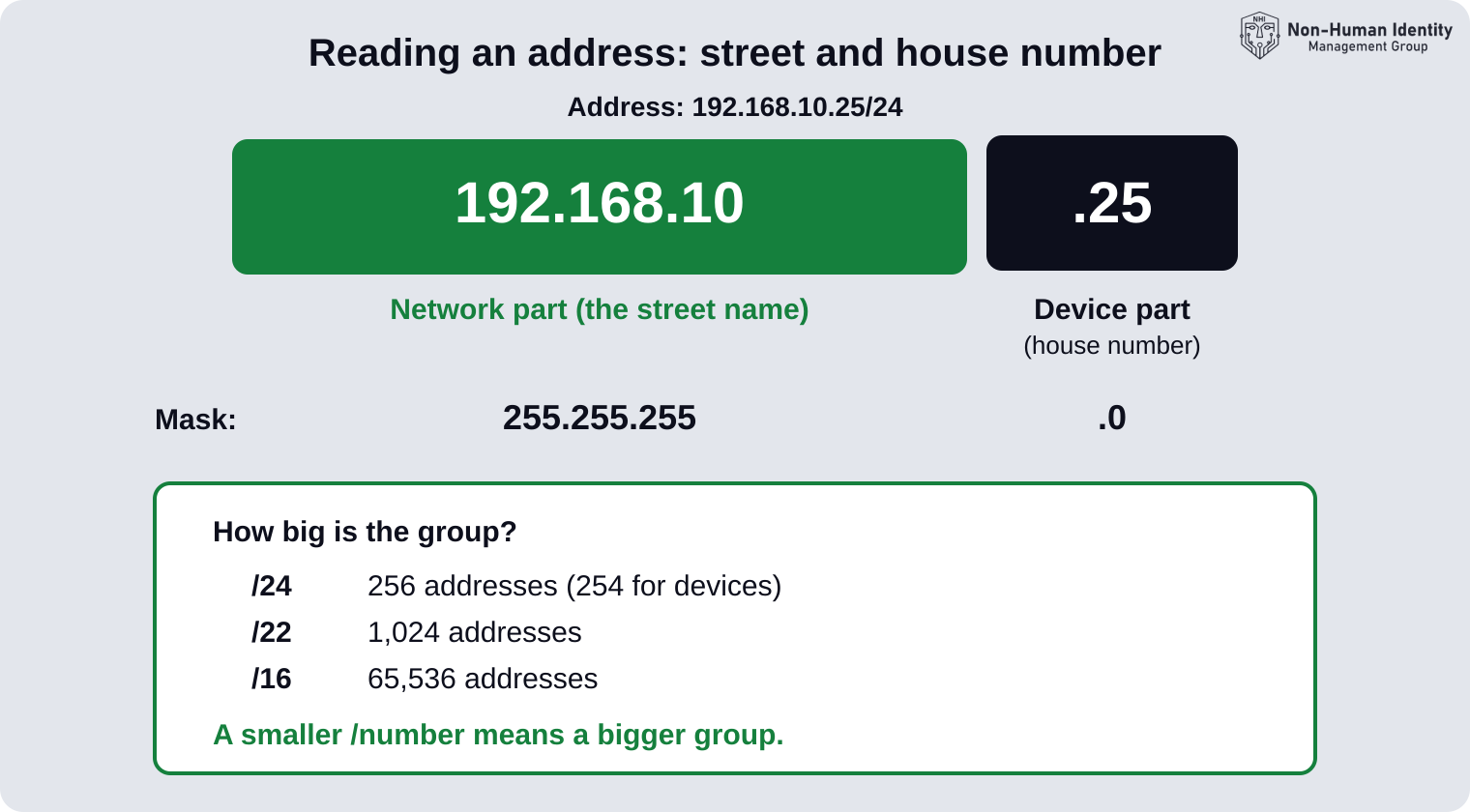
An IP address works the same way. The common kind, called IPv4, is four numbers between 0 and 255, separated by dots, such as 192.168.10.25. Part of it names the network, like the street. The rest names one device on that network, like the house number.
A subnet is one street: all the addresses that share the same network part. A subnet mask tells a device which part is the street.[3] A short way to write the same thing is a slash and a number, such as /24. This is called CIDR notation, and the number counts how much of the address is the network part.[2]
Where the comparison stops working: a street name is fixed. In a network, the same address can be split in different places. 192.168.10.25 could sit on a small street or a very large one, depending on the mask.
Why does it matter?
Subnets decide which devices can talk directly and where traffic must pass through a router. Security teams use them to keep different kinds of devices apart, and to write rules about who may reach what.
If you are studying networking
What could happen: exam questions and lab tasks assume you can read a /24 or a /16 at a glance.
Check this: practise splitting a few addresses into network and device parts.
If you are new to IT support
What could happen: a printer or camera is set up with the wrong mask, and nobody can reach it.
Check this: compare the address, mask and gateway on the device with a laptop that works.
If you read firewall or security rules
What could happen: a rule meant for one office allows a whole /16, about 65,000 addresses.
Check this: for each rule, ask how many addresses its /number covers, and whether that many is needed.
Next: Firewalls for Beginners
What does it look like?
Here is a made-up version of the network details a work laptop might show.
Example only. All values are made up.
EXAMPLE laptop network details
  IPv4 address:     192.168.10.25     (1)
  Subnet mask:      255.255.255.0     (2)
  Default gateway:  192.168.10.1      (3)
Same thing in short form
  192.168.10.25/24                    (4)
Firewall rule
  Allow 192.168.0.0/16 to file server (5)
- The laptop's own address. It is a private address, used inside the office only.
- The mask. Each 255 marks a network part, and the 0 marks the device part.
- The router this laptop sends data to when the other device is not on its own subnet.
- The same address and mask. /24 means the first three numbers are the network part.
- A rule covering every address that starts 192.168, which is 65,536 addresses.
Why this is risky: line 5 is much wider than the office's one subnet. Any device in that larger range, such as a guest network or a lab, may also reach the file server.
The safer way: write rules for the smallest group that does the job, here 192.168.10.0/24. Keep a short list of which subnet is used for what.
How does it work?
Each of the four numbers in an IPv4 address is really 8 on-or-off switches, called bits. That makes 32 bits in all.[2] You do not need to count switches to follow the steps below.
- The mask splits the address. With /24, the first 24 bits, which are the first three numbers, are the network part. The last number is the device part.[3]
- The size follows from the /number. The fewer bits used for the network, the more are left for devices. A /24 holds 256 addresses, a /22 holds 1,024 and a /16 holds 65,536.[2]
- Two addresses are kept back. The first address names the subnet itself, and the last is for sending to every device at once. So a /24 leaves 254 addresses for devices.[3]
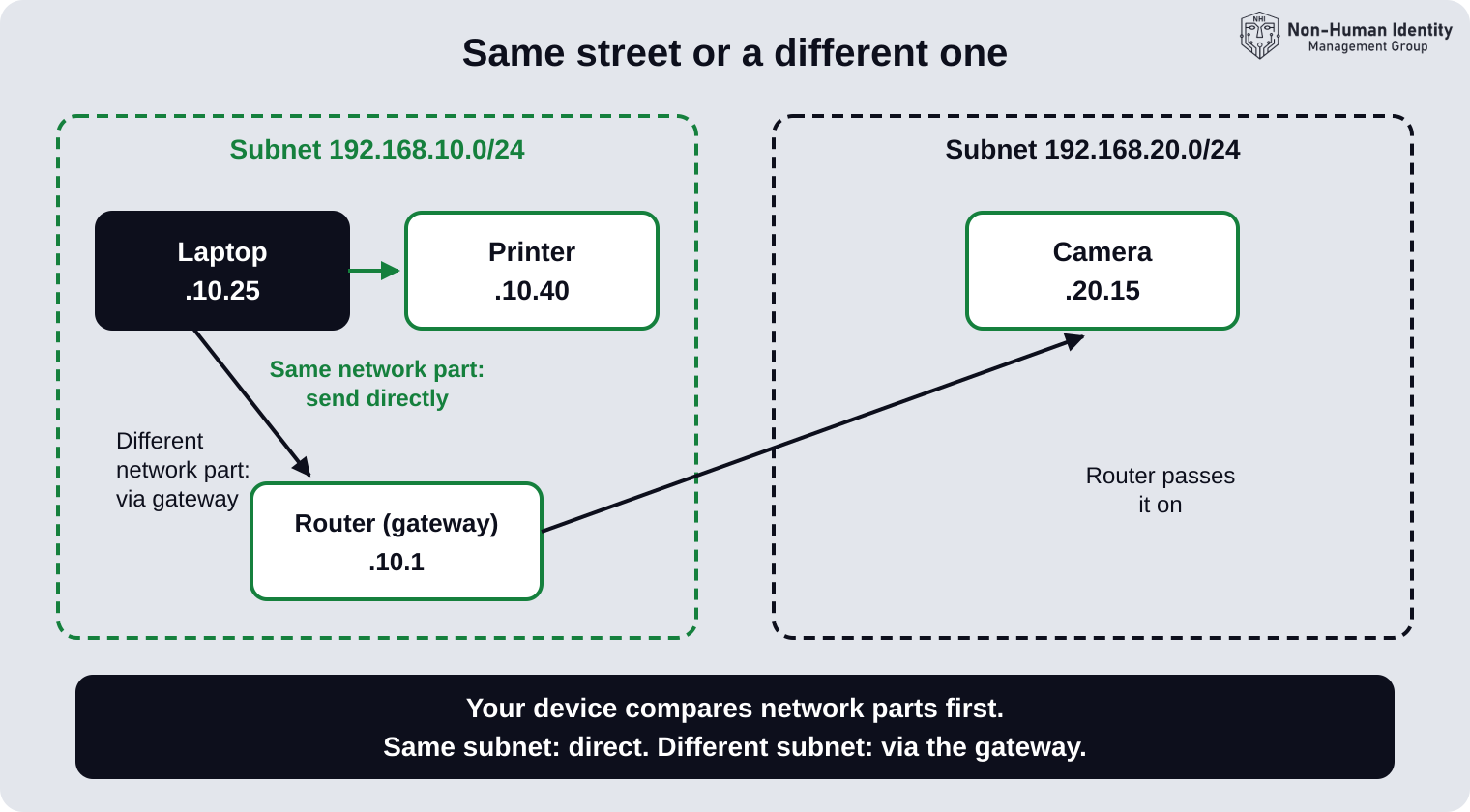
- The device compares. Before sending, a device checks whether the other address shares its network part. If it does, the device sends the data straight there on the local network.[3]
- Otherwise it uses the gateway. If the other address is on a different subnet, the device hands the data to its default gateway. The router then passes it towards the right network.[3]
Some ranges are set aside for private use inside homes and offices. They start with 10, with 172.16 to 172.31, or with 192.168.[1] Any organisation may use them without asking anyone, and internet routers are not meant to carry them.[1] How a router shares one public address between private ones is covered in NAT and Private Addresses for Beginners.
A worked example
Freya Ulrich has just started her first IT support job at Meadow Removals. Her manager, Reza Tanaka, asks her to set up a new label printer in the warehouse office.
The office laptops get their settings automatically. The printer has to be set by hand on its small screen. Freya types in the address 192.168.10.40 and the gateway 192.168.10.1. She copies the mask from a sticky note: 255.255.0.0.
Some laptops can print, but one laptop in the yard office cannot. Freya checks it. Its address is 192.168.20.12/24, on a different subnet from the printer. Its traffic goes to its own gateway, and the router passes it on.
She looks again at the printer. With a mask of 255.255.0.0, it is a /16. So the printer thinks 192.168.20.12 is on its own street, and tries to reply directly. The reply never arrives, because the yard laptop is really on another subnet.
Freya changes the printer's mask to 255.255.255.0, a /24, to match the office laptops. Now the printer sends replies for the yard laptop to the gateway, and printing works.
Reza asks her to note it down. Freya adds a short line to the team's network list: "192.168.10.0/24, office devices, gateway .1". She also throws away the sticky note, so nobody copies the wrong mask again.
Myths and mistakes
| What people think | What is true |
|---|---|
| A bigger /number means a bigger network. | It is the other way round. A /16 is much larger than a /24. |
| Every address in a /24 can go to a device. | The first and last are kept back, so 254 are left for devices. |
| Only the address matters, the mask is a detail. | A wrong mask can make a device try to reach others directly when it should use the gateway, or the reverse. |
| Devices on a private subnet are safe from everything. | Private ranges are not carried across the internet, but other devices inside the network, or rules that open a way in, can still reach them. |
| A wide firewall rule is fine because it is "internal". | A rule for a /16 covers about 65,000 addresses. Match rules to the subnets that need access. |
What can I do this week?
- Open your laptop's network settings and write down its address, mask and gateway.
- Turn that mask into a /number, and say which part is the network.
- Work out how many addresses your home or office subnet holds.
- At work, ask whether there is a list of subnets and what each is used for.
- Pick one firewall or security rule and check how many addresses it covers.
Checklist
- I can split an IPv4 address into its network part and device part.
- I can turn 255.255.255.0 into /24, and back.
- I know a smaller /number means a bigger group of addresses.
- I know why the first and last address in a subnet are kept back.
- I can explain when a device uses its default gateway.
- We keep a list of our subnets and what each is for.
- Our rules use the smallest group of addresses that does the job.
Common questions
What does the /24 after an address mean?
It means the first 24 bits of the address are the network part. In everyday terms, the first three numbers name the network and the last number names the device. It is a short way of writing the subnet mask 255.255.255.0.
Why does my home network use addresses starting 192.168?
Because 192.168 is one of the ranges set aside for private networks. Anyone may use these inside a home or office. Your router then shares its one public address between your devices when they go online.
Is a subnet the same as a network?
Mostly, yes. A subnet is a network made by dividing a larger block of addresses into smaller groups. People often use the two words for the same thing, such as "the office network" or "the office subnet".
Do I need to learn binary to understand subnets?
Not to start. For the common masks, /8, /16 and /24, the split falls neatly between the dotted numbers. Binary helps later with in-between sizes like /22 or /27, which the practitioner guide covers.
Does IPv6 use subnets too?
Yes. IPv6 addresses are much longer and written differently, but they also have a network part and a device part, shown with a /number. The ideas on this page carry over, even though the numbers look different.
Where next?
Ready for the detail? Read the practitioner guide: Subnetting and CIDR Cheat Sheet for Defenders. It goes further into a full table of /number sizes, special-use ranges, IPv6 prefixes and writing addresses into firewall and detection rules.
Also useful:
- Networking Fundamentals for Beginners
- NAT and Private Addresses for Beginners
- IPv6 for Beginners
- Network Segmentation for Beginners
Related NHI Mgmt Group resources: Networking Fundamentals for Defenders Guide · Firewall Rule Review Checklist · DHCP Security Guide
Key terms
- IP address
- A number that tells a network where to send data for a device.
- IPv4
- The common kind of IP address, made of 32 bits and written as four numbers.
- Subnet
- A group of addresses that share the same network part.
- Subnet mask
- The setting that says which part of an address is the network and which part is the device.
- CIDR notation
- A short way to write a subnet, with a slash and the number of network bits, such as /24.
- Default gateway
- The router a device sends data to when the other address is not on its own subnet.
- Private IP address
- An address kept for use inside homes and offices and not carried across the public internet.
Sources and further reading
- RFC 1918: Address Allocation for Private Internets. IETF, February 1996. https://www.rfc-editor.org/rfc/rfc1918, accessed 28 Nov 2026.
- RFC 4632: Classless Inter-domain Routing (CIDR), The Internet Address Assignment and Aggregation Plan. IETF, August 2006. https://www.rfc-editor.org/rfc/rfc4632, accessed 28 Nov 2026.
- Understand TCP/IP addressing and subnetting basics. Microsoft Learn, Microsoft. https://learn.microsoft.com/en-us/troubleshoot/windows-client/networking/tcpip-addressing-and-subnetting, accessed 28 Nov 2026.