IPv6 is the newer system of internet addresses, with enough addresses for every device to have its own.
This guide is for new IT staff and students who keep seeing long addresses full of colons. You do not need to have switched IPv6 on to be affected: many computers and phones use it already, so your network may be using it without anyone choosing to.
In short
- IPv6 replaces the older IPv4 system, which is running short of addresses. IPv6 addresses are four times longer.
- Many devices have IPv6 switched on out of the box, so it can be active on networks that were planned for IPv4 only.
- With IPv6, a device may be reachable by its own address, so the firewall becomes the main gatekeeper.
- Apply the same security rules to IPv6 as to IPv4, and make sure your tools can see IPv6 traffic.
What you will learn
- Explain what IPv6 is and how it differs from IPv4.
- Spot an IPv6 address on a device.
- Check whether your firewall treats IPv6 the same as IPv4.
- Ask whether your monitoring tools can see IPv6 traffic.
- Device address (IP address)
- the number that tells the network where to deliver data for a device.
- Gatekeeper (firewall)
- a filter that decides which network traffic may pass in or out.
- Running both (dual stack)
- a device or network that uses the old and new address systems side by side.
What is IPv6?
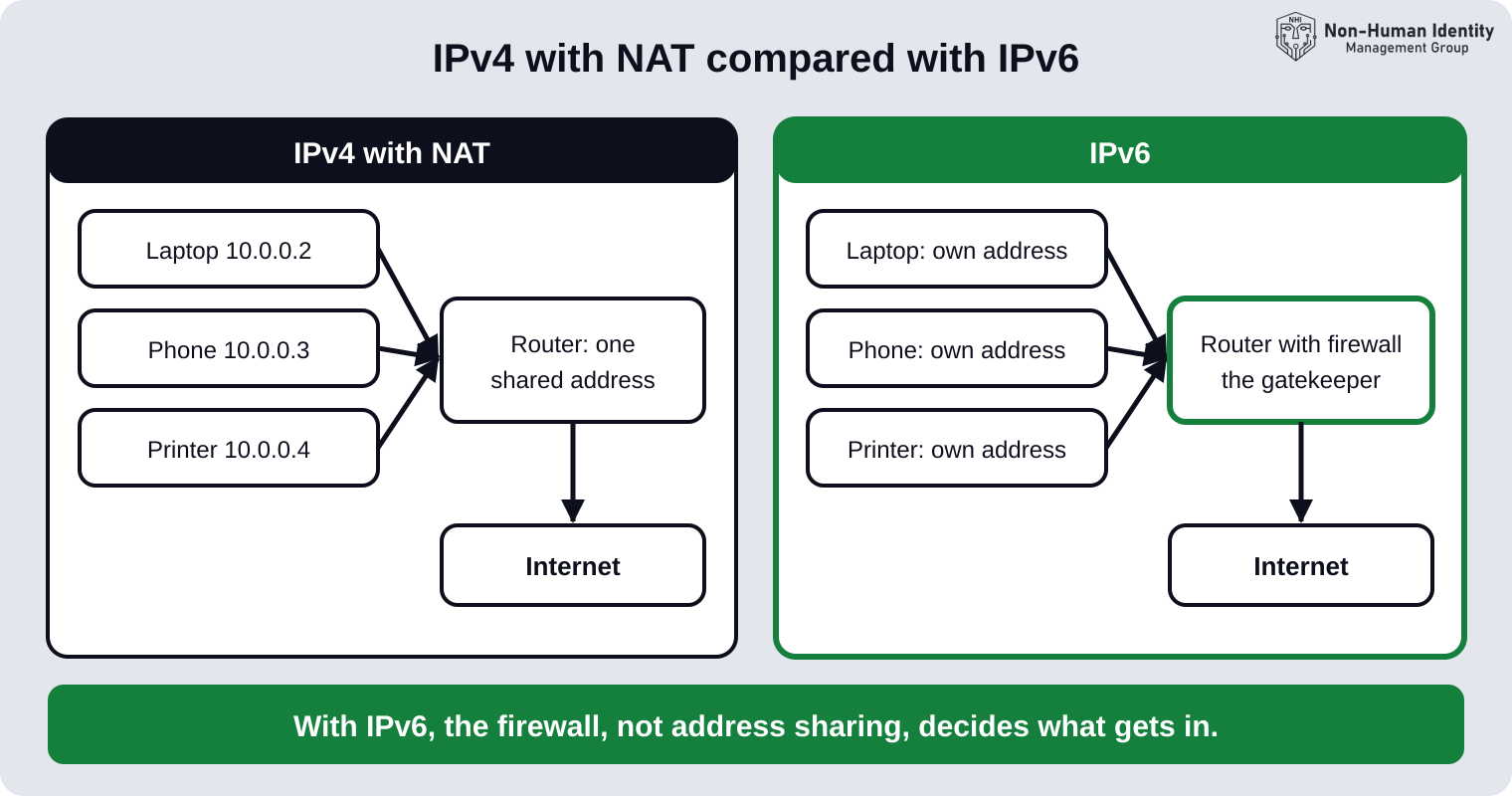
Think of an office where every call goes through one switchboard number. Outsiders cannot ring a desk directly. The receptionist puts calls through only when staff ask. Now give every desk its own direct line. Anyone who knows the number could ring straight in.
That is roughly the change from IPv4 to IPv6. Every device on the internet needs an IP address, a number that tells the network where to send data. The older system, IPv4, uses short addresses, and the world has nearly run out of them. So many homes and offices share one public address through their router, a trick called NAT (network address translation).
IPv6 is the successor to IPv4. Its addresses are 128 bits long instead of 32 bits, which gives a vast number of them.[1] So each device can have its own public address, and sharing is no longer needed.
Where the comparison stops working: a receptionist was never meant to be a security guard, and NAT was not designed as a security control either. On both systems, the real gatekeeper should be a firewall, a filter that blocks traffic you have not allowed.
Why does it matter?
IPv6 is not dangerous in itself. The risk is that people forget it is there. Most popular operating systems ship with IPv6 switched on, so it is likely active even on networks planned for IPv4 only.[2] A US government guide advises organisations to understand the risks of IPv6 early and plan for them.[6]
If you are new to IT work
What could happen: you tighten the IPv4 firewall rules, but the IPv6 rules still let traffic through.
Check this: when you look at a firewall rule, look for the matching IPv6 rule too.
Next: Firewalls for Beginners
If you are studying networking or security
What could happen: you learn only IPv4, then miss half of what a real network is doing.
Check this: look up your own device's IPv6 addresses and learn to read them.
If you look after a small office network
What could happen: your internet provider turns on IPv6, and devices become reachable in ways you did not plan.
Check this: confirm the router's firewall covers IPv6 as well as IPv4.
What does it look like?
Here is a made-up network details screen from an office laptop. The addresses use ranges kept aside for examples.
Example only. All values are made up.
Network details (EXAMPLE) - office-laptop-00
IPv4 address:        192.0.2.25                        (1)
IPv6 address:        2001:db8:0:1::25                  (2)
Temporary IPv6:      2001:db8:0:1:a1b2:0:0:fake        (3)
Link-local IPv6:     fe80::0000:fake                   (4)
Default gateway:     fe80::1 (router)                  (5)
- The old-style address: four numbers with dots.
- In a real screen, this line would show the laptop's main IPv6 address. Groups are split by colons, and "::" stands for a run of zeros.
- A temporary address that changes over time, so websites cannot track the laptop as easily.
- An address that works only on the local network. Addresses starting fe80 are this kind.
- The router the laptop sends IPv6 traffic through. The laptop learned it from the router's announcements.
Why this is risky: if nobody knows the laptop has IPv6 addresses, nobody checks whether the firewall and monitoring cover them.
The safer way: treat IPv6 as part of the network. Write it into your firewall rules, your records and your checks, just like IPv4.
How does it work?
Here is how a device usually gets online with IPv6, step by step.
- The router announces itself. Routers send regular messages called router advertisements. They tell devices which router to use and which address range the local network has.[4]
- The device builds its own address. Using that range, the device often makes up its own address, with no central server handing it out.
- It adds a temporary address for privacy. Many devices also create random addresses that change, often about once a day by default. This makes it harder for websites to link your visits together.[3]
- It finds its neighbours. Devices on the same network find each other with IPv6 messages that replace the older IPv4 method.[4]
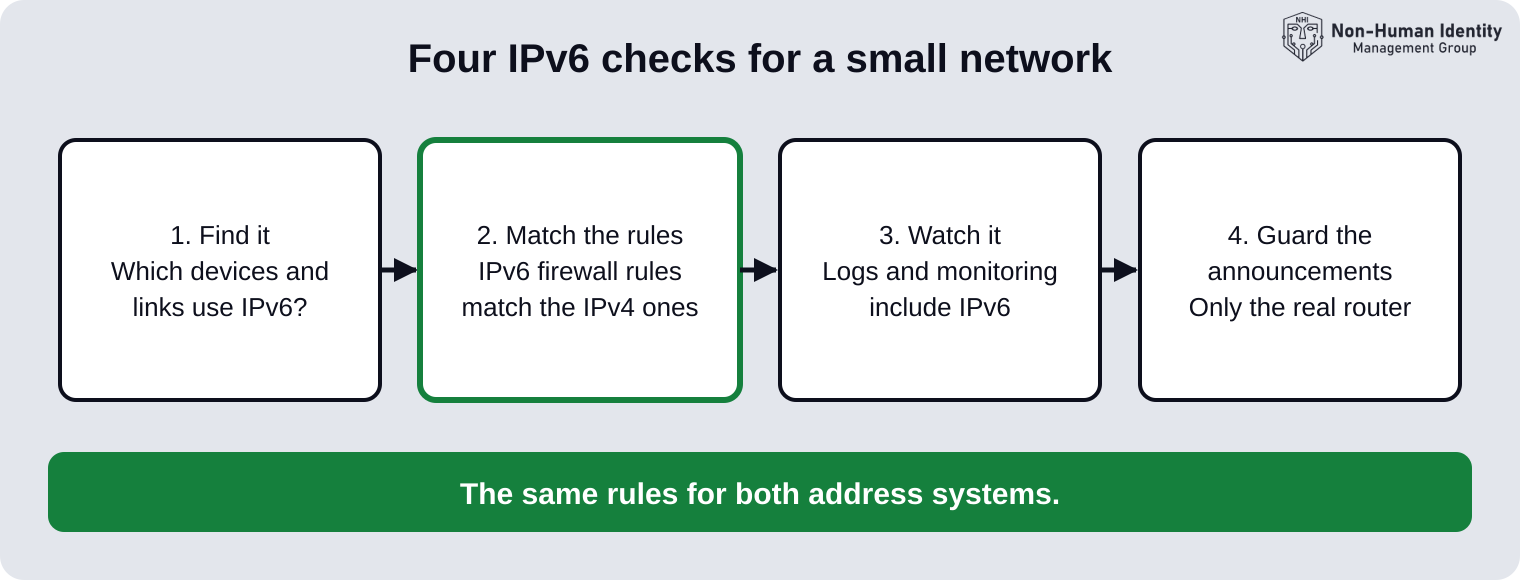
- Traffic passes the firewall. Data to and from the internet goes through the router or firewall, which should apply your rules to IPv6 just as to IPv4.
These automatic steps make IPv6 easy to use, but they also need care. A fake or badly set up device can send its own router announcements. That can send other devices' traffic the wrong way. These rogue announcements can come from attackers or from honest mistakes.[5] Network switches can filter them, a feature called RA Guard, so only the real router's announcements get through.[5]
Another risk is tunnels: ways of wrapping IPv6 traffic inside IPv4 so it can cross older networks. Some tunnels can start automatically and may slip past security tools that check only IPv4.[2]
A worked example
Jonah Lindahl has just started as the junior IT person at Juniper Dental, a fictional practice with two surgeries. His mentor, Fen Dube, gives him a first task: check the firewall.
Jonah opens the firewall's rules. The IPv4 list is neat. Only the booking website and email are let in from outside. He nearly ticks the task off.
Then he remembers the office switchboard. If every desk has a direct line, who screens the calls? He opens a laptop's network details. It has an IPv6 address starting 2001, not just an IPv4 one. The internet provider had turned on IPv6 some months earlier.
He goes back to the firewall and finds a separate IPv6 tab. One old rule there allows remote desktop access from anywhere to a reception computer. Nobody remembers adding it.
Jonah shows Fen. They agree to remove the rule and make the IPv6 list match the IPv4 one. Fen also asks Jonah to check that the monitoring tool records IPv6 traffic. It does, but nobody had looked at it.
Finally, Jonah adds a line to the monthly check: "Review IPv4 and IPv6 rules together."
In the records available to them, there is no sign the open rule had been misused. They still change the reception computer's password as a precaution.
IPv6 itself was not the problem. The problem was that nobody was looking at it.
Myths and mistakes
| What people think | What is true |
|---|---|
| We do not use IPv6, so it is not a risk. | Many devices have IPv6 switched on by default. It may be active on your network already.[2] |
| NAT keeps us safe, and IPv6 takes that away. | NAT was not built as a security control. A properly set up firewall is the gatekeeper on both systems. |
| IPv6 addresses are too many to scan, so devices are hidden. | Addresses can still leak through logs, emails and name lookups. Do not rely on being hard to find. |
| Our IPv4 firewall rules also cover IPv6. | Often they are separate lists. Check both. |
| The easy answer is to switch IPv6 off everywhere. | Switching it off can break things and only delays the work. Guidance treats blocking as a stopgap until IPv6 is properly set up.[2] |
What can I do this week?
- Look at your own device's network settings and find its IPv6 addresses.
- Ask whether your internet provider gives your office or home IPv6.
- Open the firewall or router settings and check the IPv6 rules match the IPv4 ones.
- Check that your logs and monitoring tools record IPv6 traffic.
- Note which devices on your network use IPv6, and add them to your records.
Checklist
- We know whether our network and internet provider use IPv6.
- Our firewall has IPv6 rules that match our IPv4 rules.
- IPv4 and IPv6 rules are reviewed together.
- Our logs and monitoring include IPv6 traffic.
- Only our real routers can send router announcements on office networks.
- Automatic tunnels we do not need are switched off or blocked.
- Our device and address records include IPv6 addresses.
Common questions
What happened to IPv5?
There was never a widely used IPv5. The number was taken by an experimental project, so the successor to IPv4 became IPv6. For practical purposes, the two address systems you will meet are IPv4 and IPv6.
Is IPv6 less secure than IPv4?
Not by design. Both can be run safely or badly. The extra risk usually comes from people overlooking IPv6, so it gets weaker rules and less monitoring than IPv4. Treat both with the same care and the gap closes.
How do I know if I am using IPv6?
Look at your device's network or Wi-Fi details. If you see an address with colons, such as one starting 2001 or 2a00, you have a global IPv6 address. One starting fe80 works only on the local network.
Does IPv6 make it easier to track me?
It could, which is why many devices use temporary addresses. These change over time, so websites cannot as easily link visits through the address. They do not stop all tracking, because sites can still use cookies and logins.[3]
Should I turn IPv6 off?
Usually not as a long-term fix. Turning it off can cause problems, and guidance treats blocking as a temporary step. For most networks, a better aim is to run IPv6 with the same firewall rules and monitoring as IPv4.[2]
Where next?
Ready for the detail? Read the practitioner guide: IPv6 Security Guide. It goes further into first hop protections, IPv6 firewall rules and tunnels, and how to choose between blocking, dual stack and IPv6-only.
Also useful:
- NAT and Private Addresses for Beginners
- Networking Fundamentals for Beginners
- Firewalls for Beginners
- How Network Tunnels Work for Beginners
Related NHI Mgmt Group resources: Network Security for Beginners · IP Address Privacy Guide · Network Segmentation for Beginners
Key terms
- IP address
- The number that tells a network where to deliver data for a device.
- IPv4
- The older internet address system, with short addresses that are running out.
- IPv6
- The newer internet address system, with far more addresses than IPv4.
- NAT
- A way for many devices to share one public address through a router.
- Dual stack
- Running IPv4 and IPv6 side by side on the same device or network.
- Router advertisement
- A message in which a router tells nearby devices how to reach the network.
- Firewall
- A filter that decides which network traffic may pass in or out.
- Tunnel
- A way of wrapping one kind of network traffic inside another to carry it across.
Sources and further reading
- RFC 8200 (STD 86), Internet Protocol, Version 6 (IPv6) Specification. S. Deering and R. Hinden, IETF, July 2017. https://www.rfc-editor.org/rfc/rfc8200, accessed 28 Nov 2026.
- RFC 7123, Security Implications of IPv6 on IPv4 Networks. IETF, February 2014 (Informational). https://www.rfc-editor.org/rfc/rfc7123, accessed 28 Nov 2026.
- RFC 8981, Temporary Address Extensions for Stateless Address Autoconfiguration in IPv6. F. Gont, S. Krishnan, T. Narten and R. Draves, IETF, February 2021. https://www.rfc-editor.org/rfc/rfc8981, accessed 28 Nov 2026.
- RFC 4861, Neighbor Discovery for IP version 6 (IPv6). T. Narten, E. Nordmark, W. Simpson and H. Soliman, IETF, September 2007. https://www.rfc-editor.org/rfc/rfc4861, accessed 28 Nov 2026.
- RFC 6105, IPv6 Router Advertisement Guard. IETF, February 2011 (Informational). https://www.rfc-editor.org/rfc/rfc6105, accessed 28 Nov 2026.
- NIST SP 800-119, Guidelines for the Secure Deployment of IPv6. S. Frankel, R. Graveman, J. Pearce and M. Rooks, National Institute of Standards and Technology, December 2010. https://csrc.nist.gov/pubs/sp/800/119/final, accessed 28 Nov 2026.