NAT lets many devices on a home or office network share one public internet address.
This guide is for newcomers, students and anyone who has seen an address like 192.168.1.1 and wondered what it means. You do not need to be technical to be affected: the box your internet provider gave you is almost certainly doing this right now.
In short
- Devices at home or in an office usually get a private address that only works inside that network.
- Your router swaps those private addresses for one public address when traffic goes out to the internet.
- This hides your inside addresses, but it is not a security tool on its own.
- Settings that open doors through the router, like port forwarding, need care and a regular check.
What you will learn
- Explain the difference between a private and a public address.
- Spot a private address on your own device.
- Explain why NAT is not the same as a firewall.
- Check your router for doors you did not mean to open.
- Device number (IP address)
- a number that tells the network where to deliver data for a device.
- Inside-only number (private address)
- an address that works inside one home or office network but not on the open internet.
- Address swapping (NAT)
- the router's job of swapping private addresses for its own public address, and back again.
What is NAT?
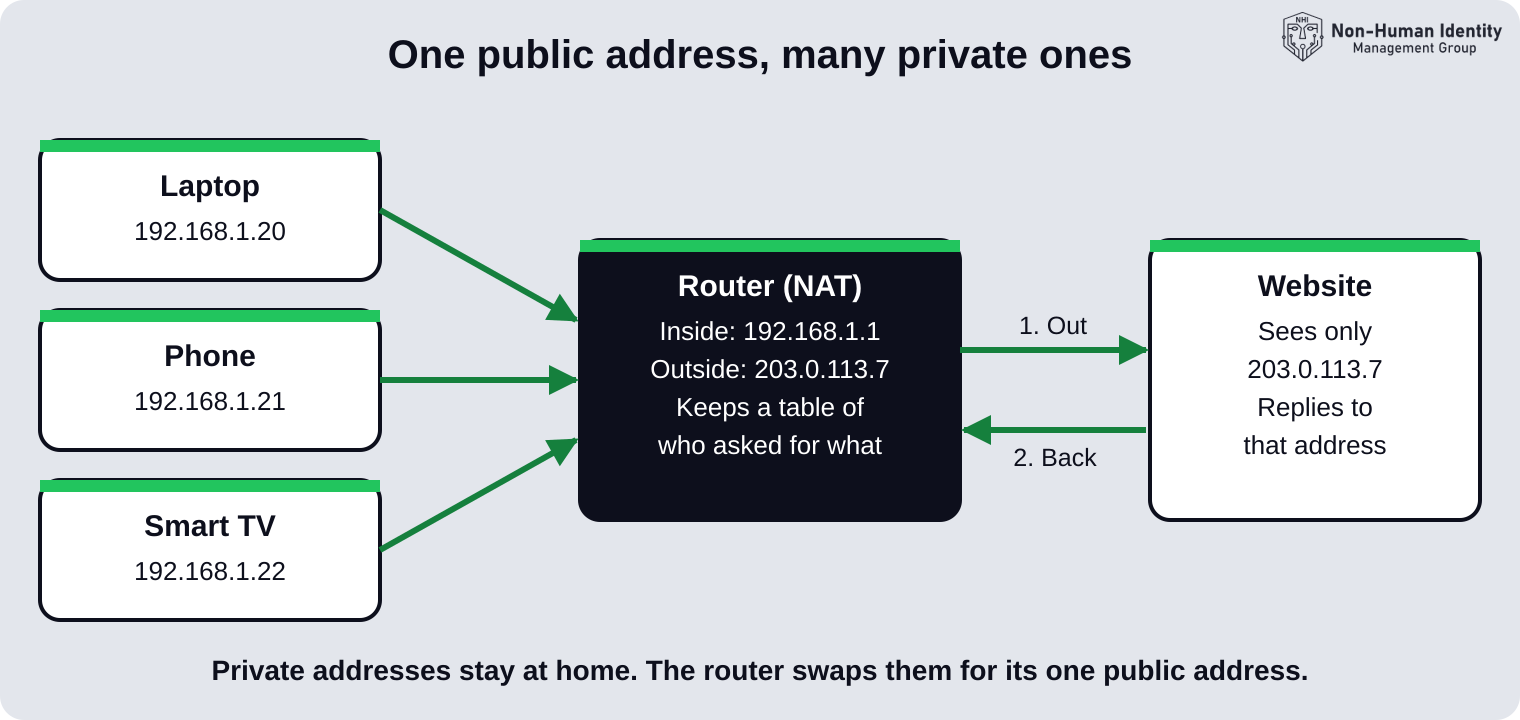
Think of a block of flats with one street address and a post room. Letters from outside arrive at the one street address. The post room knows which flat each reply belongs to.
Your home network works the same way. Every device on a network needs an IP address (a number that tells the network where to send data). Inside your home, the laptop, phone and TV each get a private address. These come from three ranges set aside for use inside networks, such as addresses starting 192.168 or 10.[1]
The router (the box that joins your home network to the internet) has one public address that the wider internet can see. NAT, short for network address translation, is the router swapping private addresses for its public one on the way out. It keeps a note of each conversation so replies reach the right device.[2]
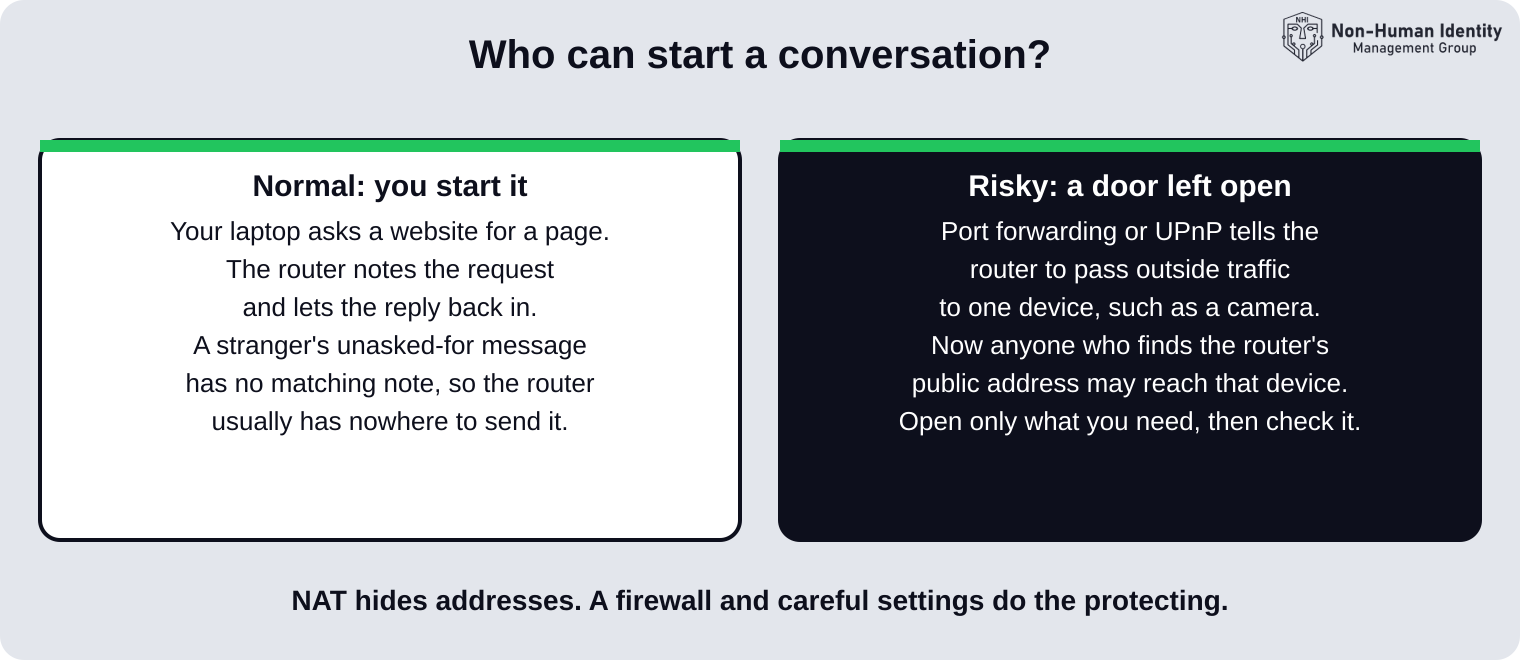
Where the comparison stops working: a post room lets anyone post a letter to a flat. A home router usually drops a message from outside that nobody inside asked for, because it has no note saying where it should go.
Why does it matter?
NAT shapes what the internet can see of your network, and what it can reach. People often think it makes them safe on its own. It helps, but the real protection comes from filtering rules and careful settings.
If you look after your home network
What could happen: a camera or games console asks the router to open a door, and that door stays open to the internet.
Check this: log in to your router and look at the port forwarding and UPnP settings.
If you run a small business
What could happen: a supplier opens a door through your router for remote support and nobody closes it.
Check this: ask for a list of every rule that lets outside traffic in, and who asked for each one.
Next: Firewalls for Beginners
If you are studying networking or new to IT work
What could happen: you trace a problem to "an address" and pick the wrong device, because many devices share it.
Check this: when you read records, note the time and the port as well as the address.
What does it look like?
Here is a made-up version of the network details a laptop might show, plus a line from a router's settings page.
Example only. All values are made up.
EXAMPLE laptop network details
  Address:          192.168.1.20    (1)
  Router (gateway): 192.168.1.1     (2)
Router status page
  Public address:   203.0.113.7     (3)
Router port forwarding
  Outside port 8080 -> 192.168.1.30 (camera)   (4)
- The laptop's private address. It works only inside this network.
- The router's inside address. Devices send internet traffic here first.
- In a real file, this line would contain the one public address the whole home shares.
- A rule that sends outside traffic straight to one device, here a camera.
Why this is risky: line 4 is a door from the internet to the camera. Anyone who finds the public address and that port may be able to reach the camera's login page. If the camera has a weak password or old software, that is a way in.
The safer way: remove forwarding rules you do not need. For remote viewing, use the maker's app or a VPN (a private, encrypted link into your network) where possible. Keep the device updated and give it a strong, unique password.
How does it work?
- Your device asks. Your laptop, at a private address, asks a website for a page.
- The router swaps the address. It replaces the laptop's private address with its own public address. It also picks a port (a numbered channel) so it can tell conversations apart.[2]
- The router takes a note. It records which inside device and port matches which outside port.
- The website replies. It only ever sees the public address, so it replies to the router.
- The router passes it on. It checks its note and sends the reply to the laptop. A message from outside with no matching note usually has nowhere to go.[2]
Why do we need this at all? The older kind of internet address, called IPv4, has a limited supply. NAT lets a whole home share one. The newer kind, IPv6, uses much longer addresses (128 bits), so there are enough for every device.[7] On IPv6, devices can have their own public address, so a firewall matters even more.
Some internet providers add a second layer, called carrier-grade NAT. Here many customers share one public address at the provider's side, often using a special range starting 100.64.[4] To trace misuse back to one customer, the provider may need the public address, the port and the exact time.[5]
A worked example
Idris Pereira runs Hazel Bakery, a fictional shop with a small office upstairs. He has a laptop, a card reader, a shared printer and two security cameras on the shop network.
A friend tells him, "Your network is behind NAT, so nobody can get in." Idris is not so sure. He remembers the post room. A post room only keeps out letters that nobody inside asked for.
He logs in to the router using the address printed on its label. On the status page he sees one public address. Every device in the shop has a private address starting 192.168.
Then he opens the port forwarding page. There is a rule he does not recognise. It sends outside traffic on one port to a camera. The installer added it two years ago so Idris could watch the shop from home.
He also sees that UPnP is switched on. UPnP is a feature that lets devices open doors through the router by themselves. Canada's national cyber security centre advises turning it off on home routers, after checking whether your devices need it.[6]
Idris deletes the old camera rule and turns UPnP off. He installs the camera maker's app, which lets him view the cameras without the open door. He updates the camera software and changes its password from the one the installer set.
Finally he writes a short note: what is forwarded, why, and who asked. He sets a reminder to check the router every three months.
Myths and mistakes
| What people think | What is true |
|---|---|
| NAT is a firewall. | NAT swaps addresses. What gets in depends on the router's filtering rules, which is the firewall's job.[3] |
| A private address means a device is safe. | It cannot be reached directly from the internet, but a forwarding rule, UPnP or malware on another device can still reach it. |
| My public address points to my laptop. | It points to your router, and it is shared by every device in your home. |
| An address alone shows who did something online. | Many people may share one public address, especially with carrier-grade NAT. Time and port are also needed.[5] |
| Moving to IPv6 removes the risk. | IPv6 often has no NAT, so the router's firewall becomes the main barrier. Check that it is on. |
What can I do this week?
- Find your device's private address and your router's public address in your settings.
- Log in to your router and list every port forwarding rule.
- Delete rules you cannot explain, and turn off UPnP if your devices work without it.
- Change the router's admin password if it is still the one printed on the label.
Checklist
- I know the difference between my private and public addresses.
- The router's admin password has been changed from the default.
- Every port forwarding rule has a clear reason and an owner.
- UPnP is off, or I have checked which devices need it.
- The router's firewall is switched on, including for IPv6 if my provider uses it.
- Devices that are reachable from outside are updated and have strong passwords.
- I review the router settings at least every few months.
Common questions
What is the difference between a public and a private IP address?
A private address works only inside your own network, and many homes reuse the same ones, such as 192.168.1.20. A public address is the one the wider internet sees. Your router usually holds the public address and shares it with every device inside.
Is 192.168.1.1 my public address?
No, it is a private address. It is usually your router's inside address, the one your devices talk to. Your public address is different. You can find it on the router's status page, or by asking a "what is my IP" website.
Does NAT protect me from hackers?
Partly. It usually stops strangers starting a connection to your devices, because the router has nowhere to send it. But it does not inspect traffic, stop malware or block doors that port forwarding and UPnP open. Keep the router's firewall on and its settings tidy.
What is port forwarding and is it safe?
Port forwarding is a router rule that sends outside traffic to one inside device. It can be safe for a clear reason, but it exposes that device to the internet. Use it only when needed, keep the device updated, and remove the rule when you are done.
What is carrier-grade NAT?
It is NAT done by your internet provider, so many customers share one public address. It saves addresses but can stop some games, cameras or home servers being reached from outside. It also means the address alone does not identify one household.
Where next?
Ready for the detail? Read the practitioner guide: NAT and Its Security Implications Guide. It goes further into NAT behaviour types, how to audit forwarding rules and how to move to IPv6 safely.
Also useful:
- Networking Fundamentals for Beginners
- Home Router Security for Beginners
- Firewalls for Beginners
- IP Address Privacy Guide
- Subnetting and CIDR Cheat Sheet for Defenders
Related NHI Mgmt Group resources: IPv6 Security Guide · VPNs for Beginners · Smart Home Security for Beginners
Key terms
- IP address
- A number that tells a network where to deliver data for a device.
- Private IP address
- An address set aside for use inside local networks, not routed on the public internet.
- Public IP address
- The address the wider internet sees for your network, usually held by your router.
- Network Address Translation (NAT)
- A method that lets many private devices share one public address by swapping addresses at the router.
- Port forwarding
- A router rule that sends outside traffic on a chosen port to one inside device.
- UPnP
- A feature that lets devices find each other and ask the router to open doors by themselves.
- Carrier-grade NAT
- NAT run by an internet provider so that many customers share one public address.
- IPv6
- The newer internet address system, with far more addresses than the older IPv4.
Sources and further reading
- RFC 1918 (BCP 5): Address Allocation for Private Internets. IETF, February 1996. https://www.rfc-editor.org/rfc/rfc1918, accessed 28 Nov 2026.
- RFC 3022: Traditional IP Network Address Translator (Traditional NAT). IETF, January 2001 (Informational). https://www.rfc-editor.org/rfc/rfc3022, accessed 28 Nov 2026.
- RFC 4787 (BCP 127): Network Address Translation (NAT) Behavioral Requirements for Unicast UDP. IETF, January 2007. https://www.rfc-editor.org/rfc/rfc4787, accessed 28 Nov 2026.
- RFC 6598 (BCP 153): IANA-Reserved IPv4 Prefix for Shared Address Space. IETF, April 2012. https://www.rfc-editor.org/rfc/rfc6598, accessed 28 Nov 2026.
- RFC 6888 (BCP 127): Common Requirements for Carrier-Grade NATs (CGNs). IETF, April 2013. https://www.rfc-editor.org/rfc/rfc6888, accessed 28 Nov 2026.
- Universal Plug and Play (ITSAP.00.008). Canadian Centre for Cyber Security, September 2025. https://cyber.gc.ca/en/guidance/universal-plug-play-itsap00008, accessed 28 Nov 2026.
- RFC 8200 (STD 86): Internet Protocol, Version 6 (IPv6) Specification. IETF, July 2017. https://www.rfc-editor.org/rfc/rfc8200, accessed 28 Nov 2026.