IP reputation is a score that says how trustworthy an internet address looks, based on its past behaviour.
This guide is for anyone whose emails bounce, whose customers get blocked, or who has just heard the word "blocklist". You do not need to run a network to be affected: if your business sends email or runs a website, your address has a reputation too.
In short
- Every device online uses an address, and services keep notes on which addresses have caused trouble.
- A blocklist is a shared list of addresses that some services choose to refuse or check more closely.
- Many people can share one address, so honest users can be blocked because of someone else.
- Criminals can borrow clean home addresses, so a good reputation alone does not prove a visitor is safe.
What you will learn
- Explain what IP reputation and a blocklist are in one sentence each.
- Spot the signs that your email or website traffic is being blocked.
- Check whether an address is listed and who to ask about it.
- Explain why blocking by address alone can shut out real customers.
- Internet address (IP address)
- a number that tells the internet where to send data, a bit like a postal address.
- Banned list (blocklist)
- a list of addresses that a service has decided to refuse or treat with care.
- Trust score (IP reputation)
- a judgement, often a score, of how risky traffic from an address is likely to be.
What is IP reputation?
Think of a group of shops that share a list of customers who caused trouble before. If your name is on the list, the next shop may turn you away at the door.
The internet works in a similar way. Every phone, laptop and server that goes online uses an IP address (a number that tells data where to go). Email services, websites and security tools keep notes on addresses that sent spam, guessed passwords or spread harmful software.
That history adds up to an address's reputation. An address with a clean history looks trustworthy. An address with a bad history may be slowed down, asked for extra checks or refused.
A blocklist is one common way to share that history. A group publishes a list of addresses it thinks are risky, and other services look up each visitor against it.
Where the comparison stops working: a shop list names a person. An internet address often belongs to a building, a phone company or a shared mail service. So one list entry can affect many people.
Why does it matter?
Reputation decides whether your messages arrive and whether your visitors get in. It can go wrong in both directions: good people blocked, and bad people let through.
If you run a small business
What could happen: your invoices bounce because the address your email leaves from was listed after someone else sent spam.
Check this: read the bounce message. It usually names the list or the reason.
If you run an online shop
What could happen: a strict blocklist turns away real customers who share an address with a troublemaker.
Check this: ask your website supplier what happens to a blocked visitor, and whether they get a way to prove they are human.
If you are new to IT or security work
What could happen: you trust a clean address, but the attacker is borrowing someone's home connection.
Check this: treat reputation as one clue among several, not as proof.
Next: Botnets for Beginners
What does it look like?
When an email is refused because of a blocklist, the sender usually gets a bounce message back. Here is a made-up one.
Example only. All values are made up.
From: Mail Delivery System
Subject: Undelivered Mail Returned to Sender

Your message to [email protected] could not be delivered.
Remote server said:
550 Rejected: 192.0.2.99 is listed on bad.example.invalid   (1)
See https://lists.example.invalid/lookup?ip=192.0.2.99       (2)

Original message: "Invoice 0000 for October"                 (3)
- In a real message, this line would name the address your email left from and the list that flagged it.
- In a real message, this would point to the list's own lookup page, where you can see why the address is listed.
- Your email was not lost. It was refused and sent back.
Why this is risky: if nobody reads bounces, invoices and replies quietly fail to arrive. The cause may be another customer on the same shared mail server, not you.[4]
The safer way: look up the named address on the list's own site. Then send the bounce to your email provider or IT supplier. Spamhaus runs some well-known lists. It says the bounce usually shows the refused address. Its lookup tool explains how to fix and remove a listing.[3]
How does it work?
Here is what usually happens, using email as the example.
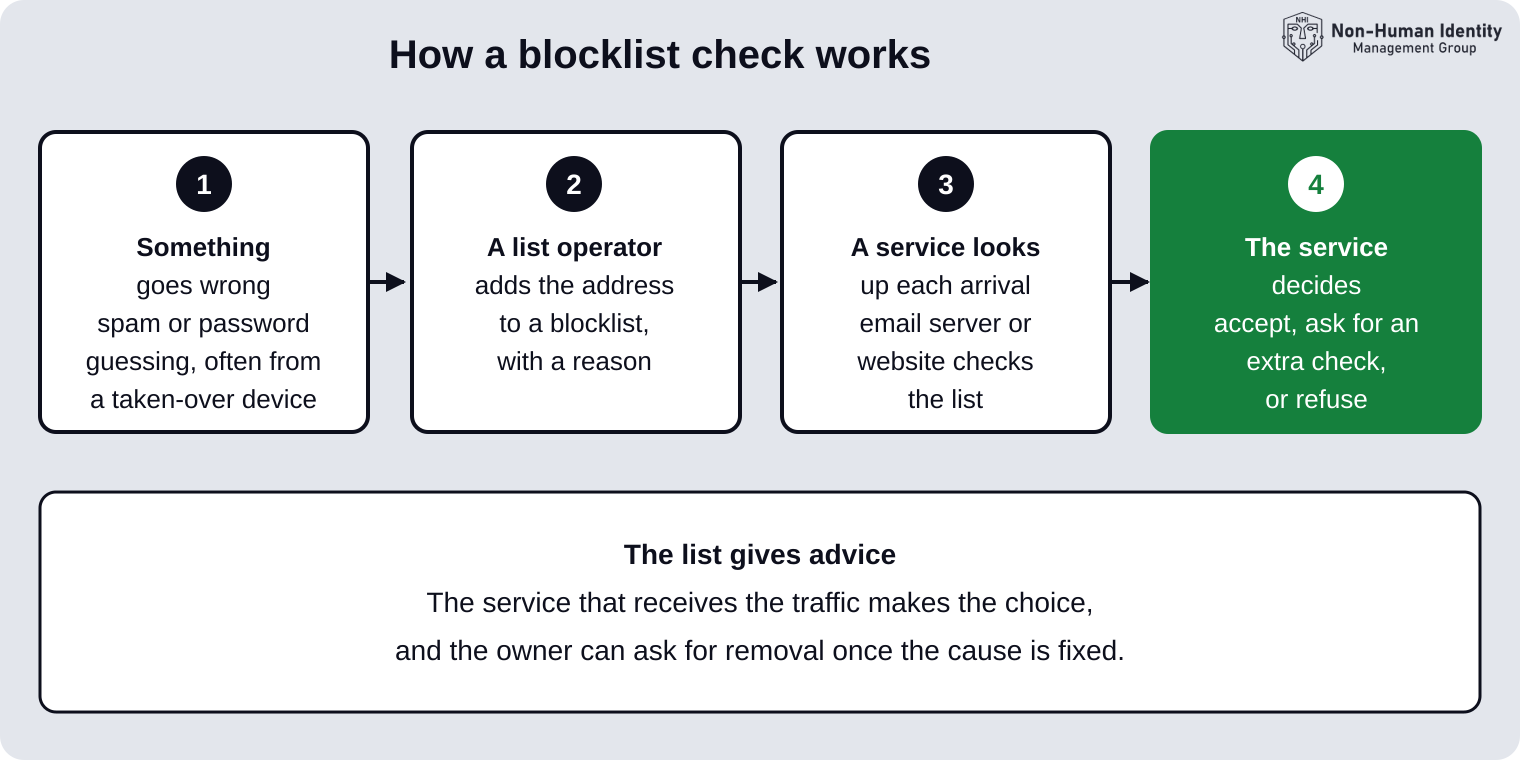
- Something goes wrong. An address sends spam, guesses passwords or spreads harmful software. Often the owner does not know, because a device was taken over.
- A list operator notices. The group that runs a blocklist adds the address, usually with a reason.
- A service looks it up. When a message or visitor arrives, the receiving service asks the list about the address. A common method uses the internet's address book system (DNS), which makes the check quick.[1]
- The service decides. The receiving service, not the list, chooses whether to refuse, slow down or simply score the traffic.[3]
- The owner fixes and asks for removal. Once the problem is cleaned up, the owner uses the list's removal process, and the listing should drop off.
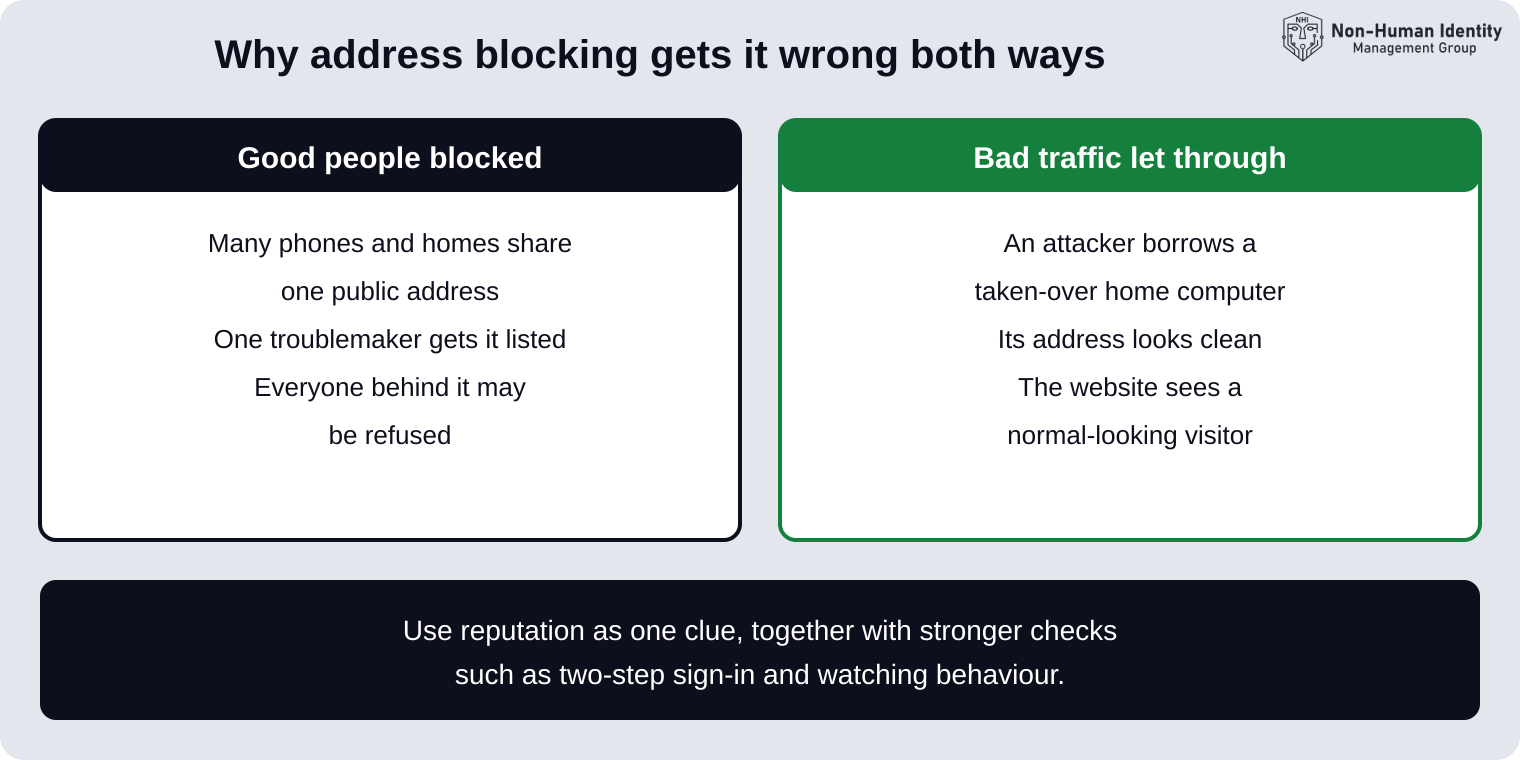
Two things make blocking by address imperfect. First, many people can share one address. Phone networks and some home broadband put many customers behind one public address. The internet's standards body notes that blocking such an address can also block innocent users who share it.[2]
Second, criminals can borrow clean addresses. A residential proxy sends their traffic through other people's home connections. In 2024 the US Department of Justice described one such service, 911 S5, as using infected home computers linked to more than 19 million addresses.[5] Traffic like this can look just like a normal customer.
A worked example
Odile Delmar runs Elm Lettings, a fictional letting agency with six staff. Her email comes from a hosting company that sends mail for hundreds of small firms.
One Monday, two landlords say they never got their monthly statements. Odile checks her inbox and finds a pile of bounce messages from the weekend.
She remembers the shared list of troublemakers. Being turned away does not always mean you did something wrong. It can mean someone who looks like you did.
She forwards one bounce to Reza Bergmann, the freelancer who looks after her computers. Reza reads the line that names the refused address. He looks it up on the list's own site. The address belongs to the hosting company's shared mail server, and it was listed on Saturday for spam.
Reza checks Odile's own account first. The sign-in records available to him show no unusual logins, and her sent folder holds only normal mail. So the spam probably came from another customer on the same server.
He opens a support ticket with the hosting company and attaches the bounce. The company moves Odile's mail to a different sending address while it cleans up and asks for removal.
By Tuesday the statements are delivered. Reza then sets up a simple rule so bounce messages go to a folder Odile checks each morning. He also turns on two-step sign-in for every staff mailbox. Then a stolen password alone is less likely to turn Elm Lettings into the spammer.
Myths and mistakes
| What people think | What is true |
|---|---|
| If my address is listed, I must have sent spam. | Not always. Shared addresses mean someone else's behaviour can affect you.[4] |
| The blocklist company blocked my email. | The list gives advice. The receiving service chooses to refuse the mail.[3] |
| A clean address means a safe visitor. | Criminals can route traffic through other people's home connections, which can look clean.[5] |
| Blocking more addresses is always safer. | Strict address blocking can shut out real customers who share an address.[2] |
| Once delisted, the problem is solved. | If the cause is not fixed, such as a taken-over account, the address is likely to be listed again. |
What can I do this week?
- Ask your email provider what happens if your sending address is listed.
- Set up a folder or rule so someone reads bounce messages.
- Turn on two-step sign-in for every mailbox. It makes stolen accounts less likely to send spam.
- Ask your web supplier if blocked visitors get a way to prove they are real.
Checklist
- Someone owns and reads email bounce messages.
- You know which company sends your email and how to contact its support.
- Every mailbox uses two-step sign-in.
- You know how to look up an address on a list's own lookup page.
- Your website treats address reputation as one signal, not the only one.
- Blocked visitors get a clear message and another way to reach you.
- After any listing, the cause is found and fixed before asking for removal.
Common questions
How do I know if my address is on a blocklist?
Start with the bounce message. It usually names the refused address and often the list. Then use that list's own lookup page to check the address and read the reason. If you cannot work it out, send the bounce to your email provider, who can check its own sending addresses.
How do I get removed from a blocklist?
Fix the cause first, then use the list's own removal process. Most well-known lists explain the steps on their lookup page. If the address belongs to your email or hosting provider, ask them to do it. They control the server and can show the problem is fixed.
Can a VPN get me blocked?
Yes, sometimes. A VPN shares its addresses among many users, so some websites treat them with extra caution or ask for extra checks. If a site keeps refusing you, try again without the VPN, or contact the site through another route.
Should my business block whole countries or address ranges?
Only with care. Blocking by place or range can stop some unwanted traffic, but it can also stop real customers, staff who travel and partners. Attackers can also route traffic through addresses in your own country. Stronger sign-in checks usually protect accounts better than address rules alone.
Is a blocklist the same as a firewall?
No, but they work together. A firewall is the tool at the door that lets traffic in or keeps it out. A blocklist is one source of advice the firewall or email service can use when it decides. See Firewalls for Beginners.
Where next?
Ready for the detail? Read the practitioner guide: Residential Proxy Networks and Abuse Guide. It goes further into how criminals borrow home addresses, why address rules miss them and how teams detect that traffic by behaviour.
Also useful:
- D3-IPRA IP Reputation Analysis
- Email Authentication for Beginners
- Botnets for Beginners
- VPNs for Beginners
Related NHI Mgmt Group resources: Bot Management Guide · Botnets Guide · DMARC, SPF and DKIM Failure Troubleshooting Guide
Key terms
- IP address
- A number that identifies where a device sits on a network so data can reach it.
- IP reputation
- A judgement of how risky traffic from an address is likely to be, based on its past behaviour.
- Blocklist
- A list of addresses, domains or other items that a service chooses to refuse or check more closely.
- DNSBL
- A blocklist published through the internet's address book system, so services can check an address quickly.
- False positive
- When something harmless is wrongly flagged as bad, such as a real customer being blocked.
- Residential proxy
- A service that sends traffic through ordinary home internet connections, often without the owners knowing.
- Botnet
- A group of taken-over devices controlled by one person or group.
Sources and further reading
- RFC 5782: DNS Blacklists and Whitelists. Internet Research Task Force, February 2010. https://www.rfc-editor.org/rfc/rfc5782.html, accessed 28 Nov 2026.
- RFC 6269: Issues with IP Address Sharing. Internet Engineering Task Force, June 2011. https://www.rfc-editor.org/rfc/rfc6269.html, accessed 28 Nov 2026.
- DNSBL usage FAQ. The Spamhaus Project. https://www.spamhaus.org/faqs/dnsbl-usage/, accessed 28 Nov 2026.
- High-risk delivery pool for outbound messages. Microsoft Learn, Microsoft. https://learn.microsoft.com/en-us/defender-office-365/outbound-spam-high-risk-delivery-pool-about, accessed 28 Nov 2026.
- 911 S5 Botnet Dismantled and Its Administrator Arrested in Coordinated International Operation. US Department of Justice, 29 May 2024. https://www.justice.gov/opa/pr/911-s5-botnet-dismantled-and-its-administrator-arrested-coordinated-international-operation, accessed 28 Nov 2026.