A Kubernetes service account is the identity an app uses to prove who it is inside a Kubernetes cluster.
This guide is for anyone who has heard the term and wants to know what it means and why it needs care. You do not need to run Kubernetes yourself. If your business uses software hosted on it, these accounts decide how much each part of that software can reach.
In short
- A service account is an identity for software, not for a person. Each app in a cluster runs as one.
- The account itself grants nothing. Separate permission rules decide what it may do.
- An app that does not choose an account gets the shared "default" one, so anything given to default spreads to many apps.
- Give each app its own account with small permissions, and switch off the pass for apps that never need it.
What you will learn
- Explain what a Kubernetes service account is and why it counts as a software identity.
- Spot the warning signs of an account with too much power.
- Check whether each app has its own account and only the access it needs.
- Ask your platform team the right questions about the default account.
- Software identity (service account)
- the name an app uses when it asks the cluster to do something.
- Digital pass (token)
- a piece of signed data the app shows to prove it is that account.
- Permission rules (RBAC)
- the lists that say what each account may do.
What is a Kubernetes service account?
Think of a shared works van with its own keys. The van belongs to the firm, not to one driver. A service account works the same way: it is an account a program uses to do its job, with no person signing in.
Kubernetes is a popular system that runs software across many computers. It runs each app inside a small unit called a pod. Pods are grouped into named sections of the cluster, called namespaces.
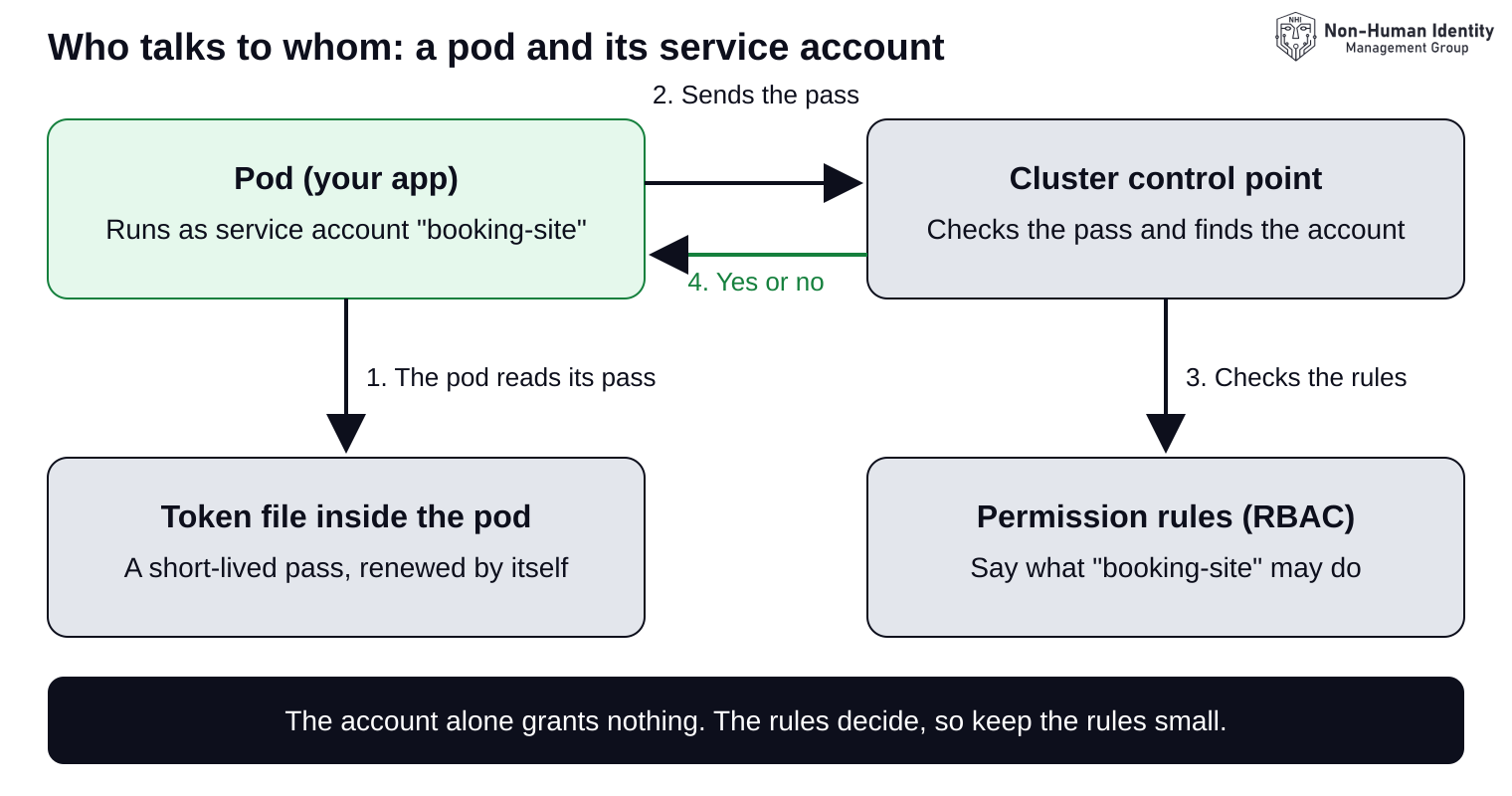
When a pod asks the cluster for something, it shows a digital pass, called a token. The token says which service account the pod is using. The cluster then checks what that account is allowed to do.
Kubernetes describes a service account as "a type of non-human account" that gives a distinct identity in the cluster.[1] People get user accounts; apps get service accounts.
Where the comparison stops working: a van key stays the same for years. A modern service account token is swapped for a fresh one every few hours. But anyone who copies a valid token can use it until it runs out.
Why does it matter?
A token sits inside the pod as a file. If an attacker finds a weakness in the app, they may be able to read that file and act as the account. How much harm they can do depends on what the account may do.
If your business runs software on Kubernetes
What could happen: one hacked app holds an account with wide rights, so the attacker can reach far more than that app.
Check this: ask your supplier or platform team whether each app has its own account with small rights.
If you are new to IT or security work
What could happen: you miss that the shared default account was quietly given extra power months ago.
Check this: when you review a cluster, look first at what the default account in each namespace can do.
If you manage a technical team
What could happen: nobody owns the service accounts, so old ones with wide rights stay in place for years.
Check this: make sure every service account has a named owning team and a regular review.
What does it look like?
Here is a made-up summary of one app's settings, in plain words.
Example only. All values are made up.
App:              booking-website
Namespace:        shop-example
Service account:  default                          (1)
Token mounted:    yes                              (2)
Permissions given to "default":
  read, change and delete everything in the cluster   (3)
Owner:            (blank)                          (4)
- The app uses the shared default account. Other apps that name no account share it too.
- A token is placed in the pod. A booking website may never need to talk to the cluster.
- In a real file, this line would name a powerful role that covers the whole cluster.
- No team owns it, so nobody is likely to review it.
Why this is risky: a flaw in the website could give an attacker a pass to the whole cluster.
The safer way: the website gets its own account with no extra rights. Its token is switched off, and a team owns it.
How does it work?
- An account exists. Kubernetes creates one called "default" in every namespace. Teams can create more, ideally one per app. If you delete the default account, Kubernetes puts a new one back.[1]
- Rights are granted separately. The permission system, called RBAC (role-based access control), links a list of allowed actions to the account. Rights only add up; there are no "deny" rules.[3] Apart from the cluster's own system accounts, service accounts start with no rights beyond basic look-ups.[3]
- A pod starts as that account. The pod's settings name its account. If they name none, Kubernetes uses default. The account can be set only when the pod is created.[2]
- The pod gets a short-lived token. Since version 1.22, Kubernetes gives pods a short-lived token that it renews by itself.[1] A helper program asks for a fresh token when the old one is past 80% of its life, or over 24 hours old.[2]
- The pod calls the cluster. It sends the token with each request. The cluster checks the token, finds the account, then checks RBAC to decide yes or no.
- The token is cancelled when things are removed. It no longer works against the cluster once the pod or the account is deleted.[2]
Older clusters could also store a token as a saved secret that does not expire or renew. Kubernetes no longer recommends this method, because long-lived passes carry more risk.[1]
Service accounts are not only for talking to the cluster. A cloud service can be set up to trust them, and a build pipeline can use one to reach the cluster from outside.[1]
A worked example
Astrid Laine looks after the systems at a small made-up online shop. Its booking website, a nightly report job and a small restart tool all run in one namespace.
Before an audit, Astrid reviews the service accounts. She finds three problems. All three apps run as the default account. Months ago, someone gave default a powerful cluster-wide role "to make the restart tool work". And every pod has a token, although only the restart tool talks to the cluster.
Astrid agrees a plan with the developers. She tests each change in a practice cluster first. She creates a separate account for the restart tool. She gives it only the pod actions it needs, in that one namespace.
Next, she switches off token mounting for the website and the report job, which never call the cluster. Then she removes the powerful role from default.
She keeps a written copy of the old settings. If a change breaks something, the team will restore only the one right that is missing. They will record who approved it and set a date to review it.
A few weeks later, a flaw is announced in a library the website uses. The website pods held no token, so there was no cluster pass to steal there. The flaw still needs fixing, so the team patches it and checks the logs. But one easy route from the website to the rest of the cluster had already been closed.
Myths and mistakes
| What people think | What is true |
|---|---|
| The default account is harmless. | It starts with almost no rights. But anything later given to it reaches every pod in the namespace that names no account of its own.[3] |
| Short-lived tokens make service accounts safe. | A stolen token can still be used until it runs out. What the account may do matters just as much. |
| Only people who can read secrets can get powerful passes. | Anyone who can create pods in a namespace can run them as any account there, and so use its rights.[4] |
| Every pod needs a token. | Many apps never call the cluster. Token mounting can be switched off on the account or the pod; if both are set, the pod setting wins.[2] |
| Giving every account full rights saves time. | Kubernetes strongly discourages it. It gives any app full access to the cluster.[3] |
What can I do this week?
- Ask for a list of the service accounts in each namespace and the rights linked to each. Start in a test cluster.
- Look at default first. Check whether the default account in any namespace has been given extra rights.
- Ask each app team whether their app talks to the cluster. Plan to switch off the token for those that do not.
- Move one app from default to its own account with only the rights it needs, and test before you roll it out.
Checklist
- Each app that talks to the cluster has its own named service account.
- The default account in each namespace holds no extra rights.
- No account has the top cluster role unless there is a recorded, approved reason.
- Rights are granted inside one namespace where possible, not across the whole cluster.[4]
- Rights avoid "everything" wildcards, which also cover new kinds of object added later.[4]
- Token mounting is switched off for pods that do not call the cluster.
- No old, never-expiring token secrets remain without a recorded reason.
- Each service account has a named owning team and a regular review.[5]
Common questions
Is a service account the same as a user account?
No. User accounts are for people. Service accounts are for apps and automation running in or around the cluster. Kubernetes keeps the two separate. Service accounts live inside the cluster itself, which makes them easy to create and easy to forget.[1]
Do service account tokens expire?
Modern ones do. Since version 1.22, the token placed in a pod is short-lived and renewed by itself. Older tokens stored as saved secrets do not expire or renew, which is why Kubernetes no longer recommends them.[1]
Should I delete the default service account?
There is little point. If you delete it, Kubernetes creates a new one.[1] We suggest leaving it with no extra rights and giving each app its own named account instead. That way a mistake on one app is less likely to spread.
How do I stop a pod getting a token it does not need?
Switch off automatic token mounting on the service account or on the pod. If both have a setting, the pod setting wins.[2] Test the change first, because an app that does call the cluster will fail without its token.
Who should own a service account?
We suggest the team that owns the app owns its account, with the platform team reviewing the rights. An owner knows why the account exists, so it can be changed or removed safely when the app changes or is retired.
Where next?
Ready for the detail? Read the practitioner guide: Kubernetes NHI Security Guide. It goes further into old and new token types, permission design for software accounts and how cluster workloads reach cloud services.
Also useful:
- Service Accounts for Beginners
- Cloud Workload Identities for Beginners
- Kubernetes Service Account Token Guide
- How to find unused Kubernetes service accounts
- NHI Foundation Level Training
Related NHI Mgmt Group resources: Kubernetes RBAC Guide · Kubernetes Secrets Security Guide · Non-Human Identities for Beginners
Key terms
- Kubernetes service account
- The identity an app in a cluster uses to call the cluster and other services.
- Non-Human Identity (NHI)
- An identity used by software, machines or AI agents rather than by a person.
- Kubernetes RBAC
- The permission system that decides what people and service accounts may do in a cluster.
- Kubernetes RoleBinding
- The link that gives a list of rights to an account inside one namespace.
- Projected Service Account Token
- A short-lived token made for one pod, placed in it as a file and renewed by itself.
- Automounting
- The default habit of placing a token in every pod unless it is switched off.
- Bearer Token
- A pass that works for whoever holds it, which is why theft is the main risk.
- Least Privilege
- Giving each person or program only the access it needs, for only as long as it needs it.
Sources and further reading
- Service Accounts. Kubernetes documentation, The Kubernetes Authors. https://kubernetes.io/docs/concepts/security/service-accounts/, accessed 28 Nov 2026.
- Configure Service Accounts for Pods. Kubernetes documentation, The Kubernetes Authors. https://kubernetes.io/docs/tasks/configure-pod-container/configure-service-account/, accessed 28 Nov 2026.
- Using RBAC Authorization. Kubernetes documentation, The Kubernetes Authors. https://kubernetes.io/docs/reference/access-authn-authz/rbac/, accessed 28 Nov 2026.
- Role Based Access Control Good Practices. Kubernetes documentation, The Kubernetes Authors. https://kubernetes.io/docs/concepts/security/rbac-good-practices/, accessed 28 Nov 2026.
- Security Checklist. Kubernetes documentation, The Kubernetes Authors. https://kubernetes.io/docs/concepts/security/security-checklist/, accessed 28 Nov 2026.