A major IT outage is when a widely used computer system fails, disrupting many people or businesses at once.
This guide is for anyone who has been caught out when cards, flights or apps stopped working, and for managers who want their team to cope next time. You do not need a technical background. Most organisations now rely on a handful of shared providers, so one fault far away can reach your desk.
In short
- Many big outages are caused by a mistake, such as a faulty update, not by an attack.
- They spread because many firms rely on the same few providers, and those providers rely on each other.
- Providers limit the damage by rolling changes out in stages, so a fault hits a few systems before it hits many.
- You cannot stop a provider's outage, but you can plan how your team keeps working without it.
What you will learn
- Explain the three common causes of big outages.
- Describe why one fault can reach thousands of organisations.
- Spot which outside services your own work depends on.
- Check that your team has a simple way to keep going.
- Weak link everyone shares (single point of failure)
- one part that, if it breaks, takes down everything that depends on it.
- Rolling out in stages (staged rollout)
- sending a change to a small group first, then to everyone once it looks safe.
- How far the damage spreads (blast radius)
- how many systems or people one failure can reach.
What is a major IT outage?
Think of a town with one main bridge. If the bridge closes, traffic jams across the whole town, even on roads nowhere near the river.
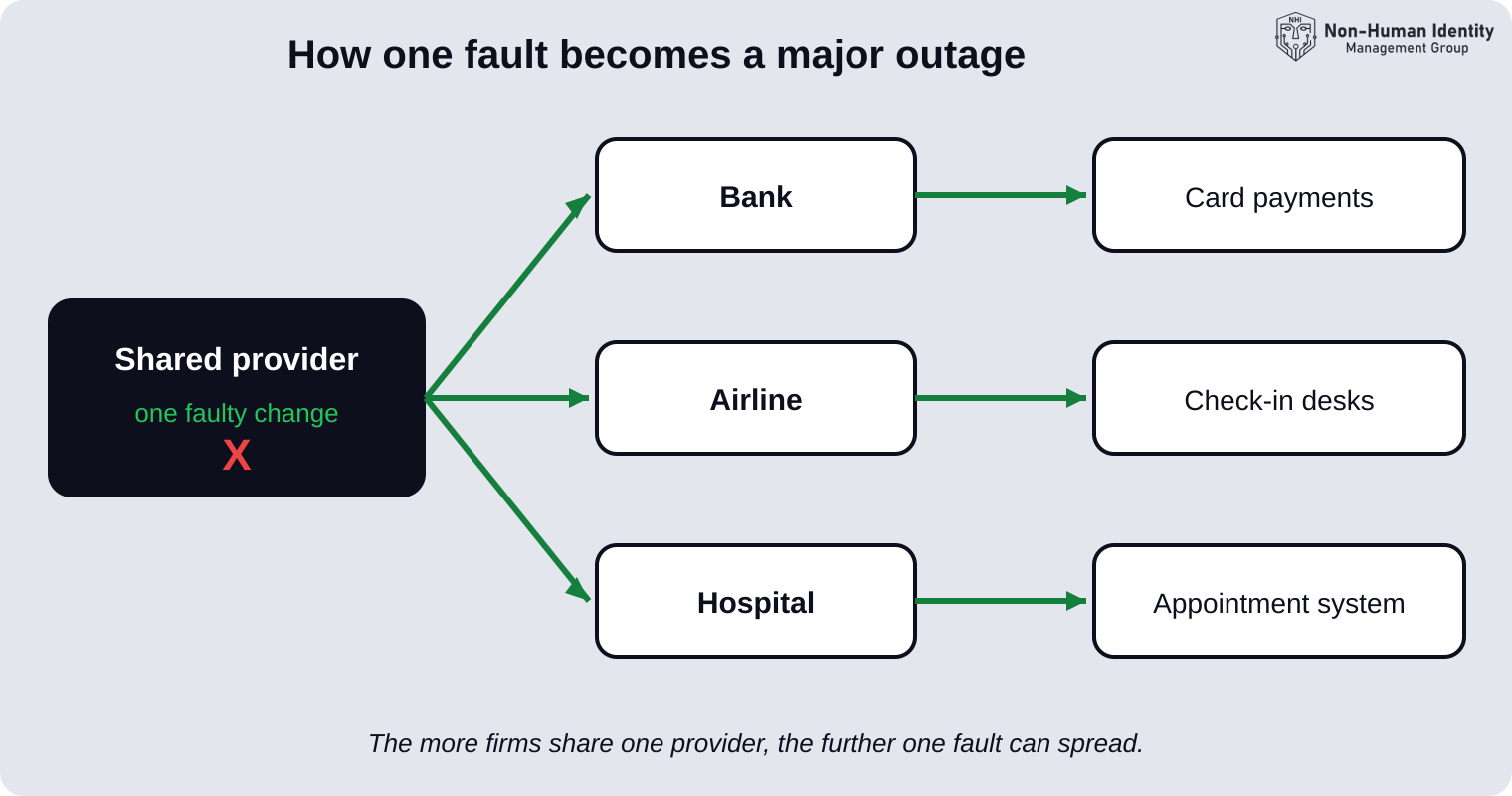
Big computer systems work the same way. Banks, airlines, shops and hospitals often use the same few cloud providers and security tools. When one of those shared services fails, everyone who depends on it is hit at the same time. That is what makes an outage "major".
Most big outages start in one of three ways:
- A faulty change. An update or setting goes out with a mistake in it.
- A hidden link breaks. A small service that many others quietly depend on fails.
- An attack. Criminals break in and lock or damage systems, often to demand money.
Where the comparison stops working: a closed bridge is easy to see on a map. In IT, the links between services are often hidden, so people may not know what depends on what until it breaks.
Why does it matter?
In July 2024, a faulty security update made Windows computers crash around the world. Microsoft estimated 8.5 million devices were affected, under one percent of all Windows machines. It said the wide impact came from the critical services those firms run.[2]
If you are a member of the public
What could happen: your card will not work at the till, or your flight is delayed, because a system you never see has failed.
Check this: keep a second way to pay and a copy of key bookings that does not need an app.
If you manage a team
What could happen: your booking or payment system goes down for a day, and nobody knows how to carry on.
Check this: agree how the team would keep working for a day without its main systems.
Next: Business Continuity and Disaster Recovery for Beginners
If you are new to IT work
What could happen: hundreds of laptops fail at once, and each one must be fixed by hand.
Check this: find out how your team would get many machines working again, and who holds the recovery keys.
What does it look like?
Here is a made-up status update, the kind of short notice a provider posts during an outage.
Example only. All values are made up.
status.example.invalid    Example Cloud Ltd
00:10  Investigating: some customers cannot connect      (1)
00:45  Identified: a settings change in one region       (2)
       caused our address lookup service to fail
01:30  Other services that rely on it are affected      (3)
03:00  Fix applied. Working through a backlog            (4)
09:00  Resolved. Full review to follow                   (5)
- The first notice often says little. The cause is not known yet.
- A small change in one place is a common starting point.
- The knock-on effect: other services depend on the broken one.
- Fixing the cause is not the end. Queued work takes time to clear.
- Many providers publish a review of what went wrong.
Why this is risky: for nine hours, every firm that used this provider was waiting. Most could do nothing to speed up the fix.
The safer way: know which providers you rely on. Have a simple plan for working without them. Follow their status page, not rumours.
How does it work?
Most big outages follow a similar path. Here it is in five steps.
- Something changes. A provider sends out an update or changes a setting. In the July 2024 case, CrowdStrike sent a content update to its security software on Windows computers.[1]
- A hidden mistake slips through. Checks are meant to catch errors, but they can miss some. CrowdStrike's own review says its checker passed the faulty update because it shared the same wrong assumption.[1]
- The fault reaches many systems at once. If a change goes to everyone together, a mistake does too. This is the blast radius, meaning how far one failure can spread.
- Linked services fall over. In October 2025, a fault in an automatic system broke the address lookup for one Amazon Web Services (AWS) database in one region. AWS says other AWS services that depend on it were hit too, and the event lasted about 14 and a half hours in all.[3]
- Recovery takes longer than the fix. Once the cause is fixed, queued work must be cleared and machines restarted. AWS describes a backlog that kept new servers from starting for hours after the main fault was fixed.[3]
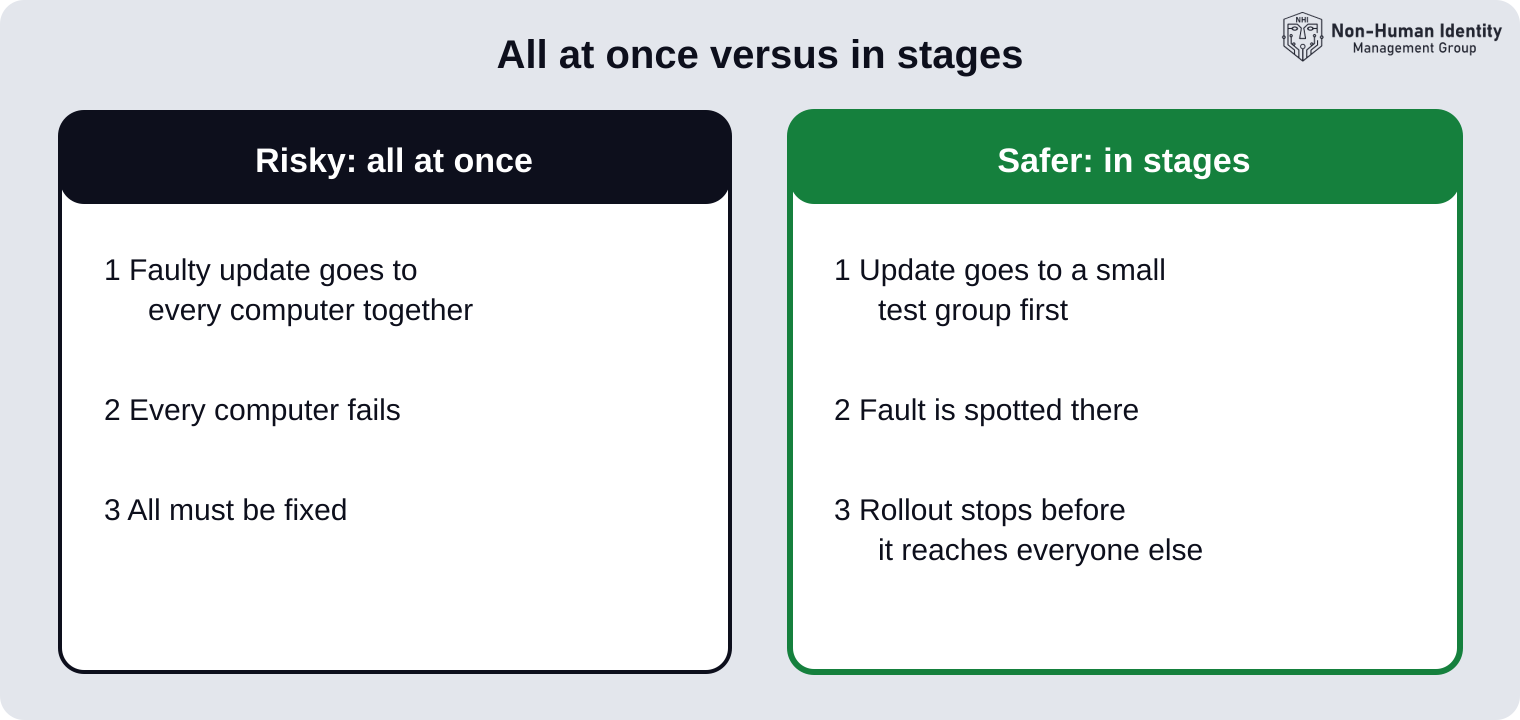
Providers limit the spread by sending changes out in stages, called a staged rollout. A change goes to a small group first. If something breaks, only that group is hit, and the change can be stopped. After July 2024, CrowdStrike said it would roll out these updates in stages and let customers choose when they receive them.[1]
Not every outage is an accident. In October 2023, the British Library was hit by a cyber attack. It says the motive appears to have been money, and it was still recovering months later.[4]
A worked example
Calla Jovanovic runs the front desk at Brightwater Dental, a fictional practice with two sites and 25 staff. One Friday morning, the booking system will not load.
Her first thought is that the practice has been hacked. Before she panics, she checks the booking provider's status page. It says a cloud provider the booking firm uses is having problems in one region. Hundreds of practices are affected.
Calla knows the practice cannot fix this. Her job is to keep patients moving. Six months ago, after a smaller outage, the practice manager Hal Sorensen asked her to help write a one-page plan. She takes it out of the drawer.
The plan says to print the day's list each evening. Yesterday's printout is in the folder, so she knows who is due in. Staff write new bookings on paper forms. Card payments still work through a separate machine, so the practice can take money. Calla sends one short message to patients due that afternoon, using the practice's text service, which runs on a different provider.
At lunchtime the status page says the fault is fixed, but the booking system is slow while it catches up. By three o'clock it is back. Calla types up the paper bookings and checks them against the screen.
On Monday, Hal adds one line to the plan: who checks the status page, and who tells the team.
Myths and mistakes
| What people think | What is true |
|---|---|
| Every big outage is a cyber attack. | Many are caused by mistakes, such as a faulty update or setting.[1][3] Attacks happen too, so check the provider's own updates. |
| Big providers do not have outages. | They do. Large providers publish reviews of their own outages, which is a good sign of openness. |
| Once the fault is fixed, everything is back. | Queued work and restarts can take hours longer than the fix itself.[3] |
| Using a cloud provider means we do not need a plan. | The provider runs its systems. You still need a way for your own team to keep working when they fail. |
| A small change cannot cause a big problem. | Small changes to widely shared systems are a common starting point for big outages. |
What can I do this week?
- List the three outside services your work cannot do without, such as email, payments or bookings.
- Find and bookmark each provider's status page.
- Decide how your team would carry on for one day without each service.
- Keep a printed or offline copy of the most important lists and contacts.
- At home, keep a second way to pay and offline copies of travel bookings.
Checklist
- We know which outside providers our main systems rely on.
- Each provider's status page is bookmarked, and someone is named to check it.
- We have a short, printed plan for working for a day without our main system.
- Key lists, such as today's bookings and contacts, are kept offline too.
- We have a way to message staff and customers that uses a different provider.
- Our IT team knows how it would fix many computers at once, and where recovery keys are kept.
- After any outage, we spend ten minutes on what to change next time.
Common questions
Why do so many companies go down at the same time?
Because many of them use the same few providers for cloud hosting, security software and payments. When one shared provider fails, every firm that relies on it is affected together. Those providers also rely on each other, so a fault can spread further than expected.
Was the July 2024 outage a hack?
No. CrowdStrike's own review says it was caused by a faulty content update to its security software, which made Windows computers crash.[1] A check that should have caught the mistake missed it. Many computers had to be fixed one by one.
What is a status page?
A status page is a web page where a provider posts live updates about problems with its service. It is usually the most reliable place to learn what is happening during an outage. Bookmark the status pages of the services you depend on before you need them.
Can a small business do anything about outages it cannot control?
Yes. You cannot fix the provider, but you can plan how to keep working. Know which services you rely on, keep key lists offline, and agree a simple manual way to carry on. Even a one-page plan helps people stay calm.
How do outages differ from cyber attacks?
An outage means a system is not working. It can be caused by a mistake or by an attack. A cyber attack is a deliberate act by someone. Both can stop work, and both need a plan, but an attack may also involve stolen data and the police.
Where next?
Ready for the detail? Read the practitioner guide: Major IT Outage Lessons Guide. It goes further into what providers' own post-incident reviews say, hidden dependencies such as identity and address lookup services, and how to recover thousands of machines at scale.
Also useful:
- Business Continuity and Disaster Recovery for Beginners
- Cyber Resilience for Beginners
- Change Management for Beginners
- Cloud Region Outage Resilience
Related NHI Mgmt Group resources: Operational Resilience for Beginners · Mass Endpoint Recovery Guide · Cyber Crisis Management for Beginners
Key terms
- Single point of failure
- One part that, if it breaks, stops everything that depends on it.
- Blast radius
- How many systems or people one failure or attack can reach.
- Staged rollout
- Sending a change to a small group first, then to more once it looks safe.
- Post-incident review
- A write-up after a problem that explains what happened and what will change.
- Business continuity
- Planning how an organisation keeps its most important work going during a disruption.
- Root cause analysis
- Working out the underlying reason a problem happened, not just its symptoms.
Sources and further reading
- External Technical Root Cause Analysis: Channel File 291. CrowdStrike, 6 August 2024. https://www.crowdstrike.com/wp-content/uploads/2024/08/Channel-File-291-Incident-Root-Cause-Analysis-08.06.2024.pdf, accessed 28 Nov 2026.
- Helping our customers through the CrowdStrike outage. David Weston, Microsoft, 20 July 2024. https://blogs.microsoft.com/blog/2024/07/20/helping-our-customers-through-the-crowdstrike-outage/, accessed 28 Nov 2026.
- Summary of the Amazon DynamoDB Service Disruption in the Northern Virginia (US-EAST-1) Region. Amazon Web Services, October 2025. https://aws.amazon.com/message/101925/, accessed 28 Nov 2026.
- Learning lessons from the cyber-attack. British Library blog, 8 March 2024. https://www.bl.uk/stories/blogs/posts/learning-lessons-from-the-cyber-attack, accessed 28 Nov 2026.