Malware analysis is the work of examining a suspicious file or program to find out what it does, how it does it and how to detect and remove it.
This guide is for newcomers, students, career changers and managers who are not security specialists. It explains in plain English why defenders study malicious software, the two main ways of looking at it, a worked example from a fictional company and simple first steps. It stays at concept level: it does not teach tools or handling of live samples, and it links deeper guides for readers who want to go further.
By the end of this guide you will be able to:
- Explain what malware analysis is and why defenders do it.
- Describe the difference between static and dynamic analysis.
- Understand why analysis happens in an isolated test system, never on a live computer.
- Identify safe first steps your team can take when a suspicious file turns up.
Key takeaways
- The goal is useful answers, not curiosity. Analysis tells responders what the malware does, how to spot it elsewhere and how to clean it up.
- There are two main approaches. Static analysis looks at a file without running it; dynamic analysis runs it in a controlled place and watches what happens.
- Safety comes first. Running malware belongs on isolated test systems, not on computers people use for work.
- The output is shared as indicators. File fingerprints, web addresses and behaviours found during analysis help other teams search for the same threat.
- Most organisations do not need a full lab. Many rely on security vendors, automated services or incident response partners, and focus on collecting samples safely.
What it is, in plain English
Malware is software built on purpose to cause harm: to steal data, lock files, spy on users or give an attacker remote control. Malware analysis is the investigation that follows when a suspicious file is found. An analyst asks simple questions. What is this file? What would it do if it ran? Who or what does it talk to? How can we find it on other computers, and how do we remove it?
The US National Institute of Standards and Technology (NIST) describes two broad ways of studying malware during an incident: running it and watching it (active analysis), or examining an infected computer without running the malware (forensic analysis).[1] In everyday security work these are usually called dynamic analysis and static analysis of the file itself, alongside forensic examination of the affected computer.
A helpful comparison is a bomb disposal team with a suspicious parcel. First they look at it from the outside: the label, the weight, an X-ray. Only if they need to know more do they open it, and then only in a safe, contained place. Where the analogy breaks down: a malware sample can be copied endlessly and studied many times without being used up, and some malware checks whether it is being watched and behaves innocently if it is.[2]
Why it matters to you
- If you run a small business: you probably will not analyse malware yourself, but knowing what the analysis tells you helps you ask your IT provider the right questions, such as "what did it steal?" and "could it be on other laptops?".
- If you are new to a security job: reading analysis reports, and pulling indicators out of them, is an everyday task in a security operations centre (SOC), even for people who never handle samples.
- If you are a manager: analysis results drive key decisions during an incident, such as how widely to reset passwords, whether data left the network and when it is safe to bring systems back.
Analysis matters because security tools can be wrong. NIST advises incident handlers to confirm that malware really is the cause of a problem, because antivirus and other detection tools can produce false alarms, and to treat an unclear incident as malware until shown otherwise, because waiting for proof can let damage grow.[1] For new or customised malware, NIST notes that vendor databases may have nothing yet, so handlers may need their own analysis or help from peers.[1]
Analysis also feeds the wider incident response process. NIST's current incident response guidance, SP 800-61 Revision 3, was published in April 2025 and ties incident response to the NIST Cybersecurity Framework 2.0.[3] What analysts learn about one sample shapes detection, containment and recovery across the whole organisation.
How it works, step by step
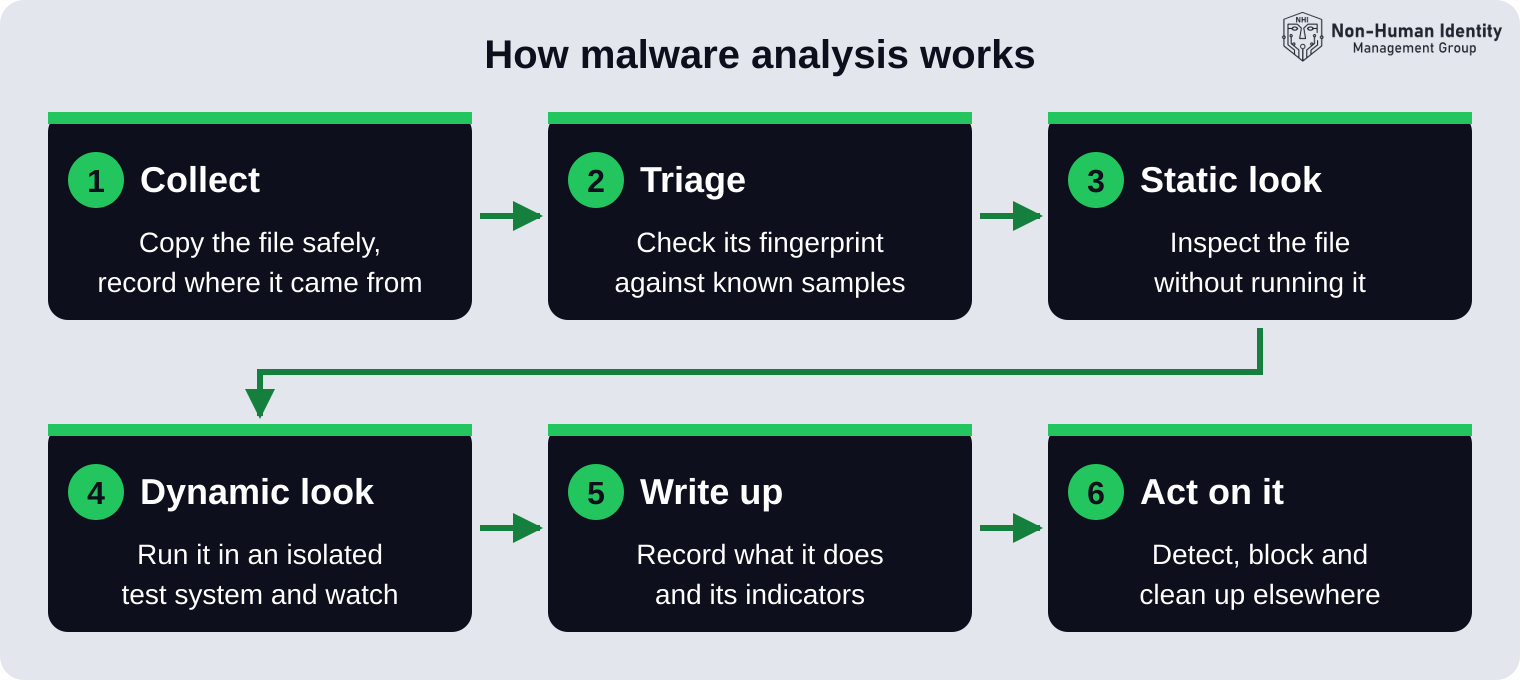
Every team works a little differently, but most analysis follows the same broad path.
- Collect the sample safely. The file is copied from the affected computer, email or download in a way that does not let it run, and the team records where and when it was found. Many teams store samples in password-protected archives so nobody opens them by accident.
- Triage. The analyst creates a file hash, a short fingerprint calculated from the file's contents, and checks whether the same fingerprint is already known to security vendors or threat intelligence sources. A known sample may already have a full write-up.
- Static analysis. The analyst inspects the file without running it: its type, its size, readable text inside it (such as web addresses or messages), who signed it and how it is built. This is fast and safe but cannot show everything the file does when it runs.
- Dynamic analysis. The file is run inside an isolated test system, often a virtual machine or a malware sandbox, while tools record what it does: files created, settings changed, programs started and network connections attempted. NIST notes that active approaches are best performed on malware test systems instead of production computers, and that a virtual test system can be reset to a known good image after the analysis.[1]
- Write up the findings. The analyst records what the malware does and lists indicators of compromise (IOCs): hashes, web addresses, file names and behaviours that show where the malware has been. Teams often share these in a standard format such as STIX, a free, open format for exchanging threat intelligence as linked objects in JSON.[6]
- Act on the results. Responders search other computers for the indicators, add detection rules, block bad addresses and plan clean-up. If what the malware did on a computer is unknown, NIST suggests rebuilding that computer is the safer recovery choice.[1]
The table below compares the two main approaches.
| Approach | What the analyst does | Strengths | Limits |
|---|---|---|---|
| Static analysis | Examines the file without running it | Fast, low risk, good for first triage | Hidden or scrambled code can conceal what the file really does |
| Dynamic analysis | Runs the file in an isolated test system and records its behaviour | Shows real actions: files, settings, network traffic | Needs a safe environment; some malware detects test systems and hides its behaviour |
| Forensic examination of the host | Examines the affected computer's storage and logs, often from a separate trusted environment | Shows what actually happened on that computer | Slower; needs care to keep evidence intact |
Useful distinctions
- Analysis is not the same as detection. Antivirus and endpoint tools decide quickly whether a file looks bad. Analysis is slower, deeper work that explains what the file does and why it matters.
- Automated sandboxes help, but are not the whole job. Services such as CISA's Malware Next-Gen platform run submitted files through a combination of static and dynamic analysis tools and return results in PDF and STIX 2.1 format.[4] A human still has to judge what the results mean for your own systems.
- Malware can try to fool the analyst. MITRE ATT&CK, a public catalogue of attacker behaviour, lists Virtualization/Sandbox Evasion (T1497), in which malware checks for analysis environments and changes its behaviour to hide.[2] A clean sandbox report is therefore not proof that a file is safe.
- Rules turn findings into detection. YARA is a tool aimed at helping malware researchers identify and classify malware samples, by describing patterns that a file must match.[5] Analysts often write such rules so that others can find related files.
- Uploading a file to a public service shares it. Some online scanning services make submitted files visible to others. That can expose your own data inside the file, or tip off an attacker that you have found their tool. We suggest agreeing in advance what may be uploaded where.
A worked example
Northfield Dental is a fictional group of four dental practices with 60 staff. Its IT is run by Leah, with help from an outside managed security provider.
On a Monday morning, a receptionist, Tom, opens an email that claims to contain an unpaid invoice. The attachment does not open properly. A little later, the endpoint protection tool on his computer raises an alert about a suspicious process.
- Contain first: Leah disconnects Tom's computer from the network and asks him not to switch it off, so evidence is kept.
- Collect safely: the security provider retrieves a copy of the attachment from the email system and the endpoint tool's quarantine, and records the time, sender and recipient.
- Triage: the provider's analyst calculates the file's hash. It is not yet known to the threat intelligence sources they check, so they move to deeper analysis.
- Static and dynamic analysis: the analyst sees that the file contains a hidden script. Run in an isolated test system, it tries to download a second program from a web address and to read saved browser passwords.
- Write up and act: the analyst sends Leah the hash, the web address and the behaviours. Leah blocks the address, the provider searches all other computers for the same indicators, and two other staff who received the email are checked.
No other computers show signs of the file. Because the malware tried to read saved passwords, Leah resets Tom's passwords and ends his active sessions, and Tom's computer is rebuilt rather than cleaned, because the team cannot be sure of everything the file did before it was stopped. The analysis did not make the incident disappear, but it turned a vague alert into specific actions the team could check.
Myths and misunderstandings
| What people think | What is true |
|---|---|
| Malware analysis means reading machine code for days. | Deep reverse engineering is one part of the field. Much everyday analysis is quicker triage: fingerprints, automated sandbox reports and indicator extraction. |
| It is fine to double-click a sample to see what happens. | Running malware on a normal computer can infect it and spread. NIST advises running samples on malware test systems, not production computers.[1] |
| If the sandbox shows nothing, the file is safe. | Some malware detects analysis environments and stays quiet.[2] Treat a clean report as one piece of evidence, not a final answer. |
| Every company needs its own malware lab. | Most small and medium organisations rely on security vendors, managed providers or incident response firms, and concentrate on collecting samples safely and acting on the results. |
| Removing the file is enough. | Malware often downloads more tools or steals passwords. Analysis shows what else to check, and a full rebuild may be the safer option.[1] |
Key terms
- Malware
- Software intentionally designed to harm the confidentiality, integrity or availability of data and systems, for example by stealing data or encrypting files.
- Malware analysis
- Examining malicious code to work out what it does, how it operates and how to detect or contain it.
- Static malware analysis
- Inspecting a file without running it, for example its structure, readable text and metadata. Useful for fast triage, but it cannot fully show what the file does when it runs.
- Dynamic malware analysis
- Running or observing a file in a controlled environment to see what it does, such as changes it makes and systems it contacts.
- Malware sandbox
- An isolated environment used to run suspicious files safely for analysis and record their behaviour.
- File hash
- A digital fingerprint of a file calculated from its contents. If even one byte changes, the hash changes.
- Indicator of compromise (IOC)
- A measurable sign that malicious activity may have happened, such as a file hash, web address, domain or IP address.
- YARA
- A pattern-matching language used to identify and classify malware and suspicious files.
- Reverse engineering
- Analysing compiled software to understand how it works without access to its source code.
- STIX
- A structured, machine-readable language for describing and sharing cyber threat intelligence, including indicators.
Common questions
What does a malware analyst actually do?
They examine suspicious files to find out what they do, then turn that into practical outputs: indicators to search for, detection rules and advice on clean-up.
What is the difference between static and dynamic analysis?
Static analysis looks at a file without running it. Dynamic analysis runs it in an isolated test system and records its behaviour. Analysts usually combine both.
Is it safe to analyse malware?
Only with the right set-up and training. Running samples belongs on isolated test systems, and even then some malware tries to detect the test system.[1][2] Beginners should not handle live samples outside a supervised lab.
Should I upload a suspicious file to an online scanner?
Check your organisation's policy first. Some services share uploaded files with others, which can expose confidential data inside the file. An approved, private service or your security provider is the safer route.
Do I need to learn programming to do malware analysis?
For triage and reading reports, no. For deeper work, such as reverse engineering, knowledge of how programs and operating systems work becomes important.
How does malware analysis connect to incident response?
It is part of the detection and analysis work in an incident. Its findings guide containment, eradication and recovery, which NIST groups together as one phase of handling a malware incident.[1]
First steps
Three things you can do this week:
- Write a one-line rule: nobody opens, forwards or uploads a suspicious file; they report it and leave it where it is.
- Decide who analyses samples. Name the person, provider or service you will send suspicious files to, and how to send them safely.
- Practise pulling indicators from a report. Take a published public malware analysis report and list the hashes, web addresses and behaviours it gives, then check how you would search for them in your own logs.
Checklist
- Staff know how to report a suspicious file without opening or forwarding it.
- We know who analyses samples for us: in-house, a provider or an approved service.
- We have rules on which files may be uploaded to which outside services.
- Any in-house analysis happens on isolated test systems, never on work computers.
- Our endpoint tools keep a quarantined copy of detected files we can retrieve.
- We can search all our computers and logs for a file hash or web address.
- Analysis findings are recorded and shared with the people who handle the incident.
- We rebuild computers when we cannot be sure what the malware did.
Simple measures that show progress: time from alert to a first analysis answer, the share of incidents where indicators were searched across all computers, and the number of new detection rules added from analysis findings.
Check your understanding
1. What is the main difference between static and dynamic analysis?
Answer: static analysis examines a file without running it; dynamic analysis runs it in an isolated test system and watches its behaviour.
2. Why should malware never be run on a normal work computer?
Answer: it can infect that computer and spread to others. Running samples belongs on isolated test systems that can be reset to a known good state.
3. Why is a clean sandbox report not proof that a file is safe?
Answer: some malware detects analysis environments and hides its behaviour, so the report may miss what it does on a real computer.
4. What is an indicator of compromise?
Answer: a measurable sign of malicious activity, such as a file hash or web address, that teams use to search for the same threat elsewhere.
Suggested learning pathway
- Start with what malware is and the main types in Malware for Beginners.
- See where analysis fits in the response in Incident Response for Beginners.
- Learn how endpoint tools raise the first alert in EDR, XDR and MDR for Beginners.
- For examining affected computers, read Digital Forensics for Beginners.
- For how indicators become decisions, read Threat Intelligence for Beginners.
- For the full practitioner method, see the Malware Analysis Guide for Defenders.
- For automated sandboxes and their data handling, see Online malware analysis services.
Standards and references
- SP 800-83 Rev. 1, Guide to Malware Incident Prevention and Handling for Desktops and Laptops. National Institute of Standards and Technology (NIST), July 2013. https://nvlpubs.nist.gov/nistpubs/SpecialPublications/NIST.SP.800-83r1.pdf.
- Virtualization/Sandbox Evasion, T1497. MITRE ATT&CK. https://attack.mitre.org/techniques/T1497/, accessed 27 Nov 2026.
- SP 800-61 Rev. 3, Incident Response Recommendations and Considerations for Cybersecurity Risk Management: A CSF 2.0 Community Profile. NIST, April 2025. https://csrc.nist.gov/pubs/sp/800/61/r3/final.
- Malware Next-Generation Analysis. Cybersecurity and Infrastructure Security Agency (CISA). https://www.cisa.gov/resources-tools/services/malware-next-generation-analysis, accessed 27 Nov 2026.
- YARA documentation. YARA project. https://yara.readthedocs.io/en/stable/, accessed 27 Nov 2026.
- Introduction to STIX. OASIS Cyber Threat Intelligence Technical Committee. https://oasis-open.github.io/cti-documentation/stix/intro, accessed 27 Nov 2026.
Related NHI Mgmt Group resources: Ghidra for Malware Analysis Guide · Attachment Sandboxing vs CDR · Infostealers for Beginners