Threat intelligence is information about attackers and their methods that has been collected, analysed and put into context so that an organisation can make better security decisions.
This guide is for newcomers, students, career changers and managers who want to understand what threat intelligence is and how it is produced, without any specialist background. It focuses on the process: how raw information becomes something a team can act on. It explains the main types, a simple step-by-step lifecycle, a worked example, common myths and first steps a small team can take. For who attackers are and why they attack, read the companion guide on threat actors linked in the learning pathway.
By the end of this guide you will be able to:
- Explain the difference between threat information and threat intelligence.
- Describe the strategic, operational and tactical levels of intelligence.
- Understand the lifecycle that turns raw information into decisions.
- Identify simple sources and first steps for a small team.
Key takeaways
- Intelligence is information plus judgement. A list of bad internet addresses is information; knowing which ones matter to you and what to do about them is intelligence.
- It starts with a question. Good intelligence answers something a decision maker needs to know, such as "which attacks should we prepare for this year?"
- Different audiences need different levels. Leaders need trends and risks, defenders need attacker behaviour, and security tools need technical indicators.
- Behaviour is more useful than addresses. Attackers change file fingerprints and servers easily; their methods are harder to change.
- Small teams can start for free. Government alerts, sector sharing groups and your own logs are good first sources.
What it is, in plain English
Security teams receive a constant stream of information: news of new attacks, warnings from government agencies, lists of suspicious web addresses, and alerts from their own tools. On its own, most of this does not tell you what to do.
NIST, the US standards body, draws a clear line here. It describes threat information as any information that helps an organisation identify, assess, monitor and respond to threats. It describes threat intelligence as threat information that has been aggregated, transformed, analysed, interpreted or enriched to provide the context needed for decision-making.[1]
A helpful comparison is a weather forecast. Raw readings of air pressure and wind speed are information. A forecaster turns them into "heavy rain in your area tomorrow afternoon", and you decide to take an umbrella. Threat intelligence does the same for cyber attacks. Where the analogy breaks down: weather does not react to your umbrella, but attackers do adapt when defenders block them, so intelligence goes out of date faster and needs constant review.
The three levels of threat intelligence
Intelligence is usually described at three levels, depending on who uses it and how far ahead it looks.
| Level | Who uses it | What it answers | Example |
|---|---|---|---|
| Strategic | Leaders, boards, risk managers | Which threats matter most to our business, and where should we invest? | A yearly briefing that ransomware groups are targeting firms in your sector. |
| Operational | Security managers, incident responders | Which campaigns are active, who is behind them and what are they after? | A warning that a phishing campaign is impersonating your main supplier this month. |
| Tactical | Security analysts and their tools | Which methods and technical signs should we detect and block? | A list of the techniques a campaign uses, and the web addresses and file fingerprints linked to it. |
What threat information looks like
NIST lists the main kinds of threat information that organisations produce and share.[1]
- Indicators: technical signs that an attack is coming, happening or has happened, such as suspicious domain names, web addresses, internet (IP) addresses, file fingerprints called hashes, or email subject lines.
- Tactics, techniques and procedures (TTPs): descriptions of how an attacker behaves, from the high-level goal down to the detailed steps.
- Security alerts: short notices about vulnerabilities and exploits, also called advisories or bulletins.
- Threat intelligence reports: written reports that describe attackers, their methods, their targets and other context.
- Tool configurations: ready-made settings, such as detection rules or firewall rules, that put the intelligence to work.
Why it matters to you
- If you run a small business: you cannot defend against everything. Intelligence helps you focus your limited time and money on the attacks most likely to reach you.
- If you are new to a security job: intelligence explains why an alert matters. Knowing that a technique is being used against your sector right now changes how quickly you act.
- If you are a manager: strategic intelligence turns "cyber risk" into specific threats you can weigh against budget, insurance and business plans.
Not all intelligence is equally useful. Security researcher David Bianco's Pyramid of Pain ranks indicators by how much trouble it causes an attacker when defenders detect them. At the bottom are file hashes and IP addresses, which attackers can change easily. At the top are TTPs: detecting an attacker's behaviour forces them to learn new methods, which is far more disruptive.[4] This is why mature teams use intelligence to improve detection of behaviour, not only to block lists of addresses.
Intelligence is also built into security frameworks. The NIST Cybersecurity Framework (CSF) 2.0 includes the outcome ID.RA-02: cyber threat intelligence is received from information sharing forums and sources.[8]
How it works, step by step
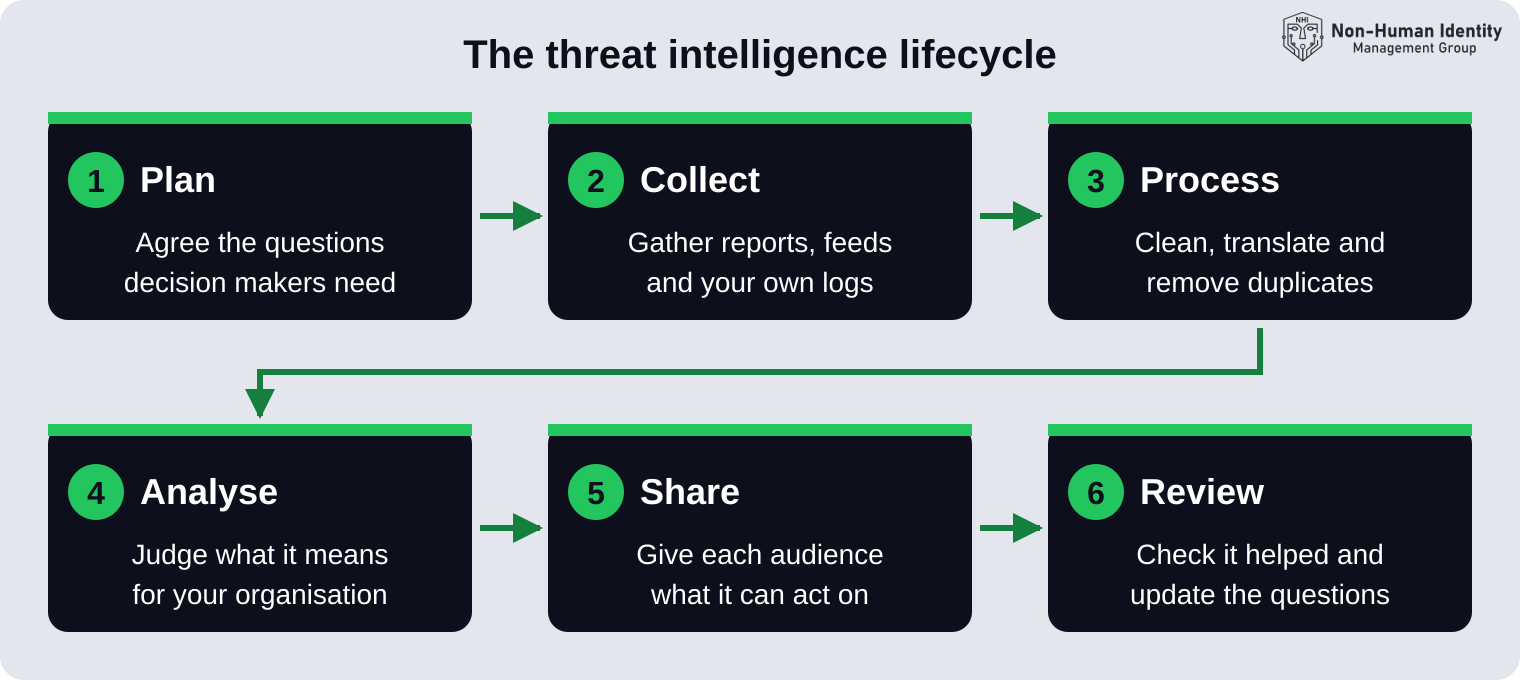
Producing intelligence is usually described as a repeating cycle. The names vary between organisations, but the stages are similar.
- Plan. Agree what decision makers need to know. These are often called intelligence requirements, for example "which attacks on our cloud accounts should we prepare for?" NIST recommends setting clear goals and scope before sharing or collecting threat information.[1]
- Collect. Gather information from relevant sources: government advisories, vendor reports, sharing communities, paid or free threat feeds, and your own logs and incidents.
- Process. Turn the raw material into a usable form: remove duplicates, translate, and put indicators into a standard format. STIX is a common language for describing threat intelligence, and TAXII is a protocol for exchanging it between systems.[3]
- Analyse. Work out what it means for your organisation. Are you a likely target? Do you use the affected systems? Would your current defences catch this? MITRE ATT&CK, a public knowledge base of attacker techniques based on real-world observations, gives analysts a common language to structure and compare intelligence.[5]
- Share. Give each audience what it can act on: a short risk summary for leaders, a technique list for defenders, indicators for tools. Mark how widely it may be passed on, for example with the Traffic Light Protocol.[2]
- Review. Ask whether the intelligence helped. Did it lead to a decision, a new detection or a patch? Use the answers to update the questions in step 1.
Sharing labels: the Traffic Light Protocol
Intelligence is often shared between organisations, so it needs clear handling rules. FIRST, the global forum of incident response teams, publishes the Traffic Light Protocol (TLP). Version 2.0 has been the current standard since August 2022.[2]
| Label | Who may receive it |
|---|---|
| TLP:RED | Only the individual recipients; no further sharing. |
| TLP:AMBER+STRICT | The recipient's own organisation only. |
| TLP:AMBER | The recipient's organisation and its clients, on a need-to-know basis. |
| TLP:GREEN | The recipient's wider community, but not public channels. |
| TLP:CLEAR | Anyone; no limit on disclosure, subject to copyright. |
A worked example
Greenway Logistics is a fictional delivery firm with 300 staff. Its small security team, led by Daniel, has no dedicated intelligence analyst, but the operations director, Fatima, asks a clear question: "Which attacks are most likely to stop our deliveries this year?"
Daniel's team works through the cycle:
- Plan: they turn Fatima's question into two requirements: attacks that could disrupt operations, and attacks that start with stolen staff accounts.
- Collect: they sign up for free government alerts, join a transport sector sharing group, and pull a month of their own email security and sign-in logs.
- Process and analyse: a sector report marked TLP:AMBER describes a phishing campaign impersonating logistics customers. Daniel maps its methods to ATT&CK and finds it starts with phishing emails, technique T1566.[9] Their own logs show three similar emails reached staff last week.
- Share: Fatima gets a half-page summary: the campaign is real, it is aimed at firms like Greenway, and two changes would reduce the risk. The email team gets the indicators, and the report stays inside the company, as its AMBER label requires.
- Act and review: the team blocks the indicators, adds a warning banner on external emails and runs a short staff briefing. A month later they check how many similar emails were reported by staff.
The outcome is modest but real. The indicators were useful for a few days before the attackers changed servers, which is what the Pyramid of Pain predicts. The longer-lasting value came from understanding the method, which led to better staff reporting and email controls. Intelligence did not stop every phishing email; it helped the team choose sensible defences.
Myths and misunderstandings
| What people think | What is true |
|---|---|
| Threat intelligence is a feed you buy. | A feed is a source of information. It only becomes intelligence when someone judges what it means for your organisation and acts on it. |
| More data means better intelligence. | Too many low-quality indicators create noise and false alarms. NIST lists judging the quality and relevance of received information as a challenge for consumers.[1] |
| It is all about the dark web. | Much of the most useful intelligence comes from government advisories, vendor reports, sharing groups and your own logs. |
| Blocking indicators is enough. | Attackers can change hashes and IP addresses easily. Detecting their behaviour causes them more difficulty.[4] |
| Intelligence is only for big companies. | Free services exist. In the UK, NCSC Early Warning is a free service for UK organisations that alerts them to possible attacks on their networks.[6] |
| Knowing exactly who attacked us is the main goal. | Naming an attacker can help, but most teams get more value from understanding methods and fixing the gaps they reveal. |
Key terms
- Threat intelligence
- Contextualised information about adversaries, techniques and signals that helps teams decide what matters and what to do next.
- Threat intelligence lifecycle
- The repeatable process of planning, collecting, processing, analysing, sharing and reviewing threat intelligence.
- Indicator of compromise (IOC)
- A measurable sign that suspicious or malicious activity may have occurred, such as an IP address, file hash, domain or email.
- Tactics, techniques and procedures (TTPs)
- How an adversary operates: tactics are the goal, techniques are the method, and procedures are the specific steps.
- Strategic threat intelligence
- High-level analysis of threat actors, motives and trends used to inform business and security decisions.
- Tactical threat intelligence
- Actionable information about attacker tools, techniques and procedures that security teams can use quickly.
- Threat intelligence feed
- A regular stream of security data about known or suspected threats, such as malicious IPs, domains or malware indicators.
- Pyramid of Pain
- A model that ranks indicators by how hard they are for an adversary to change, pushing defenders towards detecting behaviour.
- STIX
- A structured language for describing cyber threat intelligence in a consistent, machine-readable way.
- TAXII
- The protocol used to exchange threat intelligence, such as STIX content, between systems.
- Traffic Light Protocol (TLP)
- A simple labelling system that controls how widely shared information may be passed on.
- ISAC
- An Information Sharing and Analysis Centre: a sector-based body where organisations share threat intelligence and defensive guidance.
Common questions
What is the difference between threat information and threat intelligence?
Threat information is the raw material, such as a list of suspicious addresses. Threat intelligence is that information after it has been analysed and put into context to support a decision.[1]
What is the difference between threat intelligence and threat actors?
Threat actors are the people and groups who attack. Threat intelligence is the process and product that tells you about them and their methods so you can decide how to defend.
Where can a small organisation get threat intelligence?
Start with free sources: national cyber security agency alerts, sector sharing groups, your security vendors' advisories and your own logs. UK organisations can sign up for NCSC Early Warning.[6] Public reports such as the ENISA Threat Landscape, which analysed 4,875 incidents in its 2025 edition, give a strategic picture.[7]
Do we need a threat intelligence platform?
Not at first. A platform helps when you handle many feeds and indicators. A small team can begin with a short list of questions, a few trusted sources and a shared document.
How long does an indicator stay useful?
Often not long. Attackers can change IP addresses and files quickly, so we suggest giving indicators an expiry date and reviewing them, while putting more effort into detecting behaviour.[4]
What does TLP:AMBER on a report mean?
You may share it within your organisation and with its clients on a need-to-know basis, but not more widely.[2]
First steps
Three things you can do this week:
- Write down three questions your leaders want answered about cyber threats, for example which attacks could stop operations or which systems attackers would value most.
- Sign up for two free sources: your national cyber security agency's alerts and one sector sharing group or ISAC.
- Look at your own data. Review last month's blocked emails and failed sign-ins, and note any patterns that match the alerts you receive.
Checklist
- We have a short, written list of intelligence questions agreed with leaders.
- We know which sources we use and why each one is trusted.
- Indicators from feeds are checked for relevance before they are blocked or alerted on.
- Intelligence reports are mapped to attacker techniques, for example using MITRE ATT&CK.
- Leaders receive a short, plain-language threat summary at least quarterly.
- Shared reports are handled according to their TLP label.
- Lessons from our own incidents are fed back into our intelligence questions.
- We review whether intelligence led to real changes, such as new detections or patches.
Simple measures that show progress: the number of intelligence items that led to a decision or change, how quickly a relevant advisory is assessed, the share of feed indicators that produced useful alerts, and how many detections were added because of intelligence.
Check your understanding
1. What turns threat information into threat intelligence?
Answer: analysis and context that make it useful for a decision.
2. Which level of intelligence would a board most likely use?
Answer: strategic intelligence, which covers trends, threats and risks to the business.
3. According to the Pyramid of Pain, why is detecting attacker behaviour more valuable than blocking IP addresses?
Answer: because attackers can change IP addresses easily, but changing their methods takes much more effort.
4. What is the first stage of the intelligence lifecycle, and why?
Answer: planning, because intelligence should answer specific questions that decision makers need answered.
Suggested learning pathway
- For who attacks organisations and why, read Threat Actors for Beginners.
- For the stages an attack moves through, read Cyber Kill Chain for Beginners.
- For using intelligence to search for attackers, read Threat Hunting for Beginners.
- For the team that acts on intelligence day to day, read Security Operations Centres for Beginners.
- For the full practitioner view, see the Threat Intelligence Guide.
- For mapping reports to techniques, see the Mapping Threat Reports to MITRE ATT&CK Guide.
- For sharing communities, see the ISACs and Information Sharing Communities Guide.
Standards and references
- SP 800-150, Guide to Cyber Threat Information Sharing. National Institute of Standards and Technology (NIST), October 2016. https://csrc.nist.gov/pubs/sp/800/150/final.
- Traffic Light Protocol (TLP) version 2.0. FIRST (Forum of Incident Response and Security Teams), August 2022. https://www.first.org/tlp/, accessed 27 Nov 2026.
- Cyber Threat Intelligence Technical Committee: STIX and TAXII documentation. OASIS Open. https://oasis-open.github.io/cti-documentation/, accessed 27 Nov 2026.
- The Pyramid of Pain. David J. Bianco, Enterprise Detection and Response blog, 1 March 2013, updated 17 January 2014. https://detect-respond.blogspot.com/2013/03/the-pyramid-of-pain.html, accessed 27 Nov 2026.
- ATT&CK resources. MITRE ATT&CK, The MITRE Corporation. https://attack.mitre.org/resources/, accessed 27 Nov 2026.
- NCSC Early Warning. National Cyber Security Centre (NCSC). https://www.ncsc.gov.uk/information/early-warning-service, accessed 27 Nov 2026.
- ENISA Threat Landscape 2025. European Union Agency for Cybersecurity (ENISA), 1 October 2025. https://www.enisa.europa.eu/publications/enisa-threat-landscape-2025, accessed 27 Nov 2026.
- The NIST Cybersecurity Framework (CSF) 2.0 (outcome ID.RA-02). National Institute of Standards and Technology (NIST). https://www.nist.gov/cyberframework.
- Phishing (T1566). MITRE ATT&CK v20, The MITRE Corporation. https://attack.mitre.org/techniques/T1566/.
Related NHI Mgmt Group resources: ENISA Threat Landscape Guide · GIAC GCTI · What Is Cyber Security? A Beginner's Guide