A message queue is a holding place where one program leaves messages for another program to collect later.
This guide is for people learning to build apps, new IT staff and anyone who keeps hearing the words "Kafka" or "queue" at work. You do not need to write code to be affected: orders, payments and alerts in many businesses travel through these systems, so whoever can read them can read your business.
In short
- Apps often pass work to each other through a message system instead of talking directly.
- Those messages can hold customer details, orders and payment information.
- Some message systems can run with no sign-in and no encryption, so security has to be switched on.
- Give each app its own account, let it read or write only the parts it needs, and encrypt messages in transit.
What you will learn
- Explain what a message queue and an event stream are in plain words.
- Spot a message system that anyone on the network could read.
- Check that each app has its own account and only the access it needs.
- Ask the right questions when you join a team that runs one.
- Post room (message broker)
- the server that receives messages and holds them until another program collects them.
- Sender and reader (producer and consumer)
- the program that leaves a message, and the program that picks it up.
- Labelled pigeonhole (queue or topic)
- a named place inside the broker where one kind of message is kept.
This guide uses two well-known open source systems as examples. They are listed alphabetically: Apache Kafka and RabbitMQ. Details come from each project's public documentation as of November 2026.
What is a message queue?
Think of an office post room with a wall of labelled pigeonholes. One person drops a note in the "Orders" pigeonhole. Later, someone from the warehouse comes and collects it. They never need to meet.
Apps work the same way. A shop website drops a message saying "new order" into a message queue. The warehouse app collects it when it is ready. The server that runs the post room is called a message broker.
Event streaming is a close cousin. Kafka's makers describe an event as a record that something happened, such as a payment or a click.[1] Events are kept in named topics, which Kafka compares to folders, with each event like a file in the folder.[1] Many apps can read the same topic, and the events can be kept for a while, not just handed out once.
Where the comparison stops working: a post room has one door and a person on the desk. Any program that knows a broker's address can try to reach it over the network. Nobody is on the desk unless you set up sign-in.
Why does it matter?
The broker sits in the middle of everything. If someone can read it, they can see a live feed of your orders and customers. If they can write to it, they can slip in fake messages that other apps trust.
If you are learning to build apps
What could happen: your app connects with a shared admin account, so a bug in it can read or delete every queue.
Check this: ask for an account just for your app, with only the read or write rights it needs.
If you are new to IT work
What could happen: a test broker with no sign-in is reachable from the whole office network, or further.
Check this: find out which networks can reach each broker and whether sign-in is on.
If you manage a product or team
What could happen: personal data flows through a system nobody listed, so nobody checks who can read it.
Check this: ask which message topics or queues carry customer or payment details.
What does it look like?
Here is a made-up settings page for a small firm's message broker. A new team member might be shown something like it.
Example only. All values are made up.
Broker ............ events.example.invalid
Reachable from .... any address              (1)
Sign-in ........... off                      (2)
Encryption ........ off                      (3)
Topic: orders ..... read/write: everyone     (4)
Topic: payments ... read/write: everyone     (4)
App account ....... shared "admin" account   (5)
- Any machine that can reach this address can try to connect.
- No login is needed. The broker cannot tell one program from another.
- Messages travel in plain form and could be read on the way.
- In a real file, this line would list the apps allowed to use the topic.
- Every app uses one strong shared password. One leak opens everything.
Why this is risky: anyone who reaches the broker can read every order and payment. They can add fake ones too.
The safer way: only the firm's own app servers can reach the broker. Each app signs in with its own account. Messages are encrypted on the way. Each account may use only the topics it needs.
How does it work?
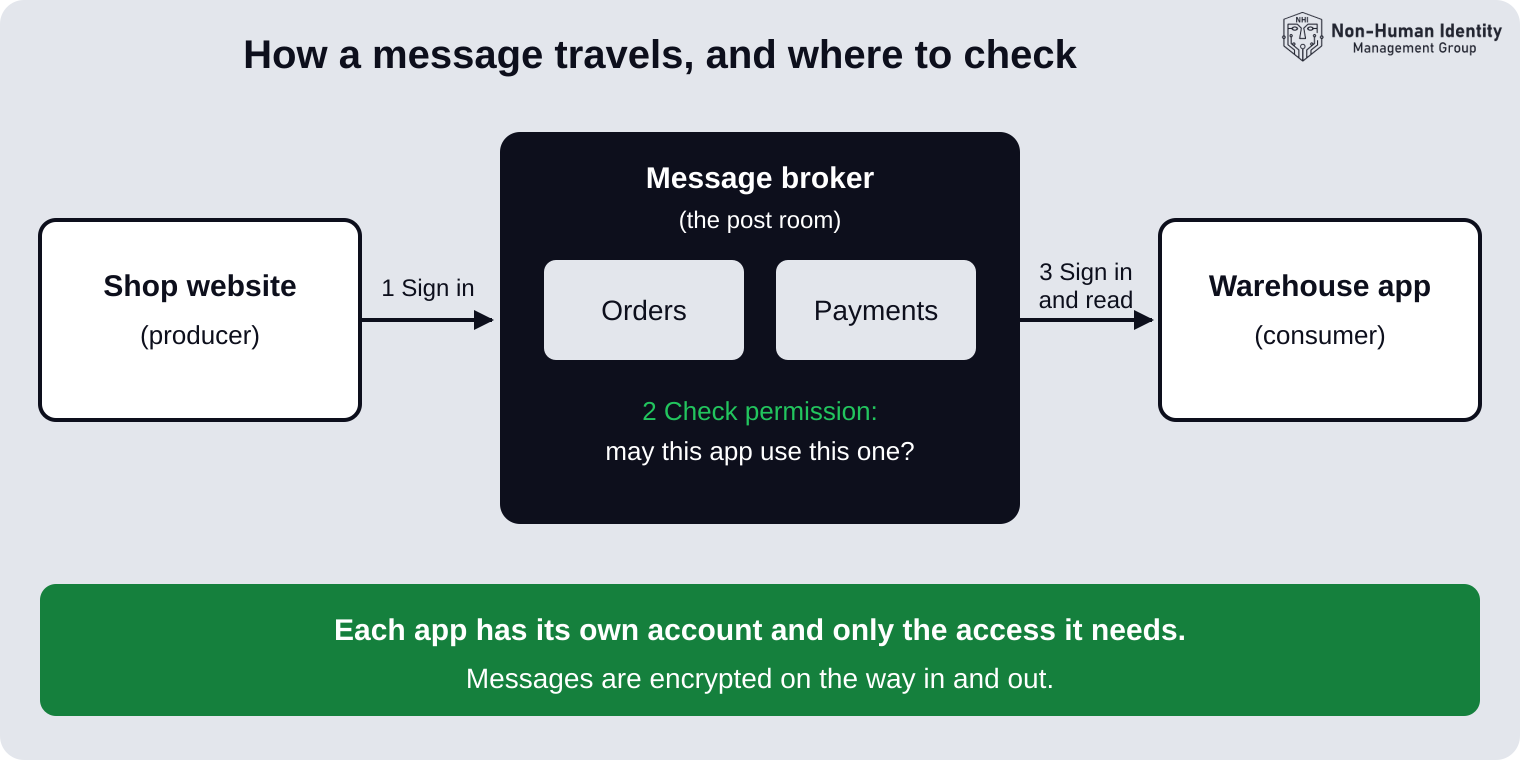
A message makes a short trip, and each step is a place to protect.
- Connect. The sending app (the producer) connects to the broker over the network.
- Prove who it is. The broker checks the app's credentials. Kafka, for example, supports sign-in for apps. But its documentation says security is optional, so someone has to turn it on.[2]
- Check permission. The broker checks whether this app may write to this queue or topic. RabbitMQ separates the right to set things up, to write messages and to read them.[3]
- Store. The message waits in the queue or topic until it is read.
- Deliver. The reading app (the consumer) signs in, is checked in the same way and collects the message.
Encryption in transit, using TLS, protects the message on the network at steps 1 and 5. Kafka's documentation notes it can cost some speed, which is one reason teams leave it off, and one reason to check.[2]
Some systems also come with safer defaults. RabbitMQ creates a default user called "guest", but by default that user can only connect from the same machine, not from the network.[3] Defaults like this help, but they can be changed, so it is worth checking.
A worked example
This story is made up to show how it can happen.
Emil Nakamura has just joined Fern Laundry, a laundry and dry-cleaning chain, as a junior IT technician. His manager, Amara Gallardo, asks him to learn how orders move from the website to the shops.
Emil finds that the website drops each order into a topic on a message broker. The shop tills and the delivery app read from it. He remembers the post room picture and asks three questions. Who can reach the post room? Who must sign in? Who may read each pigeonhole?
The answers surprise him. The broker can be reached from the whole office network, including the guest wifi. Every app uses one shared account. Anyone with that account can read the "payments" topic, which holds customer names and partial card details.
Amara agrees a plan. First, a network rule lets only the website, the tills and the delivery app reach the broker. Next, each app gets its own account. The delivery app may read "orders" but not "payments". Then encryption is turned on for connections to the broker.
They check the broker's records for unknown connections and find none in the records available. Emil writes a one-page map of which apps use which topics, so the next new starter can understand it in an hour.
What made the difference: Emil asked who could read each pigeonhole, not just whether the system worked.
Myths and mistakes
| What people think | What is true |
|---|---|
| It is internal plumbing, so it does not need security. | The broker carries real business data. Anyone on the network who can reach it may be able to read it. |
| The software is secure out of the box. | Some brokers allow running with no sign-in or encryption. Check what is actually switched on.[2] |
| One shared account is simpler. | Shared accounts make it hard to limit access or see which app did what. Give each app its own. |
| Messages vanish once they are read, so there is nothing to steal. | Event streams can keep messages for a set time after they are read, so old data can still be read.[1] |
| Encryption makes it too slow. | It can add some cost, but leaving data in plain form on the network is a bigger risk for sensitive messages. |
What can I do this week?
- Find out which message systems your organisation runs, including test ones.
- Ask which queues or topics carry personal or payment data.
- Check that sign-in and encryption are on for each broker.
- List which apps use which account, and replace any shared admin account.
- Check which networks can reach each broker.
Checklist
- Every broker is reachable only from the systems that need it.
- Sign-in is required for every app and admin.
- Each app has its own account, with its credentials stored in a secrets store, not in code.
- Each account may read or write only the queues or topics it needs.
- Connections are encrypted in transit.
- Default users are removed or limited.
- Someone owns a list of queues and topics, with the kind of data each one carries.
- Broker activity is recorded and checked for unknown connections.
Common questions
What is the difference between a message queue and event streaming?
A queue usually hands each message to one reader, who removes it once done. An event stream keeps a record of events for a time, so many apps can read the same events, now or later. Both need the same protection: sign-in, limited access and encryption.
Is Kafka a database?
Not exactly, but it does store data. Kafka keeps events in topics for a set time so apps can read them again.[1] That means it deserves the same care as a database: who can reach it, who can read it and how long data stays.
Do apps really need their own accounts?
Yes, we suggest it for every app. Each app has a non-human identity (NHI): a digital identity that represents software, so it can sign in and do its work without a person. Its own account means you can limit what it does, see what it did and cancel it without breaking other apps.
Where should the app's broker password live?
In a secrets store or the hosting platform's secure settings, not in the code or a shared document. The app fetches it when it starts. If the password ever leaks, change it at the broker first.
Where next?
Ready for the detail? Read the practitioner guide: Kafka Security Guide. It goes further into choosing sign-in methods, writing access rules and turning security on for a cluster that is already running.
Also useful:
- RabbitMQ Security Guide
- Non-Human Identities for Beginners
- Secrets Management for Beginners
- TLS and HTTPS for Beginners
- Least Privilege for Beginners
Related NHI Mgmt Group resources: Kafka Security Guide · RabbitMQ Security Guide · Service Accounts for Beginners
Key terms
- Message queue
- A holding place where one program leaves messages for another to collect later.
- Message broker
- A server that receives, stores and hands out messages between programs.
- Event streaming
- Recording a continuous flow of events so many programs can read them, now or later.
- Apache Kafka
- A widely used open source system for event streaming.
- RabbitMQ
- A widely used open source message broker.
- Access control list
- A list of who may do what, such as which app may read a topic.
- TLS
- A standard way to encrypt data as it travels between two computers.
Sources and further reading
- Introduction. Apache Kafka documentation, Apache Software Foundation. https://kafka.apache.org/intro, accessed 28 Nov 2026.
- Security overview. Apache Kafka documentation, Apache Software Foundation. https://kafka.apache.org/41/security/security-overview/, accessed 28 Nov 2026.
- Authentication, authorisation, access control. RabbitMQ documentation, RabbitMQ. https://www.rabbitmq.com/docs/access-control, accessed 28 Nov 2026.