Microsoft Sentinel is a Microsoft cloud service that gathers security records in one place and flags signs of attack.
This guide is for students, Microsoft 365 admins and anyone who has heard the name and wants to know what it does. You do not need a technical background to read it. If your firm uses Microsoft 365, someone may already be weighing up Sentinel.
In short
- Sentinel is Microsoft's cloud SIEM: a tool that collects security records from many systems and looks for trouble.
- It pulls in records from Microsoft and other sources, then uses rules to spot patterns and raise incidents.
- It does not watch itself. People still need to choose the data, tune the rules and check the incidents.
- You mainly pay for the data you bring in and keep, so planning what to collect matters.
What you will learn
- Explain what Microsoft Sentinel is in one sentence.
- Spot the main parts: connectors, rules, incidents and playbooks.
- Check which records your organisation sends to it.
- Ask sensible questions about cost and ownership.
- Security records (logs)
- notes that systems write about what happened, such as sign-ins and file changes.
- Plug-in for a source (data connector)
- a link that brings records from one system into Sentinel.
- Case to look at (incident)
- a group of related alerts that someone should check.
What is Microsoft Sentinel?
Think of a security control room with every camera on one wall. Guards no longer walk between buildings to check each screen. They see everything in one place, and alarms point them to the right camera.
Microsoft Sentinel is that control room for an organisation's computer systems. Microsoft calls it a cloud-native SIEM.[1] In plain words, it runs in Microsoft's cloud, so there is no server box to buy. It collects logs (security records) from sign-ins, email, cloud services and other tools. Then it looks for signs of attack.
When something looks wrong, Sentinel groups related warnings into an incident, a case for a person to check.[1] It can also run set steps automatically, such as opening a ticket.
Where the comparison stops working: cameras show everything in view. Sentinel only sees the records you choose to send it. A system that is not connected is a blind spot.
New to the idea of a SIEM? Start with SIEM for Beginners. This page is about Microsoft's product.
Why does it matter?
Many organisations already run on Microsoft 365 and Azure, so Sentinel is often the SIEM they look at first. Knowing what it does helps you ask the right questions.
If you look after Microsoft 365
What could happen: a stolen password is used to sign in, and nobody notices because the records are never reviewed.
Check this: ask whether your sign-in and email records go to Sentinel or another SIEM.
If you are a student or new to security
What could happen: job adverts ask for Sentinel skills and you are not sure what that means.
Check this: read Microsoft's free introduction pages to learn the main parts.
If you manage a budget
What could happen: someone connects every source at once, and the monthly bill jumps.
Check this: ask who decides which records are collected and how long they are kept.
Next: SIEM Sizing Guide
What does it look like?
Here is a made-up incident, as it might appear in a list in Sentinel.
Example only. All values are made up.
Incident 0000   Severity: Medium                         (1)
Title:   Many failed sign-ins, then one success           (2)
Account: [email protected]
Alerts:  3 grouped                                        (3)
Source:  Sign-in records (FAKE connector)                 (4)
Owner:   Unassigned                                       (5)
Status:  New
- Severity is set by the rule that fired. A person may change it.
- The title comes from the rule. In a real screen, this line would name the pattern the rule looks for.
- Related alerts are grouped into one case, so the analyst sees the full picture.
- Where the records came from. In a real screen, this line would name the connected service.
- Nobody has picked it up yet.
Why this is risky: an unowned incident can sit in the list for days. If it was a real attacker, they had all that time.
The safer way: agree who checks new incidents and how quickly. Write the check and the result in the incident notes.
How does it work?
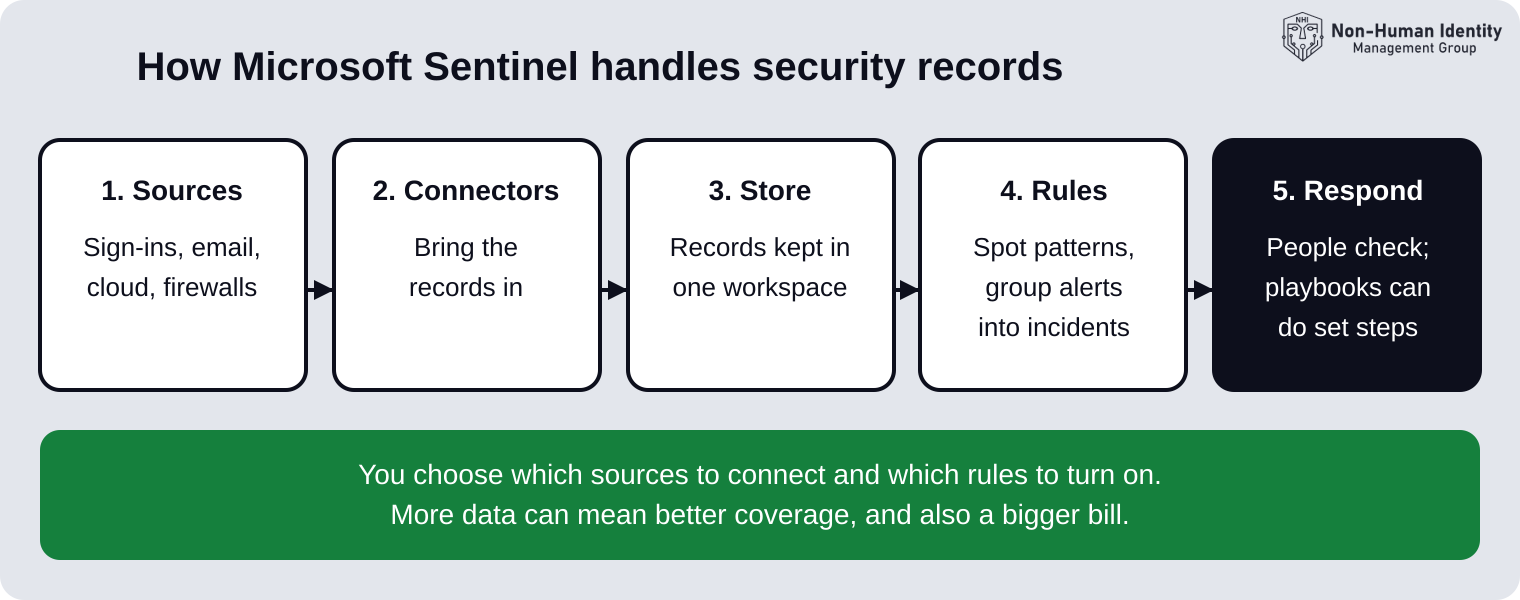
Sentinel follows the same basic pattern as most SIEMs, with Microsoft's own names for each part.[1]
- Connect. Data connectors bring in records from Microsoft services, such as sign-ins, and from other makers' tools.
- Store. The records are kept in a Log Analytics workspace, a storage area in Microsoft's cloud.[2]
- Detect. Analytics rules look for patterns and group alerts into incidents. Microsoft provides ready-made rules you can switch on or adapt.[1]
- Investigate. Analysts search the records using a query language called KQL. A query only reads data. It does not change it.[2]
- Respond. Playbooks can run set steps, such as raising a ticket. Dashboards called workbooks show trends.[1]
Sentinel can also keep watchlists, such as a list of service accounts. These are a kind of non-human identity (NHI): a digital identity that represents a machine, application, automated process, service or AI agent. Watchlists help rules and searches pay closer attention to those accounts.[1]
Where you use it is changing. Microsoft is moving Sentinel into its Defender portal. After 31 March 2027, Microsoft says Sentinel will no longer be supported in the Azure portal.[1]
What it costs
Cost mostly depends on how much data you bring in and how long you keep it. Some Microsoft records are free to bring in, such as Azure activity records and Office 365 audit records.[3] Others are paid. Microsoft also offers a free trial with a daily data limit.[3] Check Microsoft's current pricing page before you plan.
A worked example
Kaia Nakamura looks after IT for Juniper Bakery, a fictional bakery chain with twelve shops. She manages staff email and accounts in Microsoft 365.
The owner asks her to "get Sentinel set up". Kaia thinks of the control room. Before adding cameras, she needs to know which doors matter.
She starts small. She connects staff sign-ins and Microsoft 365 activity first, since those are where most of the bakery's risk sits. She checks which of those records are free to bring in.
Next she switches on a few ready-made rules. One looks for many failed sign-ins followed by a success. Another watches for new email forwarding rules.
A week later an incident appears. A shop manager's account had dozens of failed sign-ins overnight, then one success from abroad. Kaia checks with the manager, who was at home asleep. She resets the password, signs the account out everywhere and turns on stronger sign-in checks.
Kaia has no time to watch the list all day. So she agrees a deal with Umar Erikson, who runs a small monitoring firm. His team checks new incidents out of hours and phones her if one is serious.
At the end of the month she reviews the bill and the noisy rules with him. They tune one rule that fires too often.
Myths and mistakes
| What people think | What is true |
|---|---|
| Turning on Sentinel protects us straight away. | It only sees the sources you connect and only alerts on the rules you turn on. |
| Sentinel only works with Microsoft products. | It can bring in records from many other makers' tools too.[1] |
| Connect everything, just in case. | More data costs more. Start with the records that answer your biggest risks.[3] |
| Automation means nobody needs to look. | Playbooks handle set steps. People still need to check and decide. |
| Sentinel and Defender are the same thing. | They are separate products that work closely together, and now share a portal.[1] |
What can I do this week?
- Ask your IT lead whether your organisation uses Sentinel or another SIEM.
- Find out who checks new incidents, and when.
- Read Microsoft's free overview page for Sentinel.
- Read our SIEM for Beginners guide if the idea is new to you.
Checklist
- I can explain what Microsoft Sentinel is in one sentence.
- I know the main parts: connectors, rules, incidents and playbooks.
- I know which of our systems send records to it.
- I know who checks new incidents, including out of hours.
- I know who decides what data is collected and kept.
- I have checked the current pricing and any free data types.
- I know Sentinel is moving to the Defender portal.
Common questions
Is Microsoft Sentinel the same as a SIEM?
Yes, it is one SIEM product. A SIEM is the general type of tool that gathers security records and raises alerts. Sentinel is Microsoft's cloud version, with extra features for automation and hunting. See SIEM for Beginners.
Do I need to know KQL to use Sentinel?
Not to start. Ready-made rules and dashboards work without writing queries. For deeper investigation, analysts use KQL, Microsoft's query language for reading data.[2] Many people learn it on the job.
Is Sentinel free with Microsoft 365?
No, Sentinel is a separate paid service. Some Microsoft data types are free to bring in, and there is a free trial with a daily limit.[3] Other data is charged by volume, so check current pricing first.
Does a small business need Sentinel?
Not always. A small firm may get more from a monitoring service that runs a SIEM for it. What matters is that someone checks the alerts. See EDR, XDR and MDR for Beginners.
What is the Defender portal change?
Microsoft is moving Sentinel into its Defender portal, where its other security tools live. Microsoft says that after 31 March 2027, Sentinel will no longer be supported in the Azure portal.[1] See Microsoft Sentinel Move to the Defender Portal.
Where next?
Ready for the detail? Read the practitioner guide: Microsoft Sentinel Guide. It goes further into setup choices, data and cost planning, detection rules and automation.
Also useful:
- SIEM for Beginners
- Microsoft Sentinel Move to the Defender Portal
- KQL for Threat Hunting Guide
- SOAR and Security Automation for Beginners
- Microsoft 365 Security for Beginners
Related NHI Mgmt Group resources: SIEM Guide · Priority Logs for SIEM Ingestion Guide · SIEM Sizing Guide
Key terms
- Microsoft Sentinel
- Microsoft's cloud SIEM, which gathers security records and flags signs of attack.
- SIEM
- A tool that collects security records from many systems in one place and raises alerts.
- Data connector
- A link that brings security records from one system into a SIEM such as Sentinel.
- Log Analytics workspace
- The storage area in Microsoft's cloud where Sentinel keeps the records it collects.
- Security incident
- An event that may harm systems or data and needs someone to look at it.
- Playbook
- A set of steps for handling one kind of alert or incident. In Sentinel, playbooks can run automatically.
- Workbook
- A dashboard in Sentinel that shows charts and trends from the records.
Sources and further reading
- What is Microsoft Sentinel SIEM? Microsoft Learn, last updated 14 May 2026. https://learn.microsoft.com/en-us/azure/sentinel/overview, accessed 28 Nov 2026.
- Kusto Query Language in Microsoft Sentinel. Microsoft Learn, last updated 23 July 2026. https://learn.microsoft.com/en-us/azure/sentinel/kusto-overview, accessed 28 Nov 2026.
- Plan costs and understand Microsoft Sentinel pricing and billing. Microsoft Learn, last updated 6 May 2026. https://learn.microsoft.com/en-us/azure/sentinel/billing, accessed 28 Nov 2026.