An AI model card is a short fact sheet saying what an AI model is for and where it struggles.
This guide is for students, managers and anyone choosing or using an AI tool who wants to read these documents with confidence. You do not need to know how AI is built. If your team is picking a chatbot or an AI feature, the model card is one of the first things worth reading.
In short
- A model card is written by the people who made the model. It tells you what they built, what it was trained on and how it did in their tests.
- Look for five things: intended use, known limits, test results, training data and the date the card covers.
- A card shows what the maker chose to report. It is useful evidence, not an independent check.
- Match the card to the exact model version you use, and read it again when the version changes.
What you will learn
- Explain what a model card is and who writes it.
- Find the five parts of a card that matter most to a newcomer.
- Spot what a card leaves out, and the questions to ask next.
- Tell a model card apart from a system card and a training data summary.
- AI fact sheet (model card)
- a short document from the model's maker describing its purpose, testing and limits.
- Safety report (system card)
- a longer document about the safety tests and protections around a released model.
- Cut-off date (knowledge cutoff)
- the point after which the model learned nothing new from its training data.
What is an AI model card?
Think of the leaflet folded inside a box of medicine. It says what the medicine is for, how much to take, the side effects, and who should not use it. You read it before you start, not after something goes wrong.
A model card does the same job for an AI model. An AI model is the trained program inside an AI tool that turns your question into an answer. The card is written by the team that made it.
The idea came from a 2018 research paper by a group of AI researchers. They suggested short documents that travel with each trained model. These would report test results under different conditions, describe where the model is meant to be used, and explain how it was tested.[1]
Today you will find model cards in two main places. Large AI companies publish them on their own websites. Model sharing sites, such as Hugging Face, show a card as the front page of each model.[2]
Where the comparison stops working: a medicine leaflet is checked by a regulator before the medicine is sold. Most model cards are not. The maker decides what goes in, and there is no single required layout.
Why does it matter?
AI tools now draft emails, sort job applications and answer customers. The model card is often the only place the maker writes down what the model should not be used for. Skipping it means guessing.
If you are choosing an AI tool at work
What could happen: you pick a model for a task its maker lists as a known weakness, such as giving facts without checking them.
Check this: read the intended use and known limits sections before you sign up.
If you are a student
What could happen: you quote a model's test scores as if they were independent results, when the maker ran the tests.
Check this: note who ran each test and on which version of the model.
If you are new to IT or security work
What could happen: a team starts using a downloaded model with no card, so nobody knows what it was trained on or what licence applies.
Check this: treat a missing or empty card as a reason to pause and ask questions.
What does it look like?
Real cards range from a single page to hundreds of pages. Here is a made-up short card, with the parts a newcomer should look at first.
Example only. All values are made up.
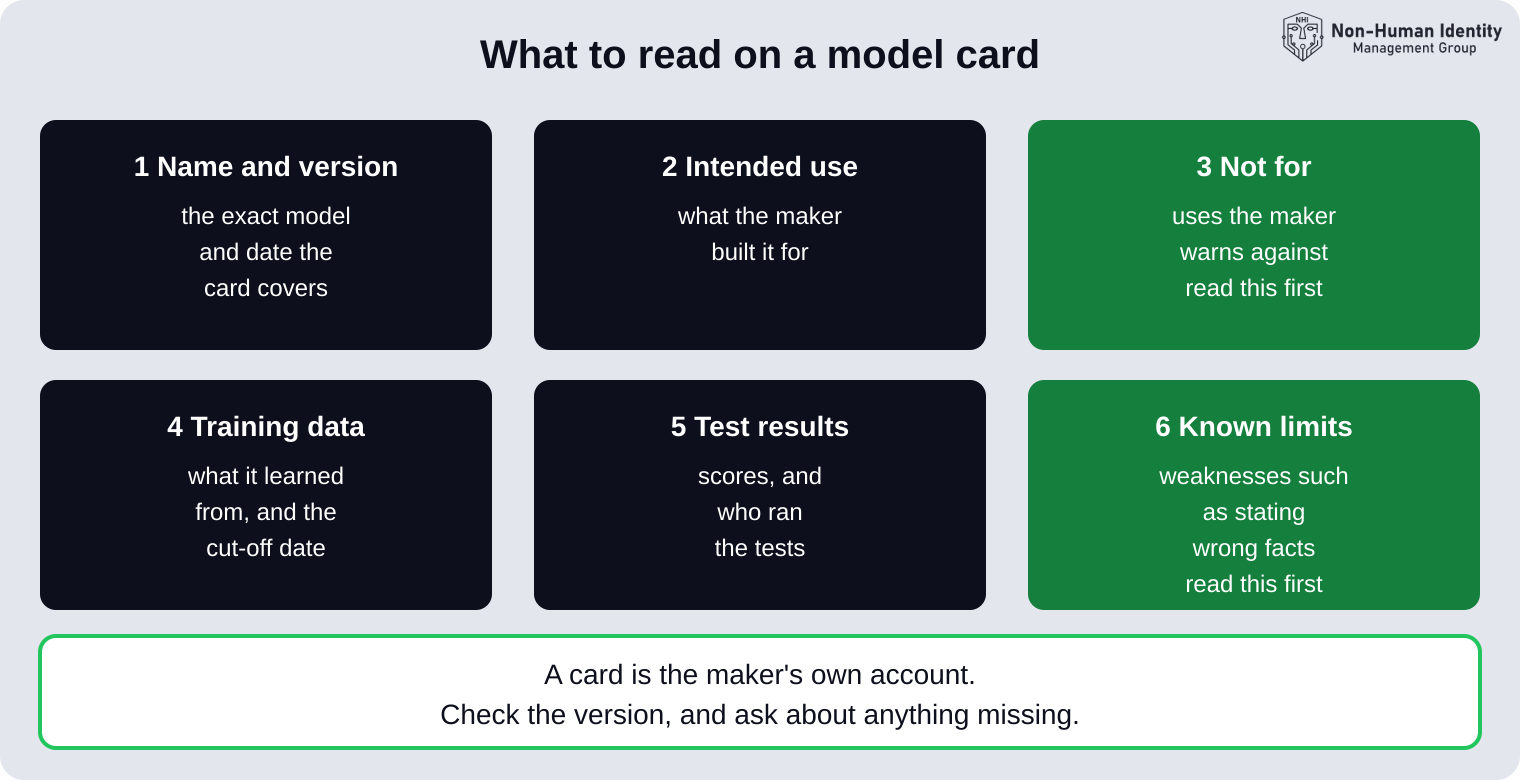
MODEL CARD: ExampleChat-2 (FAKE model, example.com)
Version: examplechat-2-0000        Published: 1 March 2026     (1)
Intended use: drafting and summarising business text          (2)
Not for: medical, legal or money decisions without review     (3)
Training data: public web text and licensed books, to Jan 2026 (4)
Test results: 81% on a reading test (maker's own testing)      (5)
Known limits: may state wrong facts confidently                (6)
- The exact version and date. A card only describes the version it names.
- What the maker built it to do. Use outside this is your own risk.
- Uses the maker warns against. Using the model for these is at your own risk.
- A summary of the training data and the cut-off date. Later events are unknown to the model.
- A test score. It says who ran the test, here the maker.
- Known weaknesses, such as making things up. AI researchers call this a hallucination.
Why this is risky: people often read only the test score and skip lines 3 and 6. The score looks like proof, but it comes from the maker's own testing on one version.
The safer way: read the "not for" and "known limits" lines first. Check the version matches the one your tool uses. Then ask the supplier anything the card does not answer.
How does it work?
There is no single legal template for a model card, but most follow the same pattern. Here is how to read one, step by step.
- Find the right card. Match the model name and version to the one inside your tool. Google DeepMind, for example, lists each card with the date it was published or updated.[3]
- Read the intended use and limits. These say what the model is for and where it struggles. One recent Google card warns that the model may produce hallucinations.[4]
- Look at the training data summary. It says, in broad terms, what the model learned from. It often gives a knowledge cutoff, the date its training data stops.[4]
- Read the test results with care. Note who ran the tests, which tests and on which version.
- Check the extra documents. Some makers publish a longer safety report, called a system card, as well. In the EU, makers of general-purpose AI models must also publish a summary of their training content.[5]
Model sharing sites add one more layer. On Hugging Face, a card is a text file stored with the model. A short block at the top holds tidy facts, such as the licence, languages and training datasets. The site uses them to sort and search models.[2]
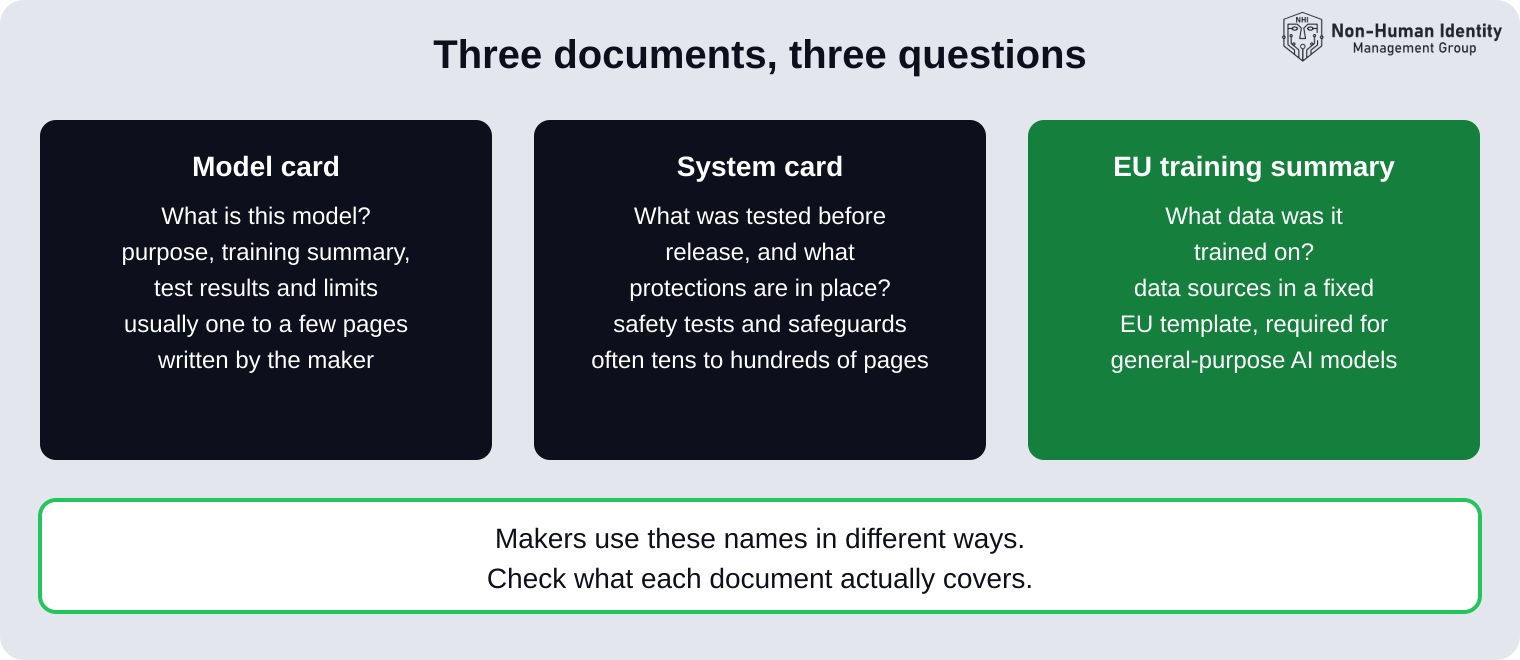
People often mix up three documents. Figure 2 shows how they differ.
A worked example
Petra Marlow runs the office at Rowan Laundry, a made-up chain of five laundrettes. The owner wants an AI tool that writes replies to customer emails. A supplier offers one and says it is "built on a leading model".
Petra asks the supplier which model and which version the tool uses. The supplier sends the name. Petra finds the model card on the maker's website and checks that the version and date match.
She reads the intended use first. The card says the model is suited to drafting and summarising text. Good so far. Next she reads the known limits. The card warns that the model may state wrong facts with confidence.
That matters for Rowan Laundry. Customers ask about prices and opening hours. If the tool invents a price, the shop could face an angry customer or a refund.
She also notes the knowledge cutoff. It is earlier than the shop's latest price change, so the model cannot know the new prices unless the tool gives it them.
Petra writes down three questions for the supplier. Does the tool feed it our own price list? Will a person check each reply before it is sent? What happens when the model version changes?
The supplier confirms that the tool reads the shop's own price list, and that replies can be held for review. Petra agrees a trial. Staff approve every reply for the first month. She sets a reminder to reread the card if the supplier moves to a new model version.
Myths and mistakes
| What people think | What is true |
|---|---|
| A model card is an independent review. | The maker writes it. Treat it as the maker's own account, and look for outside testing too. |
| High test scores mean the model suits my task. | Scores come from specific tests. Your task may be different, so try it on your own examples. |
| One card covers every version of a model. | A card describes the version it names. New versions often get a new or updated card. |
| If a tool has no card, it is probably fine. | A missing card means you know less. Ask the supplier what model it uses and where the card is. |
| A model card and a system card are the same thing. | Makers use the names differently. As a rule, the model card covers the model and the system card covers safety testing and protections. |
What can I do this week?
- Pick one AI tool you or your team use, and ask which model and version sits inside it.
- Find its model card on the maker's website or model page.
- Read the "not for" and "known limits" parts and note any that touch your work.
- Write down the knowledge cutoff so people know which recent events the model may not know.
- List the questions the card does not answer, and send them to your supplier.
Checklist
- I know which model and version each of our AI tools uses.
- I have found and saved the model card for each one.
- I have read the intended use and the uses the maker warns against.
- I have read the known limits and checked them against our tasks.
- I know the knowledge cutoff for each model.
- I note who ran each test result I quote.
- We reread the card when the model version changes.
- Questions the card does not answer go to the supplier in writing.
Common questions
Who writes a model card?
The team or company that built the model. On model sharing sites, whoever uploads the model writes its card. That is why a card is best read as the maker's own account. It is useful, but it is not the same as an independent test or audit.
Are model cards required by law?
Not as a general rule. In the EU, makers of general-purpose AI models placing them on the market must publish a summary of their training content in a set template. That is a separate document from the model card, though the two may be read together.
Where do I find a model card?
Usually on the maker's website, often under a heading such as models, model cards or safety. On Hugging Face, the card is the main page you see when you open a model. If you cannot find one, ask the supplier of your tool directly.
What is a knowledge cutoff?
It is the date the model's training data stops. The model has no built-in knowledge of events after it. It may still answer questions about later events, but those answers are more likely to be wrong unless the tool gives it fresh information.
Does a good model card mean the tool is safe to use?
No. The card covers the model, not the whole tool built around it. The tool adds its own settings, data handling and checks. Read the card, then ask the supplier how the tool handles your data and who reviews its answers.
Where next?
Ready for the detail? Read the practitioner guide: Model Cards and System Cards Explained. It goes further into what each major provider publishes, the metadata fields on model sharing sites and how system cards link to safety frameworks.
Also useful:
- AI BOM vs Model Card vs Datasheet
- Knowledge Cutoff Explained
- AI Hallucinations for Beginners
- AI Model Intake Review Checklist
Related NHI Mgmt Group resources: How to Read LLM Benchmarks · EU AI Act for Beginners · AI Security for Beginners
Key terms
- Model Card
- A short document published with a model, describing its intended use, training data in summary, test results and known limits.
- System Card
- A longer document explaining how a released model was tested, what risks were found and which protections apply.
- Knowledge Cutoff
- The point after which a model has no built-in knowledge of events from its training data.
- Training Data
- The data used to teach an AI model patterns and expected behaviour.
- Benchmark
- A standard test used to judge and compare how well a model performs.
- Hallucination
- An AI answer that sounds fluent and believable but is wrong, unsupported or made up.
Sources and further reading
- Mitchell, M. et al. Model Cards for Model Reporting. arXiv:1810.03993, first submitted 5 October 2018. https://arxiv.org/abs/1810.03993, accessed 28 Nov 2026.
- Model Cards. Hugging Face Hub documentation, Hugging Face. https://huggingface.co/docs/hub/model-cards, accessed 28 Nov 2026.
- Model cards. Google DeepMind. https://deepmind.google/models/model-cards/, accessed 28 Nov 2026.
- Gemini 4 Hydrogen model card. Google DeepMind, published 12 November 2026. https://deepmind.google/models/model-cards/gemini-4-hydrogen/, accessed 28 Nov 2026.
- Template for general-purpose AI model providers to summarise their training content. European Commission, Shaping Europe's digital future. https://digital-strategy.ec.europa.eu/en/faqs/template-general-purpose-ai-model-providers-summarise-their-training-content, accessed 28 Nov 2026.