An open-weight AI model is an AI model whose core file you can download and run yourself.
This guide is for anyone who has heard that you can run AI on your own computer and wants to know if it is safe. You do not need to be technical to be affected: if someone at your work downloads an AI model, your data and computers are part of the picture.
In short
- An open-weight model is an AI model you can download. It can run on your own computer instead of a company's servers.
- That can keep your words on your own machine, which helps with privacy.
- But you take on the safety jobs the provider would usually do: checking the file, updating it and guarding it.
- Open-weight models can be safe to use if you get them from the official source, read the licence and run them in a trusted app.
What you will learn
- Explain what "open-weight" means in one sentence.
- Spot the difference between an open-weight model and a closed one.
- Check where a model came from and what its licence allows.
- Ask the right questions before anyone at work runs one.
- AI brain file (model weights)
- the large file of numbers a model learned in training, which holds what it "knows".
- Instruction label (model card)
- the page that comes with a model and explains what it is for, its limits and its licence.
- Rules of use (licence)
- the terms that say who may use a model and for what.
What is an open-weight AI model?
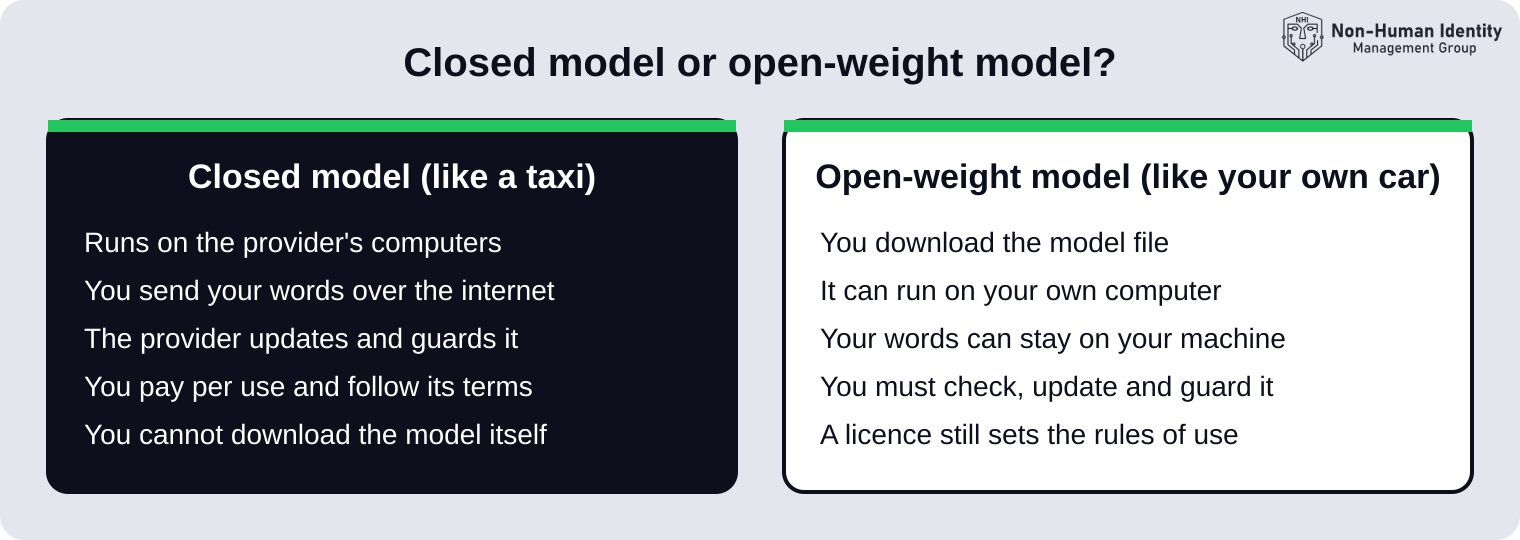
Think of the difference between taking a taxi and owning a car. With a taxi, the company owns, fuels and services the car. With your own car, you can drive anywhere, but the servicing is now your job.
Most well-known AI chat tools work like the taxi. The AI model runs on the provider's computers, and you send your questions over the internet. This is a closed model: you can use it, but you cannot download it.
An open-weight model works like owning the car. The publisher shares the weights, the big file of numbers the model learned during training. You can download that file and run the model on your own computer or server. Running AI this way is often called running AI locally.
"Open-weight" is not quite the same as "open source". One group looks after what "open source" means. It says open source AI also needs details of the training data and the code used to build it.[3] Many open-weight models share the weights but not all of that.
Where the comparison stops working: you can see the engine of a car and check it. The weights are billions of numbers, so you cannot read them to see what a model will do.
Why does it matter?
Open-weight models are easy to find and free to download. That makes them popular at home and at work. A US government report found they help more people take part in AI and let users keep their data away from third parties.[1] The same report also listed risks to watch.
If you try AI at home
What could happen: you download a model from a copy page, not the official one, and it comes with a harmful file.
Check this: get models only from the publisher's official page, through a well-known app.
If you run a small business
What could happen: a staff member runs a model on a work laptop that holds customer data, and nobody checks it.
Check this: add downloaded AI models to your rules for what staff may install.
Next: Shadow AI for Beginners
If you are new to IT work
What could happen: you are asked to set up a model server and leave it open to the whole network.
Check this: ask who should reach the model, and limit access to them.
If you buy or approve software
What could happen: a product is built on a model whose licence does not allow your kind of use.
Check this: ask the supplier which model they use and what its licence allows.
What does it look like?
Here is a made-up form. Someone might fill it in before running a model at work.
Example only. All values are made up.
MODEL REQUEST: EXAMPLE-Chat-7B (made-up model)
Publisher:    Example AI Lab                    (1)
Downloaded from: models.example.invalid/official (2)
Licence:      EXAMPLE Community Licence, read? YES (3)
File type:    .safetensors  (not .pkl / .bin)   (4)
Runs on:      office PC 0000, no internet access (5)
Data used:    sales notes, no customer names    (6)
Approved by:  FAKE Manager, 01/01/2000
- Who made the model. A known publisher is easier to check.
- Where it came from. In a real file, this line would contain the publisher's official page.
- The licence has been read, so you know what use is allowed.
- A file type that holds data only, not hidden program code.
- Where it runs, and whether it can reach the internet.
- What information will go into it.
Why this is risky: if lines 2 to 5 are blank, nobody knows where the model came from. Nobody knows what it can reach either.
The safer way: answer these few questions before the first download, and keep the answers with the model.
How does it work?
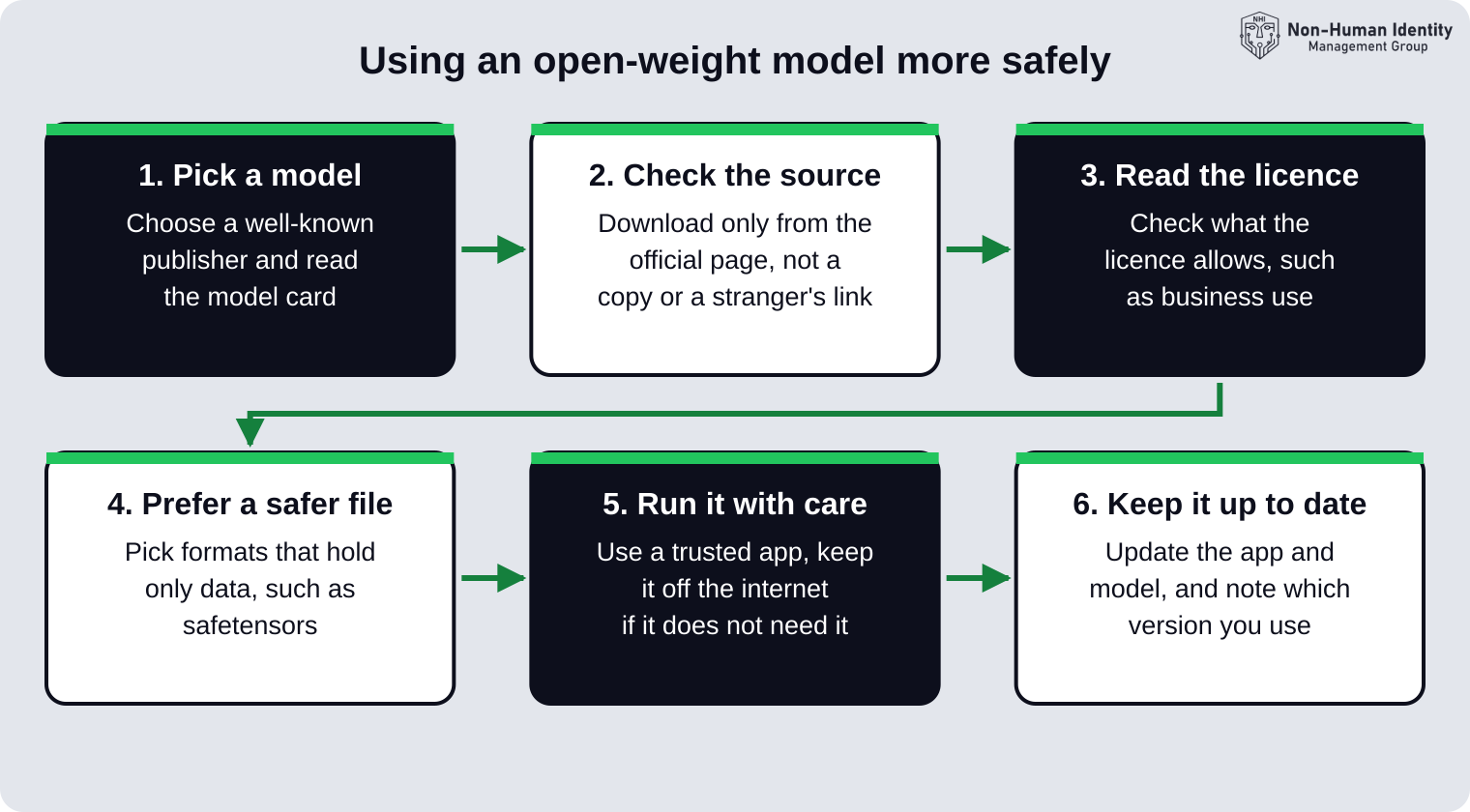
Here is the usual path from finding a model to using it.
- A publisher trains a model. It shares the weights on its own site or a model sharing site, with a model card that explains the model.[4]
- You choose and download it. Many people use a desktop app that finds and downloads models for them.
- The app loads the file. Some older file types can run hidden program code as they load. A model sharing site warns about this, and points to a newer type, called safetensors, that holds only the numbers.[2]
- You type a question. The model works out an answer on your own computer. Your words do not need to leave it, unless the app sends them somewhere.
- You keep it up to date. New versions fix problems. With a closed model the provider does this. Here, it is your job.
The same model sharing site says its own scanning is not perfect, and that users must still check what is safe.[2] That is why the source and the file type matter.
A worked example
This story is made up to show how it can happen.
Ula Kazlauskas runs a small translation agency with four staff. Clients send her contracts and letters. Some are private, so she does not want to paste them into an online chatbot.
A friend tells her she can run an AI model on her own computer. That way, the client papers stay in the office. Ula likes the idea, but she wants to do it properly.
First she searches for a model that is good at her languages. One link offers a "faster, unlocked" copy from an account she does not know. She skips it and goes to the publisher's own page instead.
She reads the model card. It says what the model is good at and where it makes mistakes. She also reads the licence. It allows business use, which is what she needs.
She sees two file types on offer. She picks the safetensors file, because the sharing site explains that it holds only data. She uses a well-known desktop app to run it.
Next, she sets the app so it does not connect to the internet while working. She tests it on an old letter with no client names. The translation is good, but it gets one legal phrase wrong. So she decides a person will always check the final text.
Finally, she writes a one-page note: which model, where it came from, the version, and who checks updates. She puts a reminder in her diary to look for new versions each month.
What made the difference: Ula treated the model like any other software. It had a known source, a read licence and someone in charge.
Myths and mistakes
| What people think | What is true |
|---|---|
| Open-weight means open source. | Not always. Many open-weight models share the weights but not the training data or code.[3] |
| Free to download means free to use for anything. | Each model has a licence. Some limit business use or certain uses. Read it first. |
| A model file is just data, so it is harmless. | Some older file types can run hidden code when they load.[2] Prefer safer types and trusted sources. |
| Running AI locally means my data is fully safe. | It keeps your words off a provider's servers. But the app, the computer and who can reach it still matter. |
| Closed models are always safer. | Each type has trade-offs. A closed model is looked after for you. An open-weight model gives you control, and the upkeep.[1] |
What can I do this week?
- Ask your team if anyone has downloaded an AI model onto a work computer.
- Pick one place staff should get models from: the publisher's official page.
- Read the model card and licence of any model you already use.
- Note which app runs each model, and who keeps it updated.
- Decide what kinds of information may go into a local model.
Checklist
- I know the difference between an open-weight model and a closed one.
- Every model we use comes from its publisher's official page.
- Someone has read the licence and it allows our use.
- We prefer safer file types, such as safetensors, where they are offered.
- Models run in a well-known app, with internet access only where needed.
- We know which version of each model we run, and who updates it.
- A person checks the model's answers before they matter.
Common questions
Are open-weight AI models safe to use?
They can be, with care. Get the model from its official source, read its licence, prefer data-only file types and run it in a trusted app. The main change from a closed model is that the checks and updates are now your job, not the provider's.
Do I need a powerful computer to run one?
Not always. It depends on the model's size. Small models can run on many modern laptops. Large models need far more memory and a strong graphics card, or a server. The model card or app usually lists what the model needs.
Does running AI locally keep my data private?
It can help a lot. The model can answer without sending your words to a provider. But check the app's settings, because some apps can connect to the internet. Also protect the computer itself, as anyone who can reach it may reach the model and your files.
Why would anyone choose a closed model instead?
Convenience and upkeep. A closed model needs no download, and the provider updates and guards it for you. It also tends to run well without special hardware. The trade-off is that your words go to the provider, under its terms.
Where next?
Ready for the detail? Read the practitioner guide: Open-Weight Model Security Guide. It goes further into model licences, file formats, scanning and signing, and how to secure the software that runs the model.
Also useful:
- Open-Weight vs Closed Models Explained
- How Large Language Models Work
- AI Supply Chain Security for Beginners
- Shadow AI for Beginners
Related NHI Mgmt Group resources: AI Model File Formats Compared for Security · Open-Weight Model Licence Tracker · Hugging Face Security Guide
Key terms
- Open-weight model
- An AI model whose trained weights are published so anyone can download and run it.
- Model weights
- The large set of numbers a model learns in training, which shapes every answer it gives.
- Large language model
- AI software that writes text by predicting the next words from patterns it learned.
- Local AI
- Running an AI model on your own computer or server instead of a provider's.
- Model card
- A document published with a model that describes what it does, how it was trained, and its limits.
- Safetensors
- A file type for model weights that holds only numbers, not program code.
- Pickle
- An older Python file type that can run code when it is loaded, so it needs a trusted source.
Sources and further reading
- Dual-Use Foundation Models with Widely Available Model Weights (report). National Telecommunications and Information Administration (NTIA), US Department of Commerce, 30 July 2024. https://www.ntia.gov/issues/artificial-intelligence/open-model-weights-report, accessed 28 Nov 2026.
- Pickle Scanning (Hub security documentation). Hugging Face. https://huggingface.co/docs/hub/security-pickle, accessed 28 Nov 2026.
- The Open Source AI Definition, version 1.0. Open Source Initiative, October 2024. https://opensource.org/ai/open-source-ai-definition, accessed 28 Nov 2026.
- Model Cards (Hub documentation). Hugging Face. https://huggingface.co/docs/hub/model-cards, accessed 28 Nov 2026.