Buying an AI tool safely means checking what it does with your data before you sign up.
This guide is for anyone choosing an AI tool for themselves, a team or a small business. You do not need to be technical: most of the work is asking clear questions and reading the answers.
In short
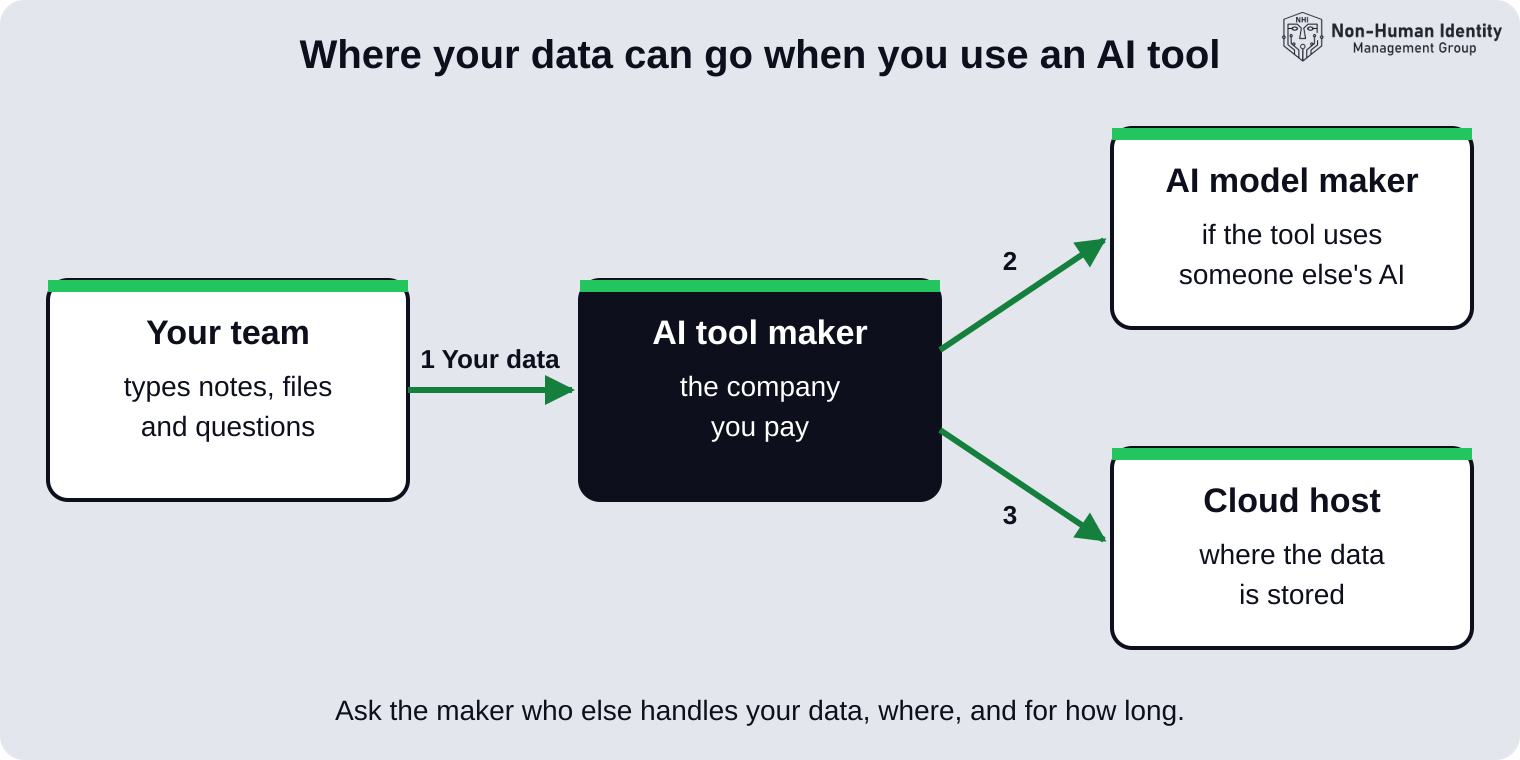
- When you use an AI tool, your notes, files and questions go to the company that runs it.
- Before you sign up, ask how long it keeps your data, whether it trains its AI on it, and where it is stored.
- Check the sign-in options and the settings that come switched on.
- Try it first with made-up or low-risk data, and recheck when the terms change.
What you will learn
- Explain where your data goes when you use an AI tool.
- Ask the five questions that matter most before you buy.
- Spot warning signs in a supplier's answers.
- Check a tool safely before your whole team uses it.
- Supplier risk (vendor risk)
- the chance that a company you buy from causes you a problem, such as a data leak.
- Data used to teach the AI (training data)
- the text and files an AI company uses to improve its models.
- How long data is kept (data retention)
- the time a company holds your data before deleting it.
What is buying AI tools safely?
Think of hiring a cleaner who gets a key to your house. Before you hand over the key, you ask who they are, who else might come along, and what happens to the key when they leave.
An AI tool is similar. To help you, it needs to see your work: emails, notes, files or customer details. Buying it safely means asking questions first. Who sees that data? How long do they keep it? What do they use it for?
A UK government code for AI security says AI tool companies should tell users where and how their data is used and stored.[1] The UK's National Cyber Security Centre adds that AI makers should take responsibility for their customers' security.[3] So these are fair questions, and a good supplier expects them.
Where the comparison stops working: a cleaner's key is one object you can take back. Data you have shared can be copied, so it is wiser to decide what to share before you start.
Why does it matter?
Once data is in someone else's system, their rules apply. The US Federal Trade Commission has warned that AI companies have strong reasons to want user data. It also says quietly changing terms to allow more use of that data may be unfair or deceptive.[2]
If you run a small business
What could happen: customer details you paste into a tool end up kept for longer than you expected.
Check this: ask how long data is kept and how you delete it.
If you lead a team
What could happen: staff sign up for free AI tools on their own, and nobody knows what was shared.
Check this: offer one approved tool and make clear which data must not go in.
Next: Shadow AI for Beginners
If you are new to IT work
What could happen: you set up a tool with a shared password and no second sign-in check.
Check this: use each person's own account and turn on extra sign-in checks.
What does it look like?
Example only. All values are made up.
Supplier answers: ExampleNotes AI (Plan: Team)
  Do you train your AI on our data?   "We may, to improve   (1)
                                       the service"
  How long do you keep it?            "As long as needed"   (2)
  Where is it stored?                 "Secure cloud"        (3)
  Can we delete it?                   Yes, in Settings
  Sign-in options                     Password, or company  (4)
                                       sign-in on Plan: Pro
  Who else handles our data?          (no answer)           (5)
- "May" means yes. Ask if you can switch it off.
- No time limit given. Ask for a number of days.
- No country or region named.
- Stronger sign-in only on a higher plan. Know this before you choose a plan.
- A blank answer. Ask again before you sign.
Why this is risky: vague answers leave you unsure what happens to your data, and you only find out later.
The safer way: ask for clear, written answers, and pick a tool or plan that gives them.
How does it work?
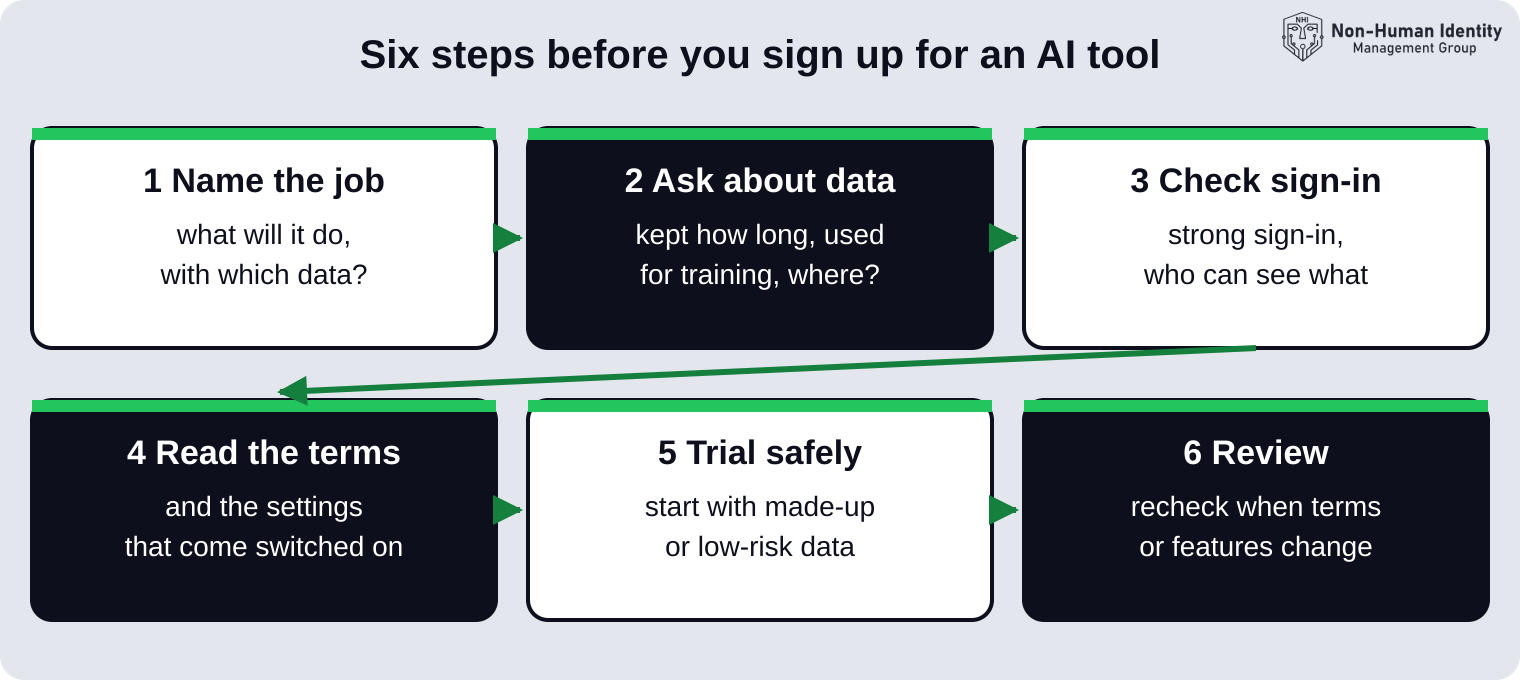
- Name the job. Write down what the tool will do and what data it will see. Notes from a public event are lower risk than customer records.
- Ask about your data. Ask how long it is kept, whether it is used to train the AI, where it is stored, and who else handles it.
- Check sign-in and access. Look for each person having their own account, a second sign-in check, and a way for you to remove people who leave.
- Read the terms and settings. Look for the privacy page and any settings that come switched on, such as sharing for training.
- Trial safely. Test with made-up or low-risk data before real customer data goes in.
- Review. Check again when the supplier changes its terms or adds new features.
Many AI tools are built on an AI model made by another company, and run on someone else's cloud. So your data may pass through more than one company. The UK code says that where an outside company builds the AI, it should give the tool maker the information users need.[1]
Free plans and paid business plans often have different rules. Some business plans promise not to train on your data by default, while a free plan may not. Check the plan you will use, not the one in the advert.
A worked example
This story is made up to show how it can happen.
Ade Adeyemi runs the members' team at Ashby Building Society, a small mutual lender. His team spends hours writing up phone calls. A sales email offers an AI tool that listens to calls and writes the notes.
Ade likes the demo. Before he signs, he sends the supplier five questions. Do you train your AI on our data? How long do you keep it? Where is it stored? Who else handles it? Can we use our own company sign-in?
The answers come back in two days. The tool does not train on business customers' data by default. Data is kept for 30 days unless the customer sets a shorter time. Company sign-in is only on the higher plan. The supplier names the AI model company and the cloud host it uses.
Ade takes the answers to his IT lead and the person who looks after data protection. They agree to try the higher plan with company sign-in. They also set the shortest time for keeping data.
For the first month, the team tests it on made-up practice calls only. Then they move to real calls, with members told that calls may be written up by an AI tool.
Ade puts a reminder in his diary to check the supplier's terms every six months.
What made the difference: Ade asked his questions in writing before he signed, and chose the plan that matched the answers.
Myths and mistakes
| What people think | What is true |
|---|---|
| A well-known brand must be safe for any data. | Ask the same questions of every supplier. Rules differ between products and plans. |
| Free and paid plans work the same way. | They often have different rules on training, keeping data and sign-in. Check the plan you will use. |
| The terms I agreed to will stay the same. | Terms can change. Watch for update emails and recheck at set times.[2] |
| Security questions are only for big companies. | Five plain questions work for a one-person business too. |
| Once we sign up, the risk is the supplier's problem. | You still choose what data goes in, who has access and which settings are on. |
What can I do this week?
- List the AI tools you or your team already use, including free ones.
- For each one, find the privacy page and note how long data is kept and whether it trains on your data.
- Write your five questions into an email you can reuse for any new tool.
- Turn on a second sign-in check for every AI tool that offers one.
- Agree which data must never go into an AI tool, such as passwords and bank details.
Checklist
- I know what job the tool will do and what data it will see.
- I know how long the supplier keeps our data.
- I know whether our data is used to train the AI, and how to switch that off.
- I know where our data is stored and who else handles it.
- Each person has their own account with a second sign-in check.
- I can delete our data and remove people who leave.
- We tested with made-up or low-risk data first.
- I have a date to recheck the terms.
Common questions
What should I check before buying an AI tool?
Check five things. How long is your data kept? Is it used to train the AI? Where is it stored, and who else handles it? What sign-in options are there? Get the answers in writing and match them to the data you plan to put in.
Are free AI tools safe to use for work?
Sometimes, but check first. Free plans often have looser rules on keeping data or training than paid business plans. Read the free plan's privacy page, and keep customer, staff and money data out unless the rules suit you.
What if the supplier will not answer my questions?
Treat that as an answer. A good supplier expects these questions, and a UK government code says AI providers should tell users how their data is used and stored.[1] If the answers stay vague, choose another tool.
Do I need a contract or special agreement?
For business use with personal data, often yes. Many suppliers offer a data processing agreement, which sets out how they handle your data. If you are unsure, ask the person who looks after data protection in your organisation.
How often should I recheck a tool?
At least once a year, and whenever the supplier emails about new terms or features. New features can bring new settings, so check what is switched on after each big update.
Where next?
Ready for the detail? Read the practitioner guide: Third-Party AI Risk Guide. It goes further into supplier assessment, contract terms and ongoing monitoring for AI services.
Also useful:
- AI Vendor Security Questionnaire Template
- Shadow AI for Beginners
- AI Acceptable Use Policies for Beginners
- AI Supply Chain Security for Beginners
Related NHI Mgmt Group resources: Contractual vs Technical Controls for Third-Party AI · Continuous Vendor Monitoring Guide · AI Vendor Breach Response
Key terms
- Vendor risk
- The chance that a company you buy from causes you harm, such as a data leak or outage.
- Training data
- The data used to teach and improve an AI model.
- Data retention
- How long a company keeps your data before it deletes it.
- Data processing agreement
- A contract that sets out how a supplier may handle personal data for you.
- Privacy policy
- A page that explains what data a company collects and what it does with it.
- Single sign-on (SSO)
- Signing in to many tools with one company account, so access is easier to control.
- Shadow AI
- AI tools used at work without the organisation knowing or approving.
Sources and further reading
- Code of Practice for the Cyber Security of AI. Department for Science, Innovation and Technology, GOV.UK, 31 January 2025. https://www.gov.uk/government/publications/ai-cyber-security-code-of-practice/code-of-practice-for-the-cyber-security-of-ai, accessed 28 Nov 2026.
- AI (and other) Companies: Quietly Changing Your Terms of Service Could Be Unfair or Deceptive. Federal Trade Commission, Office of Technology and Division of Privacy and Identity Protection staff, 13 February 2024. https://www.ftc.gov/policy/advocacy-research/tech-at-ftc/2024/02/ai-other-companies-quietly-changing-your-terms-service-could-be-unfair-or-deceptive, accessed 28 Nov 2026.
- AI and cyber security: what you need to know. National Cyber Security Centre (NCSC), 13 February 2024. https://www.ncsc.gov.uk/guidance/ai-and-cyber-security-what-you-need-to-know, accessed 28 Nov 2026.