Multi-tenancy means one app serves many customers at once, while keeping each customer's data apart.
This guide is for students, newcomers to software and anyone who buys online services for a business. You do not need to write code to be affected: if your firm uses an online booking, accounts or email service, your data almost certainly sits beside other firms' data.
In short
- Most online business apps serve many customer firms from one shared system.
- Each customer firm is called a tenant, and its data must stay walled off from the rest.
- The app should work out your firm from your sign-in, not from anything in the web address.
- Buyers can ask a supplier how it keeps customers apart and how it tests that.
What you will learn
- Explain what a tenant is and why apps share one system.
- Spot the warning sign of a gap between customers.
- Check the three common ways suppliers split customers.
- Ask a supplier useful questions about keeping your data apart.
- Customer space (tenant)
- one customer firm, or group of users, inside a shared app.
- Shared app for many firms (multi-tenancy)
- one system that serves many tenants at the same time.
- Keeping customers apart (tenant isolation)
- the checks that stop one tenant seeing or affecting another.
What is multi-tenancy?
Think of a row of post office boxes. Many people share one building, one counter and one sorting room. Each person has their own box, and the clerk should check you own box 12 before handing over its post.
Multi-tenancy works the same way. One app, run by one supplier, serves many customer firms. Microsoft describes a multitenant solution simply as one used by many customers, or tenants.[2]
A tenant is not one person. It is a whole customer, such as a dental practice with ten staff. All ten belong to one tenant.[2] Most online business tools work like this, because sharing one system costs the supplier far less than running a copy for every customer.
Where the comparison stops working: a letter in the wrong box is one letter, and someone usually notices. In an app, one missing check can show many records to the wrong firm at once, and nobody may notice for a long time.
Why does it matter?
If the walls between tenants are weak, one firm may see another firm's customers, files or invoices. A respected web security group lists this kind of leak as a key risk.[1] It also warns about one tenant hogging shared resources and slowing others down.
If you buy apps for a small business
What could happen: a fault at your supplier shows your client list to another firm on the same app.
Check this: ask the supplier how it keeps customers apart and how often it tests that.
If you are learning to build software
What could happen: a page trusts a customer number in the web address, so changing one digit shows another firm's data.
Check this: take the customer from the signed-in user, and test with two made-up customers.
If you are a student of cloud computing
What could happen: you assume the word tenant means the same thing in every product, and it does not.
Check this: ask what each provider means by account, tenant and project.
What does it look like?
Here is a made-up record of one request to an online booking app. It shows a gap between tenants.
Example only. All values are made up.
Signed in as:   [email protected]     (1)
Her tenant:     0001  (Marigold Dental)
Page asked for: /bookings?tenant=0002          (2)
App check:      none                           (3)
App showed:     bookings for tenant 0002       (4)
- The person signed in belongs to tenant 0001.
- The web address asks for tenant 0002. Anyone can edit a web address.
- The app did not check whether this person belongs to tenant 0002.
- In a real screen, this line would show another firm's bookings to the wrong person.
Why this is risky: the app trusted a number the user can change. Expert advice is to treat a tenant number sent by the user as a choice to be checked, not as proof.[1]
The safer way: the app works out the tenant from the checked sign-in. It confirms the person belongs to it, and refuses the request if anything is missing.[1]
How does it work?
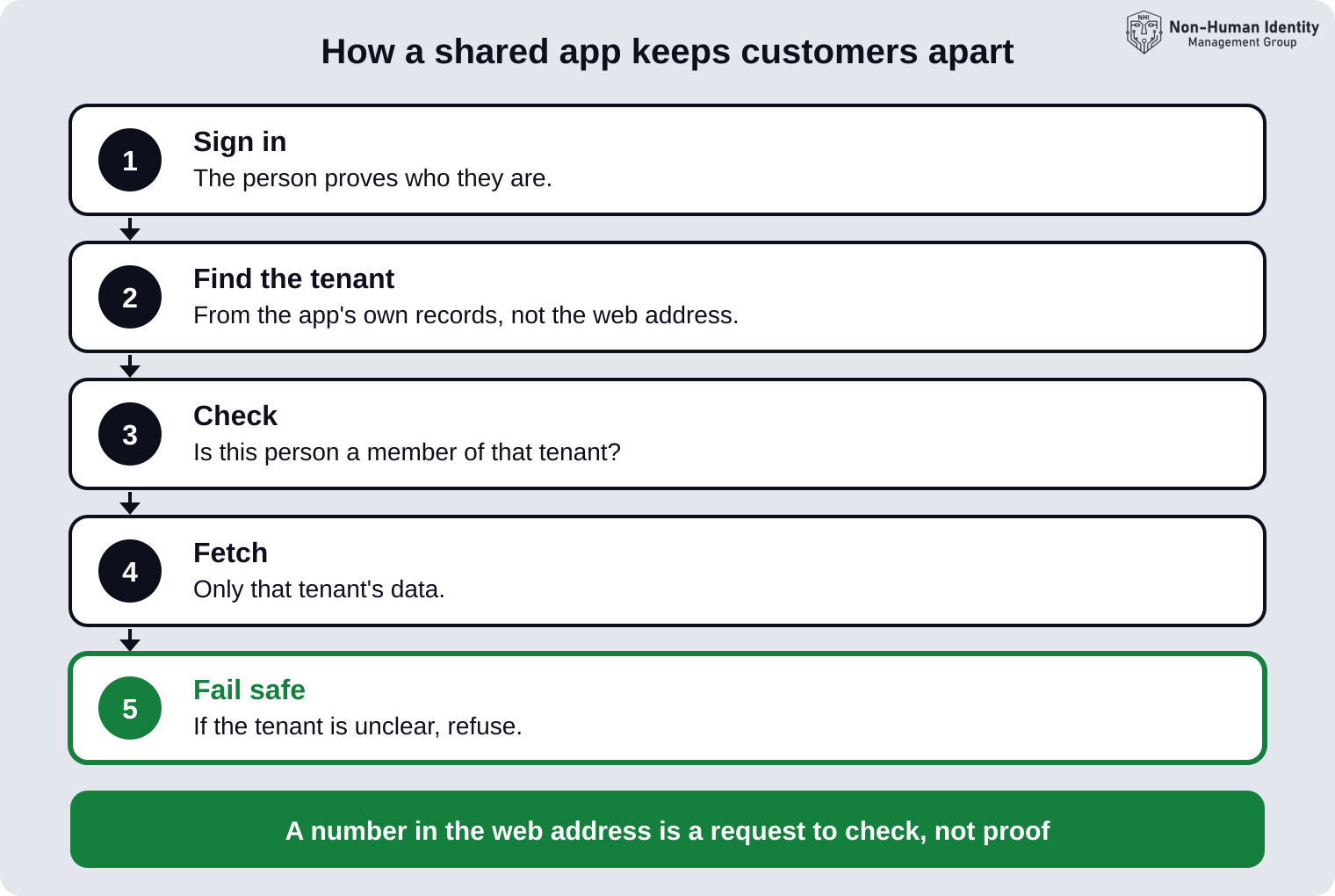
A well-built shared app follows roughly these steps on every request.
- Sign in. The person proves who they are. This is called authentication.
- Find the tenant. The app looks up which customer firm that person belongs to, using its own records, not the web address.[1]
- Check the request. If the request names a tenant, the app confirms the person is a current member of it. Deciding what someone may do is called authorisation.
- Fetch only that tenant's data. Every lookup is limited to the one tenant. Some databases can enforce this themselves with a rule that hides other tenants' rows, called row-level security.[1]
- Fail safe. If the app cannot tell which tenant a request is for, it should refuse, rather than show everything.[1]
Suppliers also choose how much to share. Amazon Web Services (AWS), a large cloud provider, names three common patterns.[3] In the pool pattern, all tenants share the same servers and storage. In the silo pattern, each tenant gets its own, such as its own database. The bridge pattern mixes the two, for example keeping sensitive data separate while sharing the rest.
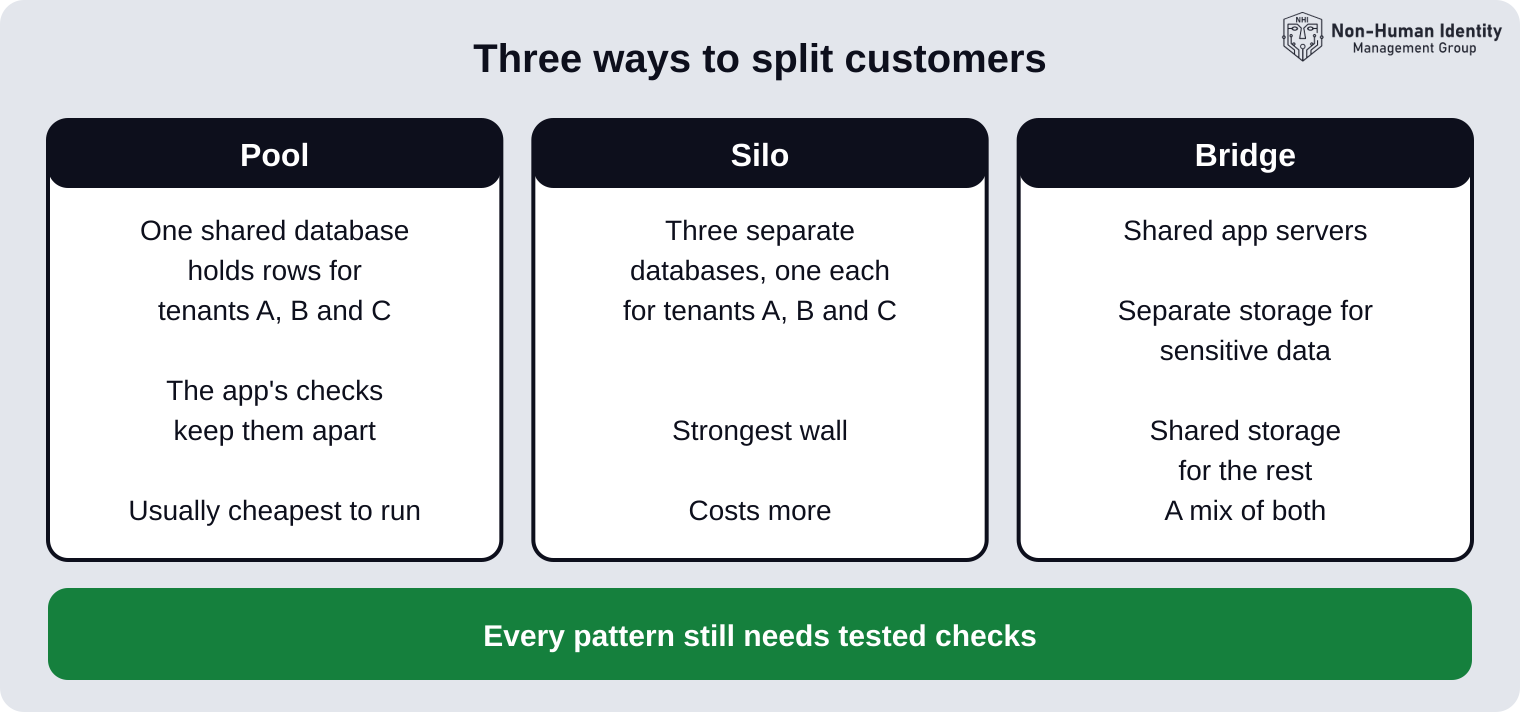
Separate databases give the strongest wall but cost more to run.[1] Shared ones are cheaper but lean harder on the app's checks. Neither is right for every service.
A worked example
Talia Yilmaz manages a fictional dental practice, Marigold Dental. The practice books patients through an online booking app that hundreds of other practices also use.
One afternoon Talia copies a booking link to send to a colleague. She notices it ends in a number, 0001. Out of curiosity, she wonders what happens if a patient mistypes it.
She does not experiment. Instead she thinks of the post office boxes. If the clerk hands out post just because someone says a box number, the whole row is at risk. She emails the supplier and asks a plain question: does the app check that the person signed in belongs to the practice in the link?
Emil Ulrich, the supplier's support lead, passes it to the developers. They test with two made-up practices. The answer is uncomfortable. On one older page, changing the number did show another test practice's bookings.
The developers fix the page so it takes the practice from the sign-in, not the link. They search the rest of the app for the same pattern. They add a test with two made-up practices to every release. Then they check their records for signs that anyone used the gap. Emil reports back that, in the records available to them, they found no sign that anyone had.
Talia adds two questions to the practice's supplier checklist: how are customers kept apart, and how is that tested? She now asks them before signing up to any new service.
Myths and mistakes
| What people think | What is true |
|---|---|
| A tenant is one user. | A tenant is usually a whole customer firm or group, with many users inside it.[2] |
| If my data is encrypted, sharing an app is safe. | Encryption protects stored data, but the app still decides who sees what. The tenant checks matter too. |
| Shared systems are always unsafe. | Sharing is normal and can be safe when the checks are designed and tested well. |
| Hiding the customer number in the web address is enough. | Anyone can edit a web address. The app must check membership on its side.[1] |
| Tenant means the same thing in every product. | Providers use account, tenant and project in different ways. Ask which ones are real security walls.[4] |
What can I do this week?
- List the online services that hold your customer or staff data.
- Ask your main supplier how it keeps customers apart and how it tests that.
- Ask if the supplier has outside test or audit reports you can see.
- If you build software, add a test that signs in as one made-up customer and asks for another's data.
Checklist
- We know which of our services share one system with other customers.
- Each key supplier has explained how it keeps customers apart.
- Each key supplier has independent testing or audit evidence.
- We know what each supplier means by account, tenant or workspace.
- Our own apps take the customer from the sign-in, not the web address.
- Our tests try to reach a second made-up customer's data, and expect a refusal.
- Requests with no clear customer are refused.
Common questions
Is multi-tenancy the same as the cloud?
No, but they often go together. The cloud means renting computers over the internet. Multi-tenancy is a way to build an app so one copy serves many customers. Most cloud business apps work this way. A supplier can also run a separate copy for each customer.
Why don't suppliers give every customer their own system?
Cost and upkeep. One shared system is cheaper to run, update and fix than hundreds of copies. AWS says sharing saves money and makes the service easier to run.[3] Some suppliers offer separate storage for customers with stricter needs, often at a higher price.
What does tenant mean in Microsoft 365?
In Microsoft's own products, a tenant usually means your firm's list of users and settings. Microsoft says this is a different use of the word from the one in this guide.[2] Both share one goal: your firm's things stay yours.
What should I ask a supplier?
Ask how your data is kept apart from other customers, and how they test it. Ask if storage and keys are separate. The UK's national cyber security agency also suggests asking for outside test results. It says to ask what words like tenant and account mean to them.[4]
What is a noisy neighbour?
A noisy neighbour is one tenant using so much of a shared system that others slow down. It is less about leaks and more about the service staying usable. Good suppliers set limits so one customer cannot take everything.[1]
Where next?
Ready for the detail? Read the practitioner guide: Multi-Tenant SaaS Authorisation and Tenant Isolation Guide. It goes further into setting tenant context, database rules, testing and the admin and support paths that cross tenants.
Also useful:
- Multi-Tenant SaaS Architecture Security Guide
- SaaS Provider Tenant Isolation and NHI Guide
- Authentication vs Authorisation for Beginners
- Broken Access Control for Beginners
Related NHI Mgmt Group resources: Kubernetes Multi-Tenancy Security Guide · Multitenant AI application security · SaaS Security for Beginners
Key terms
- Multi-tenancy
- One app serving many customer firms while keeping their data apart.
- Tenant
- One customer firm or group of users inside a shared app.
- Tenant isolation
- Keeping each tenant's data, sign-ins and records separate so one cannot reach another.
- Authentication
- Proving who you are, for example with a password and a code.
- Deciding what a signed-in person or program is allowed to do.
- Row-level security
- A database rule that shows each session only the rows it is allowed to see.
- SaaS
- Software you use over the internet while the supplier runs it for you.
Sources and further reading
- Multi-Tenant Security Cheat Sheet. OWASP Cheat Sheet Series, OWASP Foundation. https://cheatsheetseries.owasp.org/cheatsheets/Multi_Tenant_Security_Cheat_Sheet.html, accessed 28 Nov 2026.
- Architect multitenant solutions on Azure. Azure Architecture Center, Microsoft Learn. https://learn.microsoft.com/en-us/azure/architecture/guide/multitenant/overview, accessed 28 Nov 2026.
- Silo, pool, and bridge models. SaaS Lens, AWS Well-Architected Framework, Amazon Web Services. https://docs.aws.amazon.com/wellarchitected/latest/saas-lens/silo-pool-and-bridge-models.html, accessed 28 Nov 2026.
- Principle 3: Separation between customers. The cloud security principles, National Cyber Security Centre (NCSC). https://www.ncsc.gov.uk/collection/cloud/the-cloud-security-principles/principle-3-separation-between-customers, accessed 28 Nov 2026.