An MX record is a note in a domain's settings that says which server accepts its email.
This guide is for anyone who sends email for a club, a shop or a small business and wants to know why messages bounce or land in spam. You do not need to run a mail server to be affected: if your business uses its own web address for email, it depends on these settings.
In short
- Your domain's MX record tells other mail servers where to deliver email meant for you.
- A bounce is an automatic message saying an email could not be delivered, and its code says why.
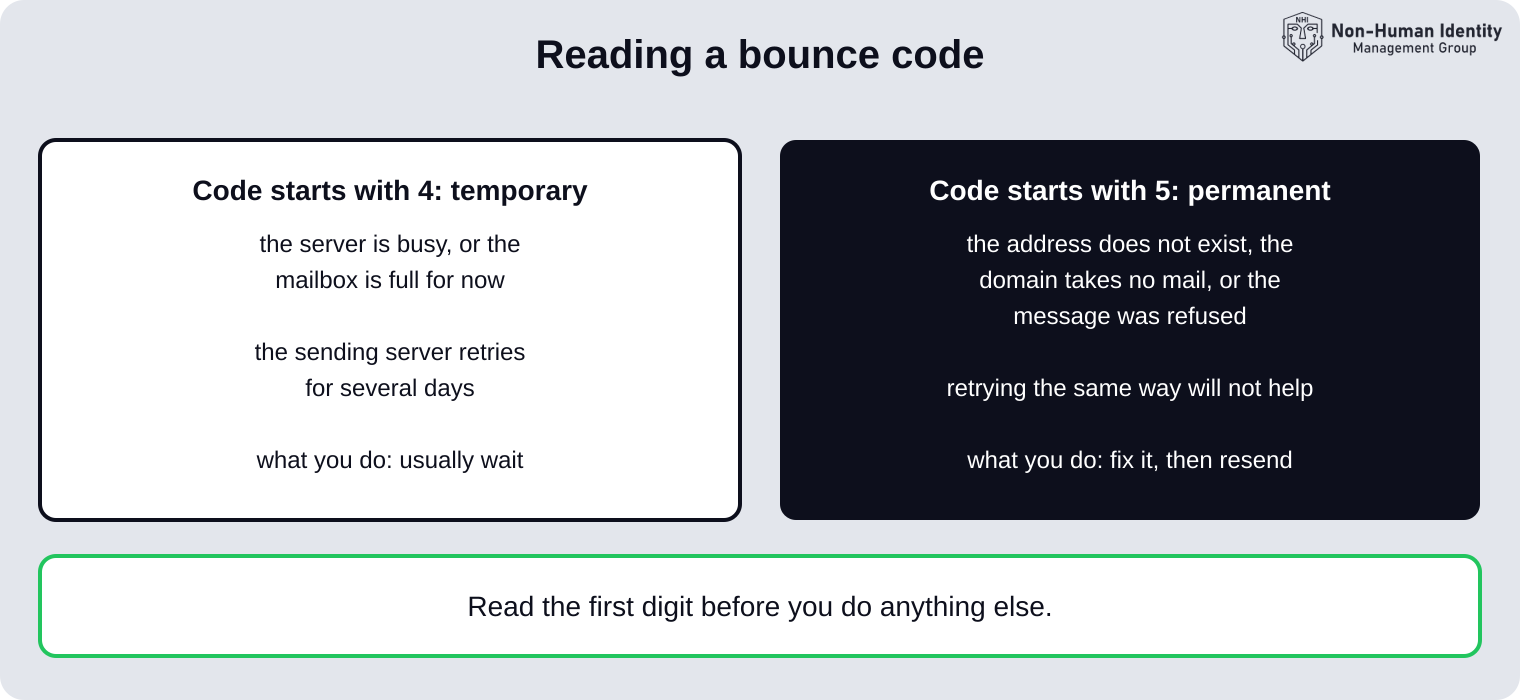
- Codes starting with 4 usually mean "try again later"; codes starting with 5 usually mean "this will not work as it is".
- Big mailbox providers expect senders to prove who they are and to keep spam complaints low, or mail may go to spam.
What you will learn
- Post room sign (MX record)
- a setting that names the server that takes in email for a web address.
- Returned letter (bounce)
- an automatic reply saying an email could not be delivered, with a reason code.
- Internet address book (DNS)
- the system that turns names like example.com into the details computers need.
What is an MX record?
Think of a big office building with a sign at the door. It says: "All post goes to the post room on floor 2." A courier reads the sign and takes the parcel straight there. An MX record works the same way for email.
Every web address, such as example.com, is called a domain. Each domain has a set of public settings stored in the DNS, the internet's address book. One of those settings is the MX record, short for mail exchange record. It names the mail server that takes in email for the domain.
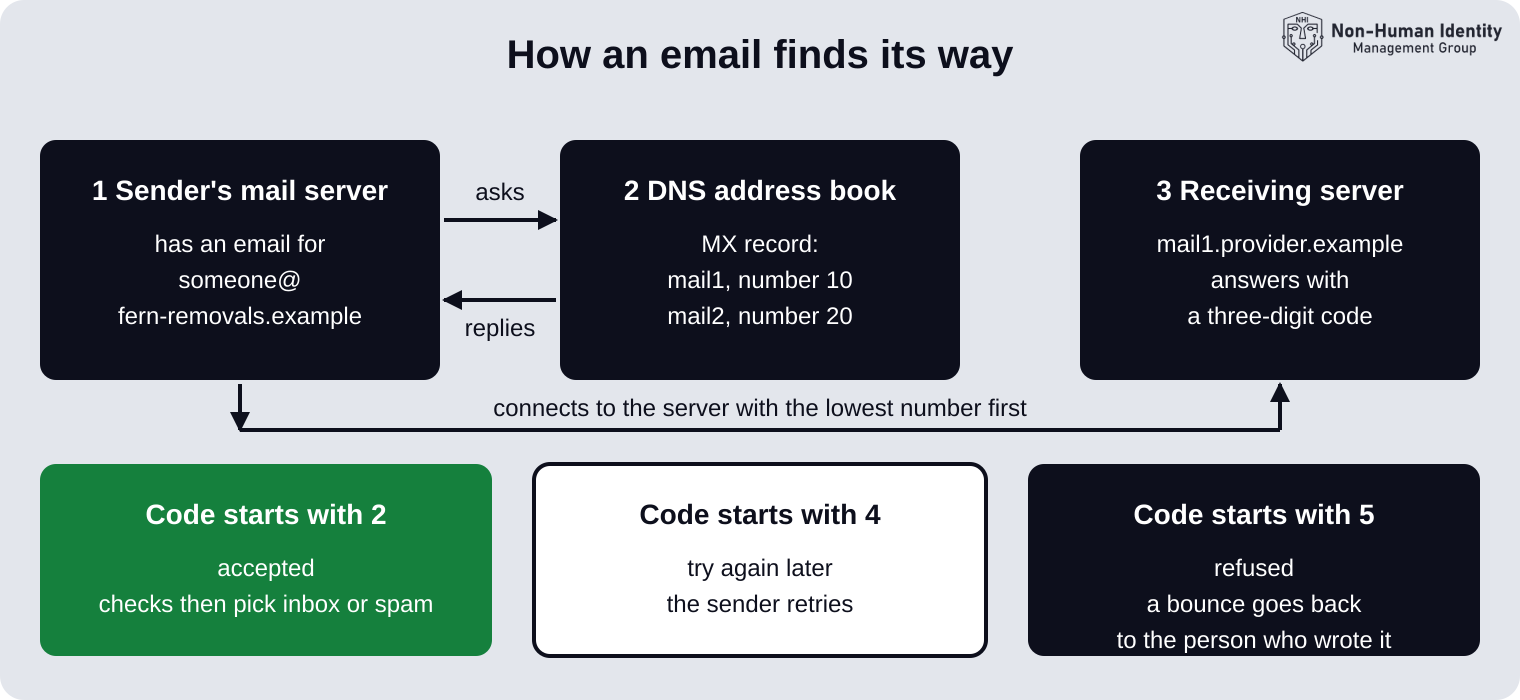
When someone sends you an email, their mail server looks up your MX record first. Then it hands the message to the server named there. A domain can list more than one mail server, each with a number. Lower numbers are tried first, and the others act as back-ups.[1]
If the message cannot be handed over, the sending side usually sends a bounce back to the person who sent it. This is an automatic note that explains what went wrong.[1]
Where the comparison stops working: a courier can see the building and ask at the front desk. A mail server only has what the settings say. If the sign is wrong or out of date, mail goes to the wrong place or nowhere. Nobody at your end may notice for a while.
Why does it matter?
Missing email costs real time and money. A lost order, a quote that never arrives or a password reset stuck in spam can all trace back to these settings.
The big free mailbox services now set rules for senders. Google says everyone who sends to Gmail should prove who they are, have matching address records and keep reported spam below 0.3%.[3] Yahoo sets similar rules.[4]
If you run a small business
What could happen: after moving to a new email provider, customer emails keep going to the old one.
Check this: ask whoever set up your domain to confirm the MX record points to your current provider.
If you send newsletters or invoices
What could happen: your messages land in spam because your domain has not been set up to prove they are really from you.
Check this: ask your provider whether sender checks are set up for your domain.
If you are new to IT support
What could happen: a user forwards you a bounce and you are not sure if it is safe to ignore.
Check this: read the code in the bounce first. It tells you whether to wait or to fix something.
What does it look like?
Here is a made-up MX setting for a removals firm, followed by part of a bounce message.
Example only. All values are made up.
fern-removals.example.  MX  10  mail1.provider.example.   (1)
fern-removals.example.  MX  20  mail2.provider.example.   (2)

Subject: Undelivered Mail Returned to Sender
To: [email protected]
Could not deliver to: [email protected]
Reason: 550 5.1.1 mailbox does not exist         (3)
Earlier try: 451 4.3.0 try again later           (4)
- The main mail server. The lower number, 10, means it is tried first.
- The back-up server, tried if the first one cannot be reached.
- A code starting with 5 means a lasting failure. In a real message, this line would usually show the address that does not exist.
- A code starting with 4 means a short-term problem, so the sending server tries again later.
Why this is risky: people often skim past bounces. A 5 code can mean a typing mistake, an old contact or a wrong setting. Sending to bad addresses again and again can harm your name with mailbox providers.
The safer way: read the first number of the code. Fix or remove addresses that fail with a 5 code. Leave 4 codes for the server to retry. If all mail to your own domain bounces, check your MX record first.
How does it work?
Here is the journey of one email from sender to inbox.
- Look up. The sender's mail server reads the domain after the @ sign and asks the DNS for its MX record.[1]
- Pick a server. It tries the server with the lowest number first, then the back-ups. If a domain has no MX record at all, the sender may try the domain's main address instead.[1]
- Hand over. The two servers talk using the standard mail language, called SMTP (the rules servers use to pass email along). The receiving server answers with a three-digit code.
- Accept, delay or refuse. A 4 code is a short-term problem; the rules say the message can succeed if tried again. A 5 code means the same request should not simply be repeated.[1]
- Retry or bounce. After a 4 code, the sender waits, usually at least 30 minutes, and tries again. The rules suggest it keeps trying for at least four to five days before giving up and sending a bounce.[1]
- Inbox or spam. Even accepted mail goes through checks. The receiver looks at whether the sender proved who it is and how people treat its mail, then picks the inbox or spam folder.[3]
Some domains are never meant to receive email. Their owners can publish a special "null MX" record. It tells senders straight away that the domain takes no mail, so a message fails at once instead of being retried for days.[2]
A worked example
Mira Mbeki runs Fern Removals, a fictional moving firm with six staff. On Monday morning she notices something odd. Nobody has booked a move through the website since Friday.
She asks her friend Soren Haddad, who looks after IT for a few local firms, to take a look. Soren sends a test email to the bookings address from his own account. Twenty minutes later, a bounce comes back. The reason line reads "domain not found" with a code starting with 5.
Soren remembers the post room sign. If the sign points to the wrong floor, the post never arrives. He looks up the MX record for fern-removals.example. It still points to the old email provider that Mira left on Friday.
Mira's new provider had sent her a short list of settings to change. The website settings were updated, but the MX line was missed. Soren logs in to the domain account with Mira and changes the MX record to the new provider's servers.
The change can take a few hours to reach every server on the internet. By the afternoon, his next test email arrives in the bookings inbox.
Next they check the other side. Soren asks the new provider to confirm the sender checks are set up. That makes Fern Removals' quotes less likely to land in spam.
Last, Mira emails the customers who tried to book over the weekend and apologises. She adds "check the MX record" to the to-do list for any future move of provider.
Myths and mistakes
| What people think | What is true |
|---|---|
| A bounce means my email was blocked as spam. | Many bounces are about a wrong address or a full mailbox. Read the code and the reason line first. |
| A 4 code means I must send the email again. | A 4 code is temporary, and the sending server usually retries for you.[1] |
| If my website works, my email works too. | Web and email use different settings. A website can work while the MX record points somewhere old. |
| Changing provider moves my email settings automatically. | Someone has to update the MX record and the sender checks. Ask your provider for the full list. |
| Landing in spam is just bad luck. | Providers look at whether you prove who you are and how many people report your mail as spam.[3] |
What can I do this week?
- Ask your email provider or IT helper which servers your MX record should point to, and check it does.
- Send a test email to your main business address from a personal account and make sure it arrives.
- Look at the last few bounces you received and sort them into 4 codes and 5 codes.
- Remove or correct contacts that keep bouncing with a 5 code.
- Ask whether sender checks (SPF, DKIM and DMARC) are set up for your domain.
Checklist
- The MX record points to the email provider you use today.
- Any back-up mail servers listed are ones you still use.
- Domains that never receive email are set up to say so.
- Someone named reads bounces for shared addresses such as bookings or info.
- Addresses that fail with a 5 code are fixed or removed from mailing lists.
- Sender checks are set up for every domain you send from.
- Mailing lists offer an easy way to unsubscribe.
- Changing email provider has a written list that includes the MX record.
Common questions
What is the difference between a hard bounce and a soft bounce?
A soft bounce is a temporary failure, shown by a code starting with 4, such as a busy server or a full mailbox. A hard bounce is a lasting failure, shown by a code starting with 5, such as an address that does not exist. Wait on soft bounces; fix hard ones.
Why do my emails go to spam?
Usually because the receiver is not sure the mail is really from you, or because people report it. Google and Yahoo ask senders to prove who they are with sender checks, keep spam reports low and, for large senders, offer one-click unsubscribe.[3][4]
How long does an MX record change take?
Often a few hours, sometimes longer. Servers keep a saved copy of DNS settings for a set time. Some senders see the old setting until their copy runs out. Keep the old mailbox open for a day or two after a change.
Can I have more than one MX record?
Yes. Many domains list two or more mail servers, each with a number. Senders try the lowest number first and move to the others if it cannot be reached. All the servers listed should belong to your current provider.[1]
Is a bounce from an address I never wrote to a problem?
It can be. Someone may be faking your address as the sender, so the bounces come back to you. Do not open links in it. Ask your provider about sender checks, which help receivers spot faked mail from your domain.
Where next?
Ready for the detail? Read the practitioner guide: Top 10 Email Authentication Mistakes. It goes further into SPF lookup limits, DMARC policy and alignment, and the bulk sender rules of the big mailbox providers.
Also useful:
- Email Authentication for Beginners
- Email Security for Beginners
- Email Headers for Beginners
- DNS Record Types Security Guide (A, MX, TXT, CNAME, CAA)
- DMARC, SPF and DKIM Failure Troubleshooting Guide
Related NHI Mgmt Group resources: DMARC, SPF and DKIM Guide · Email Security Guide · Email Authentication Checklist
Key terms
- MX record
- A DNS setting that tells the internet which mail servers receive email for a domain.
- DNS
- The internet's naming system that turns domain names into addresses and other service settings.
- SMTP
- The set of rules mail servers use to pass email to each other.
- Mail server
- Software that sends, receives and stores email.
- Bounce
- An automatic message telling the sender that an email could not be delivered, with a reason code.
- Null MX
- A special MX record that tells senders a domain does not accept any email.
- Reverse DNS
- A lookup that turns a server's address back into a name, which receivers use to judge a sending server.
- Email deliverability
- How reliably your email reaches the inbox rather than being blocked, delayed or sent to spam.
Sources and further reading
- RFC 5321, Simple Mail Transfer Protocol (sections 3.6, 4.2.1, 4.5.4.1 and 5.1). J. Klensin, IETF, October 2008. https://www.rfc-editor.org/rfc/rfc5321.html, accessed 28 Nov 2026.
- RFC 7505, A "Null MX" No Service Resource Record for Domains That Accept No Mail. J. Levine and M. Delany, IETF, June 2015. https://www.rfc-editor.org/rfc/rfc7505.html, accessed 28 Nov 2026.
- Email sender guidelines. Gmail Help, Google. https://support.google.com/mail/answer/81126?hl=en, accessed 28 Nov 2026.
- Sender best practices. Yahoo Sender Hub, Yahoo. https://senders.yahooinc.com/best-practices/, accessed 28 Nov 2026.