NHI lifecycle management means looking after a software identity from the day it is made until it is retired.
This guide is for anyone new to the topic, from students to managers. You do not need to be technical to be affected: every app your business connects to another service uses an identity like this, and someone has to look after it.
In short
- A non-human identity (NHI) is an account that software uses, not a person.
- Each one has a life, which NHI Mgmt Group splits into seven stages, from creation to retirement.
- Retirement is the step most often missed, so old accounts can keep working with their access.
- Give each identity an owner and an end date, review it, and switch it off before you delete it.
What you will learn
- Name the seven stages of looking after a software identity.
- Spot an identity that should have been retired.
- Explain why you switch an identity off before you delete it.
- Ask who owns each identity your team uses, and when it ends.
- Non-human identity (NHI)
- a digital identity, or the credential behind it, that represents a machine, application, automated process, service or AI agent, so it can authenticate, carry out tasks and connect to other systems without a person.
- Retiring (decommissioning)
- switching off and removing an identity once its job has ended.
- Changing the key (rotation)
- replacing a password or key with a new one, so old copies stop giving access.
What is NHI lifecycle management?
Think of a contractor's building pass. Someone asks for it, security issues it for the right floors, and it is switched off when the job ends.
A non-human identity works much like that pass, but for software. One example is a service account, an account a program uses to run without a person. Another is an API key, a secret code one program shows another. An AI agent's identity is a third.
Lifecycle management is the care each identity gets over its whole life. Someone asks for it and says why. It is made with only the access it needs. It is watched while it works and changed when things change. It is checked now and then. Finally, it is retired when the job ends.
Where the comparison stops working: a contractor hands the pass back at the door. Nobody walks a software identity out of the building. When an app is shut down, its identity can keep working until someone removes it. Copies of its key may also sit in files, which a plastic pass would not have.
Why does it matter?
Identities nobody retires can stay switched on, sometimes with strong access. A well-known security project lists poor retirement first in its top ten risks for software identities. It warns that leftover identities can be used by attackers. They may also keep high levels of access.[1]
If you run a small business
What could happen: you stop using an online tool, but its key to your accounts still works.
Check this: when you cancel a tool, ask your supplier to remove its access and keys too.
If you are new to IT work
What could happen: you set up an account "just for a test" and nobody ever removes it.
Check this: write down an owner and an end date for every account you create.
If you manage a team or project
What could happen: a project ends, people move on, and its accounts are left running with no owner.
Check this: make "retire its identities" a step in closing every project.
What does it look like?
Many teams keep a simple record for each identity, a bit like a card on file. Here is a made-up one.
Example only. All values are made up.
Identity record: svc-bookings-reminder-EXAMPLE
Purpose:      send booking reminders by text message
Owner:        FAKE-Owner (operations)              (1)
Access:       read bookings table only             (2)
Secret kept:  in the vault, not in code            (3)
Key changed:  2026-01-01 (every 90 days)           (4)
Review date:  2026-06-30
End date:     when the booking app is replaced     (5)
- In a real file, this line would contain the name of the person who answers for the identity.
- Only the access the job needs. This idea is called least privilege.
- The key lives in a locked store called a vault, so it is not copied into files.
- The date the key was last replaced, and how often the team plans to replace it.
- A clear trigger for retirement, so the identity is not forgotten.
Why this is risky: many identities have no record like this at all. With no owner or end date, nobody knows when to change or retire them.
The safer way: every identity gets an owner, a purpose and a review or end date before it is made. The record is then kept up to date at every stage.
How does it work?
NHI Mgmt Group splits lifecycle management into seven stages.[5] They are not strict steps in a row. Several run all the time, side by side, for as long as the identity exists.
- Provisioning and decommissioning. Provisioning means creating an identity through an approved route, with an owner, a purpose and an end date, and only the access it needs. Google, for example, suggests a separate service account for each app and a contact person in its description.[2] Decommissioning means retiring it when the job ends: switch it off, wait, delete it and cancel its keys.
- Continuous discovery and inventory. Keep one live list of every account, key, connected app and AI agent, so nothing is forgotten.
- Classification and ownership. Tag each identity with its owner, its access and how much harm it could do, then deal with the riskiest first.
- Posture management. Owners check that each identity is still needed and remove access it no longer uses. Cloud services can show when access was last used, which helps here.[3]
- Secretless credentials. Use fewer stored keys. Where the platform allows it, use short-lived passes, and keep the remaining keys in a vault and replace them on a schedule.
- Detection and response. Record what each identity does, so odd behaviour can be spotted, and act quickly if a key may have leaked.
- Preventive controls. Stop problems before they start, for example by blocking keys from being saved into code and giving access only when it is needed.
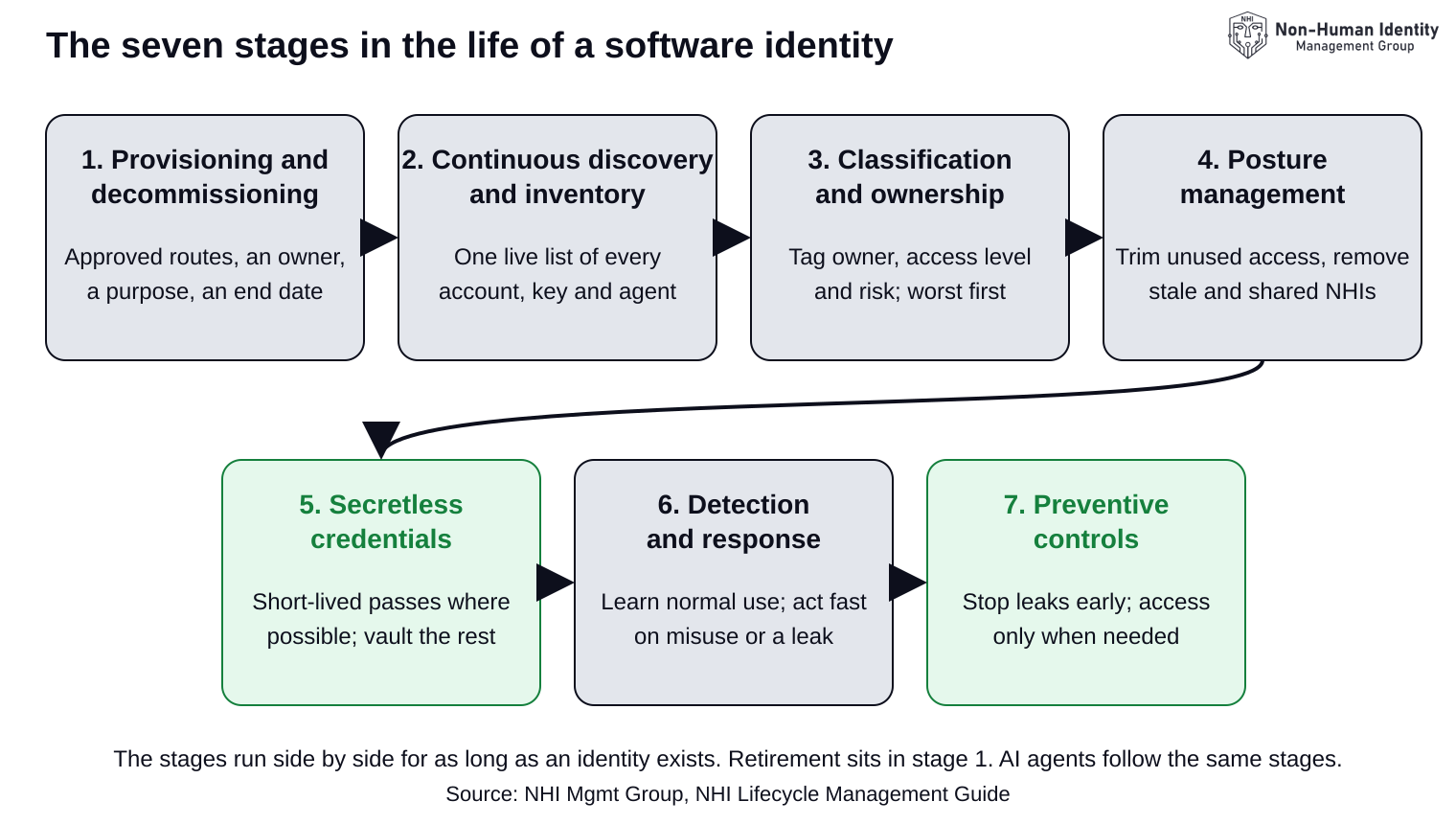
AI agents go through the same seven stages. They also need a clear link to the person they act for and limits on what they may do alone.
Some keys last until someone changes them. Others are short-lived credentials, which expire on their own after a short time. AWS suggests using these temporary keys for software where possible, and replacing long-lasting keys when needed, for example when a staff member leaves.[3] Temporary keys still need an owner and a review, because the identity that can get them stays in place.
Some cloud identities are tidied up for you. In Microsoft Azure, a managed identity (an identity the cloud provider looks after) can be tied to one resource and deleted with it. Another kind stands alone and has to be deleted on purpose.[4] Check which kind you have before you assume clean-up will happen.
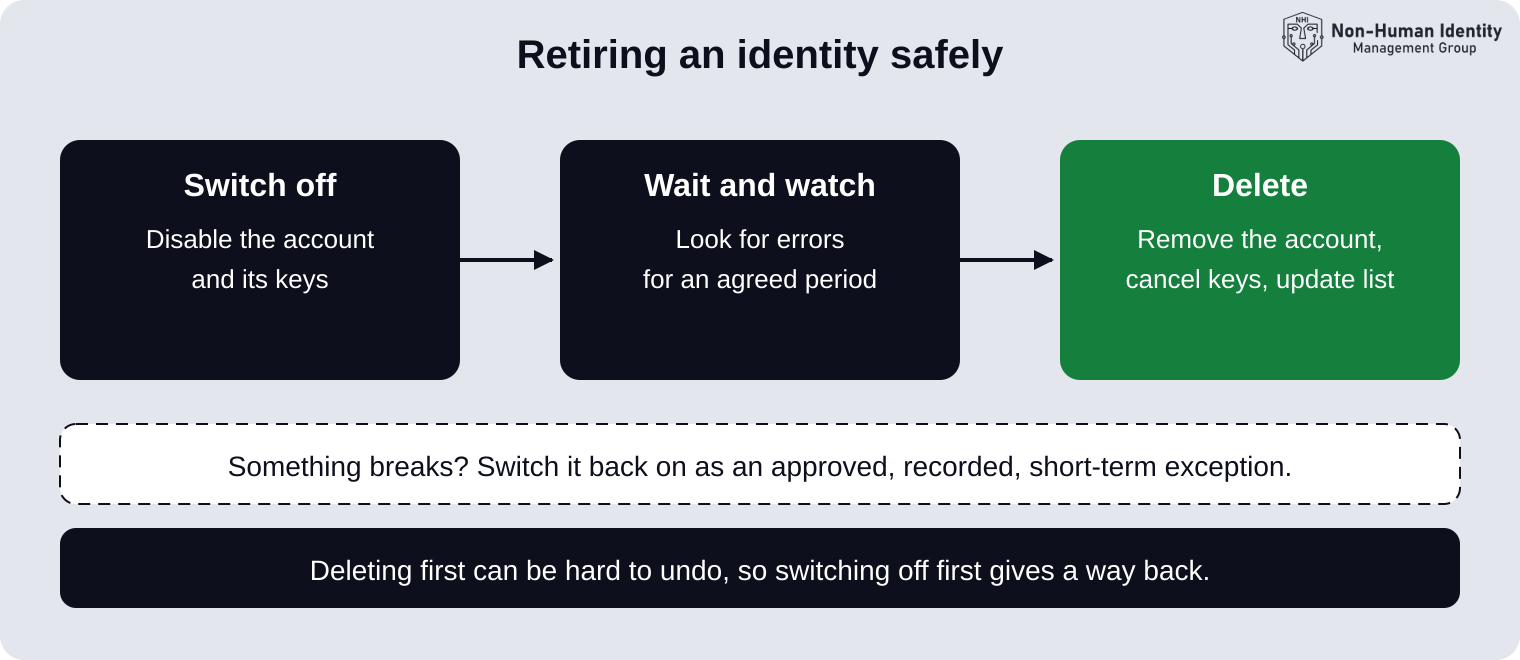
Why switch off first? Google notes that a service account switched off and back on keeps its permissions. A deleted account made again with the same name counts as a new identity, so its old permissions do not come back.[2]
A worked example
Coastwood Leisure Centre is a fictional sports centre with a pool, a gym and forty staff. Its IT lead is Ines Ulloa.
Two years ago, a freelance developer, Jarrah Engel, built a tool that texts members about class bookings. The tool used a service account to read the bookings list. It also held a key for the text message service.
This spring, Coastwood moves to a new booking system with reminders built in. Ines remembers the building pass. The old tool's pass still opens doors, even though nobody uses it.
First, she checks the record. The owner is still listed as Jarrah, who finished his contract last year. Ines makes herself the owner. Jarrah once had a copy of the text service key, so that key must be cancelled too, not left for later.
Next, she switches off the service account and the text service key. She agrees a 30-day wait with the centre manager and watches for errors.
After a week, a monthly attendance report fails. Nobody remembered that it used the same account. Ines switches the account back on as an approved, recorded exception for two weeks. In that time, she gives the report its own identity with read-only access.
When the wait ends, nothing else has failed. Ines deletes the account, cancels the old key at the text service and updates the record.
A door the centre no longer needed is now closed. Next time, every new identity will get an end date from day one.
Myths and mistakes
| What people think | What is true |
|---|---|
| When we switch off an app, its access goes with it. | Usually not. Accounts and keys often keep working until someone removes them, unless the platform ties them to the app.[4] |
| Changing keys fixes everything. | It limits how long a stolen key works. It does not fix too much access, a missing owner or an identity that should be gone. |
| Temporary keys need no care. | They expire, but the identity that can get them still needs an owner, a review and retirement. |
| Deleting straight away is safest. | Deleting can break something you did not know about and can be hard to undo. Switch off first, then delete.[2] |
| This needs a big, costly system. | A request form, a list of identities, a vault and review dates in the calendar are a reasonable start for a small team. |
What can I do this week?
- Add three must-fill boxes to each new account request: owner, purpose and end date.
- Pick one tool or project that has ended. Check with its owner, then switch off its identity.
- Book a regular review of your most powerful identities, with their owners.
- Ask suppliers how they remove access and keys when you stop using them.
Checklist
- Every new identity has a recorded owner, purpose and review or end date.
- New identities start with only the access they need.
- Keys are kept in a vault, not in code or shared documents.
- Long-lasting keys are replaced on a schedule and when someone who saw them leaves.
- Temporary keys are used where the platform supports them.
- Owners review their identities on a schedule and remove unused access.
- Retirement follows switch off, wait, then delete, with keys cancelled.
- The list of identities is updated at every stage.
Common questions
What are the stages of the NHI lifecycle?
NHI Mgmt Group uses seven stages. The first is creating and retiring NHIs. Then come finding them, giving them owners and keeping their access tidy. Then using fewer stored keys, spotting misuse and stopping problems early. The NHI Lifecycle Management Guide covers each stage by its full name.
How is this different from staff joining and leaving?
The ideas are similar, but software identities have no HR record to trigger changes. Their changes have to be triggered by owners, projects and system events instead. See Joiner, Mover, Leaver for Beginners for how it works for people.
How often should keys be changed?
There is no single answer. Each organisation sets its own schedule, based on risk. A key is also changed straight away if it may have leaked, or if someone who saw it leaves. Moving to temporary keys, where the platform supports them, reduces how often you need to do this.
When should an identity be retired?
Retire it when its app or project ends, when its owner says it is no longer needed, or when it reaches its agreed end date. An identity unused for a period set in your policy is also a strong candidate, once its owner agrees.
Does this apply to AI agents?
Yes. AI agents sign in with their own accounts and keys, so they are software identities too. They need an owner, the right access, reviews and retirement, including when a trial project ends and the agent is no longer used.
Where next?
Ready for the detail? Read the practitioner guide: NHI Lifecycle Atlas. It goes further into the lifecycle for each kind of credential, who owns what at each stage, and where automation fits.
Also useful:
- NHI Lifecycle Management Guide
- NHI lifecycle automation
- NHI Offboarding and Decommissioning Guide
- Secrets Rotation for Beginners
- Non-Human Identities for Beginners
- NHI Foundation Level Training
Related NHI Mgmt Group resources: OWASP NHI Top 10 NHI1 Improper Offboarding Guide · NHI Offboarding vs Human Offboarding · Secrets Management for Beginners
Key terms
- Non-human identity (NHI)
- A digital identity, or the credential behind it, that represents a machine, application, automated process, service or AI agent, so it can authenticate, carry out tasks and connect to other systems without a person.
- NHI lifecycle management
- Looking after a software identity from creation, through use and change, to safe retirement.
- Least privilege
- Giving each person or program only the access it needs, for only as long as it needs it.
- Credential rotation
- Replacing passwords and keys with new ones, so a stolen copy works for less time.
- Short-lived credentials
- Passwords or keys that expire on their own after a short time.
- Decommissioning
- Retiring an identity in a controlled way once it is no longer needed, after checking nothing still depends on it.
- Dormant account
- An account that has not been used for a set period but still has its access.
- Managed identity
- A cloud identity the provider looks after for a resource, so no key is stored in code.
Sources and further reading
- OWASP Non-Human Identities Top 10, NHI1:2025 Improper Offboarding. OWASP Foundation, 2025. https://owasp.github.io/www-project-non-human-identities-top-10/2025/1-improper-offboarding/, accessed 28 Nov 2026.
- Best practices for using service accounts securely. Google Cloud documentation, Google. https://docs.cloud.google.com/iam/docs/best-practices-service-accounts, accessed 28 Nov 2026.
- Security best practices in IAM. AWS Identity and Access Management User Guide, Amazon Web Services. https://docs.aws.amazon.com/IAM/latest/UserGuide/best-practices.html, accessed 28 Nov 2026.
- What is managed identities for Azure resources? Microsoft Learn, Microsoft. https://learn.microsoft.com/en-us/entra/identity/managed-identities-azure-resources/overview, accessed 28 Nov 2026.
- NHI Lifecycle Management Guide. Lalit Choda, NHI Mgmt Group, updated 27 October 2026. https://nhimg.org/nhi-lifecycle-management-guide, accessed 28 Nov 2026.