NIST SP 800-53 is a free US government catalogue of security and privacy safeguards for computer systems.
This guide is for anyone who keeps hearing "800-53" in job adverts, audits or supplier forms and wants a plain answer. You do not need to work for the US government to meet it: customers and auditors often borrow its wording when they ask how you protect your systems.
In short
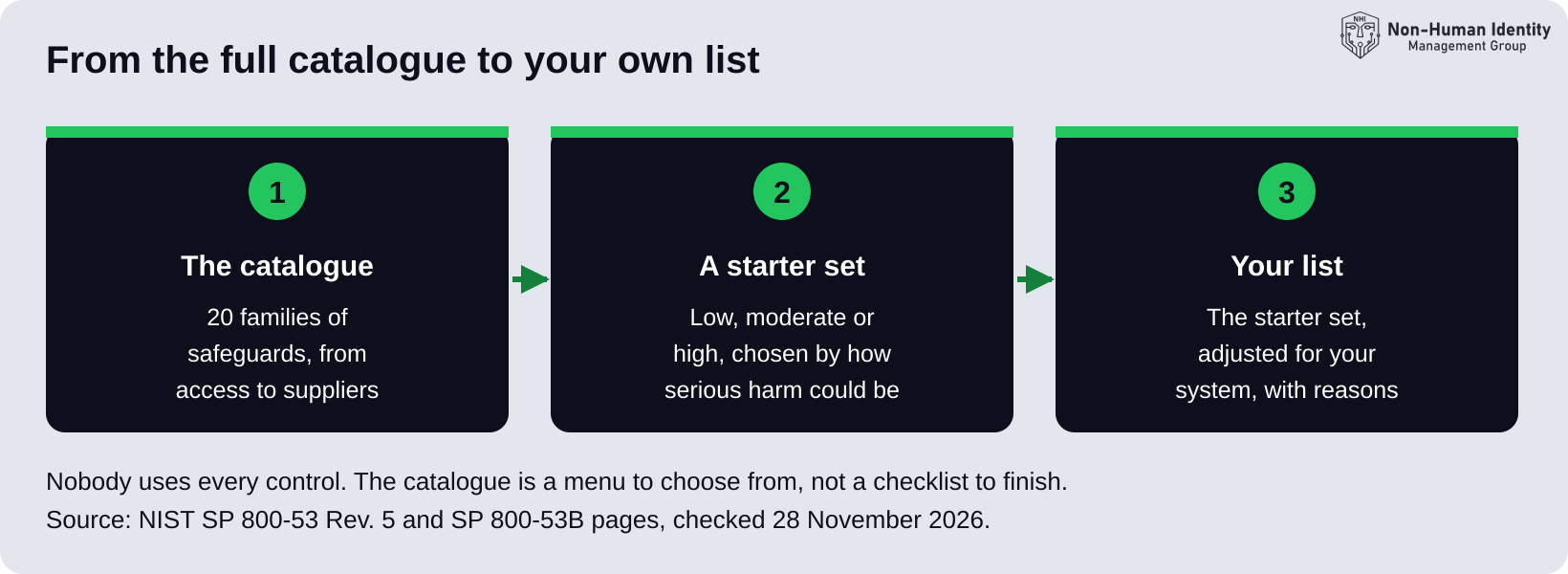
- It is a long list of possible safeguards, called controls, sorted into 20 groups.
- Nobody uses every control. You start from a ready-made starter set and adjust it.
- The starter set depends on how much harm a problem with the system could cause.
- Teams then put the controls in place, check they work and keep reviewing them.
What you will learn
- Explain what NIST SP 800-53 is in one sentence.
- Spot the difference between the full catalogue and a starter set.
- Explain how a team goes from a system to its own list of controls.
- Ask useful questions when a customer or auditor mentions 800-53.
Status: correct as at 28 November 2026, based on the NIST Computer Security Resource Center page for SP 800-53 Revision 5 (Release 5.2.0). Standards change; check the official text.
This guide explains the topic in general terms and is not legal advice.
- Safeguard (security control)
- one thing you do to protect a system, such as checking who has access.
- Group of safeguards (control family)
- a set of related controls that cover one area, such as sign-in or backups.
- Starter set (control baseline)
- a ready-made list of controls to begin from, picked by how serious harm could be.
What is NIST SP 800-53?
Think of a big catalogue of home safety parts. It lists every lock, alarm, smoke detector and fire door you could fit. Nobody fits all of them, so you pick the ones your home needs.
This catalogue works the same way for computer systems. It comes from the National Institute of Standards and Technology, a US government body. The name 800-53 is simply the document's number in a series of guides.
Each item in the catalogue is a security control (a safeguard). Some controls are technical, like a second step when you sign in. Some are about process, like checking every few months who still has access. Some are about people, like security training.
The controls are sorted into 20 groups, called control families. Examples include access, sign-in, backups, incident handling, staff and suppliers.[1]
Where the comparison stops working: a home safety catalogue is just a shop window. Once a team has chosen its controls from 800-53, it is expected to put them in place, check they work and keep the evidence.
Why does it matter?
US federal agencies use 800-53 for their own systems, and many other organisations borrow it because it is free, detailed and widely known. So its wording turns up in contracts, audits and supplier forms.
If your business sells to US public bodies
What could happen: a customer form asks which 800-53 controls you follow, and you cannot answer.
Check this: ask the customer which starter set or scheme they expect you to meet.
Next: FedRAMP for Beginners
If you are new to a security job
What could happen: colleagues and tools talk in control codes, and you feel lost.
Check this: learn the 20 family names first. The codes make sense after that.
If you manage a team
What could happen: you protect the areas you think of and miss others, such as suppliers or recovery after an outage.
Check this: use the 20 families as a list of areas to ask your team about.
What does it look like?
Every control follows the same pattern. Here is a made-up control card, written in plain words, showing the parts you will meet in the real catalogue.
Example only. All values are made up.
CONTROL CARD (made up for this guide)
Family:      Access                               (1)
Name:        EXAMPLE-00 Account checks            (2)
What to do:  Review who has an account every
             [your choice: e.g. 3 months]         (3)
Background:  Old accounts can be misused.         (4)
Add-ons:     EXAMPLE-00(1) Remove unused
             accounts automatically               (5)
- The family tells you which area the control belongs to.
- The name line shows a two-letter family code, a number and a short name. Here they are made up.
- The main statement says what to achieve. Blanks in square brackets are for your organisation to fill in.
- The background explains why the control exists. It does not add extra rules.
- Add-ons, called control enhancements, make the control stronger where the risk is higher.
Why this is risky: some teams copy the control text but leave the blanks empty. Then nobody knows what to do, or who should do it.
The safer way: fill in each blank, name an owner and write down how you will show the control works.
How does it work?
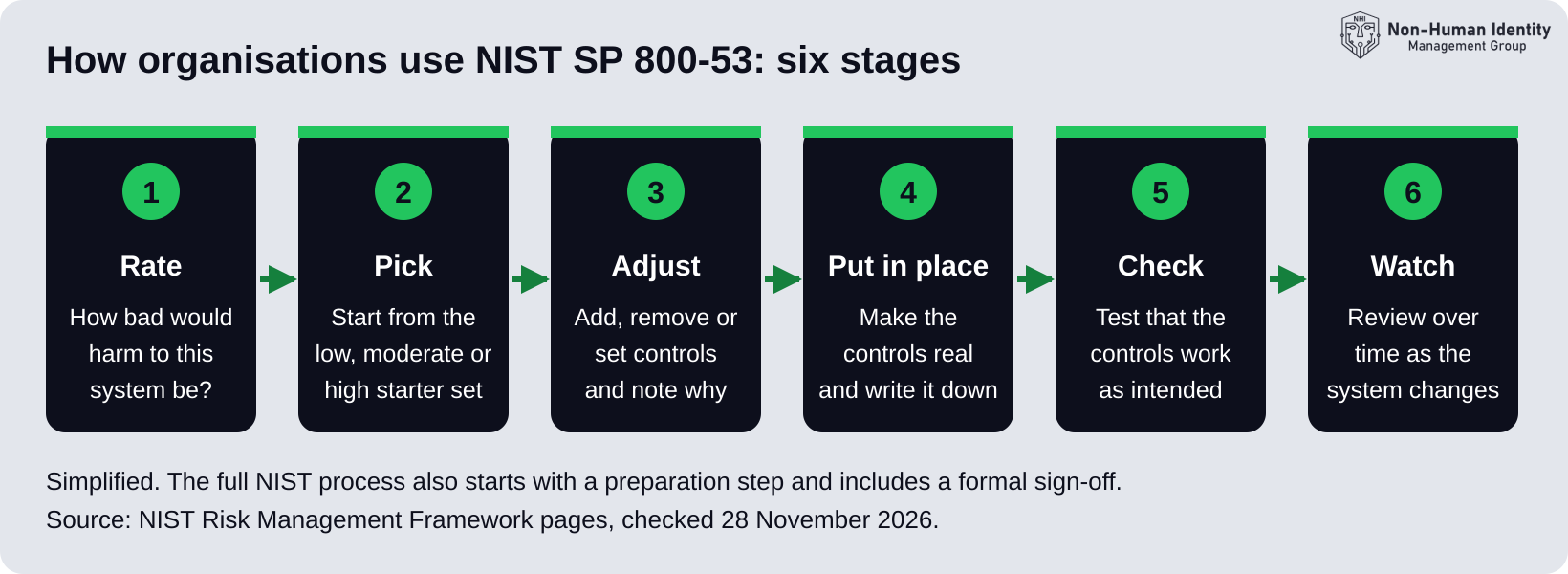
NIST describes a seven-step process for managing risk, called the Risk Management Framework. Its steps are prepare, categorise, select, implement, assess, authorise and monitor.[3] In plain words, it goes like this.
- Rate the system. Ask how bad it would be if its information leaked, was changed or became unavailable. NIST uses these three questions to sort systems by possible harm.[4]
- Pick a starter set. A companion document offers three security starter sets: low, moderate and high. There is one for each level of harm, plus a privacy set for any level.[2]
- Adjust it. Add or remove controls, fill in the blanks and write down why. This is called tailoring.[2]
- Put the controls in place. Describe how each one is met, usually in a system security plan (a document that records what you do and how).
- Check, approve and keep watching. Test that the controls work. A senior person then decides whether the remaining risk is acceptable, and the controls are reviewed over time.[3]
The catalogue is updated from time to time. The current version is Revision 5, and its latest release, 5.2.0, came out on 27 August 2025 with a few new controls.[1]
A worked example
Rhea Weber looks after IT at Willow Catering, a fictional firm with 60 staff. It runs canteens for offices, and one new customer is a US contractor that works for a federal agency.
The customer sends a long form. One question asks, "Which 800-53 controls do you meet?" Rhea has never opened the catalogue.
She calls Cosmin Diallo, a security adviser she has used before. He tells her to think of the safety parts catalogue. Nobody fits every part, so the first job is to find out which ones matter here.
First, Rhea asks the customer which starter set they expect. They say the low set, because Willow only handles staff names, shift times and canteen orders.
Next, Rhea and Cosmin go through the families one by one. For access, they find two former staff who can still sign in to the ordering system, and Rhea removes them. For backups, they confirm the ordering system is copied each night and test a restore. For training, they note that staff have had no security training for two years.
Rhea fills in the blanks, such as how often accounts are checked. She writes down who owns each control and lists the gaps with target dates.
She does not claim Willow is "800-53 certified", because no such certificate exists. Instead, she answers the form with what is in place, what is missing and when it will be fixed. The customer accepts the plan and asks for an update in six months.
Myths and mistakes
| What people think | What is true |
|---|---|
| You must use every control in the catalogue. | It is a menu. Starter sets and tailoring pick the controls that fit the system.[2] |
| You can buy an 800-53 certificate. | There is no 800-53 certificate. Systems are checked and approved through processes such as the Risk Management Framework, and some schemes build on the controls.[3] |
| It is only about technology. | Many families cover people and process, such as staff, training and planning.[1] |
| Privacy needs a separate catalogue. | Revision 5 holds security and privacy controls together, and there is a privacy starter set.[1][2] |
| Once the controls are chosen, the job is done. | The last step is ongoing monitoring. Controls are reviewed as the system and threats change.[3] |
What can I do this week?
- Read the list of 20 family names on the NIST page and note which ones your team already covers.
- Pick one system and ask how bad a leak, a change or an outage would be.
- Ask any customer who mentions 800-53 which starter set or scheme they mean.
- Write one line per family on what you do today and the biggest gap.
Checklist
- We know which version and release of the catalogue we are using.
- Each system in scope has an owner and clear edges.
- Each system has a low, moderate or high rating, with reasons written down.
- We have chosen a starter set and recorded every change we made to it.
- Blanks in the controls, such as how often to review accounts, are filled in.
- Controls provided by a supplier are recorded, with where the evidence comes from.
- Gaps have owners and target dates.
- Controls are checked on a schedule, not only before an audit.
Common questions
Is 800-53 a law?
No, it is a catalogue of safeguards, not a law. US federal agencies use it for their own systems, and contracts can ask for it too. Most other organisations use it by choice, because it is free and detailed. Check your contract to see what applies.
How is it different from the NIST Cybersecurity Framework?
The Cybersecurity Framework describes security goals at a high level for any organisation. The 800-53 catalogue is far more detailed and lists specific controls. Many teams use the framework to plan and 800-53 to fill in the detail. See NIST Cybersecurity Framework for Beginners.
Do small businesses need to use it?
Usually only if a customer or contract asks for it. Even then, you normally work from the low starter set and adjust it. Many small firms also read it for free ideas on topics such as account checks and backups, without adopting it in full.
Does it cover software accounts as well as people?
Yes. The access and sign-in families cover accounts used by programs, and the passwords and keys they use. They are not only about staff. This matters, because many systems hold lots of software accounts, and each one needs an owner and a check.
Where do I find the official text?
On the NIST Computer Security Resource Center website. It publishes the catalogue and its companion documents for free. Check the release number on that page. NIST updates the catalogue from time to time, so older copies may be out of date.
Where next?
Ready for the detail? Read the practitioner guide: NIST SP 800-53 Guide. It goes further into the control codes, each family in turn, enhancements and how the catalogue links to other frameworks.
Also useful:
- NIST SP 800-53B Control Baselines and Tailoring Guide
- NIST 800-53 vs 800-171
- NIST Cybersecurity Framework for Beginners
- Security Controls for Beginners
- FedRAMP for Beginners
Related NHI Mgmt Group resources: NIST SP 800-53 Top 20 Controls · Least Privilege for Beginners · ISO 27001 for Beginners
Key terms
- Security control
- A safeguard that lowers the chance or the harm of something going wrong with a system.
- Control family
- A group of related controls that cover one area, such as access or backups.
- Control enhancement
- An extra step that makes a base control stronger, used where risk is higher.
- Control baseline
- A starter set of controls for a system, chosen by how serious harm could be.
- Tailoring
- Adjusting a starter set of controls to fit a system, and writing down the reasons.
- System security plan
- A document that describes how the chosen controls are put in place for a system.
- Risk Management Framework
- NIST's step-by-step process for choosing, using and checking security and privacy controls.
Sources and further reading
- SP 800-53 Rev. 5, Security and Privacy Controls for Information Systems and Organizations. NIST, September 2020, updated 10 December 2020; Release 5.2.0, 27 August 2025. https://csrc.nist.gov/pubs/sp/800/53/r5/upd1/final, accessed 28 Nov 2026.
- SP 800-53B, Control Baselines for Information Systems and Organizations. NIST, September 2020, updated December 2020. https://csrc.nist.gov/pubs/sp/800/53/b/upd1/final, accessed 28 Nov 2026.
- About the RMF. NIST Risk Management project. https://csrc.nist.gov/projects/risk-management/about-rmf, accessed 28 Nov 2026.
- FIPS 199, Standards for Security Categorization of Federal Information and Information Systems. NIST, February 2004. https://csrc.nist.gov/pubs/fips/199/final, accessed 28 Nov 2026.