A security control is any step, rule or tool that lowers the chance or cost of something going wrong.
This guide is for anyone who has heard the word "controls" at work and wants to know what it means. You do not need to be technical to use them: a locked door, a second sign-in step and a backup are all controls.
In short
- A control is a safeguard. It protects your information, your systems or the people who use them.
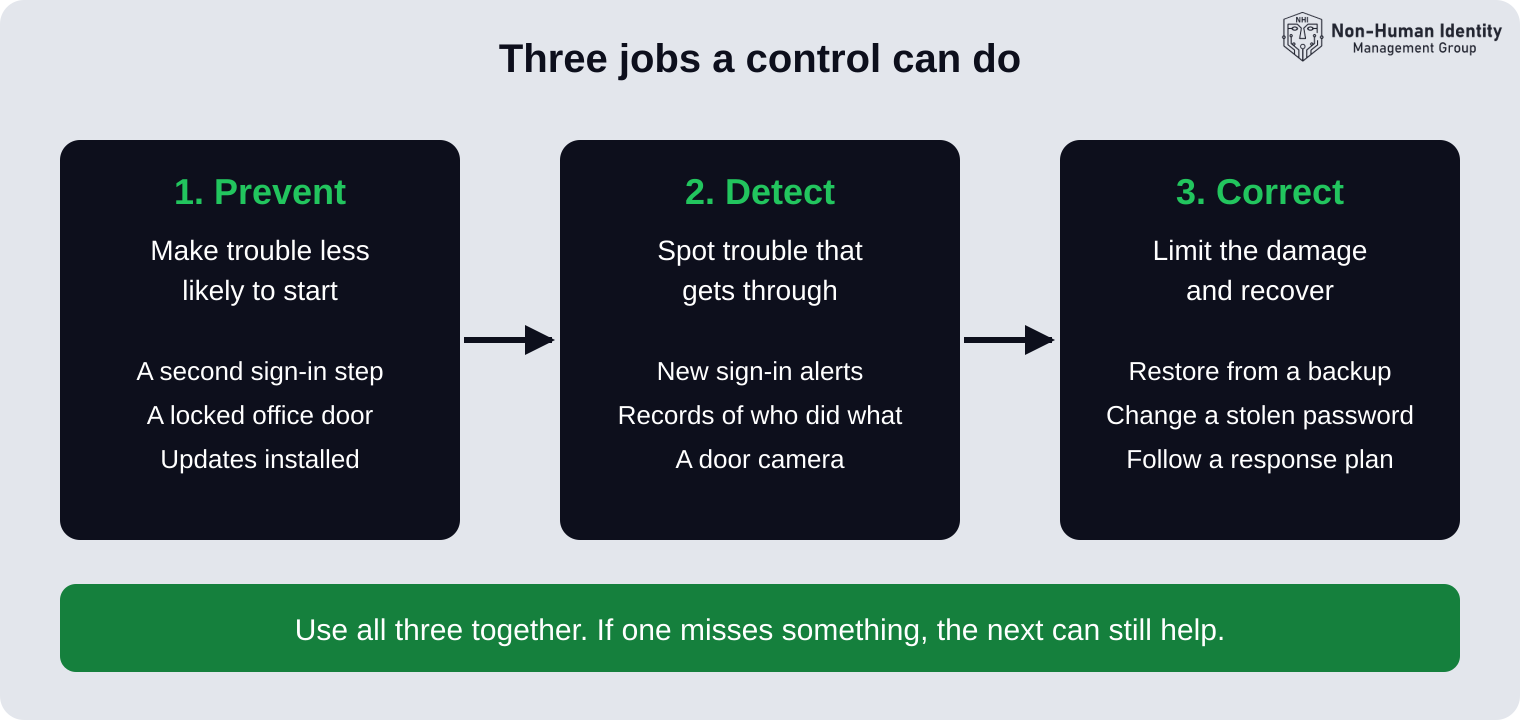
- Controls do three jobs: they help stop trouble starting, spot trouble, or fix things afterwards.
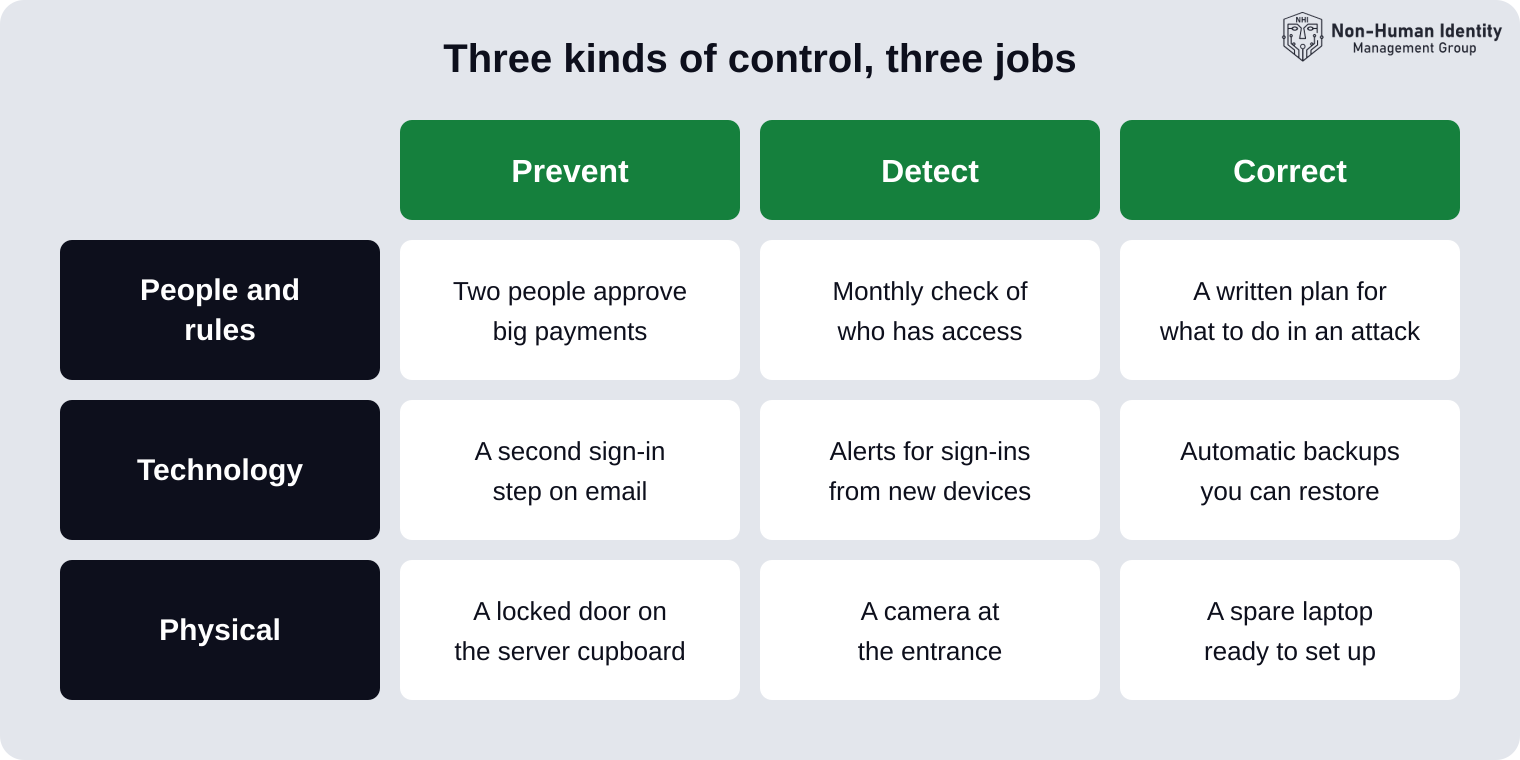
- They also come in three kinds: people and rules, technology, and physical protection.
- No single control covers everything, so good security mixes several jobs and kinds.
What you will learn
- Explain what a security control is in one sentence.
- Sort a control by its job and by its kind.
- Spot a gap where a business has prevention but no way to notice or recover.
- Ask simple questions about the controls at your own workplace.
- Safeguard (security control)
- a step, rule or tool that protects information or systems.
- Stand-in safeguard (compensating control)
- a different control used when the usual one is not possible, giving similar protection.
What is a security control?
Think of the safety features on a car. The seatbelt helps stop injury, the warning lights tell you something is wrong, and the spare tyre gets you moving again. Each one does a different job, and you want all three.
A security control is the same idea for information and computers. A US standards body calls controls safeguards. They keep information private, correct and ready to use.[1] In plain words, a control is anything you set up on purpose to make a problem less likely or less harmful.
Controls can be sorted in two simple ways. The first is by job: does it help stop trouble, spot it, or fix it? The second is by kind: is it a rule people follow, a piece of technology, or something physical like a lock?
Where the comparison stops working: a car's safety features are fitted at the factory and rarely change. Security controls need regular checks, because people, systems and threats keep changing.
Why does it matter?
Every organisation uses controls, often without calling them that. Knowing the types helps you see what is missing. A business with strong locks but no backups is protected from one kind of trouble and exposed to another.
If you run a small business
What could happen: you invest in prevention, but nobody notices a break-in and there is no backup to recover from.
Check this: for each main risk, name one control that helps stop it, one that spots it and one that fixes it.
If you are new to IT or security work
What could happen: you hear "controls" in every meeting and audit but cannot tell how they fit together.
Check this: sort five controls you use each day by job and by kind.
If you manage a team
What could happen: a rule exists on paper, but nobody follows it or checks that it works.
Check this: ask who owns each rule and when it was last checked.
What does it look like?
Here is a made-up control list for a small building firm. Lists like this are often called a control register.
Example only. All values are made up.
# Control register, EXAMPLE Builders Ltd (fake)
Risk: someone gets into the email account
  C-01 Second sign-in step on all email    prevent / technology   (1)
  C-02 Alert on sign-in from a new device  detect  / technology   (2)
  C-03 Steps to reset a stolen account     correct / people+rules (3)
Risk: laptop lost or files locked by an attack
  C-04 Office locked when empty            prevent / physical     (4)
  C-05 Nightly backup, tested each month   correct / technology   (5)
Owner: EXAMPLE-OWNER   Last checked: 0000-00-00
- A preventive control. It makes a stolen password alone less useful.
- A detective control. It warns someone that a sign-in looks unusual.
- A corrective control. It is a written plan, so it belongs to people and rules.
- A physical control. It protects the equipment itself.
- In a real file, this line would also say who runs the test and where the results go.
Why this is risky: the second risk has nothing that detects trouble. If a laptop goes missing, nobody may notice for days. The "last checked" date is also blank, so nobody knows if these controls still work.
The safer way: give each main risk at least one control for each job. Give every control an owner, and record when it was last checked.
How does it work?
Choosing controls usually follows a simple pattern.
- Name what matters. List what you need to protect, such as customer records, email, money and the ability to keep trading.
- Name what could go wrong. For each one, list the likely problems, such as a stolen password, a lost laptop or a virus.
- Pick controls for each job. A widely used US framework includes protecting, detecting, responding and recovering among its main groups of security work.[2] Stop, spot and fix is a simpler way to say the same thing.
- Mix the kinds. US government guidance sorts controls into those carried out mainly by people, those carried out by systems, and those that focus on managing risk.[3][4][5] Physical protection, like locks and cameras, sits alongside these.
- Check they work. Test backups, review who has access and look at the alerts. A control nobody checks can fail quietly.
Placing controls in layers like this is called defence in depth (several separate safeguards, so one failure does not leave you exposed). Sometimes the usual control is not possible, for example an old machine that cannot run a second sign-in step. Then a team may use a compensating control, a different safeguard that gives similar protection, such as keeping that machine on its own network.[6] We suggest writing down why it was chosen and who approved it.
A worked example
Esra Dubois runs Cedarline Builders, a fictional firm with fifteen staff. Her nephew, Kiri Dubois, looks after the office computers part time.
A customer asks Esra what security controls the firm has. She is not sure, so she asks Kiri to help her make a list.
They start with the car picture. What is the seatbelt, what are the warning lights, and where is the spare tyre?
The seatbelts are easy to find. Everyone uses a second sign-in step for email, laptops get updates, and the office is locked at night.
The warning lights are harder. Kiri finds that sign-in alerts go to an old mailbox that nobody reads. He points them to his own inbox instead.
The spare tyre is the biggest gap. The firm has a backup, but nobody has ever tried to restore it. Kiri tests it on a Friday afternoon. Two folders are missing, so he fixes the settings and tests again.
Last, they write a one-page plan for what to do if an account is taken over. It lists who to call and which passwords to change first.
Esra now has a short register with an owner and a "last checked" date for each control. She sends a summary to the customer, and she puts a monthly check in the diary.
Myths and mistakes
| What people think | What is true |
|---|---|
| Controls are just technology. | Rules, training and locked doors are controls too. Technology is only one kind. |
| If we block attacks, we do not need detection. | Prevention can fail. Detection and recovery cover what gets through. |
| A written policy means the control works. | A rule on paper helps only if people follow it and someone checks. |
| More controls always mean more safety. | Controls that annoy people get skipped. Pick the ones that fit your main risks. |
| Backups are a control once they are switched on. | A backup helps only if you can restore from it. Test it. |
What can I do this week?
- List three things your organisation most needs to protect.
- For each one, name a control that helps stop trouble, one that spots it and one that fixes it.
- Ask who owns your backups and when someone last restored from them.
- Check where security alerts go, and that someone reads them.
- Turn on a second sign-in step for your own email if it is not on already.
Checklist
- We have a short list of what matters most and what could go wrong.
- Each main risk has at least one preventive, one detective and one corrective control.
- Our controls include people and rules, technology and physical protection.
- Every control has a named owner.
- Backups are tested by restoring them, on a schedule.
- Security alerts go to someone who reads and acts on them.
- Any stand-in control is written down, approved and reviewed.
- We review the list at least once a year, or after a big change.
Common questions
What are some examples of security safeguards?
Common examples are a second sign-in step, updates, backups, locked doors, staff training and alerts for odd sign-ins. A UK government guide for small firms starts with email, key accounts, devices, backups and spotting attacks. That is a good place to begin.[7]
What is the difference between preventive and detective controls?
A preventive control tries to stop trouble before it starts, like a lock. A detective control spots trouble that has got through, like an alarm. You usually want both. Locks can fail, and the alarm tells you when they have.
Are administrative controls the same as policies?
Mostly, yes. Administrative controls are the rules people follow, such as policies, training, access checks and sign-off steps. Some guides call them management or people controls. They work alongside technology and locks, not instead of them.
What is a compensating control?
It is a stand-in safeguard used when the normal control is not possible. It should give similar protection against the same risk.[6] For example, an old machine that cannot use a second sign-in step might be kept on a separate network and watched more closely.
Where next?
Ready for the detail? Read the practitioner guide: CIA Triad Guide. It goes further into confidentiality, integrity and availability, and how to match controls to each one.
Also useful:
- Defence in Depth Guide
- CIS Controls for Beginners
- Backup Security for Beginners
- Multi-Factor Authentication for Beginners
Related NHI Mgmt Group resources: Measuring security control effectiveness · Common Control Framework Template · Incident Response for Beginners
Key terms
- Security control
- A step, rule or tool that makes unwanted access, misuse or disruption less likely or less harmful.
- Preventive control
- A control that aims to stop a problem before it happens, such as a second sign-in step.
- Detective control
- A control that spots a problem after it starts, such as logs or alerts.
- Corrective control
- A control that limits damage and restores normal working, such as restoring a backup.
- Compensating control
- A different control used in place of the usual one, giving similar protection and recorded and approved.
- Defence in depth
- Using several separate layers of controls so one failure does not leave you exposed.
- CIA triad
- Confidentiality, integrity and availability: the three things controls try to protect.
Sources and further reading
- Security control (glossary entry). NIST Computer Security Resource Center, National Institute of Standards and Technology. https://csrc.nist.gov/glossary/term/security_control, accessed 28 Nov 2026.
- The NIST Cybersecurity Framework (CSF) 2.0, NIST CSWP 29. National Institute of Standards and Technology, 26 February 2024. https://nvlpubs.nist.gov/nistpubs/CSWP/NIST.CSWP.29.pdf, accessed 28 Nov 2026.
- Operational controls (glossary entry, from FIPS 200). NIST Computer Security Resource Center. https://csrc.nist.gov/glossary/term/operational_controls, accessed 28 Nov 2026.
- Technical controls (glossary entry, from FIPS 200). NIST Computer Security Resource Center. https://csrc.nist.gov/glossary/term/technical_controls, accessed 28 Nov 2026.
- Management controls (glossary entry, from FIPS 200). NIST Computer Security Resource Center. https://csrc.nist.gov/glossary/term/management_controls, accessed 28 Nov 2026.
- Compensating security control (glossary entry, from NIST SP 800-30 Rev. 1 and SP 800-39). NIST Computer Security Resource Center. https://csrc.nist.gov/glossary/term/compensating_security_control, accessed 28 Nov 2026.
- Small organisations guide to cyber security. National Cyber Security Centre (UK). https://www.ncsc.gov.uk/collection/small-business-guide, accessed 28 Nov 2026.