osquery is a free tool that lets you ask a computer questions about itself, using a database language called SQL.
This guide is for students and people starting out in a security team who meet osquery in labs or on the job. You do not need to know SQL already. If your business looks after many laptops or servers, osquery is one way to check them all with the same questions.
In short
- osquery shows a computer's details as tables, like a spreadsheet, so you can ask questions about them.
- You ask in SQL, a common language for looking things up in tables.
- It works on Windows, macOS and Linux.
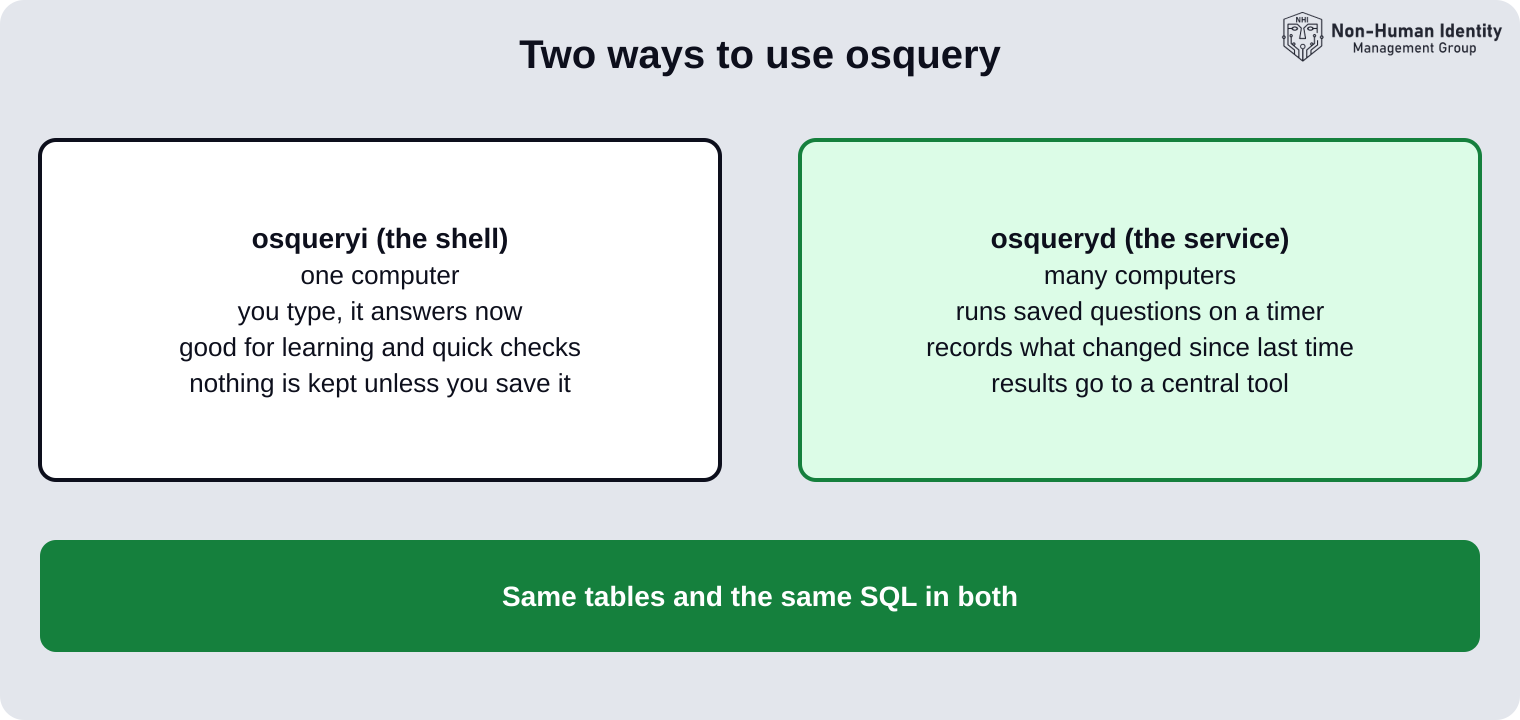
- Use the shell to ask one computer a question now, or the service to ask many computers on a timer.
What you will learn
- Explain what osquery does in one sentence.
- Read a simple osquery question and its answer.
- Spot the difference between the shell and the service.
- Ask sensible questions before osquery runs on work computers.
- Lookup language (SQL)
- a common way to ask for rows from tables, such as "show me every name in this list".
- Table
- information laid out in rows and columns, like a spreadsheet.
- Computer in use (endpoint)
- a laptop, desktop or server that people or programs use.
What is osquery?
Think of a standard questionnaire. You send the same form to every office, and each one fills in the same boxes, so the answers are easy to compare.
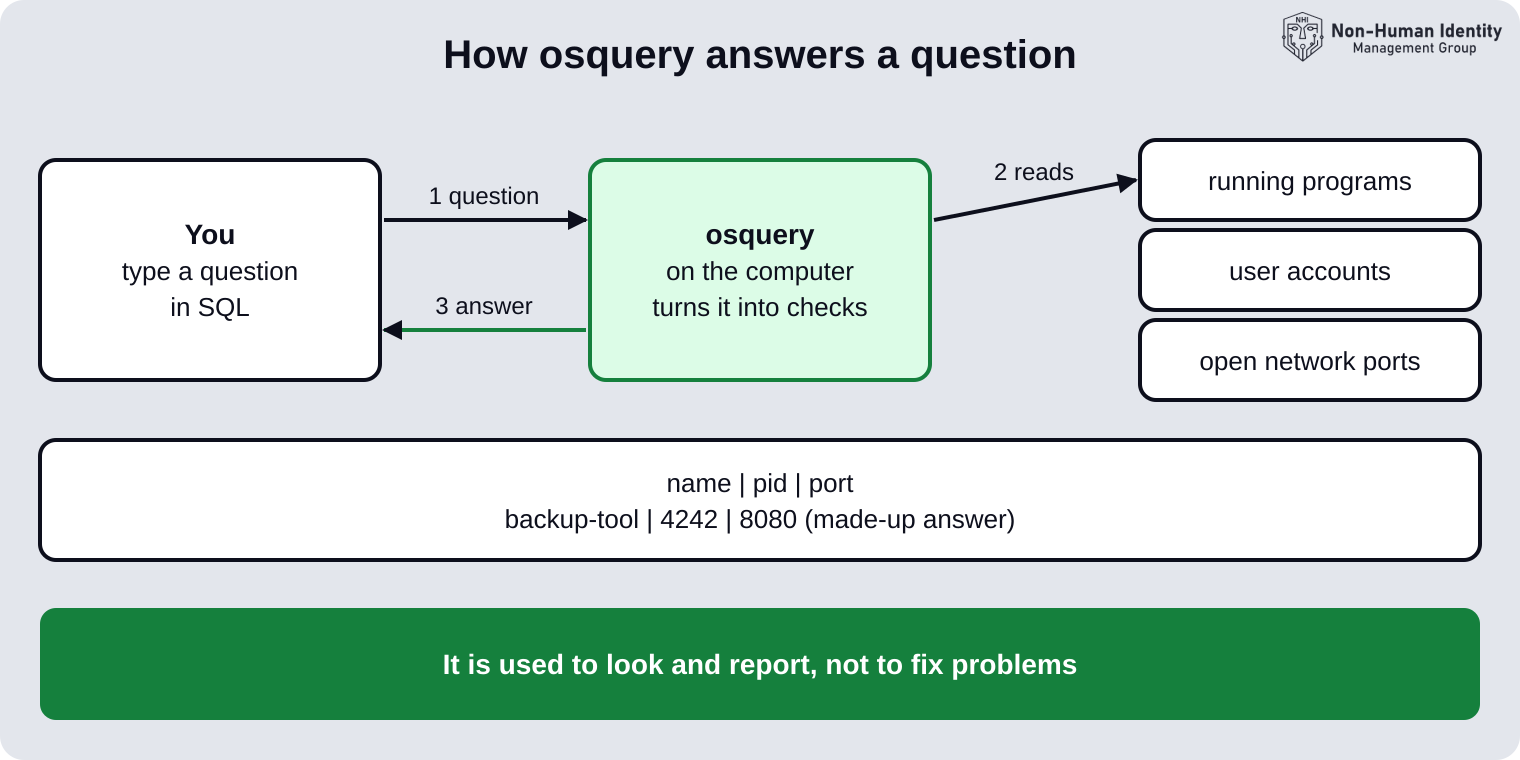
The osquery tool does this for computers. It runs on the computer and shows the system as a set of tables, much like a database.[1] One table lists the programs that are running. Another lists user accounts. Another lists network ports, the numbered doors a program uses to send or receive data.
You ask questions in SQL, a language many people already use to look things up in databases. The project describes itself as SQL-powered operating system instrumentation, monitoring and analytics, available for Linux, macOS and Windows.[2]
Where the comparison stops working: a person fills in a paper form, and may forget or guess. Here the tool reads the answers from the computer itself. It shows what is true at the moment you ask. So it can miss a program that started and stopped in between.
Why does it matter?
Security work often starts with simple questions. What is running on this laptop? Who has an account on this server? osquery lets you ask the same question on many computers and compare the answers.
If you are new to a security team
What could happen: an alert names a laptop, and you do not know how to check what is running on it.
Check this: ask whether your team uses osquery, and where you can practise safely.
If you are a student
What could happen: you copy queries from the internet without knowing what they ask.
Check this: before you run a query, say in plain words what it should return.
If you manage IT for a team
What could happen: scheduled questions run too often and slow staff computers.
Check this: agree which questions run, how often, and who can see the answers.
Next: osquery Guide
What does it look like?
Here is a made-up session in the osquery shell. The question asks which programs are waiting for network connections, and on which port.
Example only. All values are made up.
osquery> SELECT p.name, l.port              (1)
     ...> FROM listening_ports l JOIN processes p  (2)
     ...> USING (pid);                          (3)
name           | port
EXAMPLE-web    | 8080
FAKE-tool-0000 | 4444                           (4)
- Ask for two columns: the program's name and the port number.
- Take them from two tables: open ports, and running programs.
- Match the rows using the process number (pid), which both tables share.
- In a real screen, this line would show a program you may not recognise.
Why this is risky: a program you do not recognise, waiting for connections, may be a sign that something unwanted is on the computer. It may also be harmless. osquery shows you the fact, not the verdict.
The safer way: check unknown names against a list of approved software, and ask the computer's owner before you act. Record the question, the time and the answer, so others can follow your work.
How does it work?
- Install. osquery is installed on each computer you want to ask. Packages exist for Windows, macOS and Linux.[1]
- Explore. In the shell, called
osqueryi, you type.tablesto list the tables and.schemato see a table's columns. The shell works on its own and does not talk to the background service.[3] - Ask. You type a SQL question. osquery reads the computer's current state and returns rows.
- Schedule. For regular checks, the service, called
osqueryd, runs saved questions on a timer you set. The longest gap allowed between runs is one week.[4] - Record changes. By default, after the first run the service logs only what changed, such as a new program added or one removed.[4] These logs can be sent to a central tool for many computers.
Groups of saved questions are called packs. A pack can include a check that decides whether it runs at all, for example only on computers of a certain kind.[4] Teams with many computers often use a fleet manager, a central tool that sends questions out and gathers answers back.
A worked example
Hugo Jovanovic has just joined the IT team at a fictional charity with forty laptops. His manager, Anil Rosen, asks him to learn osquery in a test lab before it goes near staff laptops.
Hugo installs osquery on a spare laptop and opens the shell. Remembering the questionnaire picture, he starts with simple forms. He types .tables and scrolls through the list. Then he asks for every user account. Three rows come back: his own, an admin account and a guest account he did not expect.
He writes the question, the time and the answer in his notes. Anil explains that the guest account came with the laptop's setup, and asks Hugo to check whether the other laptops have one too.
Hugo asks which programs are waiting for network connections. One name he does not know turns up. He searches the approved software list and finds it is the backup tool. He notes that as harmless.
Next, they plan a small schedule. Anil agrees to two saved questions on ten laptops, once an hour: user accounts and listening programs. They check that staff laptops do not slow down. After two weeks, the logs show one new account appearing on a laptop. The owner explains it was set up by a supplier, and it is removed with her agreement.
Hugo now understands the tool's limit, too. It reports facts. People still decide what they mean.
Myths and mistakes
| What people think | What is true |
|---|---|
| osquery is an antivirus. | It is a way to ask questions and record answers. Deciding what is bad is up to people and other tools. |
| You need to be a database expert. | A few simple SQL words take you a long way. Start with one table at a time. |
| The same query works on every computer. | Some tables exist on only one kind of system. Check the table list for the system you are asking. |
| A query shows everything that happened. | Most tables show the state right now. Short-lived programs can be missed between checks. |
| Running queries every few seconds is safest. | Very frequent or heavy queries can slow computers. Test the cost, then pick a sensible timer. |
What can I do this week?
- Install osquery on a spare or test computer, not a work laptop.
- Open the shell and list the tables it can answer questions about.
- Ask three simple questions: running programs, user accounts and listening ports.
- Write each question in plain words next to the SQL.
- Read the practitioner cheat sheet to find more example questions to try.
Checklist
- We practise in a test lab before running osquery on staff computers.
- Every scheduled question has a plain-words purpose written down.
- Timers are tested so computers do not slow down.
- Only named people can send questions and read the answers.
- Answers that matter are saved with the question, the computer and the time.
- We check that a table exists on each kind of system we ask.
Common questions
Is osquery free?
Yes. osquery is open source, and its code is published on GitHub under the Apache 2.0 and GPL 2.0 licences. You can download and use it at no cost. Some companies sell fleet managers and support built around it, which are separate products.
Do I need to know SQL to use osquery?
Only a little. Most beginner questions use a few words: SELECT to pick columns, FROM to pick a table and WHERE to filter rows. You can learn these in an afternoon, then build up by reading example queries.
What is the difference between osqueryi and osqueryd?
osqueryi is the shell. You type a question and get an answer straight away on one computer. osqueryd is the background service. It runs saved questions on a timer and records changes, which suits many computers and long-term checks.
Is osquery the same as EDR?
No, they do different jobs. EDR stands for endpoint detection and response. These tools watch computers for attacks and can act, for example by cutting a laptop off the network. The osquery tool is mainly for asking questions and recording answers. Some teams use both.
Can osquery slow a computer down?
It can, if questions are heavy or run very often. The project offers a tool to measure how much memory and processing power each question uses.[5] Test each scheduled question first, then choose a sensible timer for it.
Where next?
Ready for the detail? Read the practitioner guide: osquery SQL Cheat Sheet. It goes further into which tables answer which investigation question, how to join them, and how to schedule queries in packs without slowing computers.
Also useful:
- osquery Guide
- Open Source Security Monitoring for Beginners
- EDR, XDR and MDR for Beginners
- Cyber Security Home Labs for Beginners
Related NHI Mgmt Group resources: osquery Guide · Open Source SIEM and Detection Tools Landscape Guide · EDR Guide
Key terms
- osquery
- A free tool that shows a computer's details as tables you can ask questions about.
- SQL
- A common language for asking for rows from tables.
- Table
- Information in rows and columns, such as a list of running programs.
- Endpoint
- A laptop, desktop, server or similar device connected to a network.
- osqueryi
- The osquery shell, for asking one computer questions straight away.
- osqueryd
- The osquery background service, which runs saved questions on a timer.
- Pack
- A named group of saved osquery questions that run together.
Sources and further reading
- osquery documentation: welcome. The osquery project. https://osquery.readthedocs.io/en/stable/, accessed 28 Nov 2026.
- osquery repository README and licence files. The osquery project, GitHub. https://github.com/osquery/osquery, accessed 28 Nov 2026.
- Using osqueryi (shell). osquery documentation, the osquery project. https://osquery.readthedocs.io/en/stable/introduction/using-osqueryi/, accessed 28 Nov 2026.
- Configuration. osquery documentation, the osquery project. https://osquery.readthedocs.io/en/stable/deployment/configuration/, accessed 28 Nov 2026.
- Performance safety. osquery documentation, the osquery project. https://osquery.readthedocs.io/en/stable/deployment/performance-safety/, accessed 28 Nov 2026.