Open source security monitoring means using free, openly shared tools to watch computers and networks for signs of attack.
This guide is for students, home lab learners and small businesses who keep hearing names like Wazuh and Security Onion. It explains what these tools do in plain words. If your business has no budget for a paid monitoring service, free tools can help, but only if someone has the time to run them.
In short
- Free monitoring tools collect records of what happens on your computers and network, then raise an alert when something looks wrong.
- Most setups have four parts: collectors, a rules engine, a store and a dashboard.
- Wazuh and Security Onion bundle several parts into one kit. Suricata and Zeek watch network traffic.
- The software is free to download. The real cost is the time to set it up, tune it and read the alerts.
What you will learn
- Explain what an open source monitoring tool does in one sentence.
- Name the four parts most free monitoring setups share.
- Spot the difference between a full kit and a single sensor.
- Ask the right questions before you rely on a free tool.
- Event record (log)
- a short note a computer writes each time something happens, such as a sign-in.
- Warning message (alert)
- a notice the tool raises when a record matches a rule for trouble.
- Helper program (agent)
- a small program on a laptop or server that sends its records to the tool.
What is open source security monitoring?
Think of a flat-pack furniture kit. The plans and parts cost little or nothing, but you build it yourself, and you fix it when a shelf wobbles.
Open source monitoring tools work the same way. Open source means the code is published and free to use under a licence. You download the tools, put them together and keep them running.
Their job is to watch. Computers and network devices write a record, called a log, each time something happens. A monitoring tool gathers these logs in one place. It checks them against rules and raises an alert when something looks like trouble.
Some projects are full kits. Wazuh calls itself a free, open source platform for threat prevention, detection and response.[1] Security Onion calls itself a free and open platform for security monitoring, built by defenders for defenders.[3] Other projects do one job well. Suricata and Zeek watch network traffic.[4][5]
Where the comparison stops working: a flat-pack wardrobe stays built once you finish. A monitoring tool needs care every week, because your computers, the rules and the attacks all change.
Why does it matter?
Many attacks leave traces in logs long before anyone notices the damage. If nobody gathers and reads those logs, the traces are wasted. Free tools let small teams and learners start watching without a big budget.
If you run a small business
What could happen: you install a free tool, nobody reads the alerts, and a break-in goes unseen.
Check this: name the person who will read alerts, and how often.
If you are a student or building a home lab
What could happen: you learn the buttons of one tool but not what the alerts mean.
Check this: for each alert you see, write one line on what caused it.
If you are new to a security team
What could happen: you trust a quiet dashboard, when a key computer has stopped sending logs.
Check this: ask which computers send logs, and how you would know if one stopped.
Next: SIEM for Beginners
What does it look like?
Here is a made-up alert of the kind a free monitoring tool might show for a small office.
Example only. All values are made up.
Alert level:   10 of 15                          (1)
Rule:          Many failed sign-ins, then a success  (2)
Computer:      office-pc-03.example.invalid      (3)
User:          EXAMPLE-user-0000
Source:        192.0.2.10 (test address)
Seen by:       agent on office-pc-03             (4)
- A score showing how serious the rule thinks this is.
- The rule that matched. In a real screen, this line would name the rule in the tool's own words.
- The computer the record came from.
- Which collector saw it: an agent on the computer, or a network sensor.
Why this is risky: an alert like this is only useful if a person reads it soon and checks it. If alerts pile up unread, the tool gives a false sense of safety.
The safer way: agree who reads alerts and how fast. Start with a small number of rules that matter to you. Turn off or tune rules that keep firing for harmless reasons, so real warnings stand out.[6]
How does it work?
Most free monitoring setups follow the same path, even when the names differ.
- Collect. Agents, small helper programs on laptops and servers, send records to a central server. In Wazuh, agents run on Linux, Windows, macOS and other systems.[2]
- Watch the network. A network sensor copies traffic and writes what it sees. Zeek writes detailed records of network activity.[5] Suricata can also match traffic against known attack patterns.[4]
- Check against rules. A rules engine reads each record and raises an alert when a rule matches. The Wazuh server does this with its decoders and rules.[2]
- Store. Alerts and records go into a store, a search engine built for large amounts of text, so you can look back later.[2]
- Show. A dashboard, a web page of charts and lists, shows alerts to a person, who decides what to do.
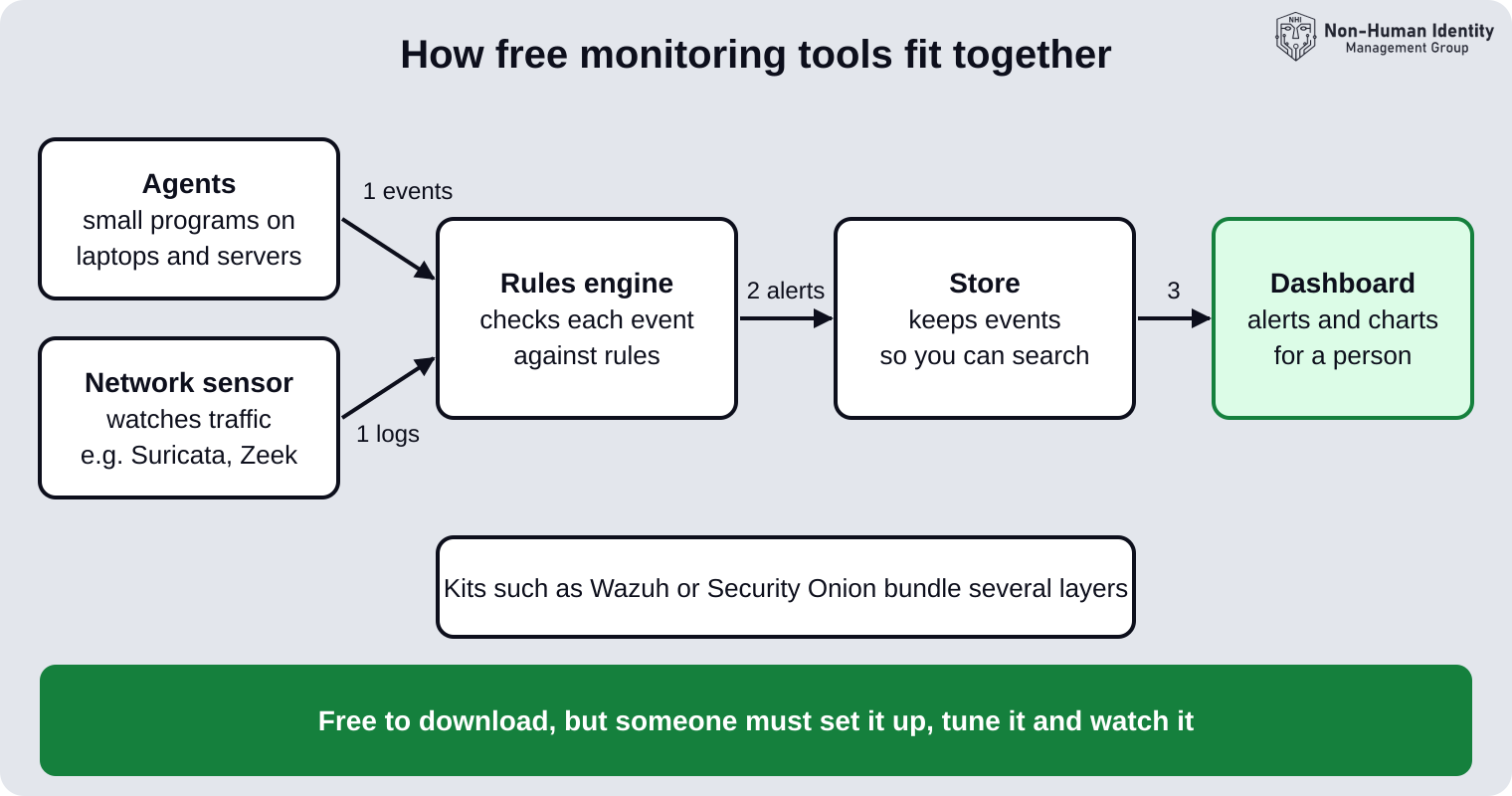
Full kits save you joining the parts yourself. Wazuh has an agent, a server, an indexer (its store) and a dashboard.[2] Security Onion brings network and host visibility, log management and case management (a way to track each investigation) into one platform.[3] Single tools like Suricata or Zeek need somewhere to send their records, such as one of these kits.
Free does not mean free of rules. Each project has its own licence, which says what you may do with the code. Suricata, for example, uses a licence called GPL version 2, which allows free use, including in a business.[4] Check the licence of each part before you build a product or service on it.
A worked example
Nils Pereira runs a small, fictional design studio with eight staff. He has no budget for a paid monitoring service. His friend Mira Dube is studying cyber security and offers to help.
Mira starts in a home lab, on a spare computer at her flat. She installs a full kit with a dashboard, then adds agents to two test laptops. She types a wrong password ten times on purpose. An alert appears on the dashboard. Now she knows what a real warning looks like.
Next, they talk about the studio. Like flat-pack furniture, the parts are free, but somebody has to build them and fix them. Nils agrees to spend one hour each morning reading alerts. Mira writes a short note on what each common alert means.
In the first week, the dashboard shows hundreds of alerts. Most come from a backup tool that signs in again and again. Mira tunes that rule for the backup tool only, and records why. The list drops to a handful a day.
In week three, one laptop stops sending records. Mira had set a rule to warn when an agent goes quiet. They find the laptop had been rebuilt and the agent was not put back.
After a month, Nils decides the hour a day is worth it for now. He agrees with Mira that if the studio grows, they will look at a paid service instead.
Myths and mistakes
| What people think | What is true |
|---|---|
| Open source means it costs nothing. | The download is free. Setup, storage, updates and reading alerts take time and money. |
| Installing the tool means we are protected. | A tool only helps if someone reads and acts on its alerts. |
| More rules means better security. | Too many noisy alerts hide the real ones. Start small and tune.[6] |
| A quiet dashboard means nothing is happening. | It can also mean a computer has stopped sending records. Check that logs keep arriving. |
| Every open source tool has the same licence. | Licences differ. Check each one before using it in a product. |
What can I do this week?
- Write down which computers and devices you would most want to watch.
- Decide who will read alerts, and how often.
- Try a full kit in a home lab on spare hardware before using it at work.
- Read the licence page for each tool you plan to use.
Checklist
- We know which computers and devices send records to the tool.
- A named person reads alerts on an agreed schedule.
- We get a warning if a computer stops sending records.
- Noisy rules are tuned, and each change is written down with a reason.
- The monitoring server itself is updated and protected with strong passwords.
- We have checked the licence of each tool we use.
- We have a plan for what to do when a serious alert appears.
Common questions
Which free monitoring tool should a beginner start with?
A full kit is usually easiest, because it brings the collectors, store and dashboard together. Wazuh and Security Onion are both well known. Try one in a home lab first, and pick the one whose guides you find clearest.
Is Wazuh a SIEM?
Partly, yes. Wazuh describes itself as a platform that combines security information and event management (SIEM) features with detection and response on computers. It gathers logs, checks them against rules and shows alerts, which is the core of what a SIEM does.
Can a small business rely on free tools?
It can, if someone has the time and skills to run them. The tools need setting up, updating and tuning, and alerts need reading every day. If nobody can do that, a paid managed service may be safer.
What is the difference between Suricata and Zeek?
Both watch network traffic. Suricata can match traffic against known attack patterns and raise alerts, and can also block traffic in some setups. Zeek mainly writes detailed records of what happened on the network, for people and other tools to search.
Do I need a powerful computer to try these tools?
For a small home lab, a spare computer or a virtual machine is often enough to start. Each project lists its own minimum hardware. A busy business network needs much more storage, so check the project's guidance before going live.
Where next?
Ready for the detail? Read the practitioner guide: Open Source SIEM and Detection Tools Landscape Guide. It goes further into each project's licence, how the layers combine and how to size and harden a deployment.
Also useful:
Related NHI Mgmt Group resources: Wazuh Guide · Security Onion Guide · Suricata IDS Guide · Zeek Network Monitoring Guide
Key terms
- Open source
- Software whose code is published and may be used, changed and shared under its licence.
- Log
- A record a computer or device writes when something happens.
- Agent
- A small program on a computer that collects records and sends them to a central tool.
- Alert
- A warning the tool raises when a record matches a rule for possible trouble.
- SIEM
- A system that gathers logs from many places, checks them and shows alerts in one view.
- Network sensor
- A tool that watches network traffic and writes records or alerts about it.
- False positive
- An alert for something that turns out to be harmless.
Sources and further reading
- Getting started with Wazuh. Wazuh documentation, Wazuh Inc. https://documentation.wazuh.com/current/getting-started/index.html, accessed 28 Nov 2026.
- Components. Wazuh documentation, Wazuh Inc. https://documentation.wazuh.com/current/getting-started/components/index.html, accessed 28 Nov 2026.
- About Security Onion. Security Onion documentation, Security Onion Solutions. https://docs.securityonion.net/en/2.4/about.html, accessed 28 Nov 2026.
- What is Suricata. Suricata user guide, Open Information Security Foundation (OISF). https://docs.suricata.io/en/latest/what-is-suricata.html, accessed 28 Nov 2026.
- Zeek: the open source network monitor. The Zeek Project. https://zeek.org/, accessed 28 Nov 2026.
- Detection practices. Building a Security Operations Centre, National Cyber Security Centre (UK). https://www.ncsc.gov.uk/collection/building-a-security-operations-centre/detection/detection-practices, accessed 28 Nov 2026.