Password reset security means making sure only the real account owner can use "forgot password".
This guide is for students, new developers and anyone who runs a website with user accounts. You do not need to write code to be affected: if your site lets people reset a password, that reset page is a second way into every account.
In short
- A reset page lets someone in without the old password, so it needs as much care as the sign-in page.
- Show the same message whether or not an account exists, so the page does not tell strangers who has an account.
- A reset link should hold a long, random, one-use code that expires, and it should point only to your own site.
- After a reset, tell the user, ask them to sign in again and end their other sessions.
What you will learn
- Explain the two halves of a forgot-password flow.
- Spot a reset message that gives away who has an account.
- Check what makes a reset link safe to send.
- Ask your developer or supplier the right questions about resets.
- One-use code (reset token)
- a long random code in a reset link that proves the email reached the owner.
- Checking who has an account (account enumeration)
- using a site's replies to find out which email addresses have accounts.
What is password reset security?
Think of a locksmith who posts a spare key to the address on your file. They do not hand it to whoever turns up at the counter. The key opens the door once, and only for a short time.
A forgot-password flow works the same way. The site sends a one-use code, called a reset token, to the email or phone already on the account. Whoever holds the code can choose a new password. So the whole flow rests on one idea: only the real owner should be able to get that code.[4]
The flow has two halves. First, someone asks for a reset. Then they use the code to set a new password.[1] Each half can go wrong in its own way.
Where the comparison stops working: a posted key is easy to see in your hand. A reset link is just text. It can be copied, forwarded or left in an inbox that someone else can read.
Why does it matter?
A weak reset page lets someone take over an account without ever knowing its password. It can also tell strangers which people use your service.
If you are learning to build websites
What could happen: your reset link uses a short or guessable code, and someone guesses their way into another user's account.
Check this: make reset codes long, random, one-use and short-lived.
If you run a site with customer accounts
What could happen: your reset page says "no account found", and scammers use it to check which emails belong to your customers.
Check this: try your own reset page with an unknown email and compare the message.
If you work on a help desk
What could happen: a caller asks you to change the email on an account, then resets the password themselves.
Check this: follow a written check before changing any contact details.
What does it look like?
Here are two made-up replies from a reset page, and the email a safe flow sends.
Example only. All values are made up.
Risky reply:  "No account found for [email protected]"     (1)
Safer reply:  "If an account exists for that address,
               we have sent a reset link."               (2)

Email to the address on file:
  Reset your password:
  https://shop.example.com/reset?code=EXAMPLE-0000-FAKE  (3)
  This link works once and expires soon.                (4)
  Did not ask for this? You can ignore this email.      (5)
- This reply tells anyone who types an email whether that person has an account.
- The same reply is shown for every request, so it gives nothing away.
- In a real email, this line would contain a long random code, and the link would point only to the site's own address.
- The code can be used once and is set to expire after a short time.
- A calm note for people who did not ask for a reset.
Why this is risky: the first reply turns the reset page into a free lookup tool. Different wording, or a slower reply for real accounts, can give the same thing away.[2]
The safer way: show one message for every request and keep reply times the same. Send the link only to the email already on the account.[1]
How does it work?
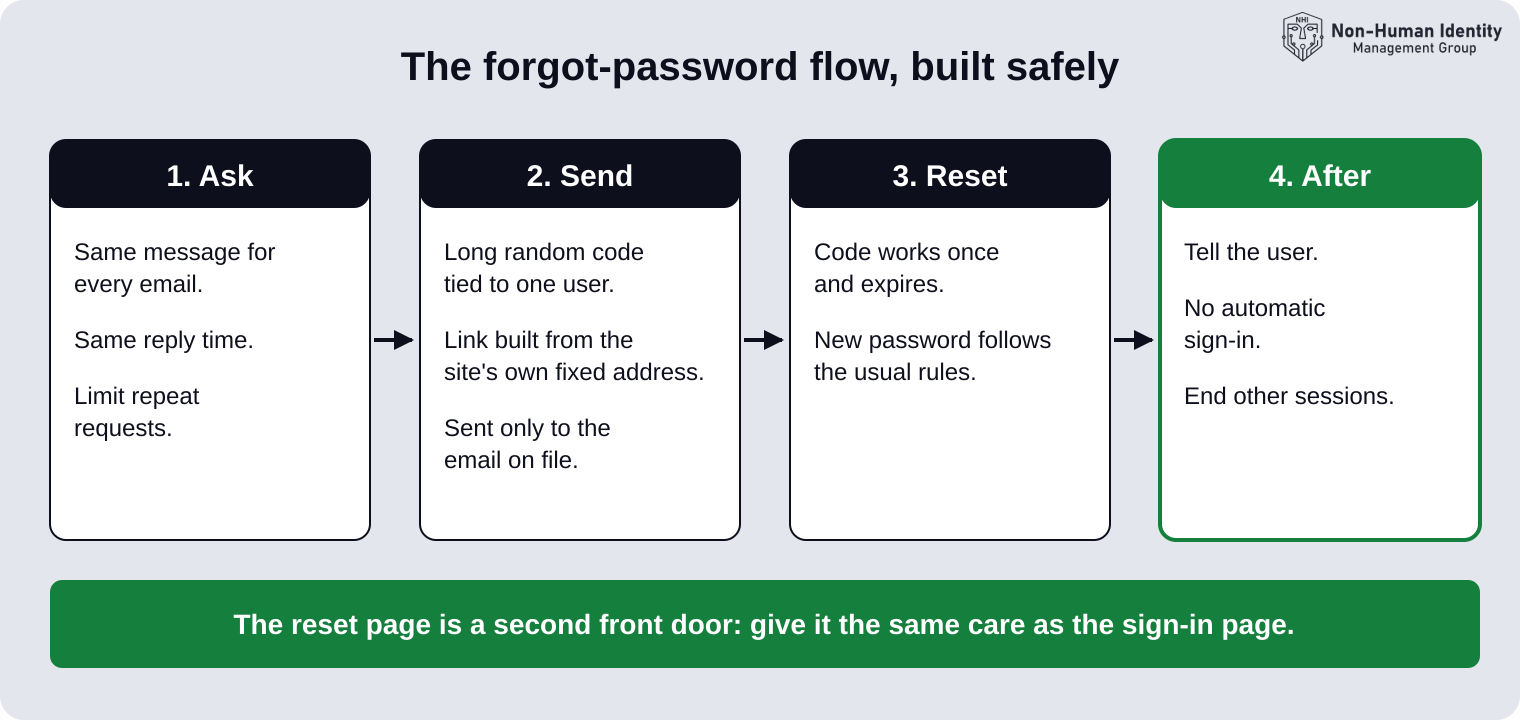
A safe forgot-password flow has a few checks at each step.
- The request. The user types their email. The site shows the same message and takes the same time, whether or not the account exists. It limits how many requests one person or account can make, so nobody can flood an inbox.[1]
- The code. The site makes a long random code with a secure generator. It ties the code to one user, stores it safely and sets it to expire.[1]
- The link. The site builds the link from its own fixed web address. It never takes the address from details in the incoming request, which someone could change to point the link at their own site.[1][4]
- The reset. The user opens the link and chooses a new password, which must follow the site's usual password rules. The site then marks the code as used, so it cannot be used again.[1]
- The clean-up. The site emails the user to confirm the change, without the password in it. It asks them to sign in as normal, and ends or offers to end their other sessions.[1]
Short codes need short lives. A US government digital identity guide sets time limits for recovery codes. A code sent by text or voice should last at most 10 minutes. One sent by email should last at most 24 hours. It also says the account owner should be told whenever an account is recovered.[3]
A worked example
Umar Vance is a junior developer at Velvet Recruitment, a fictional job agency. Candidates sign in to its website to upload their CVs. His manager, Wanda Novak, asks him to review the forgot-password page before a busy hiring season.
Umar types a made-up email into the reset form. The page replies: "No account found." He types his own email. The page says: "Reset link sent." So anyone could check whether a person is looking for work through the agency.
He thinks of the locksmith. The locksmith never tells a stranger who lives at an address. Umar changes the page to show one message for every request. He also makes the slow work, such as sending the email, happen in the background, so both kinds of request take about the same time.
Next he looks at the link. The code is only six digits long and lasts a week. He swaps it for a long random code that works once and expires after an hour. He checks that the link is built from the site's fixed address, not from the incoming request.
Last, he adds a confirmation email after each reset and ends the candidate's other sessions. He does not sign the candidate in automatically.
Wanda adds one more step for the help desk. Nobody changes a candidate's email over the phone without the written check. The fixes take two days, and Umar adds a test so the old message cannot quietly come back.
Myths and mistakes
| What people think | What is true |
|---|---|
| Saying "no account found" is more helpful. | It also helps strangers check who has an account. Use one message for every request.[2] |
| Lock the account after too many reset requests. | That lets anyone lock real users out. Limit requests instead, and change nothing until a valid code is used.[1] |
| Security questions are a good way to reset. | They should not be the only way to reset. If a site uses them at all, the questions need careful choice.[1] |
| After a reset, sign the user straight in. | Ask them to sign in as normal with the new password.[1] |
| A reset link can last for days, to be friendly. | The longer a code lives, the longer a copied link may work. Keep it short and one-use.[1] |
What can I do this week?
- Try your own reset page with a made-up email and check the message matches a real one.
- Ask your developer how long reset links last and whether they work only once.
- Check that users get an email after every password change.
- Write down how your help desk checks a caller before changing an email or phone number.
Checklist
- The reset page shows the same message for every request.
- Reply times do not reveal whether an account exists.
- Reset requests are limited per account and per source.
- Reset codes are long, random, tied to one user, one-use and short-lived.
- Reset links are built from the site's own fixed address.
- Links go only to the email or phone already on the account.
- Users are told after every reset, and other sessions are ended or offered to be ended.
- The help desk follows a written check before changing contact details.
Common questions
What should a forgot-password page say?
Use one neutral message, such as: If an account exists for that address, we have sent a reset link. Show the same words for every request, whether or not the account exists, and keep the reply time the same. That way the page cannot be used to check who has an account.
How long should a password reset link last?
Not long, and only for one use. One US government guide sets limits for recovery codes. It allows at most 24 hours for codes sent by email, and 10 minutes for codes sent by text or voice. Ask for a new link if it has expired.
Why did I get a reset email I did not ask for?
Someone may have typed your email by mistake, or may be testing whether you have an account. If the site is built well, nothing changes until the link is used. Do not click it. If you get many, or you are worried, change your password from the site directly.
Should the user be signed in after a reset?
No, ask them to sign in as normal. The site should also send a confirmation email, without the password, and end or offer to end other sessions. That way, if someone else was signed in, they are pushed out by the change.
Is a six-digit code good enough for a reset?
Only if it is short-lived, sent to the phone or email on file, and the number of guesses is limited. Longer random codes in email links are harder to guess. Whatever you use, it should come from a secure random generator and work only once.
Where next?
Ready for the detail? Read the practitioner guide: Secure Password Reset Flow Guide. It goes further into token storage, reset rules for multi-factor sign-in and how to detect reset abuse.
Also useful:
- Account Enumeration for Beginners
- Account Takeover for Beginners
- Session Tokens and Cookies for Beginners
- Account Recovery and Help Desk Security Guide
Related NHI Mgmt Group resources: Password Security for Beginners · Secure Coding for Beginners · Mass Password Reset Playbook
Key terms
- Account recovery
- The process for getting back into an account when you cannot sign in as normal.
- Reset token
- A long random one-use code in a reset link that lets the holder set a new password.
- User enumeration
- Finding out whether an account exists by comparing a site's replies.
- Rate limiting
- A limit on how many requests someone can make in a set time.
- Account takeover
- When someone else gets into and uses an account that is not theirs.
- Password reset poisoning
- A flaw where a site builds a reset link from details someone can change, so the link points to the wrong site.
Sources and further reading
- Forgot Password Cheat Sheet. OWASP Cheat Sheet Series, OWASP Foundation. https://cheatsheetseries.owasp.org/cheatsheets/Forgot_Password_Cheat_Sheet.html, accessed 28 Nov 2026.
- Authentication Cheat Sheet: authentication and error messages. OWASP Cheat Sheet Series, OWASP Foundation. https://cheatsheetseries.owasp.org/cheatsheets/Authentication_Cheat_Sheet.html, accessed 28 Nov 2026.
- Digital Identity Guidelines: Authentication and Authenticator Management (SP 800-63B-4), account recovery. National Institute of Standards and Technology. https://pages.nist.gov/800-63-4/sp800-63b.html, accessed 28 Nov 2026.
- Password reset poisoning. Web Security Academy, PortSwigger. https://portswigger.net/web-security/host-header/exploiting/password-reset-poisoning, accessed 28 Nov 2026.