Account enumeration is when a website reveals, by accident, whether an account exists for a given email or username.
This guide is for people who run or commission websites with logins, new IT and web staff, and students. You do not need to write code to be affected: if your business has a customer portal, its login and reset pages may be giving this away.
In short
- Some sites answer "no account with that email" on one attempt and "wrong password" on another. That tells a stranger which accounts are real.
- Attackers use that list to focus password guessing and to aim fake emails at real customers.
- Login, sign-up and password reset pages can each leak it, through wording, page behaviour or how long a reply takes.
- Give the same reply whatever the account, and limit how many tries one person can make.
What you will learn
- Explain what account enumeration is in one sentence.
- Spot the messages on a login page that give accounts away.
- Check your own site's login, sign-up and reset pages.
- Ask your web supplier how they handle it.
- Finding out who has an account (account enumeration)
- using a site's replies to learn which emails or usernames are real.
- Limiting tries (rate limiting)
- capping how many attempts someone can make in a set time.
What is account enumeration?
Imagine phoning a gym and asking, "Is Sam Lee a member?" A careful gym says it cannot share that. A careless one says, "Yes, Sam trains here on Tuesdays." Now the caller knows something useful.
Websites can make the same slip. A login page might say "This email is not registered" for one address and "Incorrect password" for another. The second reply confirms the account exists. Repeated over thousands of addresses, this builds a list of real accounts.
Finding that list is called account enumeration, also known as user enumeration. It does not break into anyone's account on its own. It tells an attacker where to aim.
Where the comparison stops working: a gym receptionist would notice the same caller asking about thousands of people. A website may not notice unless someone has set it up to count and limit tries.
Why does it matter?
A list of real accounts makes later attacks quicker and more convincing. Password guessing can skip the fake addresses, and scam emails can target people known to be customers.
If you run a business with a customer portal
What could happen: someone confirms which of your customers have accounts, then sends them a convincing fake login email.
Check this: try your own reset page with a made-up email and a real one, and compare the replies.
Next: Phishing for Beginners
If you are new to IT or web work
What could happen: a helpful error message you write tells attackers which accounts to target with leaked passwords.
Check this: use one message for every failed login, whatever went wrong.
If a service holds sensitive information
What could happen: simply knowing someone has an account, for example with a clinic or a debt adviser, reveals something private about them.
Check this: treat "does this person have an account?" as personal information.
What does it look like?
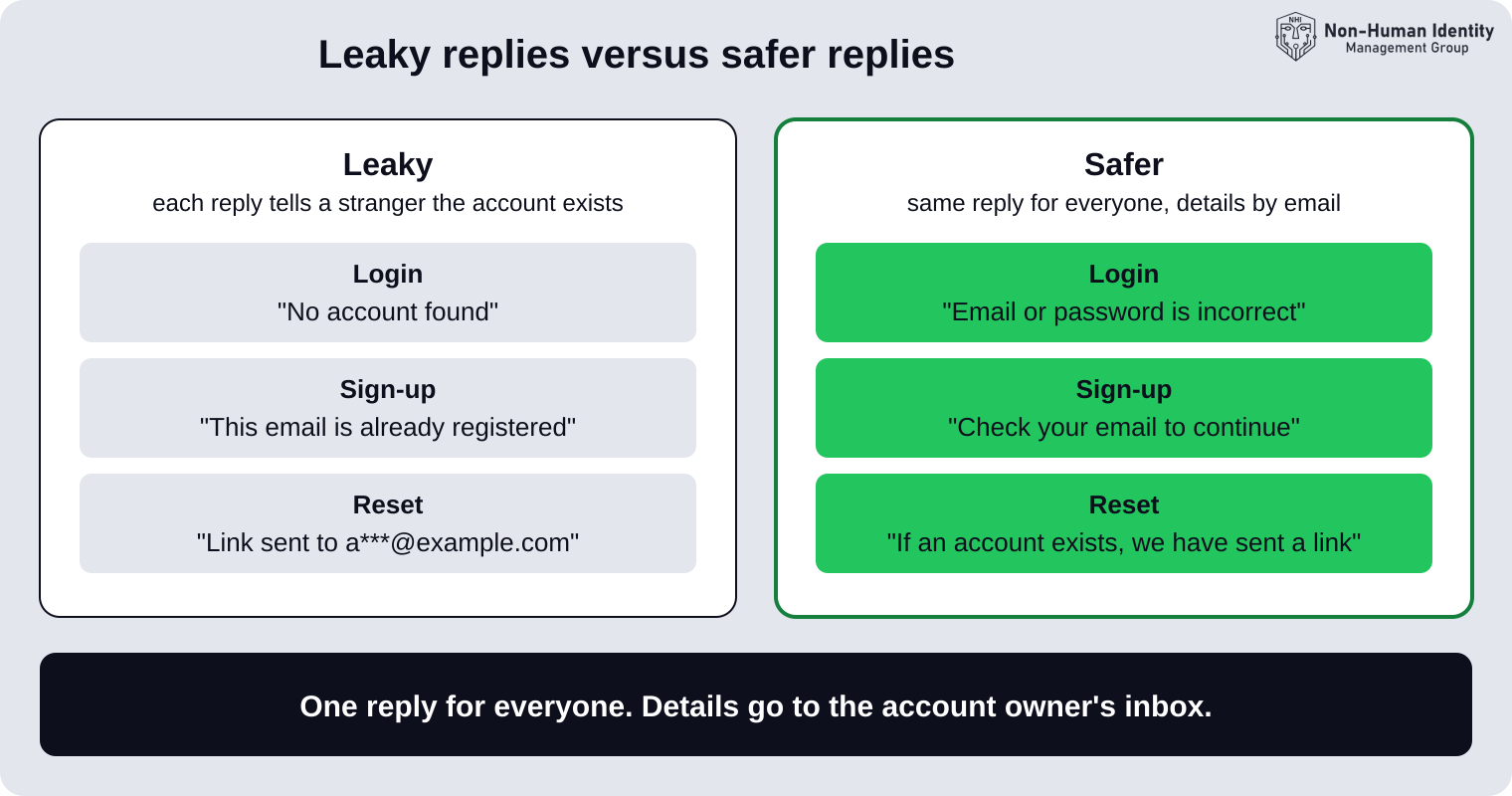
Here are made-up replies from a login page and a reset page. The leaky version is on top.
Example only. All values are made up.
LEAKY
login  [email protected]   -> "No account found for this email."          (1)
login  [email protected]  -> "Incorrect password. Try again."            (2)
reset  [email protected]  -> "Reset link sent to a***@example.com."      (3)

SAFER
login  any email         -> "Email or password is incorrect."           (4)
reset  any email         -> "If an account exists, we have sent a link." (4)
- Tells the visitor this email has no account.
- Tells the visitor this email does have an account. Only the password was wrong.
- Confirms the account and hints at the address. In a real message, this line might show part of a customer's email or phone number.
- The same reply whether or not the account exists, as security guidance recommends.[1]
Why this is risky: comparing the leaky replies sorts real accounts from fake ones.
The safer way: give one reply for every case, and send any details to the account's own email.
How does it work?
- The list. An attacker starts with many email addresses or usernames, often from earlier data leaks.
- The probe. An automated program tries each one on a login, sign-up or reset page.
- The tell. The program looks for any difference: the wording, the page it lands on, or how long the reply takes. Security guidance notes that checking a real account can take longer than rejecting a fake one, which can give it away.[1]
- The sort. Addresses that get the "real account" reply go on a shorter list.
- The next step. That list is used for password guessing, for trying passwords leaked elsewhere, or for scam emails.
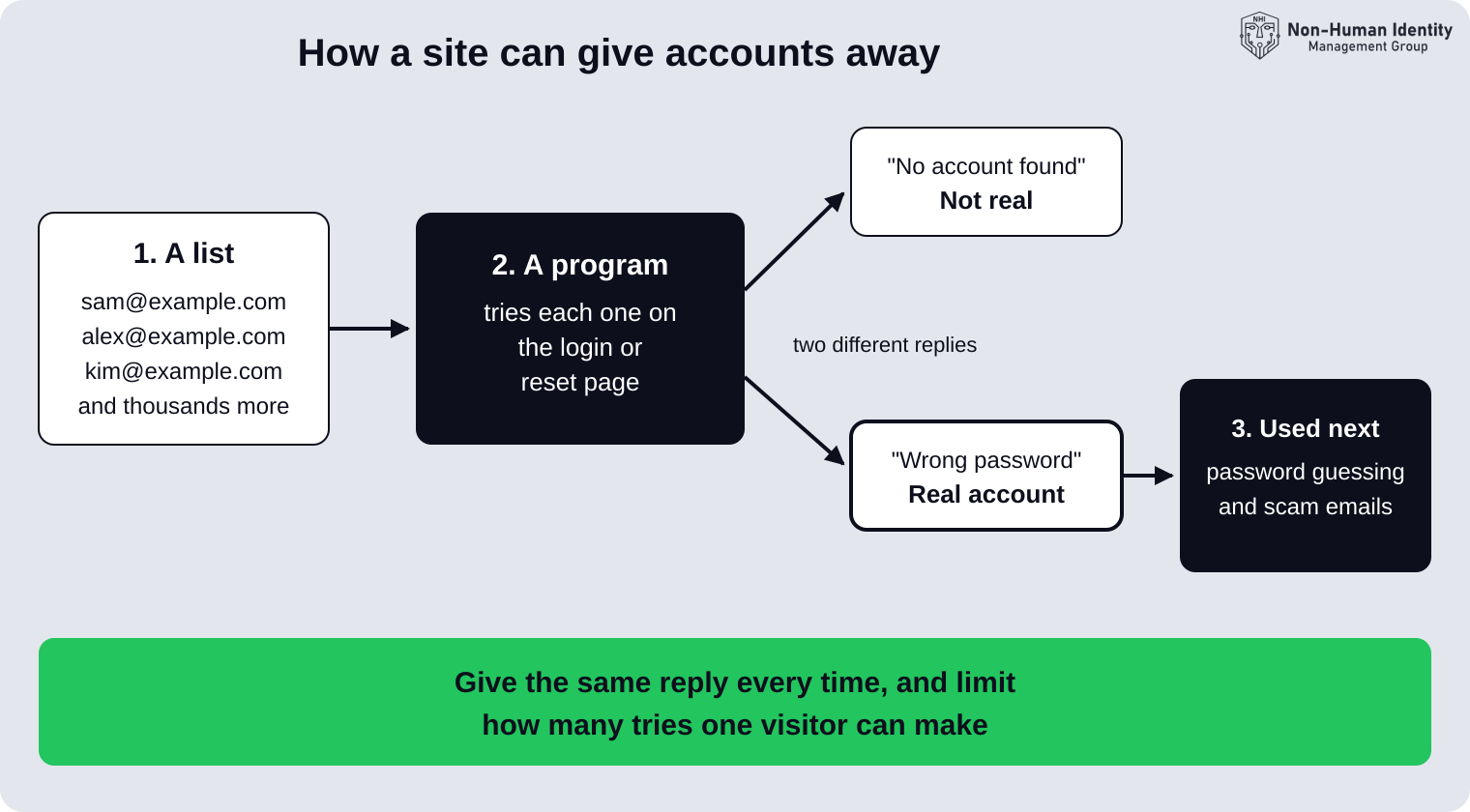
Two things work together to reduce the risk. The first is giving the same reply, in the same time, whatever the account. The second is rate limiting: capping how many attempts one visitor can make. A US government identity standard, for example, requires services to limit repeated failed logins on one account.[2]
There is a trade-off. Vague messages can confuse real customers. Security guidance says the choice can depend on how sensitive the service and its data are.[1] Where a clear message is needed, extra checks such as rate limits and bot challenges matter more.
A worked example
Lars Rosen manages the tenant portal at Alder Lettings, a letting agency. Tenants log in to pay rent and report repairs. A tenant forwards him an email that looks like it came from the portal, asking her to "confirm her login".
Lars wonders how the sender knew she was a tenant. He asks Wren Quist, the agency's web contractor, to look at the portal's public pages.
Wren tries the reset page with a made-up address, and it says no account was found. With her own test account, it says a reset link was sent. The sign-up page also says when an email is already registered. Anyone could use these pages to check whether a person rents from Alder Lettings.
She also checks the portal's records. On several days, there were thousands of reset requests from a small number of internet addresses, each for a different email.
Wren changes the reset page so it gives one reply for every email. Sign-up now asks the visitor to check their email, and any "already registered" note goes to the owner's inbox. She adds a cap on reset and login attempts from one address in a short time.
Lars sends tenants a short note about the fake email and how to reach the real portal. Afterwards, the records show the bursts of reset requests getting blocked by the new limit.
Myths and mistakes
| What people think | What is true |
|---|---|
| Knowing an email has an account is harmless. | It helps attackers aim password guessing and scam emails, and can reveal private facts. |
| Fixing the login message is enough. | Sign-up and password reset pages often leak the same thing.[1] |
| If the words match, nothing leaks. | Differences in page behaviour or reply time can still give it away.[1] |
| Helpful error messages are always better for customers. | Clarity matters, but it can be balanced. Send the detail to the account owner's email instead. |
| A bot challenge solves it. | It slows automated tries. It works best alongside the same-reply rule and rate limits. |
What can I do this week?
- Try your login, sign-up and reset pages with a made-up email and a real test account. Compare the replies.
- Write down any message that differs, and send the list to whoever builds your site.
- Ask whether the site limits how many login and reset attempts one visitor can make.
- Check your records for bursts of failed logins or reset requests.
Checklist
- Login shows one message for any failed attempt.
- Password reset gives the same reply whether or not the account exists.
- Sign-up does not tell the visitor an email is already registered.
- Details such as "you already have an account" go to the owner's inbox.
- Login and reset attempts are rate limited.
- Bursts of failed attempts are logged and someone looks at them.
- The pages are retested after any change to the login system.
Common questions
Is account enumeration a hack?
Not on its own. It uses the site's normal pages and replies. Nobody's account is opened by it. But it gives attackers a list of real accounts, which makes password guessing and targeted scam emails more effective. That is why it is treated as a weakness to fix.
Why do so many sites still say "wrong password"?
Because it helps real customers, who often forget which email they used. Security guidance accepts that this is a trade-off, and that the right choice depends on how sensitive the service is.[1] Where a site keeps clear messages, limits on attempts matter more.
How is this different from credential stuffing?
Enumeration finds which accounts exist. Credential stuffing tries leaked passwords on accounts to get in. Enumeration often comes first, so attackers waste fewer tries on addresses that have no account. See Credential Stuffing for Beginners.
Do passkeys or single sign-on fix this?
They can help, but not automatically. Passkeys remove the password to guess, so a list of accounts is less useful for guessing. The site can still leak which accounts exist through sign-up or reset pages. Test those pages either way. See Passkeys for Beginners.
Can I test my own site for this?
Yes, on sites you own or are allowed to test. Compare the replies for a made-up email and a real test account on each page. Only test systems you have permission for. For a deeper test, ask your web supplier or a security tester.
Where next?
Ready for the detail? Read the practitioner guide: Account Enumeration Prevention Guide. It goes further into making responses identical, sign-up flows that do not disclose accounts, rate limits and bot controls, and how to test.
Also useful:
- Credential Stuffing for Beginners
- Brute-Force Attacks for Beginners
- Rate Limiting for Beginners
- Password Reset Security for Beginners
- Account Takeover for Beginners
Related NHI Mgmt Group resources: Password Spraying and Credential Stuffing Defence Guide · CAPTCHA for Beginners · Bot Management Guide
Key terms
- Account enumeration
- Using a site's replies to find out which emails or usernames have accounts.
- User enumeration
- Another name for account enumeration.
- Rate limiting
- A control that caps how many attempts a caller can make in a set time.
- Credential stuffing
- Trying username and password pairs leaked from one site on other sites.
- Brute force attack
- Guessing passwords over and over until one works.
- CAPTCHA
- A challenge that tries to tell people apart from automated programs, to slow bots down.
Sources and further reading
- Authentication Cheat Sheet (authentication and error messages). OWASP Cheat Sheet Series, OWASP Foundation. https://cheatsheetseries.owasp.org/cheatsheets/Authentication_Cheat_Sheet.html, accessed 28 Nov 2026.
- NIST SP 800-63B-4, Digital Identity Guidelines: Authentication and Authenticator Management, section 3.2.2 Rate Limiting (Throttling). National Institute of Standards and Technology. https://pages.nist.gov/800-63-4/sp800-63b.html, accessed 28 Nov 2026.