Crown jewels are the few systems and pieces of data an organisation could least afford to lose.
This guide is for managers, small business owners and people new to security work. You do not need a technical job to help: the people who know which work matters most are often outside IT.
In short
- Most organisations have a short list of things that, if lost or stolen, would stop the business or cause serious harm.
- Finding them starts with the work, not the technology: ask which tasks must keep going, then what those tasks depend on.
- The hidden helpers count too, such as the admin accounts, backups and suppliers that keep the main system running.
- Once you know your crown jewels, give them the strongest protection and the fastest recovery plan.
What you will learn
- Explain what "crown jewels" means in security.
- Spot the systems and data your own team depends on most.
- Check the hidden things a crown jewel relies on.
- Ask the right people the right questions to build a short list.
- Most precious systems (crown jewels)
- the systems and data whose loss would hurt the organisation most.
- What it relies on (dependency)
- anything a system needs in order to work, such as a server, an account or a supplier.
- List of what you own (asset inventory)
- a record of the devices, software, accounts and data an organisation has.
What are crown jewels?
Think of a museum. It may hold thousands of objects, but only a few get the glass case, the alarm and a guard standing beside them.
In security, crown jewels are those few objects. They are the systems and data an organisation most needs to keep safe and working. For a shop it might be the till and the stock system. For a clinic it might be patient records. For a factory it might be the machines that run the production line.
Security teams use the phrase because no organisation can guard everything equally. One US research group describes the job as finding the systems most important to the work. That way, effort goes where it counts most.[1]
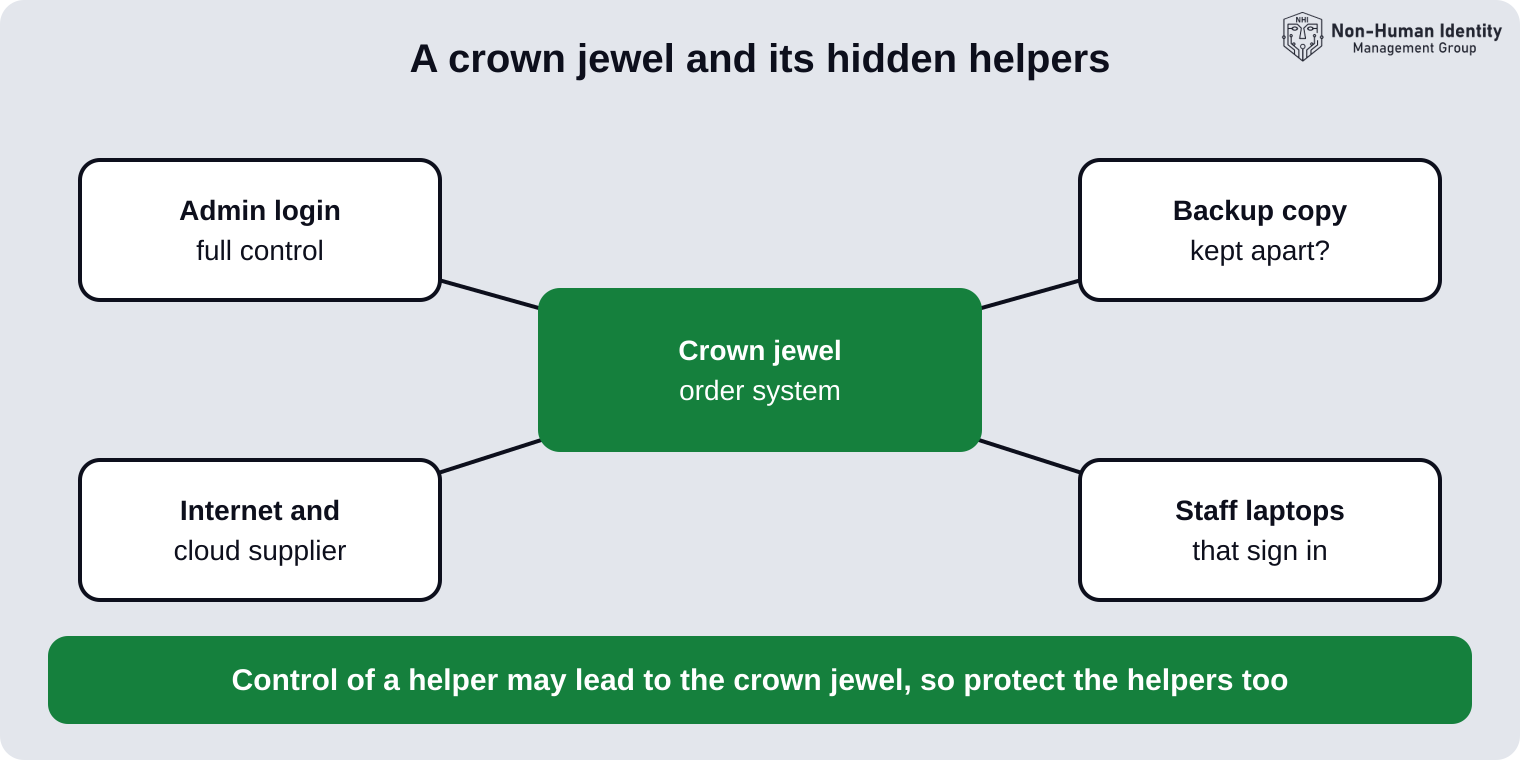
Where the comparison stops working: a museum's treasures sit in one room. Digital crown jewels depend on many hidden helpers, like admin accounts, network links and backups. Guarding the jewel but not its helpers leaves a side door open.
Why does it matter?
Time and money for security are limited. Knowing your crown jewels tells you where to spend them first, and what to bring back first after an attack.
If you run a small business
What could happen: ransomware locks the one system you take orders through, and you have no plan to restore it.
Check this: name the two or three systems you could not trade without for a day.
If you manage a team or department
What could happen: IT protects the systems it thinks matter, but misses the spreadsheet your team cannot work without.
Check this: tell IT which tools and files your team relies on most.
If you are new to security work
What could happen: you spend weeks fixing low-risk problems while a key system has a weak admin password.
Check this: ask your manager for the crown jewels list before you plan your work.
What does it look like?
A crown jewels list can be a short table. Here is a made-up one for a small laundry business.
Example only. All values are made up.
Crown jewels list: Example Laundry Ltd (draft)
Work that must keep going   System or data          Relies on
Taking and tracking orders  Order system (cloud)    Owner login (1), internet link
Paying staff                Payroll file            Finance laptop, backup drive (2)
Collecting payments         Card machine account    Supplier contract (3)
Owner: FAKE-NAME   Reviewed: 00 Month 0000
- In a real file, this line would name the account with full control of the system. Whoever holds it can change or delete everything.
- A backup is only useful if it works and is kept apart from the laptop.
- Some crown jewels sit with a supplier, so the contract and their support line matter too.
Why this is risky: without a list, nobody knows which system to protect or fix first. The helpers in the last column are easy to forget.
The safer way: keep the list short. Give it an owner, and check it when the business changes. The UK's National Cyber Security Centre (NCSC) suggests giving each system a purpose and an owner.[2]
How does it work?
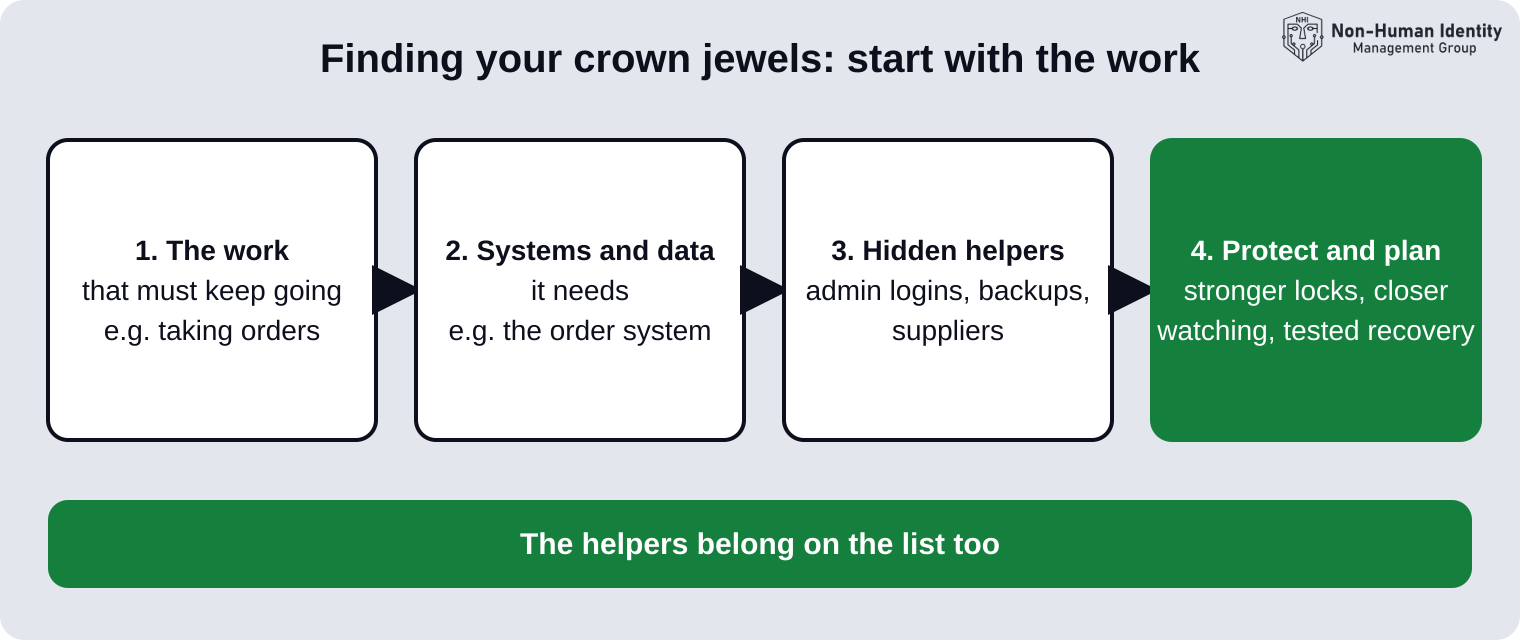
Finding crown jewels is mostly a set of good questions, asked in order.
- Start with the work. List the tasks that must keep going, such as taking orders, paying staff or treating patients.
- Ask what each task needs. Note the systems, data, accounts and suppliers behind each task. The NCSC suggests mapping critical services to the data and technology they depend on.[2]
- Ask what would hurt most. For each item, ask what happens if it stops, leaks or is changed. Security standards describe high value assets in a similar way: information or systems so important that losing them would seriously harm the organisation's work.[3]
- Follow the helpers. Add the admin accounts, backups and links each crown jewel relies on. These belong on the list too.
- Protect and plan. Give the list stronger locks, closer watching and a tested recovery plan. We suggest checking it at least once a year and after big changes.
A worked example
Celia Castell runs Alder Laundry, a fictional business with two shops and a delivery van. She has never thought of her systems as jewels. She just wants to know what to protect first.
Her nephew, Ivo Haddad, has just started a job in IT. He offers to help. He does not start with the computers. Instead he asks Celia a simple question: "If one thing stopped working tomorrow, what would hurt most?"
Celia does not hesitate. "The order system. If it goes down, we do not know whose shirts are whose." Second comes payroll, because her staff must be paid on Friday. Third is the card machine account.
Ivo writes these three down, then asks what each one needs. The order system lives with a cloud supplier. One owner login controls it, and that login uses a password Celia also uses for her personal email. Payroll sits on one laptop, and the backup drive is plugged into that same laptop all the time.
So the list grows to include the helpers. Celia turns on a second sign-in check for the owner login and picks a new, unique password. Ivo sets the backup drive to be unplugged and kept in the other shop. He also writes down the order system supplier's support details on paper.
Six months later, the laptop fails. Payroll is back by Thursday, because the backup was safe. Celia puts a review date on the list for every spring.
Myths and mistakes
| What people think | What is true |
|---|---|
| Everything is a crown jewel. | If everything is top priority, nothing is. Keep the list short. |
| IT can work out the crown jewels alone. | The people who do the work know what matters most. IT knows what it depends on. You need both. |
| Crown jewels are always data, like customer records. | They can be systems that must keep running, such as a till or a production line. |
| Protecting the main system is enough. | Admin accounts, backups and suppliers can be a way in. Protect the helpers too. |
| Once written, the list is done. | Businesses change. A new supplier or system can create a new crown jewel. Review it. |
What can I do this week?
- Ask three colleagues which system they could least work without.
- Write down your top three crown jewels and what each relies on.
- Check who holds the admin login for each one, and whether it has a second sign-in check.
- Ask when each crown jewel's backup was last tested.
- Share the list with whoever handles IT and agree an owner.
Checklist
- We have a short written list of our crown jewels.
- Each crown jewel is linked to the work it supports.
- The helpers each one relies on are listed: admin accounts, backups, links and suppliers.
- Admin logins for crown jewels use a second sign-in check.
- Each crown jewel has a backup that is kept apart and has been tested.
- Each crown jewel has a named owner.
- Supplier support details for crown jewels are stored somewhere you can reach during an outage.
- The list is reviewed at least once a year and after big changes.
Common questions
Why are they called crown jewels?
The name comes from royal treasures, which are few in number and guarded far more closely than anything else. In security it means the small set of systems and data an organisation most needs to protect. Some standards use the phrase high value assets for a similar idea.
How many crown jewels should we have?
Usually only a few. There is no fixed number, but a small business might list three to five. If your list has dozens of items, it probably mixes important systems with useful ones. Ask again which loss would truly stop the work or cause serious harm.
Is this the same as an asset inventory?
No. An asset inventory lists everything you have. A crown jewels list picks out the few items that matter most. You need the inventory first, because you cannot rank what you do not know about. See Asset Inventory for Beginners.
Can accounts be crown jewels?
Yes. An account with full control of a key system can matter as much as the system itself. Whoever holds it can change or delete everything. This includes accounts used by software, called non-human identities (NHIs). List these accounts and protect them closely.
Who should own the crown jewels list?
A senior person who understands the business should own it, with IT helping. We suggest the owner signs off the list and asks for it to be checked when the business changes. Each crown jewel should also have its own named owner.
Where next?
Ready for the detail? Read the practitioner guide: Crown jewels analysis. It goes further into mapping dependencies, scoring impact and choosing controls for the most critical systems.
Also useful:
- Business Impact Analysis for Beginners
- Asset Inventory for Beginners
- Data Classification for Beginners
- Backup Security for Beginners
- Least Privilege for Beginners
Related NHI Mgmt Group resources: Crown jewels analysis · Cyber Risk Management for Beginners · Non-Human Identities for Beginners
Key terms
- Crown jewels
- The few systems and pieces of data an organisation could least afford to lose.
- Asset inventory
- A record of the devices, software, accounts and data an organisation has, and who looks after each.
- Dependency
- Anything a system needs in order to work, such as an account, a network link or a supplier.
- Tier 0 asset
- A system or account that controls many others, so taking it over gives wide control.
- Blast radius
- How much damage could follow if one account or system were taken over.
- Least privilege
- Giving each person or program only the access it needs, and no more.
Sources and further reading
- Crown Jewels Analysis. MITRE, 4 January 2024. https://www.mitre.org/our-impact/intellectual-property/crown-jewels-analysis, accessed 28 Nov 2026.
- 10 Steps to Cyber Security: Asset management. National Cyber Security Centre (UK). https://www.ncsc.gov.uk/collection/10-steps/asset-management, accessed 28 Nov 2026.
- Glossary: high value asset (definitions citing NIST SP 800-160 Vol. 2 Rev. 1 and CISA Secure High Value Assets). NIST Computer Security Resource Center. https://csrc.nist.gov/glossary/term/high_value_asset, accessed 28 Nov 2026.