Photo verification means checking whether a picture is what it claims to be before you trust it.
This guide is for anyone who sees photos online, and for students learning to check sources. You do not need special tools: a phone or a computer with a web browser is enough for the basic checks.
In short
- Many misleading photos are real pictures used with a false story, not clever fakes.
- A reverse image search shows where else a photo has appeared, which can reveal its true age and place.
- Hidden photo details, such as the camera and date, help when present, but sites often remove them.
- No single check is certain, so combine several checks and look for trusted sources.
What you will learn
- Explain the three main ways a photo can mislead.
- Run a reverse image search on a photo.
- Spot warning signs in a post that shares a photo.
- Check a story with trusted sources before you share it.
- Search with a picture (reverse image search)
- a search where you give a photo, not words, and get back pages that show it or similar ones.
- Hidden photo details (metadata)
- extra information stored inside a photo file, such as the camera model and date.
What is photo verification?
Think of checking a banknote you are unsure about. You hold it to the light, feel the paper and compare it with one you trust. No single test settles it, but together they give you a good answer.
Checking a photo works the same way. You look at the picture, find out where else it has appeared and check the story that comes with it.
A photo can mislead in three main ways. It can be edited, with things added or removed. It can be made by AI, so it shows a scene that never happened. Or it can be real but misused: an old photo, or one from another place, shared with a new story.
Where the comparison stops working: banknotes have official security features to check. Most photos have none, so you rely more on where the photo came from and who shared it.
Why does it matter?
Misleading photos can spread fear, push scams and damage people's names. UK government advice asks people to check whether an image looks edited before they share it.[4]
If you use social media
What could happen: you share a dramatic photo that turns out to be from years ago, and friends pass it on.
Check this: run a quick reverse image search before you share anything surprising.
If you buy and sell online
What could happen: a seller's photos of a flat or a car were copied from another listing.
Check this: search the photos. If they appear elsewhere under another name, walk away.
If you are a student
What could happen: a photo in your project turns out to be AI-made or wrongly labelled.
Check this: trace each photo back to its first source, and say where it came from.
What does it look like?
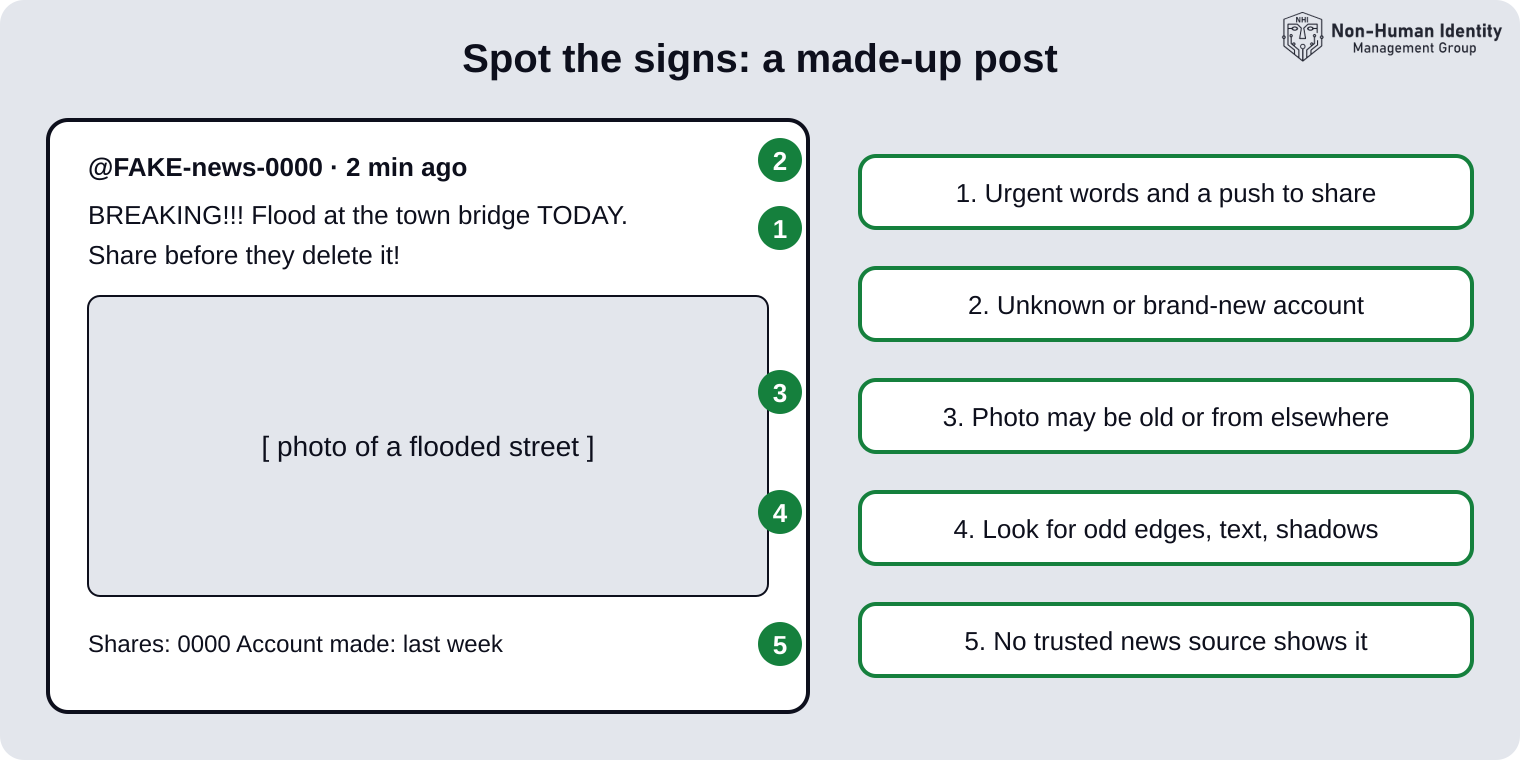
Here is a made-up post with a photo, followed by the details stored in the made-up photo file.
Example only. All values are made up.
@FAKE-news-0000: BREAKING!!! Flood at the town bridge TODAY.   (1)
Share before they delete it!                                    (2)
[photo: flooded street]
Photo details: Camera EXAMPLE-CAM 0000                          (3)
Photo details: Date taken 2019:03:04                            (4)
Photo details: Software EXAMPLE-Editor                          (5)
- A new or unknown account, with urgent words and capital letters.
- A push to share fast, before you have time to think.
- The camera model saved in the file. In a real file, this line would name the real camera.
- The date the camera recorded. Here it is years before "today", which does not fit the story.
- An editing program saved the file. That is common and is not proof of a fake on its own.
Why this is risky: the photo may be real, but the date suggests it is old. The post asks you to share before you check.
The safer way: pause and search the photo. Read its details if there are any. Then look for the story on trusted news sites before you share.
How does it work?
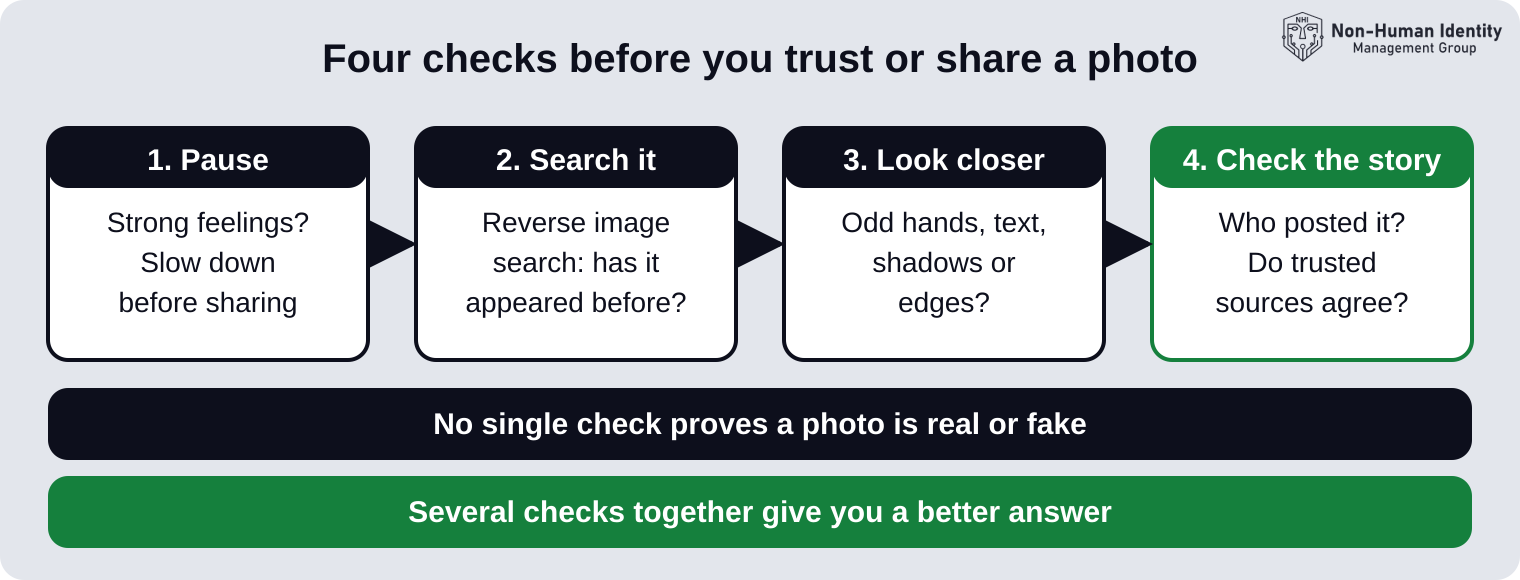
- Pause. If a photo makes you angry, scared or excited, slow down. Strong feelings are what misleading posts aim for.
- Search the photo. Use a reverse image search. Google's version lets you upload a photo or paste its web address, and it shows sites with the same or similar pictures.[1] If the photo appeared years ago, or in another country, the new story is probably wrong.
- Check the hidden details. Photo files can hold metadata (hidden details such as the camera, the date taken, the editing software and sometimes the place).[3] Many sites remove these details when photos are shared, and anyone can change them, so treat them as clues, not proof.[2]
- Look closer. Zoom in on hands, text on signs, shadows, reflections and edges around people. Odd details can be a sign of editing or AI.
- Check the story. Who posted it first? Do trusted news sources or official accounts show the same event?
Tools that claim to spot AI-made pictures can help, but they make mistakes. A US government report says such detectors are not reliable on their own, especially after a picture has been squeezed or resized.[2] Some photos now carry a signed record of how they were made, called content credentials. Our Content Provenance for Beginners page explains them.
A worked example
Pia Pereira is looking for a flat to rent. She finds a bright, cheap one-bed advert on a social media marketplace. The landlord asks for a deposit before any viewing, because he is "abroad for work".
Pia remembers the banknote. One good-looking photo is not enough, so she runs more than one check.
First, she saves one of the flat photos and runs a reverse image search. The same kitchen appears on a holiday rental site in another city, with a different address.
Next, she looks at the photo's hidden details. There are none. Pia knows sites often remove them, so she does not read anything into that.
Then she looks closer at the living room photo. A window shows a view of hills, but the advert says the flat is in the town centre.
Last, she checks the story. The landlord's account is two weeks old and has no other posts. He will not do a video call.
Pia does not pay. She reports the advert to the marketplace and to Report Fraud, the fraud reporting service for England, Wales and Northern Ireland.[5] She tells a friend who is also flat hunting what she spotted.
No single check proved the advert was a scam. Together, the copied photo, the odd view and the new account told her enough to stop.
Myths and mistakes
| What people think | What is true |
|---|---|
| Fake photos are always made by AI. | Many are real photos with a false story, such as an old picture shared as new. |
| If the photo has no hidden details, it is fake. | Many sites remove those details when photos are shared.[2] |
| The date in the details proves when it was taken. | Details can be changed. Treat them as a clue, not proof.[2] |
| An AI detector gives a final answer. | Detectors make mistakes and work best alongside other checks.[2] |
| If a reverse search finds nothing, the photo is genuine. | It may be new or simply not indexed. Keep checking the source and the story. |
What can I do this week?
- Try a reverse image search on a photo you took yourself, so you know how it works.
- Pick a viral photo and trace it back to its first appearance.
- Choose two or three trusted news sources to check surprising stories against.
- Agree a "pause before sharing" rule with family or friends.
Checklist
- I pause before sharing photos that make me feel strongly.
- I run a reverse image search on surprising photos.
- I check whether the photo appeared earlier or somewhere else.
- I treat hidden photo details as clues, not proof.
- I zoom in on hands, text, shadows and edges.
- I check who posted it first and whether trusted sources agree.
- I do not pay a deposit based on photos alone.
Common questions
How do I do a reverse image search on my phone?
Use a search app or your phone's web browser. Google's image search works in common browsers and shows pages with matching or similar images. You can upload a photo or use one from a web page. Other search engines offer similar features, so try more than one.
Can I tell if a photo was made by AI?
Sometimes, but not with certainty. Look for odd hands, warped text and strange shadows, and check where the photo first appeared. Detector tools help but make mistakes. Some AI tools add labels or content credentials, though these can be removed. See Deepfakes and AI Fraud for Beginners.
Is it safe to upload a photo to a reverse image search?
For public photos, it is usually fine. Think twice before uploading private photos of yourself or others, because you are sending them to an outside service. Read the service's privacy notice if you are unsure how long it keeps uploads.
What should I do if I have already shared a fake photo?
Delete or correct your post, and say plainly that the photo was misleading. Most people respect an honest correction. If the photo is part of a scam, report it to the platform. Then report it to Report Fraud in England, Wales and Northern Ireland, or Police Scotland in Scotland.
Where next?
Ready for the detail? Read the practitioner guide: Image Forensics. It goes further into metadata analysis, pixel-level checks, evidence handling and building a repeatable verification workflow.
Also useful:
- Deepfakes and AI Fraud for Beginners
- Content Provenance for Beginners
- AI Image and Video Generators for Beginners
- AI Content Provenance and C2PA Guide
Related NHI Mgmt Group resources: Deepfake and AI Impersonation Guide · Deepfake Awareness Training for Staff · Deepfake-Resistant Identity Verification Guide
Key terms
- Reverse image search
- A search that uses a picture instead of words to find where it, or similar pictures, appear.
- Metadata
- Extra information stored with a file, such as a photo's camera, date and software.
- Deepfake
- A picture, video or voice made or changed with AI so that something looks real when it is not.
- Content credentials
- A signed record attached to a file that describes where it came from and how it was edited.
- Misinformation
- False or misleading information shared without meaning to deceive.
- Disinformation
- False or misleading information made or shared on purpose to deceive.
Sources and further reading
- Search with an image on Google. Google Search Help, Google. https://support.google.com/websearch/answer/1325808?hl=en, accessed 28 Nov 2026.
- NIST AI 100-4: Reducing Risks Posed by Synthetic Content: An Overview of Technical Approaches to Digital Content Transparency. National Institute of Standards and Technology, November 2024. https://nvlpubs.nist.gov/nistpubs/ai/NIST.AI.100-4.pdf, accessed 28 Nov 2026.
- EXIF Tags. ExifTool documentation, Phil Harvey. https://exiftool.org/TagNames/EXIF.html, accessed 28 Nov 2026.
- Government cracks down on spread of false coronavirus information online (SHARE checklist). UK Government, GOV.UK. https://www.gov.uk/government/news/government-cracks-down-on-spread-of-false-coronavirus-information-online, accessed 28 Nov 2026.
- Report Fraud service goes live. Report Fraud, 4 December 2025. https://www.reportfraud.police.uk/news/report-fraud-service-goes-live/, accessed 28 Nov 2026.