A stolen login list is a file of email addresses and passwords that criminals copy, swap and sell.
This guide is for anyone who has seen a headline about "billions of passwords leaked" and wondered if it affects them. You do not need any technical knowledge. If you use the same password in more than one place, or run a small business whose staff do, these lists matter to you.
In short
- Most "billions of passwords" headlines are about huge lists that join together many older leaks, plus logs taken from infected computers.
- Criminals feed these lists into tools that try each password on other websites. This works when people reuse passwords.
- You can check if your email or password appears in known lists with a free checking service.
- Use a different password for each account, keep them in a password manager and turn on a second sign-in step or passkeys.
What you will learn
- Explain the two main kinds of stolen login list in plain words.
- Spot why a big headline number does not mean billions of new victims.
- Check if your own email or password is in a known list.
- Ask your team to stop reusing passwords and turn on extra sign-in checks.
- Password list (combolist)
- a file that pairs email addresses or usernames with passwords, often joined together from older leaks.
- Infected computer record (stealer log)
- a record of saved passwords and other sign-in data, taken from one computer by harmful software.
- Password reuse
- using the same password on more than one account.
What is a stolen login list?
Think of a stolen address book with the door code written next to every name. The thief may never visit most of those homes. But they can sell the book, and the buyer can try each code on each door.
A stolen login list works the same way. Each line holds an email address or username and a password. Some lines also say which website the password was for. Criminals copy these lists, swap them in online groups and sell them.
There are two main kinds. A combolist is a big list built by joining many older leaks together. A stealer log comes from one infected computer. Harmful software, called an infostealer, copies the passwords saved in that computer's web browser and sends them to the criminal.
Where the comparison stops working: a stolen address book is one book. A stolen login list can be copied thousands of times at no cost, so getting every copy back is not realistic. The fix is to change the codes on the doors.
Why does it matter?
If you reuse a password, one leak can open several of your accounts. Criminals use tools that try each line of a list against many websites. This is called credential stuffing.
The lists are huge. In November 2025, the Have I Been Pwned checking service added about 1.96 billion unique email addresses from credential stuffing lists.[2]
If you use the internet at home
What could happen: a password leaked from an old shopping site is tried on your email, and it works.
Check this: look up your email address and your main passwords on a trusted checking service.
If you run a small business
What could happen: a staff member's reused password lets a stranger into your shared email or accounts system.
Check this: turn on a second sign-in step for every staff account that supports it.
If you are new to IT work
What could happen: a user's work laptop is infected, and its saved passwords turn up in a stealer log.
Check this: treat an infected computer as a leak of every password saved on it, and change them.
What does it look like?
Here is a made-up piece of each kind of list. Real lists can run to millions of lines.
Example only. All values are made up.
# part of a combolist (email:password)
[email protected]:FAKE-Sunshine-0000      (1)
[email protected]:EXAMPLE-pass-0000

# part of a stealer log (website:email:password)
https://shop.example.invalid/login:[email protected]:FAKE-Sunshine-0000   (2)
https://bank.example.invalid:[email protected]:FAKE-Sunshine-0000         (3)
- In a real file, this line would contain a person's email address and a password from an older leak.
- In a real file, this line would contain a website, plus the email and password saved for it in a person's browser.
- The same password on a second site. Reuse means one stolen line can open more than one account.
Why this is risky: anyone who buys or downloads the list can try the same email and password on other websites. A stealer log adds the website name, which tells the criminal exactly where to try.[1]
The safer way: give every account its own password, so one stolen line opens only one door. Add a second sign-in step, so a password alone is not enough.
How does it work?
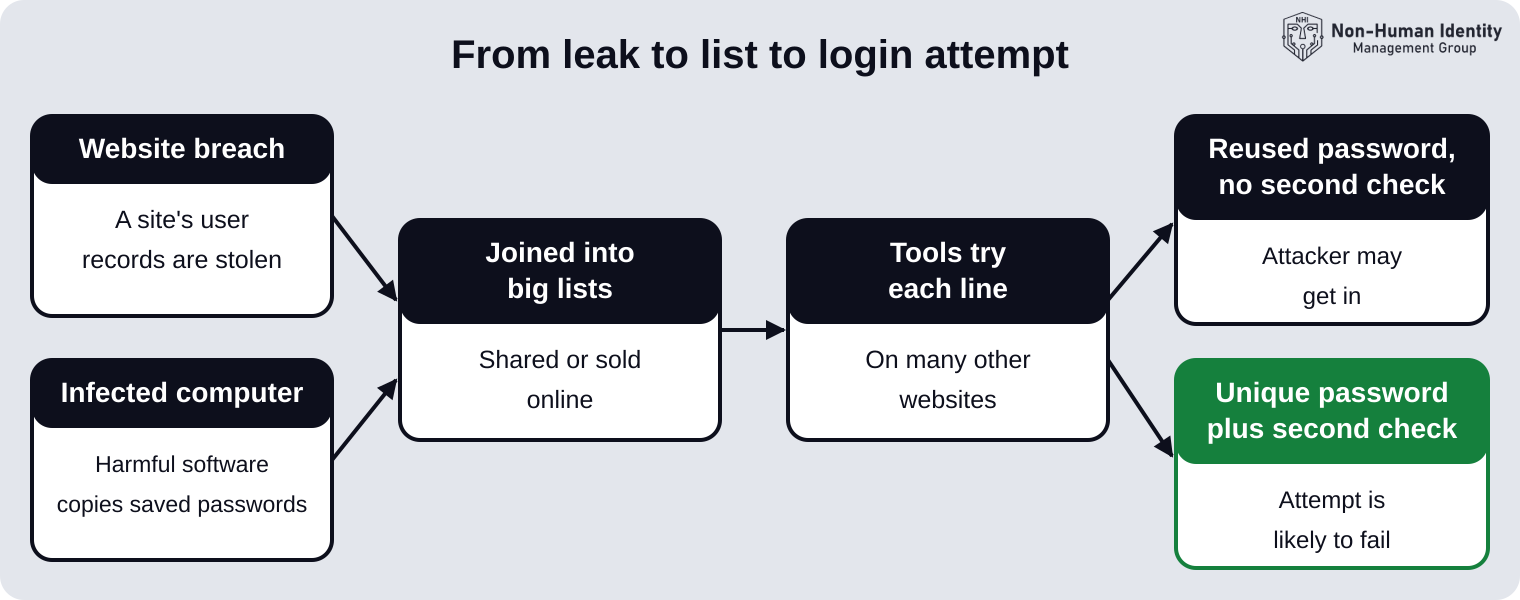
Here is how a password usually travels from a leak to an attack.
- The leak. A website is breached, or a person's computer is infected with an infostealer that copies saved passwords.[1]
- The list. Criminals tidy the stolen data into lists and join many leaks together into larger files.[2]
- The trade. The lists are shared or sold, for example in chat channels. One set of stealer logs studied in 2025 was posted as 744 files on the Telegram chat app.[1]
- The test. Buyers run tools that try each email and password on other websites.
- The takeover. Where a password was reused and there is no second check, the criminal gets in.
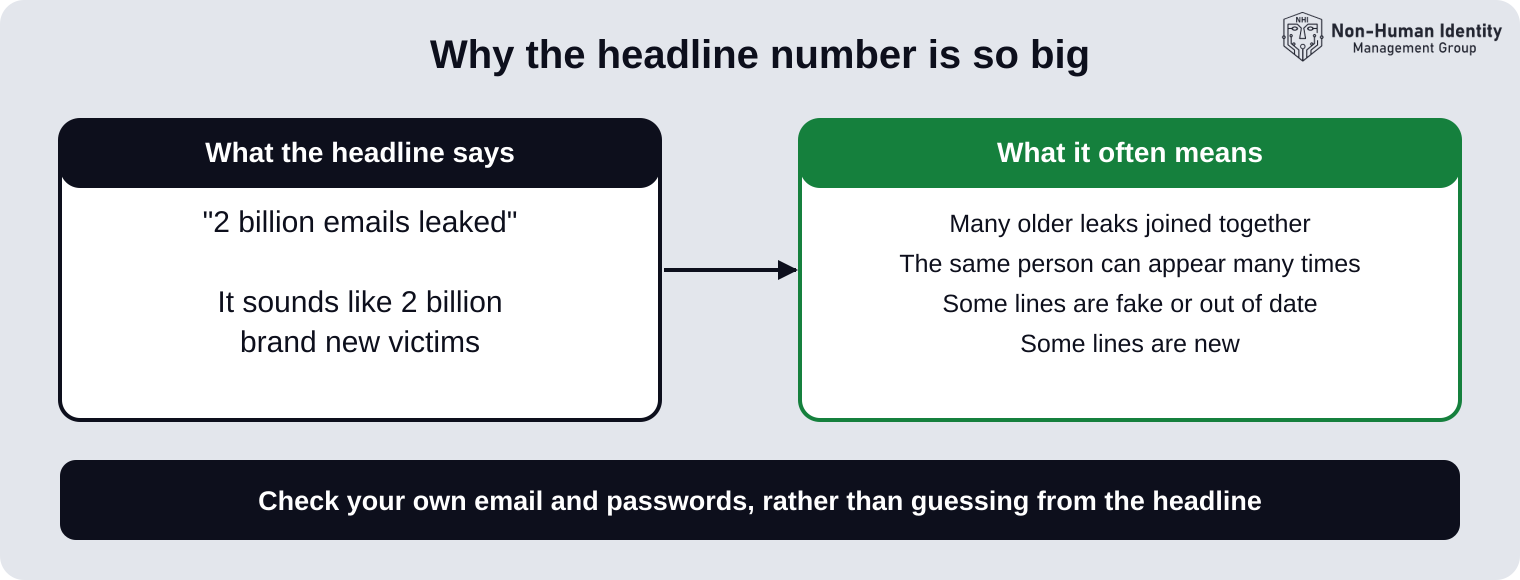
Big numbers in headlines often count lines, not people. The same email can appear many times across different lists. In one 2025 set of stealer logs, 23 billion rows boiled down to about 284 million unique email addresses.[1] That is still a lot of people, so it is worth checking your own accounts.
A worked example
Hugo Varga runs a small, fictional bike repair shop. One morning he reads a headline about two billion leaked email addresses. He is not sure whether to worry.
He remembers the stolen address book. The question is not how big the book is. It is whether his door code is written in it.
He types his work email into a trusted checking service. It shows his address in several old leaks, including a forum he joined years ago. Next, he checks his usual password with the service's password check. It has been seen in leaked data.
Hugo has used that password for his shop email and his parts supplier account. So he changes both, starting with his email, because email is used to reset other accounts. He gives each account its own long password and saves them in a password manager.
His helper, Quinn Pereira, looks after the shop's online booking page. She turns on a second sign-in step for the email, the booking page and the supplier account. She also signs both accounts out of all other devices.
Then Quinn checks the email account's recent activity page. She finds no unknown sign-ins in the records available to her.
The whole check takes about an hour. Hugo now sees the next headline as a reminder to check, rather than a reason to panic.
Myths and mistakes
| What people think | What is true |
|---|---|
| Billions of passwords leaked means billions of new victims. | Big lists often join many older leaks and repeat the same people. Check your own accounts. |
| My password is strong, so a list cannot hurt me. | A strong password still leaks if the website or your computer is breached. Reuse is what spreads the damage. |
| Changing one password fixes it. | Change it everywhere you used it, starting with your email.[3] |
| Only careless people end up on these lists. | Many people appear because a site they trusted was breached. |
| A stealer log only means my passwords leaked. | Infostealers can also take browser data that keeps you signed in, which may get past some second sign-in checks.[5] Sign out of other devices too, and clean the computer. |
What can I do this week?
- Check your main email addresses on a trusted checking service, such as Have I Been Pwned.
- Change any password you have reused, starting with your email account.
- Set up a password manager and let it create a new password for each account.
- Turn on a second sign-in step, or use passkeys, on your email, bank and shopping accounts.
- Be wary of messages about a breach that ask you to click a link or reset a password.[3]
Checklist
- Each important account has its own password.
- Passwords are kept in a password manager, not a notebook or a shared sheet.
- Email, banking and work accounts have a second sign-in step or passkeys turned on.
- You have checked your email addresses against a known breach service.
- Any password seen in a leak has been changed everywhere it was used.
- A computer thought to be infected is cleaned, and the passwords saved on it are changed.
- Staff know how to report a suspicious sign-in alert straight away.
Common questions
How do I know if my password is on a stolen list?
Use a trusted checking service. Have I Been Pwned lets you search an email address, and has a separate check for passwords. Many password managers also warn you about leaked passwords. If a password shows up, change it everywhere you used it.[2]
What is the difference between a combolist and a stealer log?
A combolist is usually built from older website leaks joined together. A stealer log comes from one infected computer and often lists the website next to each password. Stealer logs can be fresher and more exact, so they are often more dangerous.
Should I change all my passwords after a big headline?
Not all at once. Check first, then change any password that appears in a leak or that you have reused. Experts advise against changing passwords on a timer, but say you should change one when there is evidence it has leaked.[4]
Does a second sign-in step help if my password is on a list?
Yes, it helps a lot. With a second step, a stolen password alone is usually not enough to get in. It does not replace changing the leaked password, and some scams try to trick you into giving the second code too.
Can businesses check new passwords against these lists?
Yes. A US government guide on digital identity says systems should compare a new password against a list of values from earlier breaches and refuse matches. Ask your IT supplier whether your sign-in systems do this.[4]
Where next?
Ready for the detail? Read the practitioner guide: Combolists and ULP Files Guide. It goes further into how security teams collect and check these lists, match them to staff accounts and handle the data lawfully.
Also useful:
- Credential Stuffing for Beginners
- Infostealers for Beginners
- Data Breach Alerts for Beginners
- Infostealer Logs Monitoring and Response Guide
Related NHI Mgmt Group resources: Credential Stuffing Attack Response Playbook · Infostealer Logs and Session Token Abuse Guide · Account Takeover Statistics
Key terms
- Combolist
- A compiled list of username and password pairs, often built from leaked data.
- Stealer logs
- Records of passwords and sign-in data taken from infected devices by malware.
- Infostealer
- Harmful software that collects saved passwords, browser cookies and other sign-in data from a computer.
- Credential stuffing
- Trying stolen email and password pairs from earlier leaks on other websites.
- Password reuse
- Using the same password on more than one account, so one leak can open several.
- Password manager
- A tool that creates, stores and fills in a different password for each account.
- Have I Been Pwned
- A free service that lets you check whether an email address or password has appeared in known leaks.
Sources and further reading
- Processing 23 Billion Rows of ALIEN TXTBASE Stealer Logs. Troy Hunt, 26 February 2025. https://www.troyhunt.com/processing-23-billion-rows-of-alien-txtbase-stealer-logs/, accessed 28 Nov 2026.
- 2 Billion Email Addresses Were Exposed, and We Indexed Them All in Have I Been Pwned. Troy Hunt, 5 November 2025. https://troyhunt.com/2-billion-email-addresses-were-exposed-and-we-indexed-them-all-in-have-i-been-pwned, accessed 28 Nov 2026.
- Data breaches: guidance for individuals and families. National Cyber Security Centre (UK). https://www.ncsc.gov.uk/guidance/data-breaches, accessed 28 Nov 2026.
- NIST SP 800-63B-4, Digital Identity Guidelines: Authentication and Authenticator Management, section 3.1.1.2. National Institute of Standards and Technology. https://pages.nist.gov/800-63-4/sp800-63b.html, accessed 28 Nov 2026.
- Steal Web Session Cookie. MITRE ATT&CK, MITRE Corporation, version 1.5. https://attack.mitre.org/techniques/T1539/, accessed 28 Nov 2026.