Public key infrastructure (PKI) is the system that issues and checks digital certificates, so computers can prove who they are.
This guide is for anyone who has seen a certificate warning, or heard the word PKI at work, and wants to know how it fits together. You do not need to be technical to be affected: if your website, email or office Wi-Fi uses certificates, an expired or untrusted one can stop people getting in.
In short
- A digital certificate is an electronic ID card that links a name, like a web address, to a special key.
- A trusted organisation, called a certificate authority, checks the name and signs the certificate.
- Your browser trusts a certificate when the signatures lead back to a signer on its built-in trusted list.
- Certificates expire, and their lifetimes are getting shorter, so keep a list of them and renew them automatically where you can.
What you will learn
- Explain what PKI does in one sentence.
- Spot the parts of a certificate and what each one tells you.
- Explain why your browser trusts some certificates and warns about others.
- Ask who looks after your organisation's certificates and when they expire.
- Electronic ID card (digital certificate)
- a small file that links a name to a key and is signed by someone others trust.
- Trusted signer (certificate authority)
- an organisation that checks names and signs certificates.
- Chain of signatures (chain of trust)
- the line of signed certificates that leads from a website back to a trusted signer.
What is public key infrastructure?
Think of a driving licence. A shop assistant has never met you, but they accept your licence because they trust the office that issued it. They check the photo, the name and the date, not you.
PKI works the same way for computers. When your browser connects to a website, the site shows a digital certificate (an electronic ID card). The certificate names the site and holds its public key, one half of a matched pair of keys. The site keeps the other half, its private key, secret.
A certificate authority, or CA, is the trusted signer. It checks the name and then signs the certificate. Your browser and phone come with a list of signers they trust, called a root store. PKI is the whole set of signers, certificates, lists and rules that makes this work.[1]
Where the comparison stops working: a licence office checks you in person. A public CA usually only checks that whoever asked controls the web address. A certificate shows the site is the one named in the address bar. It does not show that the people behind it are honest.[6]
Why does it matter?
Certificates sit behind the padlock in your browser. They also protect email, Wi-Fi logins and links between programs. When one runs out or is not trusted, people see warnings. Some services may fail to connect.
If you run a small business website
What could happen: your certificate runs out on a weekend. Customers see a scary warning instead of your shop.
Check this: ask your web host if your certificate renews by itself, and who gets the reminders.
If you are new to IT work
What could happen: you are told to "just click past" a warning on an internal system. That is a bad habit to learn.
Check this: find out if your organisation runs its own CA, and how staff devices are set up to trust it.
If you manage a team or a budget
What could happen: nobody owns certificates, so one runs out and a key system goes down.
Check this: ask for a list of your certificates, their owners and their expiry dates.
What does it look like?
If you click the padlock in your browser, you can open the site's certificate. Here is a made-up one, shortened to the parts that matter.
Example only. All values are made up.
Issued to:     shop.example.com                (1)
Issued by:     Example Issuing CA 0000          (2)
Valid from:    1 March 2026
Valid until:   30 May 2026                      (3)
Public key:    EXAMPLE-PUBLIC-KEY-0000-FAKE     (4)
Chain:         Example Root CA 0000             (5)
                 > Example Issuing CA 0000
                   > shop.example.com
- The name the certificate covers. Your browser checks it matches the address you typed.
- The CA that signed it. Here it is a middle signer, called an intermediate, not the top one.
- The end date. After this, browsers show a warning.
- This is where the site's public key goes. The matching private key is not part of the certificate.
- The chain. Each line is signed by the one above it, up to a root.
Why this is risky: every certificate has an end date. If nobody tracks it, the site may go down with no warning. If the private key is copied, someone else may be able to pretend to be the site until the certificate is cancelled.
The safer way: keep a list of every certificate, with an owner for each. Use tools that renew certificates automatically. Keep private keys in protected storage, and ask the CA to cancel a certificate if its key may have leaked.
How does it work?
Here is how a website gets a certificate, and how your browser decides to trust it.
- Make a key pair. The website's server makes a public key and a private key. The private key stays on the server.
- Prove control. The site asks a CA for a certificate. The CA sets a small test, such as putting a file on the site or adding a record to its web address settings. If the test passes, the CA knows the requester controls the address.[3]
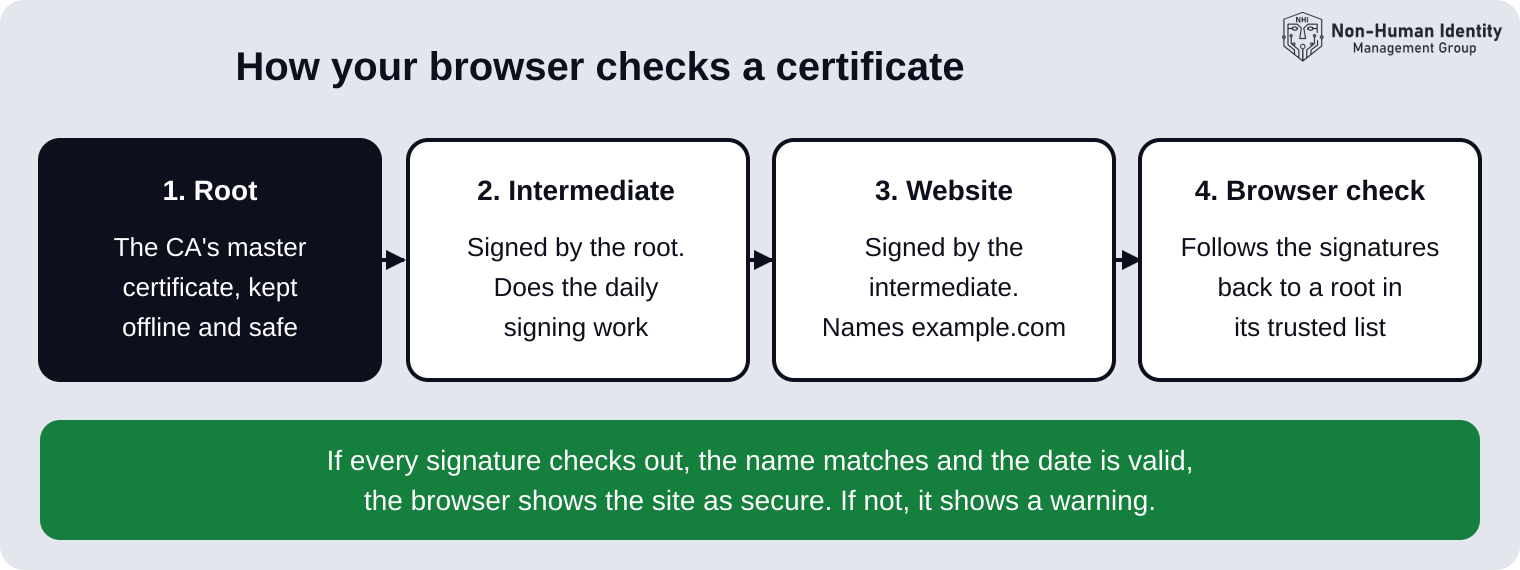
- Sign. The CA puts the name and public key into a certificate and signs it. Many CAs keep their top certificate, the root, offline. A second signer, called an intermediate, does the daily signing.[4]
- Check the chain. When you visit, the site sends its certificate and the intermediate. Your browser follows the signatures back, one by one. It trusts the result only if the chain ends at a root in its root store.[1]
- Check the details. The browser also checks the name matches and the dates are valid. It may also check whether the CA has cancelled the certificate. Cancelling is called revocation.[1]
Who gets onto the trusted list? Browser and system makers decide. Mozilla, for example, publishes a policy for its root store. CAs must pass audits before they are added, and at least once a year after that.[2]
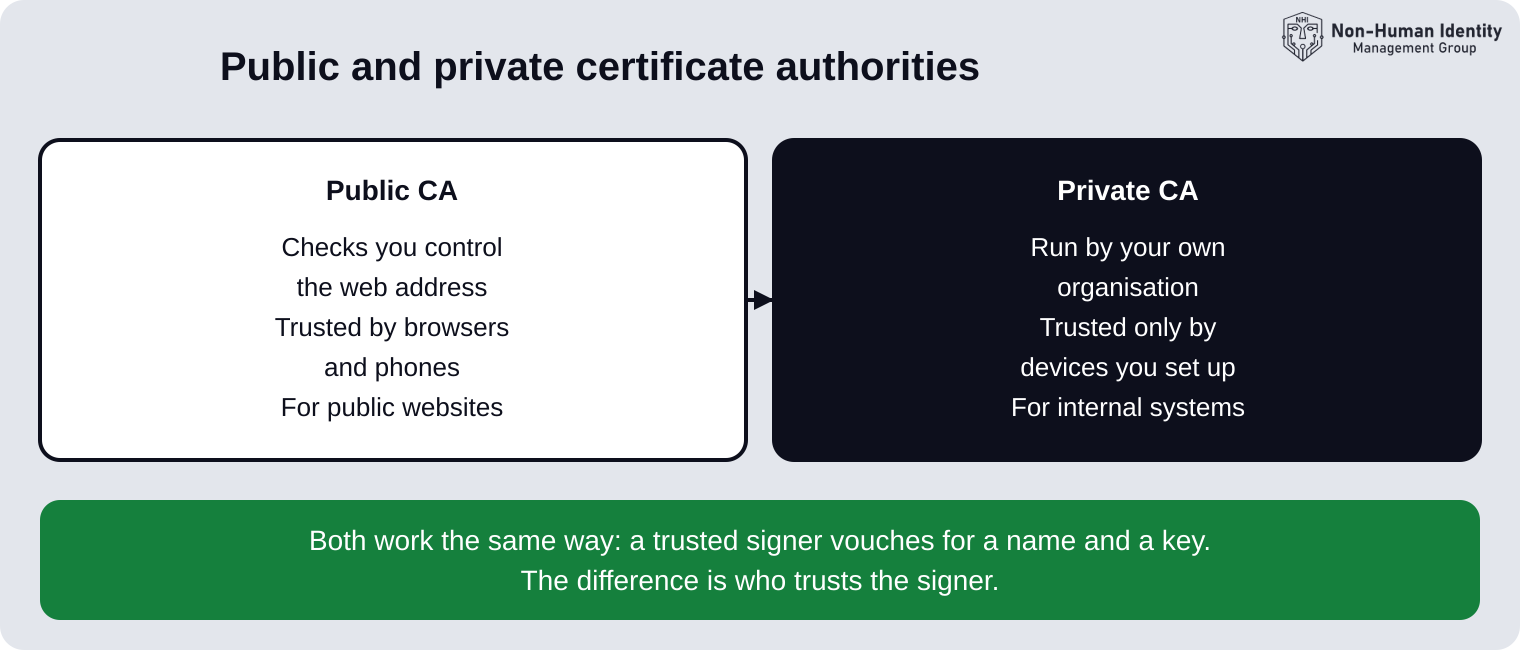
Not every certificate is for the public web. Many organisations run their own private CA for internal systems, staff laptops and Wi-Fi. Those certificates are trusted only by devices set up to trust that private root. The UK's National Cyber Security Centre advises keeping the private root offline and protecting private keys.[4]
Certificate lifetimes are getting shorter. Browser makers and CAs set the rules for public web certificates together. In 2025 they voted to cut the longest allowed lifetime from 398 days to 47 days. The cuts happen in steps between March 2026 and March 2029.[5] That makes automatic renewal much more important.
A worked example
Hannah O'Brien is the practice manager at Ashgrove Surgery, a fictional GP surgery with forty staff. On Monday morning, staff report that the patient booking portal shows a red warning: "Your connection is not private".
Hannah remembers the driving licence. A shop would refuse a licence that had run out, even if the photo was right. She clicks the padlock area and opens the certificate. The "Valid until" date was Sunday.
She calls Omar Haddad, the surgery's IT supplier. Omar asks the CA for a new certificate for the portal's address. He passes the CA's check by adding a record to the address settings. Within the hour the new certificate is installed and the warning has gone for the staff who tested it.
Then they ask why it happened. The renewal reminders had gone to the email of someone who left last year. Nobody else knew the date.
Omar sets up automatic renewal for the portal. Hannah starts a simple list of every certificate the surgery uses, with an owner and an expiry date for each. They find two more on the list: one for the office Wi-Fi from the surgery's private CA, and one for the email server.
Last, Hannah makes a team inbox the contact for all reminders, so the warnings reach someone even when people move on.
Myths and mistakes
| What people think | What is true |
|---|---|
| The padlock means the website is safe and honest. | It means the connection is protected and the name was checked. Scam sites can have valid certificates too.[6] |
| A certificate lasts for years, so we can forget it. | Public certificate lifetimes are shrinking towards 47 days. Plan for automatic renewal.[5] |
| It is fine to click past certificate warnings at work. | Clicking past teaches people to ignore real warnings. Fix the certificate or set up trust properly. |
| The certificate is secret and must be hidden. | The certificate is meant to be shared. The private key is the part to protect. |
| PKI is only for websites. | Certificates also protect email, Wi-Fi, VPNs and connections between programs. |
What can I do this week?
- Click the padlock on a site you use and open its certificate. Find the name, the signer and the end date.
- Ask your IT team or web host if your certificates renew by themselves.
- Start a list of your certificates, with an owner and an end date for each.
- Check that reminders go to a shared inbox, not one person.
Checklist
- We have a list of all our certificates, public and private.
- Each certificate has a named owner.
- Public certificates renew automatically where the system allows it.
- Expiry reminders go to a shared inbox or ticket queue.
- Private keys are kept in protected storage and not shared by email or chat.
- If we run a private CA, its root is kept offline and protected.
- Staff know not to click past certificate warnings, and who to tell.
Common questions
Is PKI the same as TLS or HTTPS?
No, but they work together. TLS is the protection that scrambles data between your browser and a site, and HTTPS is the web using TLS. PKI provides the certificates that let your browser check it is talking to the right site. See TLS and HTTPS for Beginners.
What happens when a certificate expires?
Browsers and programs stop trusting it. Visitors see a warning page, and programs that connect to the service may fail. The fix is to get and install a new certificate. Automatic renewal and a clear owner make this much less likely to catch you out.
What is the difference between a root and an intermediate certificate?
A root is the top signer that browsers trust directly. An intermediate is signed by the root and does the everyday signing of website certificates. Keeping the root offline and using intermediates limits the damage if a signing key is ever exposed.[4]
Do I need to run my own CA?
Most small organisations do not. Public websites can use a public CA, often through their web host. A private CA helps when you have many internal systems, devices or Wi-Fi logins to protect. It needs careful setup, and the root key must be well protected.[4]
What should I do if a private key leaks?
Tell your IT or security contact straight away. They should ask the CA to revoke the certificate, make a new key pair and install a new certificate. Revoking marks the old certificate as cancelled, so systems that check should stop trusting it.[1]
Where next?
Ready for the detail? Read the practitioner guide: PKI Basics Guide. It goes further into certificate fields, revocation checking, automated issuance and how to design a private CA.
Also useful:
- TLS and HTTPS for Beginners
- Machine Identities and Certificates for Beginners
- Digital Signatures for Beginners
- Private PKI vs Public PKI
- Certificate Expiry Outages and 47-Day TLS Certificates Guide
Related NHI Mgmt Group resources: PKI and Certificate Glossary · Certificate Revocation Guide · ACME and Automated Certificate Management Guide
Key terms
- Public key infrastructure (PKI)
- The signers, certificates, trusted lists and rules that let computers prove who they are.
- Digital certificate
- An electronic document that links a name to a public key, signed by a certificate authority.
- A trusted organisation that checks identities and signs digital certificates.
- Chain of trust
- The line of signed certificates that links a website's certificate back to a trusted root.
- Root store
- The built-in list of root certificates that a browser or operating system trusts.
- Private key
- The secret half of a key pair, which the owner keeps safe and never shares.
- Certificate revocation
- Cancelling a certificate before its end date, for example when its key may have leaked.
- Private PKI
- A PKI an organisation runs for itself, trusted only by the devices it sets up.
Sources and further reading
- RFC 5280, Internet X.509 Public Key Infrastructure Certificate and Certificate Revocation List (CRL) Profile. IETF, May 2008. https://www.rfc-editor.org/rfc/rfc5280.html, accessed 28 Nov 2026.
- Mozilla Root Store Policy. Mozilla. https://www.mozilla.org/en-US/about/governance/policies/security-group/certs/policy/, accessed 28 Nov 2026.
- How It Works. Let's Encrypt. https://letsencrypt.org/how-it-works/, accessed 28 Nov 2026.
- In-house public key infrastructure: design principles. National Cyber Security Centre (UK). https://www.ncsc.gov.uk/collection/in-house-public-key-infrastructure, accessed 28 Nov 2026.
- Ballot SC-081v3: Introduce Schedule of Reducing Validity and Data Reuse Periods. CA/Browser Forum, 11 April 2025. https://cabforum.org/2025/04/11/ballot-sc081v3-introduce-schedule-of-reducing-validity-and-data-reuse-periods/, accessed 28 Nov 2026.
- Cyber Actors Exploit 'Secure' Websites in Phishing Campaigns, Alert I-061019-PSA. FBI Internet Crime Complaint Center (IC3), 10 Jun 2019. https://www.ic3.gov/PSA/2019/PSA190610, accessed 28 Nov 2026.