Card terminal and till security means keeping the machines that take card payments in your shop safe from tampering.
This guide is for shop, café, salon and restaurant owners and their staff. You do not need to be technical. If customers pay you by card in person, these checks apply to you.
In short
- Criminals may try to tamper with card terminals or get into the till system to copy card details.
- Know what your terminals look like, and check them often for added parts, broken seals or strange wires.
- Change default passwords, give each person their own login, and keep vendor remote access off when not needed.
- Use the terminal and till only for payments, keep them updated, and call your provider if anything looks wrong.
What you will learn
- Explain how a card payment travels from the customer's card to the bank.
- Spot the signs that a card terminal may have been tampered with.
- Check five simple settings on your terminal and till.
- Ask your payment provider and till supplier the right questions.
- Card machine (payment terminal)
- the small device a customer taps, inserts or swipes their card on.
- Till system (point of sale, or POS)
- the till or tablet that rings up sales, often linked to the card machine.
- Card copying device (skimmer)
- a hidden add-on that secretly copies card details as cards are used.
What is card terminal and till security?
Think of a letterbox. Post should drop straight through to the person inside. Now imagine someone fixes a second box over the slot, so every letter stops there first. A tampered card terminal works like that fake letterbox.
When a customer pays, their card details pass through your card machine and often your till system. From there they go to your payment provider, the firm that handles your card payments. Card terminal and till security means keeping that path clean, so nothing copies the details on the way.
It covers the device you can touch, the logins on it, the software inside it, and the network it uses. Most of it is simple habits, not technical work.
Where the comparison stops working: a second box on a letterbox is easy to see. A skimmer or hidden program can be small or invisible, so you need regular checks, not just a glance.
Why does it matter?
Stolen card details lead to fraud against your customers. They can also lead to awkward questions from your payment provider, and lost trust.
If you own a small shop or café
What could happen: a "repair engineer" you did not book swaps your card machine for a tampered one.
Check this: keep photos of each terminal and only let in visitors your provider has confirmed.
Next: PCI DSS for Beginners
If you work behind the counter
What could happen: everyone uses the same till login, so nobody can tell who issued a refund.
Check this: ask for your own login and keep it to yourself.
If you look after IT for a few shops
What could happen: a till supplier's remote access tool is left switched on, and someone else uses it to get in.
Check this: list every way outsiders can reach your tills, and switch off what is not needed.
What does it look like?
Here is a made-up weekly check card for a small shop. Each numbered line is a common problem.
Example only. All values are made up.
EXAMPLE SHOP - weekly terminal and till check
Terminal T1 (counter): seal on back cover torn          -> PROBLEM (1)
Terminal T2 (tables):  extra cable going under counter  -> PROBLEM (2)
Till login:            "shop" / password "0000" shared  -> PROBLEM (3)
Supplier remote access: always on since install         -> PROBLEM (4)
Till PC also used for:  email and web browsing          -> PROBLEM (5)
Card terminal Wi-Fi:   same network as customer Wi-Fi   -> PROBLEM (6)
- A broken seal over a cover or screws can be a sign someone opened the device.
- A cable or part you do not recognise is a warning sign.
- In a real file, this line would contain a default or shared password that many people know.
- Remote access tools are often on by default, and anyone who gets the login can use them.
- Using the payment system for other things opens more ways in.
- Customers on the same network are closer to your payment devices than they need to be.
Why this is risky: each line is a door a criminal could use to copy card details or take over the till.
The safer way: photograph your terminals and compare them weekly. Give each person a login, keep remote access off, and use the payment system only for payments.
How does it work?
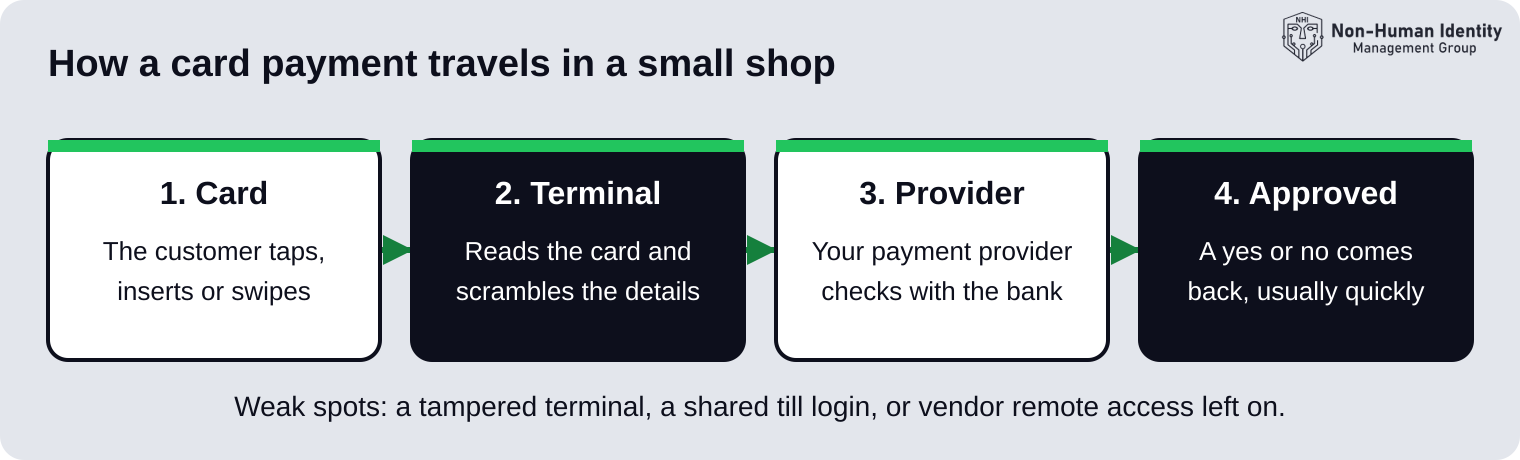
Here is the path a card payment usually takes in a small shop, and where the weak spots are.
- The card. The customer taps, inserts or swipes their card on your terminal.
- The terminal. It reads the card. Many terminals scramble the details straight away, which is called encryption, so a copy is hard to use.
- The till. In some shops the till system and terminal are linked, so sales and payments match up.
- The provider. The details go to your payment provider, who asks the customer's bank to approve the payment.
- The answer. A yes or no comes back, and the customer gets a receipt.
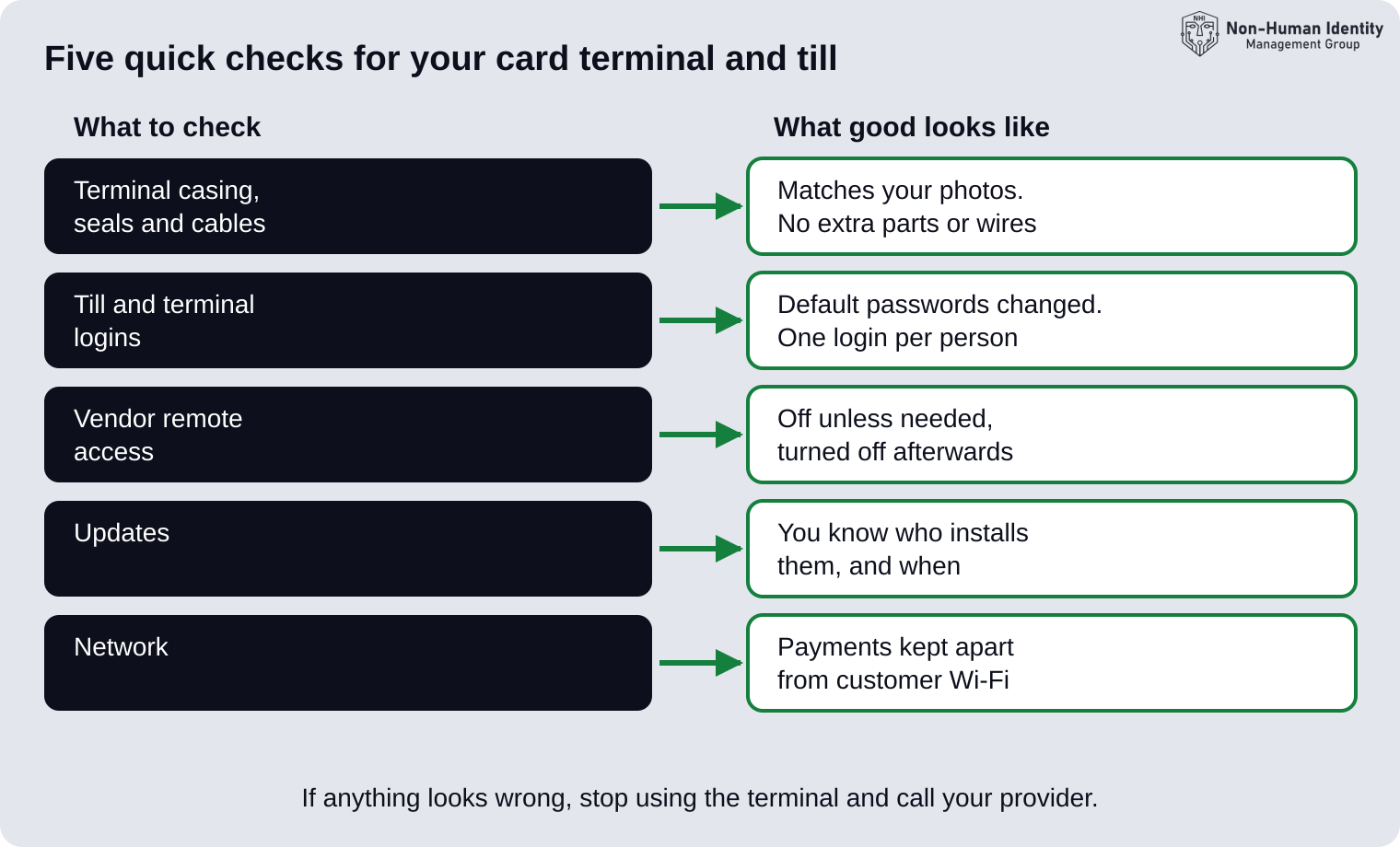
The card industry's security body, the PCI Security Standards Council, publishes free guides for small shops.[2] One suggests keeping a list of every terminal with photos of each side, its cables and connections, so changes stand out. If you think a device has been tampered with, it says to stop using it and tell your provider.[1]
The same guide says terminals and software often come with preset passwords that attackers know. It suggests changing them and giving every member of staff their own login.[1] It also notes that suppliers' remote access tools are often always on by default. It suggests keeping them off unless needed, and switching them off again afterwards.[1]
Two more habits help. Use the payment system only for payments, and keep it on a separate network from customer Wi-Fi.[1] And check your terminal model is on the Council's list of approved payment devices.[1]
The UK National Cyber Security Centre has a short guide for the rest of your business. It covers email, backups and staff accounts.[3]
A worked example
This story is made up to show how it can happen.
Ivo Ilic runs Rowan Nursery, a small garden centre with two card terminals and one till. On a busy Saturday, a man in a smart polo shirt arrives. He says the payment provider has sent him to "upgrade" the counter terminal.
Hana Brandt, who works the till, has not heard of any visit. She remembers the rule Ivo set up last month: no visitor touches the terminals unless the provider has confirmed the visit. She asks the man to wait.
She rings the provider on the number printed on their latest letter, not the number on the man's card. The provider has no engineer booked. When she comes back, the man has gone.
Ivo does not take chances. He takes the photos he made of each terminal and compares them with the devices. The seals look intact and there are no extra cables. He still reports the visit to the provider, who asks him to keep watch and call if anything changes.
The next week Ivo works through the rest of his list. He finds the till still uses the password from the day it was installed. He asks the supplier to help change it and set up a login for each member of staff. He also asks the supplier to switch off remote access when they are not working on the till.
What made the difference: Hana checked the visit through a number she already trusted. Ivo's photos meant he could check the terminals in minutes rather than guess.
Myths and mistakes
| What people think | What is true |
|---|---|
| My terminal came from the bank, so it cannot be tampered with. | Any device on a counter can be swapped or opened. Regular checks help you spot changes.[1] |
| Sharing one till login is fine in a small team. | Shared logins hide who did what, such as a refund. Give each person their own.[1] |
| The supplier needs remote access to the till all the time. | Most of the time it can stay off. Turn it on for a job, then off again.[1] |
| Checking email on the till PC saves buying another computer. | Using the payment system for anything else adds ways in. Keep it for payments.[1] |
| Updates are the supplier's job, so I do not need to think about them. | Ask who installs updates and when, so they are not missed.[1] |
What can I do this week?
- Take photos of each terminal from every side, with its cables. Keep them with a list of the serial numbers.
- Ask your till supplier whether any default passwords are still in use, and change them.
- Set up a separate login for each member of staff.
- Ask your supplier whether remote access is switched on, and agree to keep it off when not in use.
- Tell staff to stop using a terminal and call you if it looks different or a surprise "engineer" arrives.
Checklist
- I have a list and photos of every card terminal.
- Someone checks the terminals for added parts, broken seals or new cables each week.
- Visitors may touch the terminals only after the provider confirms the visit.
- No default passwords remain on the terminals or till.
- Each member of staff has their own login.
- Supplier remote access is off unless a job needs it.
- The till and terminals are used only for payments.
- Payment devices are on a separate network from customer Wi-Fi.
- I know who installs updates and how often.
Common questions
What should I do if a terminal looks tampered with?
Stop using it and call your payment provider or terminal supplier on a number you already trust. Do not try to open it yourself. Keep it aside so the provider can check it, and use another approved terminal in the meantime.
Is a standalone card machine safer than one linked to my till?
Often it is simpler, because fewer of your own systems handle card details. A linked till brings more devices and logins into the picture. Either way, the checks on this page still apply. Ask your provider which setup suits your shop.
How do I know my terminal is an approved model?
Ask your provider, or look up the model on the PCI Security Standards Council's list of approved payment devices. The Council's small business guide suggests checking this. Older devices may come off the list, so it is worth asking when you renew.
Does this have anything to do with PCI DSS?
Yes. PCI DSS is the card industry's security rulebook, and your provider asks you to follow it. Keeping terminals and tills safe is a big part of what it asks of a small shop. Our PCI DSS beginner guide explains the rules.
Where next?
Ready for the detail? Read the practitioner guide: Point of Sale Security Guide. It goes further into point-to-point encryption, hardening till computers and separating store networks.
Also useful:
- PCI DSS for Beginners
- Contactless Payments for Beginners
- Small Business Cyber Security for Beginners
- PCI PTS POI Device Security Guide
Related NHI Mgmt Group resources: PCI Point-to-Point Encryption Guide · Payment Fraud for Beginners · PCI DSS SAQ Types
Key terms
- Card skimming
- Secretly copying card details with a hidden device or program as the card is used.
- Default password
- The password a device or program comes with, which is often widely known.
- Point-to-point encryption
- Scrambling card details in the terminal so they stay scrambled until they reach the payment provider.
- Network segmentation
- Splitting a network into parts, so payment devices are kept apart from things like guest Wi-Fi.
- Patch management
- Making sure software updates that fix security problems are installed in good time.
- Tricking a person into doing something, such as letting a fake engineer touch a terminal.
Sources and further reading
- Data Security Essentials for Small Merchants: Guide to Safe Payments, version 3.0. PCI Security Standards Council, April 2024. https://www.pcisecuritystandards.org/wp-content/uploads/2022/05/Small_Merchant_Guide_to_Safe_Payments.pdf, accessed 28 Nov 2026.
- Resources for merchants (small merchant guides). PCI Security Standards Council. https://www.pcisecuritystandards.org/merchants/, accessed 28 Nov 2026.
- Small organisations guide to cyber security. National Cyber Security Centre (NCSC), reviewed 21 July 2026. https://www.ncsc.gov.uk/collection/small-business-guide, accessed 28 Nov 2026.