Contactless payment fraud is when criminals misuse your tap-to-pay card or phone wallet, usually after tricking you.
This guide is for anyone who taps a card or phone to pay, and for people who help family members with banking. You do not need any technical knowledge: the scams described here start with a text message or a phone call, not with clever gadgets.
In short
- Each contactless payment uses a one-time code, so copying one tap is of little use later.
- Newer scams instead trick you into tapping your card on your own phone, or into reading out a bank code.
- That lets criminals pass your card's signal to a helper far away, called a relay, or add your card to their own phone.
- Your bank should not ask you to tap your card on your phone, install an app from a link or share a code.
What you will learn
- Explain why a normal tap is hard to copy.
- Spot the call or message that sets up a relay scam.
- Check your banking app for wallets and devices you do not recognise.
- Ask your bank about contactless limits and alerts.
- Short-range radio (NFC)
- the wireless link your card or phone uses to talk to a card machine when you tap.
- Passing the signal on (relay)
- a trick that carries your card's tap over the internet to a card machine somewhere else.
- Phone wallet
- an app such as Apple Pay or Google Wallet that holds a stand-in for your card.
What is contactless payment fraud?
Think of a very long extension lead. Your card still has to be close to something to work, but the lead carries its signal a long way. A relay scam is that extension lead, built from phones and the internet.
When you tap to pay, your card or phone talks to the card machine by short-range radio, called NFC (near-field communication). Each payment uses a fresh one-time security code, so a recording of one tap is of little use for a new payment.[1]
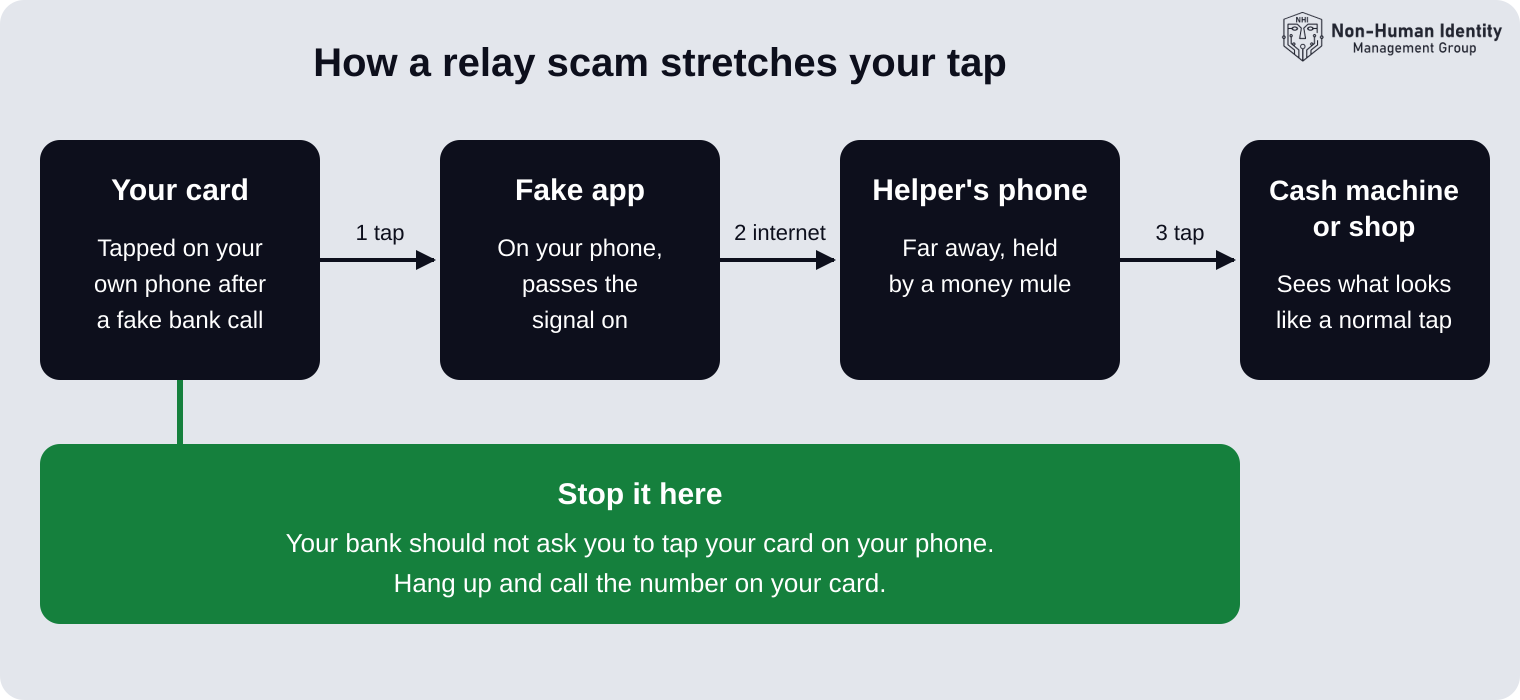
Because the code is hard to copy, criminals go after the person instead. They may persuade you to tap your card on your own phone inside a fake app. That app then passes the card's signal on to a helper at a cash machine. Or they may trick you into sharing card details and a bank code, then add your card to a phone wallet they control.[2][3]
Where the comparison stops working: you would notice a cable running out of your house. A relay leaves no visible sign. On the card machine, the payment can look like a normal tap.
Why does it matter?
These scams have been seen in real life. In Czechia in 2024, police arrested a man who had taken cash from machines in Prague using cards relayed from victims' phones.[2]
If you pay with a card or phone
What could happen: a caller "from your bank" asks you to install an app and tap your card on your phone to "protect" it.
Check this: hang up and call your bank on the number on the back of your card.
If you help an older relative with banking
What could happen: a text about a refund leads them to a fake bank app outside the official app store.
Check this: help them install apps only from the official store, and turn on payment alerts.
If you run a small shop
What could happen: a customer pays with a phone holding someone else's stolen card, often buying gift cards.
Check this: ask your payment provider which fraud checks and alerts your card machine supports.
What does it look like?
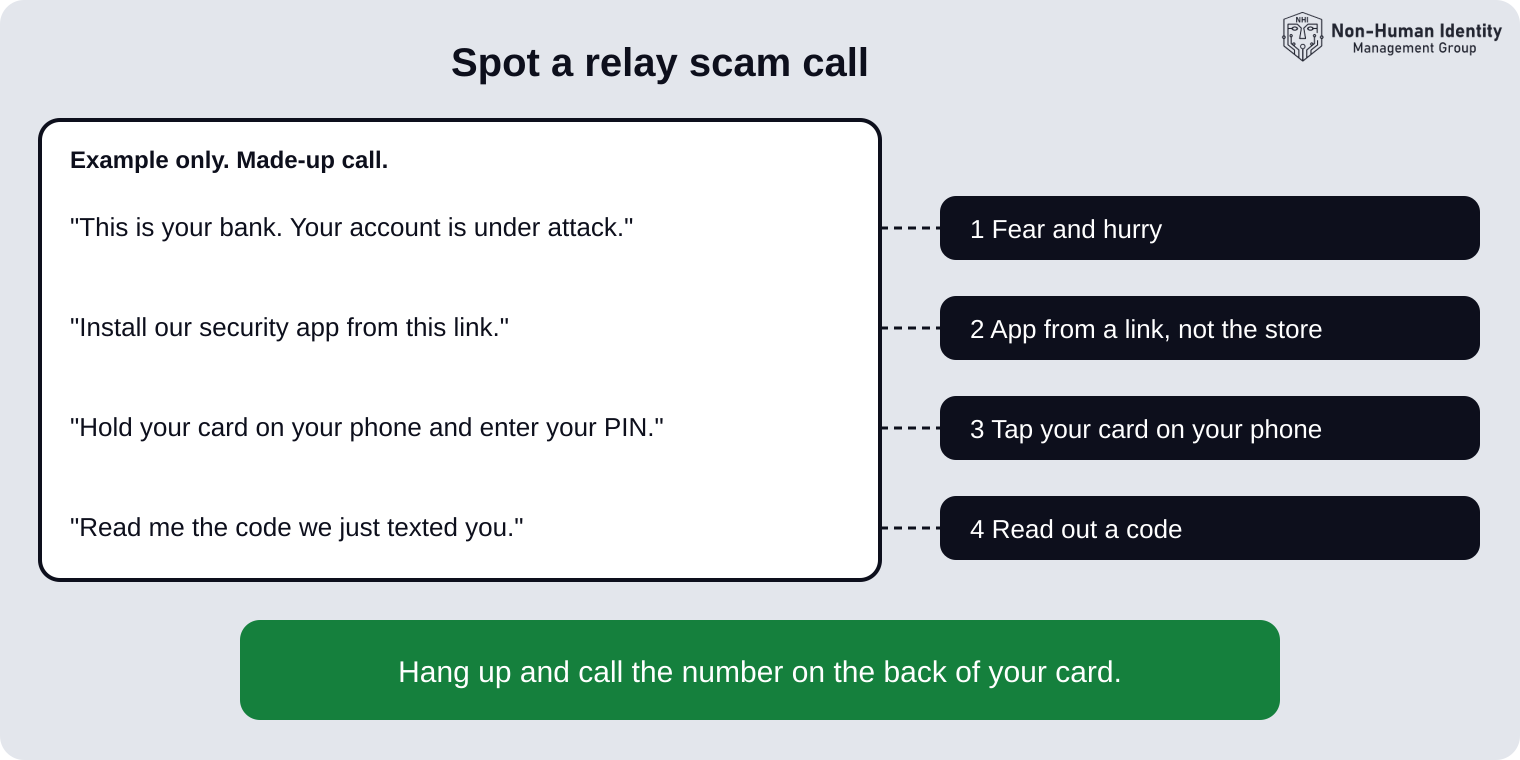
Here is a made-up script of the kind of call that sets up a relay scam.
Example only. All values are made up.
Caller: Hello, this is the fraud team at Example Bank (FAKE).
        Your account has been attacked.                       (1)
Caller: I have sent you a text with our new security app.
        Please install it from that link.                     (2)
Caller: Now open the app, hold your card on the back
        of your phone and type your PIN to verify it.         (3)
Caller: Also read me the code we just texted you: 000000.     (4)
- Urgency and fear, so you act before you think.
- An app from a link, not from the official app store.
- This request lets the fake app pass your card's signal to a criminal.
- A bank code shared aloud can let a criminal add your card to their own phone wallet.
Why this is risky: every step hands over something the security was built to keep with you: the card's tap, the PIN and the code.[2][3]
The safer way: hang up. Call your bank on the number on your card, from a different phone if you can. Install apps only from the official store, and never read out a code you did not ask for.[2]
How does it work?
Researchers have described two main patterns. Both start with tricking a person.[2][3]
- The bait. A text about a tax refund, a parcel or a security problem leads to a fake bank website or app.
- The details. The fake site or app asks for card details, a PIN or the code your bank sends you.
- The call. A caller posing as the bank says your card is at risk and asks you to "verify" it in the app.
- The relay. Either the fake app passes your card's tap to a helper's phone, or your card is added to a phone wallet the criminal controls.
- The cash-out. A helper, often called a money mule, uses the relayed card at a cash machine or shop. Purchases are often small and quick, such as gift cards.
Phone wallets add protection of their own. The wallet holds a stand-in number, called a token, not your real card number.[1] On most phones, you also confirm a payment with your face, fingerprint or passcode. That is why criminals want a bank code: banks often send one when a card is added to a new phone.[3]
Limits matter too. In the UK, from March 2026, banks with strong fraud controls may set their own contactless limits. The UK regulator also encouraged them to let customers set their own limit or turn contactless off.[4]
A worked example
Nils Iyer is a retired teacher who pays for most things by tapping his debit card. One morning he gets a text saying he is owed a tax refund. He taps the link, which opens a page that looks like his bank. He types in his card number before something feels wrong, and he closes the page.
That afternoon his phone rings. The caller says she is from his bank's fraud team. She knows his name and the last four digits of his card. She says criminals are using his card. He must install a "card protection" app, then hold his card against his phone and enter his PIN.
Nils thinks of the extension lead. Why would his bank need his card to touch his phone? He says he will call back and hangs up.
Using his landline, he rings the number printed on the back of his card. The real fraud team says they did not call him. They cancel his card and send a new one. They also check his account. There are no payments he does not recognise in the records they can see, and no phone wallet has been added for his card.
Nils deletes the text and reports it as a scam. He switches on payment alerts in his banking app. He asks his bank whether he can set a lower contactless limit. Then he writes a note by his phone: "My bank will never ask me to tap my card on my phone."
Myths and mistakes
| What people think | What is true |
|---|---|
| Someone can copy my card by walking past me with a reader. | Each tap uses a one-time code, so a copied tap is of little use later.[1] The bigger risk is being tricked into helping. |
| A caller who knows my card details must be my bank. | Criminals often have details from fake websites or leaks. Call back on the number on your card. |
| Tapping my card on my phone in an app is a normal bank check. | The relay scams researchers describe ask for exactly this.[2] Treat the request as a warning sign. |
| The code from my bank is just for checking it is me, so I can read it out. | The code may be for adding your card to someone else's phone.[3] Keep it to yourself. |
| Contactless is less safe than paying online. | Both have protections. Most of the risk in these scams comes from fake calls, texts and apps, not the tap itself. |
What can I do this week?
- Turn on payment alerts in your banking app.
- Check the app for phones or wallets linked to your card that you do not recognise.
- Write down your bank's number from the back of your card, ready for any suspicious call.
- Ask your bank whether you can set a lower contactless limit or turn contactless off.
- Tell family members: a bank should not ask you to tap your card on your phone.
Checklist
- I install banking apps only from the official app store.
- I never tap my card on my phone because a caller asked me to.
- I never read out a bank code I did not ask for.
- I hang up and call the number on my card if a "bank" calls me.
- Payment alerts are on in my banking app.
- I know which phones and wallets hold my cards.
- My phone has a screen lock with a face, fingerprint or passcode check.
Common questions
Is contactless payment safe?
Yes, for most people it is a safe way to pay. Each tap uses a one-time code, and phone wallets add a stand-in card number and a face or fingerprint check. The scams on this page work by tricking people, so the best defence is knowing the warning signs.
What is ghost tapping?
Ghost Tap is a name researchers gave to one cash-out trick. Criminals add a stolen card to a phone wallet, then pass its signal to helpers at shops, sometimes in several places at once. It needs your card details and the bank code, which is why you should never share them.
Do card-blocking wallets or sleeves help?
They can stop your card being read while it is inside them, and some security researchers suggest them.[2] But the relay scams described here work by persuading you to take the card out and tap it yourself. Knowing the warning signs matters more.
What should I do if I think I have been caught out?
Call your bank straight away on the number on your card, and ask them to block it. Delete any app you installed from a link. Then report the scam through your country's official reporting service, and keep any texts as evidence.
Where next?
Ready for the detail? Read the practitioner guide: Mobile Wallet and Contactless Payment Security. It goes further into how wallets and tokens are set up, the checks banks run when a card is added to a phone and how card machines handle contactless.
Also useful:
- Card Payment Security for Beginners
- NFC Relay and Ghost Tapping Fraud
- Payment Fraud for Beginners
- Reporting Scams and Cybercrime for Beginners
Related NHI Mgmt Group resources: Digital Wallet Token Provisioning Fraud Guide · Online Banking Security for Beginners · Mobile Malware Guide
Key terms
- NFC
- Short-range radio that lets a card or phone talk to a card machine when you tap.
- Relay attack
- Passing a card's tap over the internet so it can be used at a machine somewhere else.
- Phone wallet
- An app that holds a stand-in for your card and pays when you tap your phone.
- Token
- A stand-in card number used by a phone wallet instead of your real card number.
- One-time code
- A fresh security code made for a single payment, or sent by your bank to confirm a single action.
- Money mule
- A person who moves or cashes out stolen money for criminals.
Sources and further reading
- EMV Contactless quick reference guide. EMVCo, 2023. https://www.emvco.com/wp-content/uploads/2023/06/EMVCo_QRG_EMV-CONTACTLESS_FINAL.pdf, accessed 28 Nov 2026.
- NGate Android malware relays NFC traffic to steal cash. ESET Research, 22 August 2024. https://www.eset.com/blog/en/research/ngate-android-malware-relays-nfc-traffic-to-steal-cash/, accessed 28 Nov 2026.
- Ghost Tap: New cash-out tactic with NFC relay. ThreatFabric, 20 November 2024. https://www.threatfabric.com/blogs/ghost-tap-new-cash-out-tactic-with-nfc-relay, accessed 28 Nov 2026.
- Greater flexibility to be given in setting future contactless limits. Financial Conduct Authority, December 2025. https://www.fca.org.uk/news/press-releases/greater-flexibility-be-given-setting-future-contactless-limits, accessed 28 Nov 2026.