QR code phishing, or quishing, is a scam that uses a QR code to send you to a fake website.
This guide is for anyone who scans QR codes on menus, car park signs, letters or emails. You do not need to be good with technology to stay safe: a few habits before you tap a link go a long way.
In short
- A QR code hides a web link inside an image, so you cannot read where it goes until you scan it.
- Criminals stick fake codes over real ones, or send codes in letters, emails and texts.
- The fake page usually asks for card details, a password or a sign-in code.
- Before you open a scanned link, read the address your phone shows. If in doubt, use the official app or type the address yourself.
What you will learn
- Explain how a QR code can lead to a scam.
- Spot the signs of a fake or tampered code.
- Check a scanned link before you open it.
- Know what to do and who to tell if you were caught out.
- Square barcode (QR code)
- a pattern of black and white squares that your phone camera turns into a web link.
- QR scam (quishing)
- phishing that uses a QR code instead of a link you can see.
- Link preview
- the web address your phone shows after a scan, before you open it.
What is QR code phishing?
Think of a fake sign taped over a real one. The car park looks the same and the sign looks official. But the "pay here" notice was put there by a stranger, and the money goes to them.
A QR code is a square barcode. Your phone camera reads it and turns it into a web link. You cannot read the link by looking at the squares, so you have to trust where it came from.
Quishing is when criminals use that trust. They make a code that leads to a fake page, then put it where people expect a real one.[1] It is a kind of phishing, which means tricking people with messages or sites that pretend to be someone they trust.
Where the comparison stops working: a taped-on sign is often easy to spot up close. A fake code sent in an email or letter has nothing to peel off, so the link it opens is the main clue.
Why does it matter?
QR codes are now on menus, parking meters, parcels and bills. That makes them easy to fake, and many people scan them without a second look.
If you drive and park in towns
What could happen: you pay for parking on a fake site, and the criminal keeps your card details.
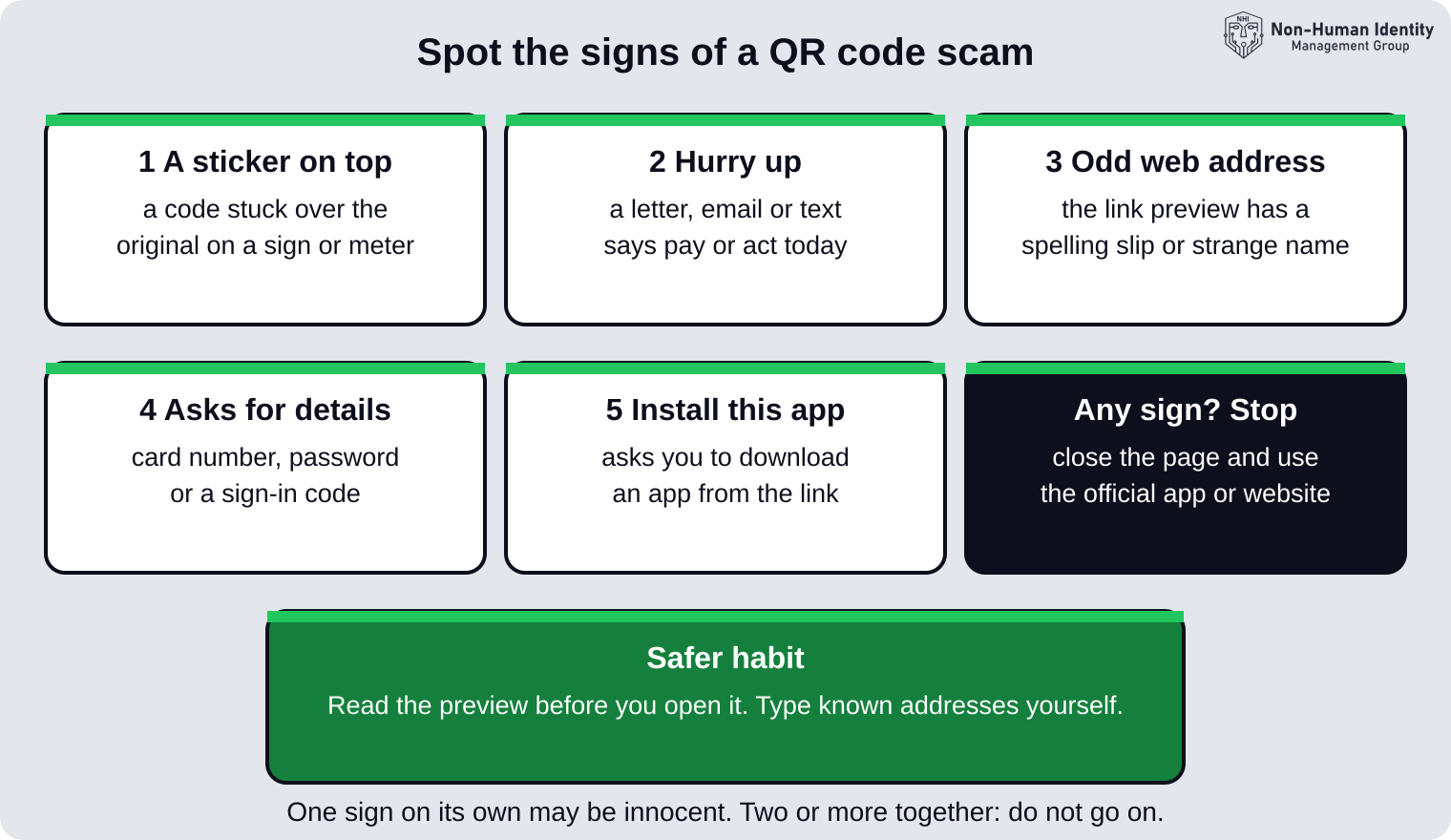
Check this: look for a sticker stuck over the code. Be wary in open places like car parks, and use the parking app or the meter instead.[4]
If you work in an office
What could happen: an email asks you to scan a code to "reset your password", and your work sign-in is stolen on your phone.
Check this: do not scan codes in unexpected emails. Report the email to your IT team.
Next: Phishing for Beginners
If you run a café, shop or car park
What could happen: someone covers your codes with their own, and your customers lose money.
Check this: check your printed codes often, and use codes that open your own web address.
What does it look like?
Here is a made-up phone screen after scanning a code on a car park sign.
Example only. All values are made up.
[ Camera ]  QR code found                          (1)
  Open "pay-parking-example.invalid"?              (2)
--------------------------------------------------
FAKE CAR PARK PAYMENTS                             (3)
  Pay now or get a £100 fine today                 (4)
  Card number:    0000 0000 0000 0000
  Security code:  000                              (5)
- Your phone has found a code. Nothing has opened yet, so this is the moment to check.
- The link preview. In a real message, this address would look close to a known company name but not quite right.
- The page copies the look of a parking company.
- A threat and a deadline, to make you hurry.
- It asks for full card details, including the security code.
Why this is risky: once you type your card details into the fake page, the criminal can use them.
The safer way: read the address in the preview. If it is not one you know, close it and pay through the official app or the meter.
How does it work?
This is a simple view so you can spot it. It is not a guide to doing it.
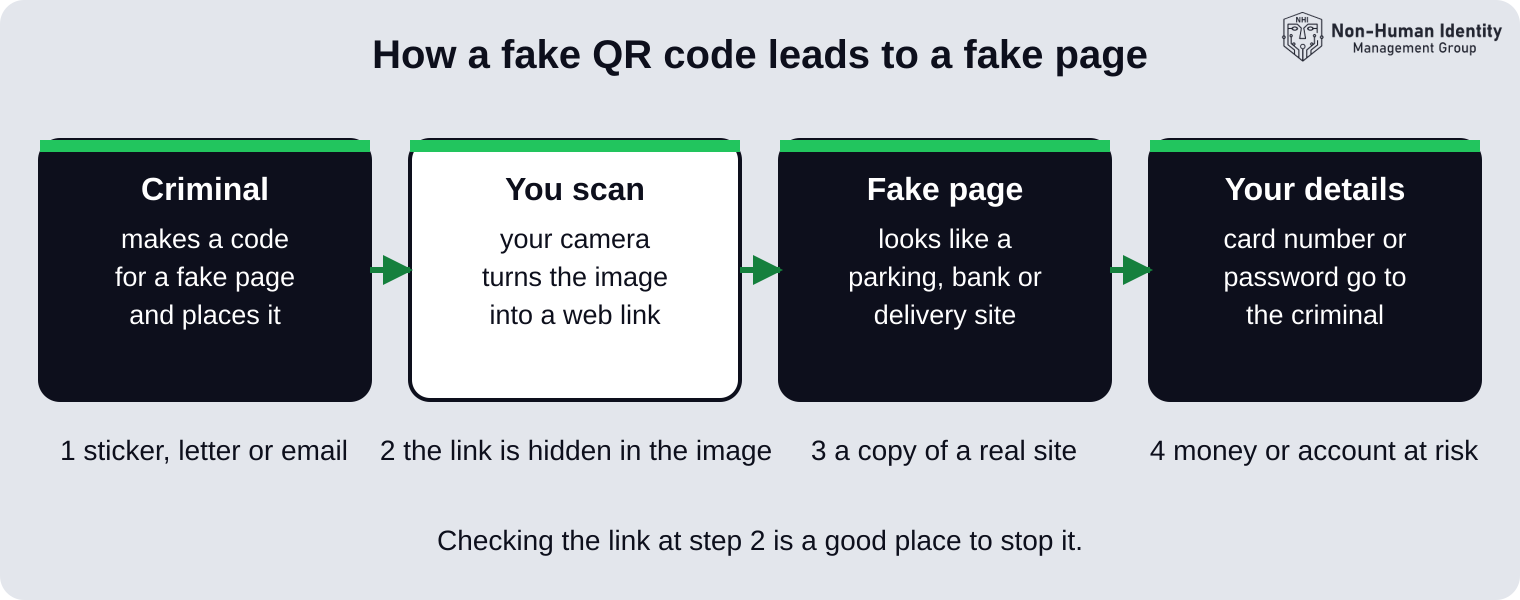
- The criminal makes a code. It points to a fake page that copies a real company, such as a parking firm, a bank or a delivery service.
- They put it where you will scan it. They stick it over a real code, or send it in a letter, email or text that says you must act quickly.[1][2]
- You scan it. Your phone shows a web address. Many people open it straight away without reading it.
- The fake page asks for details. It may ask for your card, a password or a sign-in code. Some codes try to get you to install an app.[2]
- The criminal uses what you typed. They may take money or sign in to your account.
Scam codes in emails have extra tricks. Some email filters do not check pictures, and the scan moves you from a work computer onto your own phone, which may have less protection.[4]
A worked example
This story is made up to show how it can happen.
Jan Kowalski is a delivery driver in Bristol. On Saturday he parks in a town centre car park and walks to the pay machine. It has a sign that says "Pay by phone: scan here".
He scans the code. His phone shows a web address and asks if he wants to open it. The address is long and has the word "parking" in it, so he taps it.
The page asks for his car registration and his card number. Then it asks for the three-digit code on the back of his card and his date of birth. That feels like a lot for a parking fee.
Jan stops. He looks back at the sign. The code is on a sticker that sits slightly crooked over another code underneath.
He has already typed his card number, but not the security code. He closes the page and pays at the machine with coins instead.
Next he calls his bank using the number on the back of his card. The bank cancels the card and sends a new one. There is no strange payment on his account in the records the bank can see so far.
He reports the scam to Report Fraud, the UK fraud reporting service.[5] He also tells the car park owner, who removes the stickers that afternoon.
What made the difference: Jan noticed the page asked for more than a parking fee needs, and checked the sign before going any further.
Myths and mistakes
| What people think | What is true |
|---|---|
| A QR code on an official sign must be safe. | Criminals stick their own codes over real ones. Check for stickers and odd addresses.[1][2] |
| Scanning a code is the risky part. | The risk is mostly in what you open, type or install next. Read the address before you go on. |
| I need a special scanner app to stay safe. | Your phone camera usually reads QR codes. The FBI suggests avoiding extra scanner apps.[2] |
| An email with a QR code has passed the spam filter, so it is fine. | Filters read links better than pictures. Treat a code in an unexpected email as a warning sign.[4] |
| Paying by QR code is always quicker. | The official app or typing a known address takes a moment longer and is safer.[2] |
What can I do this week?
- Next time you scan a code, stop and read the address before you open it.
- Install the official app for the car parks or services you use often.
- Keep your phone's software up to date.[1]
- Turn on extra sign-in checks for your email and bank, so a stolen password alone is not enough.
- Save the help number for your bank somewhere you can find it quickly.
Checklist
- I read the link preview before I open a scanned link.
- I check public codes for stickers or signs of tampering.
- I do not scan codes in unexpected emails, letters or texts that ask me to hurry.
- I do not install apps from a QR code. I use my phone's app store.
- I use official apps or typed addresses for payments where I can.
- I know to call my bank and report it if I typed details into a fake page.
Common questions
Can scanning a QR code hack my phone by itself?
Usually, no. Scanning only reads a link. The harm mostly comes from what happens next: opening a fake page, typing in details or installing an app. Keep your phone updated, read the address first, and only install apps from your phone's app store.[2]
How can I tell if a QR code is fake?
Look for a sticker stuck over another code, a message that says you must act today, and an address that does not match the company. Any one of these is a reason to stop. If unsure, use the company's own app or website.[1][2]
What should I do if I typed my card details into a fake page?
Call your bank straight away on the number on the back of your card. Ask them to block the card. If you typed a password, change it on the real site. Then report what happened to the fraud reporting service where you live.
Where do I report a QR code scam in the UK?
If you lost money, report it to Report Fraud in England, Wales or Northern Ireland, or to Police Scotland. You can also send a screenshot of a suspicious QR code to the National Cyber Security Centre using its reporting page.[3][5]
Is quishing the same as phishing?
Yes, it is one kind of phishing. The aim is the same: to trick you into giving away details or money. The difference is that the link is hidden in a QR code, so you only see the address after you scan it.
Where next?
Ready for the detail? Read the practitioner guide: QR Code Phishing (Quishing) Guide. It goes further into why email filters miss QR codes, the controls organisations can layer, and how to train staff and handle reports.
Also useful:
- Phishing for Beginners
- Checking Suspicious Links for Beginners
- Payment Fraud for Beginners
- Social Engineering for Beginners
Related NHI Mgmt Group resources: Phishing Guide · Securing Your Smartphone Guide · Two-Factor Authentication for Everyone Guide
Key terms
- Quishing
- Phishing that uses a QR code to hide the web address of a fake page.
- QR code phishing
- Another name for quishing: a QR code that takes you to a page built to steal details.
- Phishing
- Messages or websites that pretend to be someone you trust, to trick you into giving away details, money or access.
- Phishing link
- A web link made to lead you to a fake page or an unsafe action.
- Smishing
- Phishing sent by text message.
- Multi-factor authentication (MFA)
- Asking for two or more kinds of proof, such as a password and a code, before letting you in.
Sources and further reading
- Scammers hide harmful links in QR codes to steal your information. Federal Trade Commission (FTC) Consumer Advice, 6 December 2023. https://consumer.ftc.gov/consumer-alerts/2023/12/scammers-hide-harmful-links-qr-codes-steal-your-information, accessed 28 Nov 2026.
- Cybercriminals Tampering with QR Codes to Steal Victim Funds (PSA I-011822-PSA). Federal Bureau of Investigation, Internet Crime Complaint Center (IC3), 18 January 2022. https://www.ic3.gov/PSA/2022/PSA220118, accessed 28 Nov 2026.
- Reporting a scam text message. National Cyber Security Centre (NCSC). https://www.ncsc.gov.uk/collection/phishing-scams/report-scam-text-message, accessed 28 Nov 2026.
- QR codes: what's the real risk? Dave Chismon, National Cyber Security Centre (NCSC) blog, 8 February 2024. https://www.ncsc.gov.uk/blog-post/qr-codes-whats-real-risk, accessed 28 Nov 2026.
- Report Fraud service goes live. Report Fraud (City of London Police), 4 December 2025. https://www.reportfraud.police.uk/news/report-fraud-service-goes-live/, accessed 28 Nov 2026.