Checking a link means finding out where it really goes before you click or tap it.
This guide is for anyone who gets emails, texts or social media messages with links in them. You do not need any technical skill: the main check is reading one part of a web address.
In short
- The words you see in a message can differ from where the link really goes.
- The most useful clue is the main website name, just before the first single slash in the address.
- Pressure to act fast is a warning sign in itself.
- If in doubt, do not click. Go to the website or app yourself, or call using details you already trust.
What you will learn
- Spot the main signs that a link may be a trap.
- Check where a link really goes without opening it.
- Explain why a padlock or a familiar logo is not enough.
- Know what to do if you have already clicked.
- Web address (URL)
- the text that tells your browser which website and page to open.
- Website name (domain name)
- the main name in a web address, such as example.com, which shows who runs the site.
What is checking a suspicious link?
Think of a shop sign and a street address. Anyone can paint any name on a sign. The street address tells you where you really are.
A link in a message works the same way. The words you can see are the sign, and they can say anything, such as "Your bank" or "Track your parcel". The web address behind it is where you would really go.
A phishing link is a link sent to trick you. It may lead to a fake page that asks for your password or card details. It may also try to get you to download something harmful. UK and US advice is similar. If a message you did not expect asks you to act, contact the firm using details you already trust.[1][2]
Checking a link means looking past the sign to the real address, and asking whether it makes sense.
Where the comparison stops working: a fake street address is hard to set up. A fake web address is cheap and quick to make, and it can look almost the same as the real one.
Why does it matter?
One tap on a bad link can lead to a stolen password, a stolen card number or a harmful download. A short check first costs a few seconds.
If you shop and bank online
What could happen: a "your parcel is held" text leads to a fake page that takes your card details.
Check this: open the delivery firm's app or website yourself, not the link.
If you use email at work
What could happen: a fake "shared document" email asks you to sign in, and your work password goes to a criminal.
Check this: report odd emails to your IT team before you click.
Next: Phishing for Beginners
If you help family members online
What could happen: a relative taps a link in a message that claims to be from their bank.
Check this: agree a simple rule together: never sign in from a link in a message.
What does it look like?
Example only. All values are made up.
From: Coastwell Brewery Deliveries                  (1)
Your order could not be delivered. Pay a £1.45
re-delivery fee within 24 hours or it will be
returned.                                           (2)
Tap here: https://coastwell.example.com.track-0000.example.invalid/pay   (3)
Ref: EXAMPLE-0000
- A familiar-sounding name. Anyone can type any name here.
- A small fee and a deadline. Both push you to act before you think.
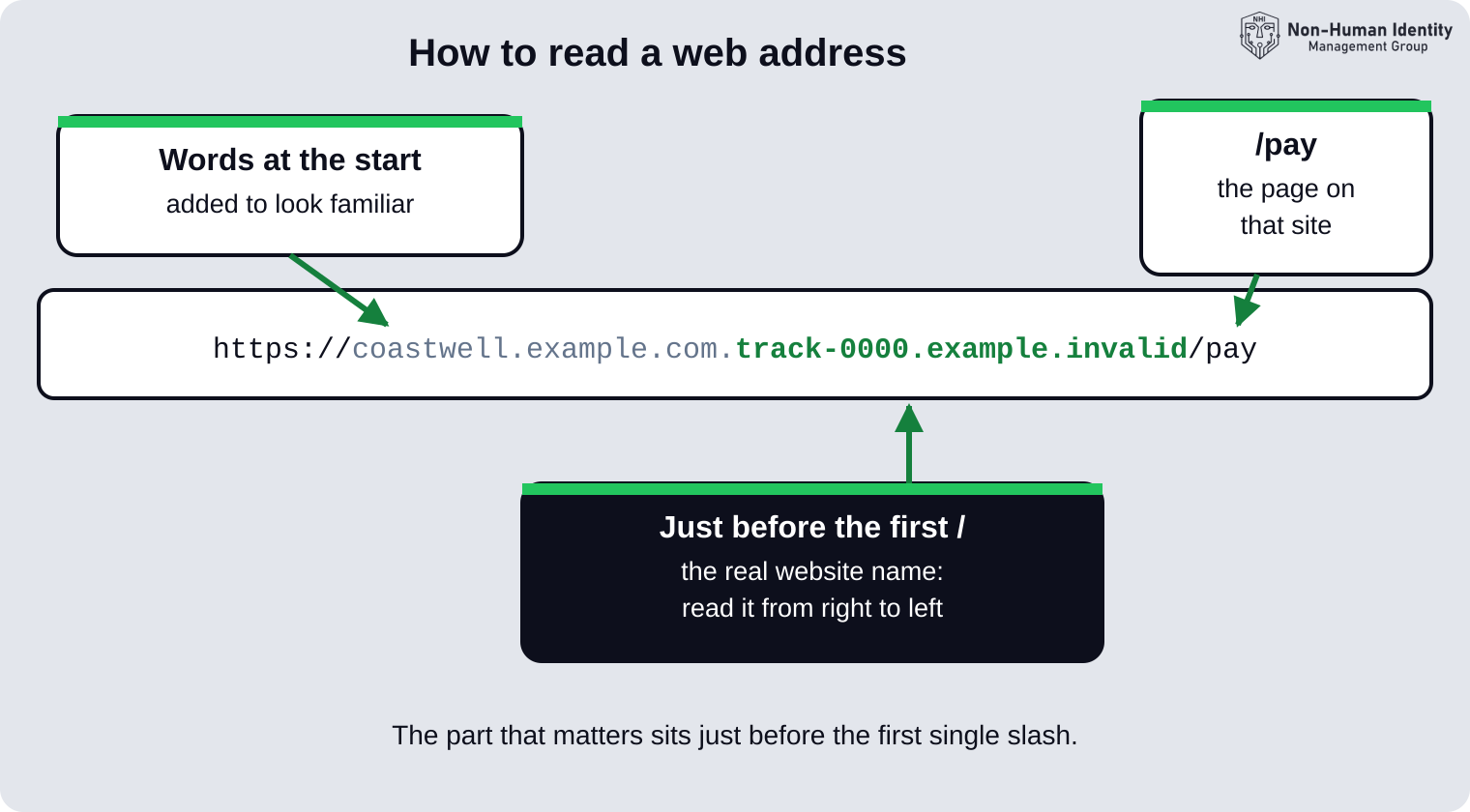
- The address starts with a familiar name, but that part is only decoration. The website name that counts sits just before the first single slash, here just before /pay.
Why this is risky: in a real message, a link like this could lead to a page that asks for your card details. The familiar words at the start are only there to look right.
The safer way: do not tap. Open the delivery firm's own app, or type its website yourself, and check for any parcel there.
How does it work?
This is a simple view of how a link trap works, so you can spot it. It is not a guide to making one.
- A message arrives. It claims to be from a bank, a delivery firm, a boss or an official body.[1]
- It pushes you. It sets a deadline, makes a threat, or offers something you want.[1]
- The link hides its real address. The words you see differ from where the link goes, or the address looks like a real one with a letter changed.[3]
- A fake page opens. It copies a real site's look and asks you to sign in or pay.
- Your details go to the criminal. They may use them to get into your account or spend your money.
A web address has parts. It starts with a scheme such as https, then the website name, then the page on that site.[4] The website name tells your browser which web server, the computer that runs the site, to ask for the page.[4] That is why it is the part to check.
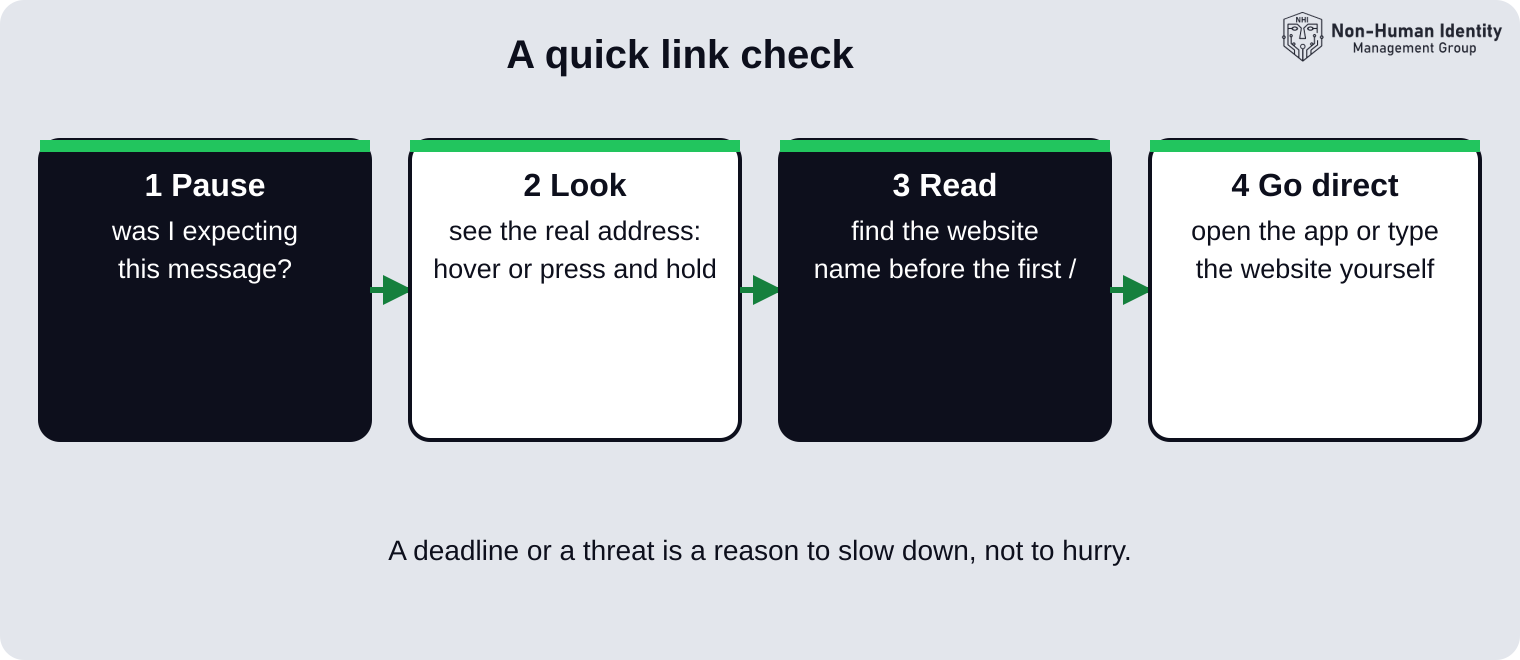
On a computer, you can rest the mouse pointer over a link, without clicking, to see the real address. On a phone, pressing and holding a link often shows it. If the shown address does not match the sender, that is a warning sign.[3]
A worked example
This story is made up to show how it can happen.
Jess Whitfield is a hairdresser in Bristol. She orders a lot online, so parcel texts are normal for her.
On Friday evening a text says her parcel is held. It asks for a small re-delivery fee within 24 hours. Jess is waiting for a parcel, so it feels real.
Before she taps, she remembers a tip from a friend: press and hold the link to see where it goes. The address starts with the delivery firm's name. But near the end, just before the first single slash, there is a different website name she does not know.
That is enough for Jess. She does not tap. She opens the delivery firm's own app instead. Her parcel shows as "out for delivery", with no fee to pay.
Jess forwards the text to 7726, the free UK number for reporting scam texts, and then deletes it.[5] She tells her sister, who had a similar text the week before.
Two weeks later her sister admits she did tap a similar link and typed in her card number. Jess helps her call her bank, using the number on the back of her card. The bank blocks the card and sends a new one.
What made the difference: Jess checked the real website name, then went to the firm's app herself rather than trusting the message.
Myths and mistakes
| What people think | What is true |
|---|---|
| A padlock in the address bar means the site is safe. | The padlock means the connection is private between you and the site.[6] A fake site can have one too. Check the site name as well. |
| If the address contains the bank's name, it is the bank. | Anyone can put a brand name at the start of an address. Look at the website name just before the first single slash. |
| Scam messages are full of spelling mistakes. | Some are. Many look polished. Judge the request and the link, not the spelling. |
| Links from friends are always safe. | Friends' accounts can be taken over. If a link from a friend seems odd, ask them another way. |
| Opening a link to "just have a look" is harmless. | Links in scam messages can lead to pages that steal details or try to install harmful software.[2] Go to the real site yourself instead. |
What can I do this week?
- Practise on a real link you trust: hover or press and hold, and find the website name.
- Save the official apps or bookmarks for your bank and the shops you use most.
- Turn on a second sign-in step for your email, so a stolen password alone is not enough.
- Agree with family a simple rule: never sign in or pay from a link in a message.
- Note how to report scams: forward texts to 7726, and use the official reporting pages for emails.
Checklist
- I stop and think when a message pushes me to act fast.
- I know how to see a link's real address without opening it.
- I can find the website name just before the first single slash.
- I go to the app or type the website myself when in doubt.
- I do not trust a padlock or a logo on its own.
- I know how to report a scam text and a scam email.
- I know what to do if I have already clicked and typed in details.
Common questions
What should I do if I already clicked a link?
Do not panic. If you typed a password, change it at once from the real website, and turn on a second sign-in step. If you gave card details, call your bank on the number on your card. If you downloaded something, run your security software.
How do I report a scam email or text in the UK?
Forward scam texts to 7726, which most UK phone providers offer for free. Report scam emails and websites through the National Cyber Security Centre's reporting pages. If you lost money, report it to Report Fraud, or to Police Scotland in Scotland.[5]
Are shortened links dangerous?
Not always, but they hide the real address. A short link could lead anywhere. Take extra care with one in a message you did not expect. If it asks you to sign in or pay, go to the website yourself.
Can a link be dangerous even if I do not type anything?
It can be. Most link traps need you to type details or download a file. But some pages try other tricks. So it is safest not to open links you doubt, and to keep your phone and browser updated.
Is it safe to use a link-checking website?
Such tools can help, but they only know about sites already reported. A new fake site may not be listed yet. Use them as an extra check, never as a reason to sign in from a link in a message.
Where next?
Ready for the detail? Read the practitioner guide: Phishing links. It goes further into reading tricky web addresses, what link-checking tools can and cannot tell you, and the first hour after a click.
Also useful:
- Phishing for Beginners
- QR Code Phishing for Beginners
- Text Message Scams for Beginners
- Browser Security for Beginners
Related NHI Mgmt Group resources: Phishing Guide · Two-Factor Authentication for Everyone Guide · Passkeys for Everyone Guide
Key terms
- Phishing link
- A link sent to trick you into visiting a fake page or downloading something harmful.
- Domain name
- The main name of a website, which shows who runs it.
- Typosquatting
- Using a website name that looks like a real one with a small spelling change.
- URL shortener
- A service that turns a long web address into a short one, which hides where it goes.
- Smishing
- Phishing sent by text message.
- HTTPS
- A private, scrambled connection between your browser and a website, shown by the padlock.
- Credential harvesting
- Collecting people's usernames and passwords, often through fake sign-in pages.
Sources and further reading
- How to spot a scam email, text message or call. National Cyber Security Centre (NCSC). https://www.ncsc.gov.uk/collection/phishing-scams/spot-scams, accessed 28 Nov 2026.
- How to Recognize and Avoid Phishing Scams. Federal Trade Commission (FTC), Consumer Advice. https://consumer.ftc.gov/articles/how-recognize-and-avoid-phishing-scams, accessed 28 Nov 2026.
- How to protect against phishing attacks. Microsoft Learn (Microsoft Defender for Endpoint documentation). https://learn.microsoft.com/en-us/defender-endpoint/malware/phishing, accessed 28 Nov 2026.
- What is a URL? MDN Web Docs, Mozilla. https://developer.mozilla.org/en-US/docs/Learn_web_development/Howto/Web_mechanics/What_is_a_URL, accessed 28 Nov 2026.
- Report a scam text message. National Cyber Security Centre (NCSC). https://www.ncsc.gov.uk/collection/phishing-scams/report-scam-text-message, accessed 28 Nov 2026. See also: Report a scam email, NCSC. https://www.ncsc.gov.uk/collection/phishing-scams/report-scam-email, accessed 28 Nov 2026.
- Check if a site's connection is secure. Google Chrome Help. https://support.google.com/chrome/answer/95617, accessed 28 Nov 2026.