A residential proxy sends a stranger's internet traffic through someone's home connection, so it seems to come from that home.
This guide is for anyone who wants to know how a home phone, TV box or router can end up carrying strangers' traffic. You do not need any technical background. If you run a website or an online shop, residential proxies also explain why a criminal's visit can look like an ordinary customer's.
In short
- Criminals rent home internet connections so their traffic looks like it comes from ordinary households.
- Homes join these networks through infected devices, old routers, cheap TV boxes and apps that hide proxy code, including some free VPNs.
- The device owner can be harmed too: their address can get blocked, and their home network can be exposed.
- Buy devices from known brands, use official app stores, avoid apps that pay for your "spare bandwidth" and replace unsupported routers.
What you will learn
- Explain what a residential proxy is in one sentence.
- Spot the common ways a home device gets signed up without the owner knowing.
- Check your own router, TV box and apps for warning signs.
- Explain why websites cannot rely on an address alone to spot criminals.
- Internet address (IP address)
- the number that identifies your connection to websites, a bit like a postcode for your home internet.
- Go-between (proxy)
- a computer or device that passes traffic on, so the website sees the go-between's address, not yours.
- Address reputation (IP reputation)
- a score websites give an internet address, based on what traffic from it has done before.
What is a residential proxy?
Think of someone borrowing your car without asking. They drive around town doing things you would never do. Every speed camera records your number plate, not theirs.
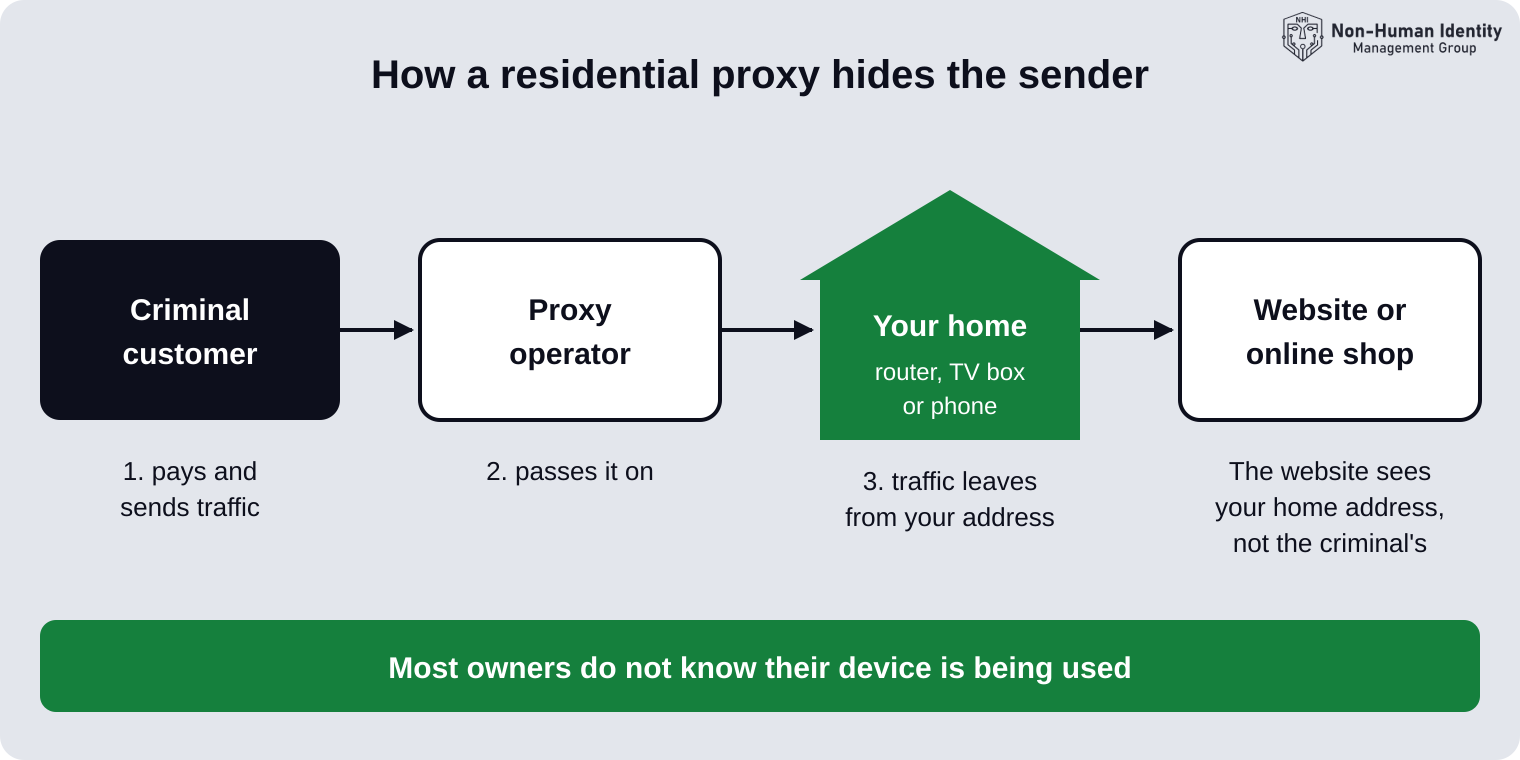
A residential proxy works the same way for internet traffic. A proxy is a go-between that passes traffic on. A residential proxy uses a home internet connection as that go-between. The website sees the home's internet address, called an IP address, not the real sender's.
Some of these services sell access to thousands or millions of homes. Their customers pick a country or even a city, and their traffic leaves from a household there. To the website, it looks like an ordinary person browsing from home.
Where the comparison stops working: you would notice if your car went missing. A device carrying proxy traffic usually keeps working as normal, so most owners do not know it is being used.
Why does it matter?
Many websites judge visitors partly by their address. Traffic from a known data centre may get extra checks. Traffic from a normal home address usually does not. That is what criminals are paying for.
The scale can be large. In 2024 the US Department of Justice described one service, 911 S5, as linked to more than 19 million IP addresses.[1]
If you have smart devices at home
What could happen: a cheap TV box or old router carries strangers' traffic, and your address gets flagged or blocked by websites.
Check this: where each device came from, and whether it still gets updates.
If you install free apps or VPNs
What could happen: an app you trust quietly turns your phone into an exit point for other people's traffic.
Check this: who makes the app, and whether it offers to pay you for your internet connection.
Next: Botnets for Beginners
If you run a website or online shop
What could happen: fake sign-ups, stolen card orders and password guessing arrive from home addresses that look like real customers.
Check this: whether your defences rely only on blocking bad addresses.
What does it look like?
Many proxy networks grow through ordinary-looking apps. Here is a made-up example of the kind of screen an app might show. Some apps show no screen like this at all.
Example only. All values are made up.
FreeStream Lite (EXAMPLE app)
-------------------------------------------
Enjoy free films with no adverts!         (1)
To keep this app free, we share a small
part of your unused internet with
our partners.                             (2)
Earn up to 0.00 FAKE credits a month.     (3)
[ Start watching ]   [ Settings ]         (4)
- A free offer that sounds generous. Free streaming apps from unofficial stores are a warning sign named by the FBI.[3]
- In a real screen, this line would mean other people's traffic leaves through your connection.
- A promise of payment for your "spare bandwidth". Google calls these apps a main way illicit proxy networks grow.[4]
- The big button starts the service. The way to turn it off is hidden in Settings.
Why this is risky: you cannot see or control what traffic goes through your connection. If it is used for fraud, websites see your address. Google also found that one network's software let outsiders send traffic into the device, which could expose other devices on the same home network.[4]
The safer way: use apps from official app stores. Read what an app says it does with your connection. Say no to offers that pay for your internet.
How does it work?
Most residential proxy networks follow the same four steps.
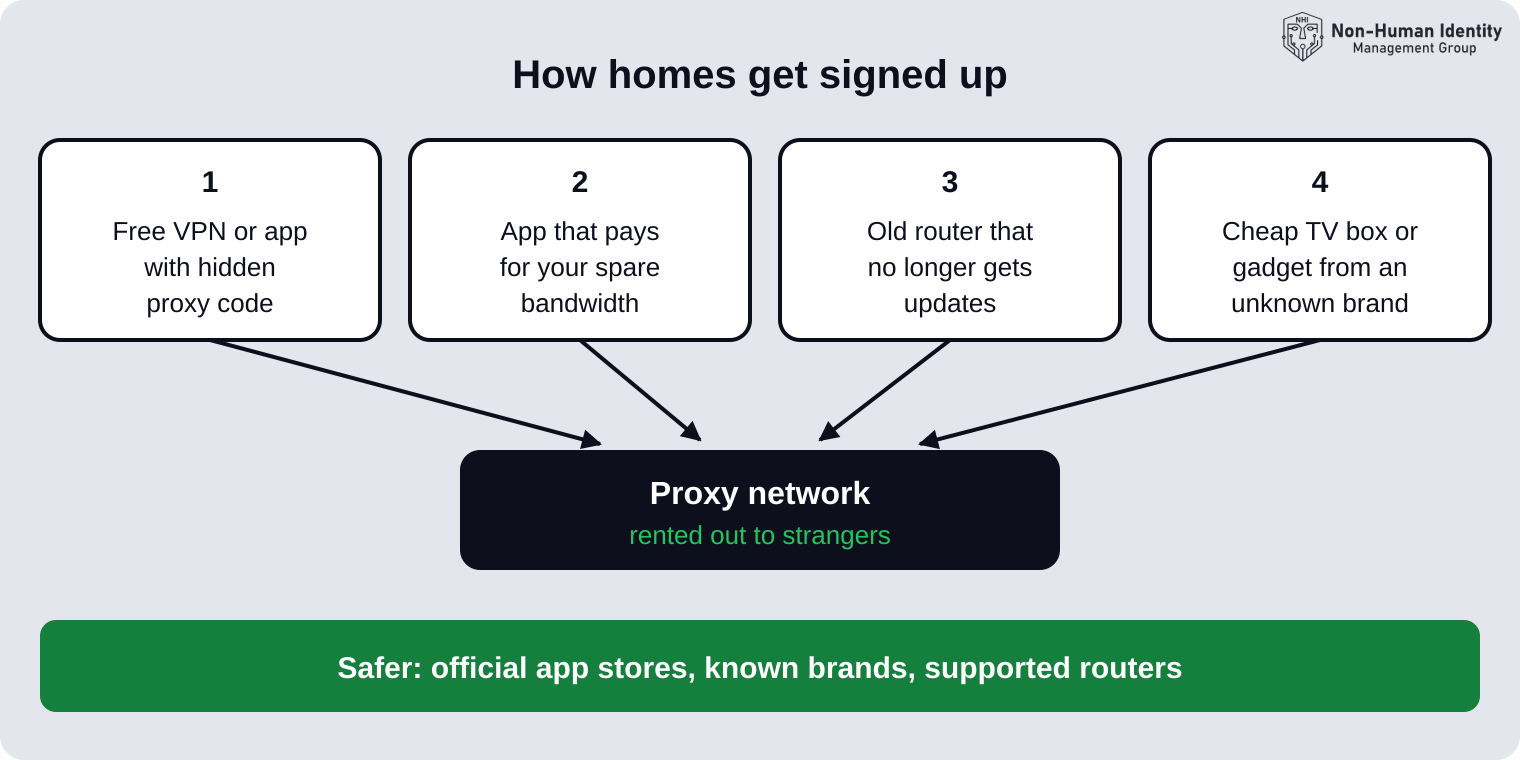
- Homes are signed up. Some devices are infected with harmful software, called malware. Others run apps with hidden proxy code. A few owners join on purpose for small payments.
- The operator links them together. Each home device checks in with the operator's computers and waits for work.
- Access is sold. Customers pay to send traffic through the network. They often choose the country or city their traffic should come from.
- Traffic leaves from the home. The website sees the household's address. Each request can use a different home, so blocking one address does little.
The ways homes get signed up are well documented by law enforcement and researchers:
- Free VPN apps with hidden code. The US Department of Justice said the 911 S5 operator spread his malware through free VPN programs and through bundles with pirated software.[1] In 2026 Google said two VPN apps it studied also joined devices to a proxy network without clear disclosure.[4]
- Toolkits inside ordinary apps. A software development kit (SDK) is a ready-made block of code that app makers add to their apps. Google found proxy SDKs in more than 600 Android apps, many of them simple games and tools. It said app makers were paid, usually per download.[4]
- Old routers. The FBI warned in 2025 that criminals put proxies on routers that no longer get security updates from the maker.[2]
- Cheap TV boxes and gadgets. The FBI warned about millions of infected streaming boxes, projectors, car screens and picture frames. Some were infected before they were sold. Others picked up bad apps from unofficial stores.[3]
A worked example
Zane Tanaka lives in a shared flat in Leeds. Last year he bought an unbranded TV box online. It promised every film and sports channel for free. To set it up, he had to download an app from a website, not the official store.
A few months later, odd things start to happen. His online bank asks him to prove he is human every time he signs in. A shopping site blocks his card order and says his connection looks risky. The flat's internet feels slow in the evenings, even when nobody is streaming.
Zane asks his friend Amara Kowal, who works on a help desk. She asks what is plugged into the router. The TV box stands out. It is an unknown brand, and its apps came from outside the official store. Zane's phone had also warned him about one of them.
Amara suggests a plan. Zane unplugs the TV box and stops using it. He signs in to the router and finds remote management switched on, so he turns it off. He checks the maker's website and sees the router still gets updates, so he installs the latest one. He also changes the router password to a long, unique one.
Over the next few weeks, the extra checks on his bank and shopping sites become less frequent. Zane cannot know exactly what the box was doing. But the FBI lists unbranded streaming boxes and apps from unofficial stores as warning signs, and he no longer wants that risk at home.[3]
His lesson: a "free" device can cost you in other ways, even if it works perfectly.
Myths and mistakes
| What people think | What is true |
|---|---|
| Only hackers' computers get used as proxies. | Ordinary phones, routers and TV boxes in normal homes are the main supply. |
| A VPN always makes me safer. | A trusted, paid VPN can help. Some free VPN apps have been found to share your connection with strangers. |
| If my device works fine, it is not infected. | Proxy software is usually designed to stay quiet. Slowness or extra website checks may be the only hints. |
| Selling my spare bandwidth is harmless extra money. | You cannot control who uses your connection. Their actions are tied to your address. |
| Websites can just block the bad addresses. | Proxy traffic changes homes constantly, and blocking a home address can also block the real family. |
What can I do this week?
- List every device on your home network, including TV boxes, cameras and smart plugs.
- Check if your router model still gets updates from its maker. Replace it if not.[2]
- Turn off remote management on your router unless you really need it.
- Remove apps that pay you to share your internet, and any VPN from a maker you cannot name.
- Make sure your phone's built-in app protection is turned on.[4]
Checklist
- My router still gets security updates from its maker.
- Remote management on my router is off, or I know why it is on.
- My router has a long, unique password.
- My TV boxes and gadgets come from known brands.
- I only install apps from official app stores.
- I do not run apps that pay for my spare bandwidth.
- My VPN, if I use one, comes from a provider I can identify.
- I know how to report a suspected infected device.
Common questions
Is a residential proxy the same as a VPN?
Not quite. Both pass your traffic through someone else's connection. A VPN usually sends it through the provider's own servers and is something you choose. A residential proxy sends traffic out through other people's homes, often without those people knowing.
Are all residential proxies illegal?
No. Some companies use them for things like checking how adverts appear in other countries. The problem is how many networks get their homes: through malware, hidden app code or unclear consent. And criminals are among their customers.
How can I tell if my device is part of a proxy network?
Often you cannot tell for sure. The FBI lists signs such as overheating, connection problems, settings you did not change, unknown brands and apps from unofficial stores. Extra website checks can also be a hint. None of these alone proves an infection.[2][3]
Could I get in trouble if my address was used for crime?
Your address may appear in a website's records, and it may get blocked or flagged. If you think a device was compromised, disconnect it and report it, for example to your country's fraud or cyber crime reporting service. Keep a note of what you did.
Why do websites keep asking me to prove I am human?
Often because your address has a poor reputation. That can happen when many people share one address, such as on mobile networks. It can also happen when a device on your network has been sending suspicious traffic.
Where next?
Ready for the detail? Read the practitioner guide: Residential Proxy Networks and Abuse Guide. It goes further into how proxy traffic shows up in attacks on sign-in pages, how security teams detect it across many accounts and why stronger sign-in checks matter more than address blocklists.
Also useful:
- IP Reputation and Blocklists for Beginners
- Botnets for Beginners
- Home Router Security for Beginners
- IoT Security for Beginners
Related NHI Mgmt Group resources: Botnets Guide · Password Spraying and Credential Stuffing Guide · Bot Management Guide
Key terms
- Residential proxy
- A service that sends traffic out through ordinary home internet connections, often without the owners knowing.
- Proxy
- A go-between that passes traffic on, so the website sees the go-between's address.
- IP address
- The number that identifies a connection on the internet.
- IP reputation
- A score that shows how trustworthy traffic from an address has been in the past.
- Exit node
- The device whose address the website finally sees when traffic passes through a network of go-betweens.
- Botnet
- A group of infected devices controlled together by one operator.
- SDK
- A ready-made block of code that app makers add to their own apps.
- Malware
- Harmful software that runs on a device without the owner's agreement.
Sources and further reading
- 911 S5 Botnet Dismantled and Its Administrator Arrested in Coordinated International Operation. US Department of Justice, Office of Public Affairs, 29 May 2024. https://www.justice.gov/opa/pr/911-s5-botnet-dismantled-and-its-administrator-arrested-coordinated-international-operation, accessed 28 Nov 2026.
- Cyber Criminal Proxy Services Exploiting End of Life Routers (Alert I-050725-PSA). FBI Internet Crime Complaint Center, 7 May 2025. https://www.ic3.gov/PSA/2025/PSA250507, accessed 28 Nov 2026.
- Home Internet Connected Devices Facilitate Criminal Activity (Alert I-060525-PSA). FBI Internet Crime Complaint Center, 5 June 2025. https://www.ic3.gov/PSA/2025/PSA250605, accessed 28 Nov 2026.
- No Place Like Home Network: Disrupting the World's Largest Residential Proxy Network. Google Threat Intelligence Group, Google Cloud Blog, 28 January 2026. https://cloud.google.com/blog/topics/threat-intelligence/disrupting-largest-residential-proxy-network/, accessed 28 Nov 2026.