A rooted or jailbroken phone has had the maker's built-in safety limits removed by its owner or someone else.
This guide is for anyone who owns a smartphone, uses a personal phone for work, or is new to IT support. You do not need a technical background. If a bank or work app has ever refused to open on a phone, this is often why.
In short
- Rooting (Android) and jailbreaking (iPhone) unlock parts of the phone that the maker keeps locked.
- Those locks keep apps apart and check that the phone's software is genuine. Removing them weakens that protection.
- Banking and work apps may check for this and refuse to run, because they can no longer trust the phone.
- If a work app blocks your phone, talk to IT. Do not try to hide the change, and keep the phone up to date.
What you will learn
- Explain what rooting and jailbreaking change, in one or two sentences.
- Spot the signs that a phone may have been modified.
- Check how a work or bank app treats a modified phone.
- Ask IT the right questions if your phone is blocked.
- Unlocking an Android phone (rooting)
- getting top-level control of Android, which the maker normally keeps for itself.
- Unlocking an iPhone (jailbreaking)
- using a software flaw to switch off Apple's limits on what can run.
- Work phone rules (device management)
- settings your employer uses to check a phone is safe before it can open work apps.
What is a rooted or jailbroken phone?
Think of a company car with a speed limiter. You can take the limiter off, and the car may feel freer. But the fleet manager may no longer let it carry passengers, because the safety promise has gone.
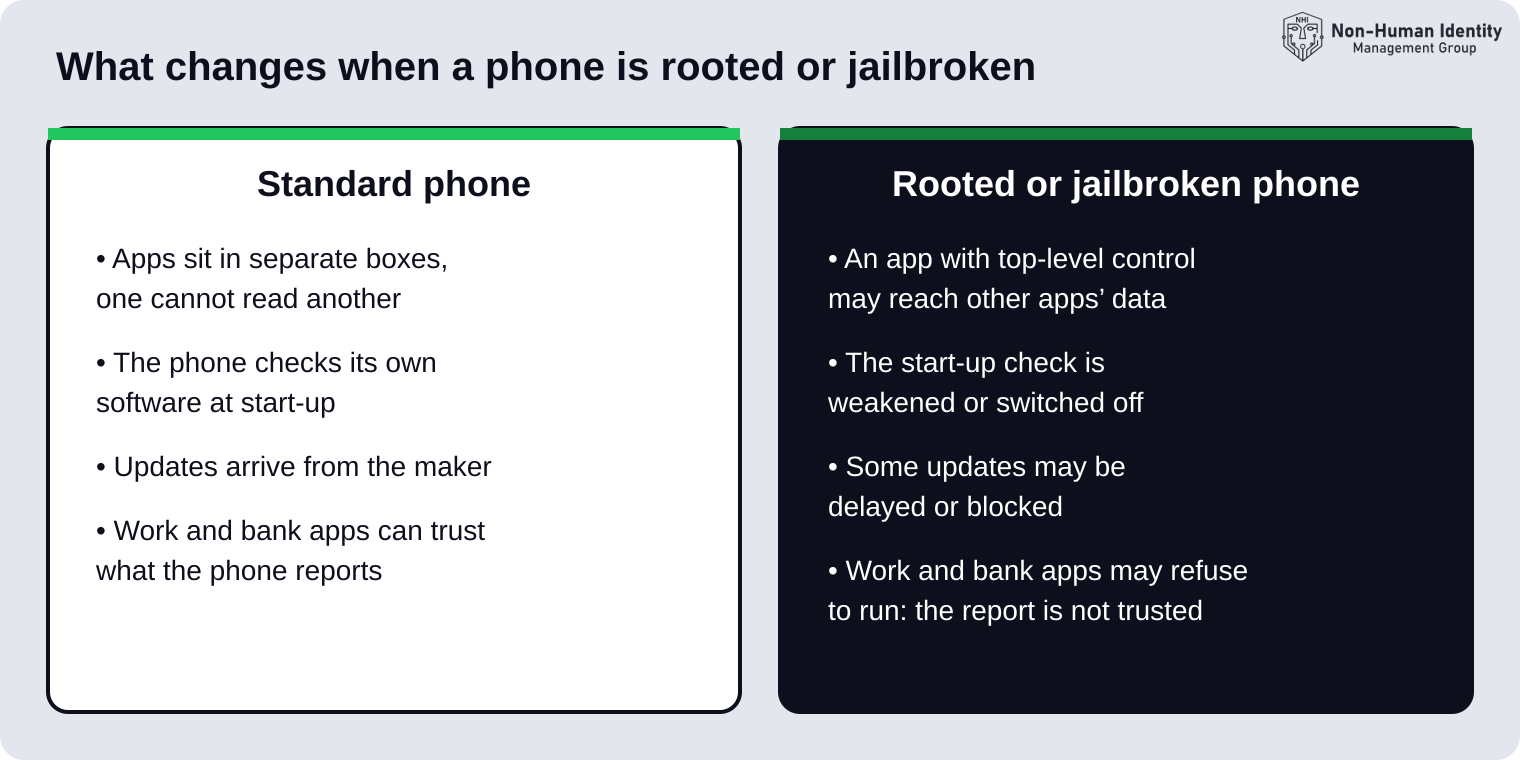
A phone ships with similar limits. Each app lives in its own walled-off space, called a sandbox, so one app cannot read another app's data. The phone also checks, each time it starts, that its main software is the version the maker approved. Android calls this check Verified Boot.[3]
Rooting an Android phone gives the owner, or any app they approve, top-level control. That control is called "root". Jailbreaking an iPhone uses a flaw in Apple's software to switch off the rules about which apps can run. Apple says jailbreaking removes security layers that protect your personal information and your device.[1]
People do it for many reasons: to change how the phone looks, to remove built-in apps, or to install apps from outside the official store. Most are not trying to cause harm.
Where the comparison stops working: a car without a limiter still looks the same from outside. A modified phone may also look normal. But apps can sometimes detect the change. And some of the protection is hard to put back without a full reset.
Why does it matter?
The phone's locks protect more than the owner. They protect the bank, the employer and anyone whose data sits on the phone.
If you own a smartphone
What could happen: a harmful app with root access may read data from your other apps. Apple also warns of crashes, battery drain and problems with later updates.[1]
Check this: only install apps from the official store, and keep the phone updated.
If you use your own phone for work
What could happen: your work email or chat app stops opening, because the phone no longer meets the company's rules.
Check this: read your firm's personal phone policy before you change anything on the phone.
If you are new to IT support
What could happen: a staff member asks you to "just let the phone through". Doing so may expose work data on a phone you cannot trust.
Check this: learn how your device management tool flags modified phones, and what the agreed exception process is.
What does it look like?
Here is the kind of message a work phone check might show. The app and company names are made up.
Example only. All values are made up.
ExampleWork Portal                          (1)
Device: Phone-EXAMPLE-0000
Status: NOT COMPLIANT                       (2)
Reason: Device appears to be rooted         (3)
        or jailbroken
Work email and files are blocked.           (4)
Contact IT: helpdesk.example.invalid        (5)
- The app your employer uses to check phones.
- "Not compliant" means the phone does not meet the company's rules right now.
- The reason: the phone's built-in limits seem to have been removed.
- Work apps stay locked until the problem is fixed. Personal apps are usually not affected.
- In a real message, this line would show your own IT team's contact details.
Why this is risky: the work app cannot be sure the phone is telling the truth about itself. So it cannot protect the work data on it.
The safer way: contact IT. The usual fix is to remove the modification, often by resetting the phone to factory settings, then enrolling it again.
How does it work?
This is a simple view of how apps and employers decide whether to trust a phone. It is not a guide to rooting or jailbreaking.
- The phone starts up and checks itself. Each part of the start-up software checks the next part before handing over.[3]
- An app asks for proof. A bank or work app asks the phone maker's service for a signed report on the phone's state. Google calls its service Play Integrity.[2]
- The report comes back. For a genuine Android phone the report can say it "meets device integrity". Google's documentation says a rooted phone does not get that label.[2]
- The app or employer decides. It may allow the phone, limit what you can do, ask for extra checks, or block it.
- Work phone rules apply the decision. An employer's device management tool can mark a jailbroken phone as "not compliant", which can block work apps.[4]
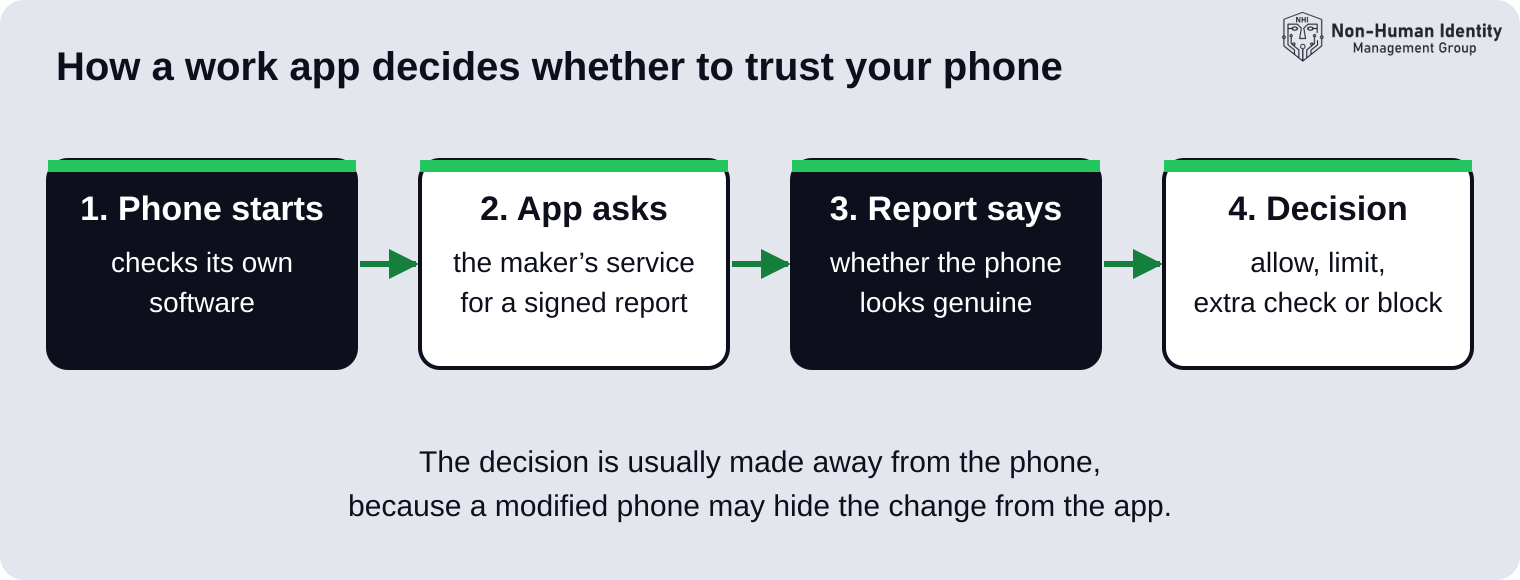
Why not just ask the phone? On a rooted or jailbroken phone, the software can be changed to give false answers. That is why the decision is usually made on the company's or bank's own computers, using the signed report.
A worked example
This story is made up to show how it can happen.
Kaia Iyer is a pharmacist at Birch Pharmacy. She uses her own Android phone for work email and the staff rota app.
Last year a friend, Idris Tanaka, rooted the phone for her. He wanted to remove some built-in apps and change the home screen. Kaia liked the result and forgot about it.
In March, Birch Pharmacy brings in new work phone rules. Kaia gets a message: her phone is "not compliant" and work email is blocked. She is annoyed. Her phone works fine.
She calls the IT contact, Leila Pajari. Leila explains that the phone's built-in limits have been removed. The pharmacy can no longer be sure that other apps on the phone cannot read work emails, which sometimes mention customers.
Kaia asks if Leila can just make an exception. Leila says the pharmacy's rule allows short, approved exceptions only, and they are recorded. She suggests a better fix instead.
Kaia backs up her photos and contacts. She resets the phone to factory settings, which removes the change. She installs the latest system update and reinstalls her apps from the official store. Then she enrols the phone again. The check now passes and her work email returns.
What made the difference: Kaia asked why the block was there, instead of looking for a way around it.
Myths and mistakes
| What people think | What is true |
|---|---|
| Rooting or jailbreaking is always illegal. | It depends on the country, and the law here is not the point. The security risk is the same either way. Apple says it may refuse service for a phone running unauthorised software.[1] |
| My phone works fine, so it must be safe. | The lost protection is invisible day to day. You notice it only if a harmful app takes advantage of it. |
| Hiding the change from the app solves the problem. | It hides the warning, not the risk. Your employer may also treat it as breaking its rules. |
| Only hackers root or jailbreak phones. | Most people do it to customise the phone. The risk comes from what other software can then do. |
| A factory reset always undoes it. | Often it does, but not always. Some changes need the official software reinstalled. Ask IT or the maker's support if a check still fails. |
What can I do this week?
- Check that your phone has the latest system update installed.
- Remove any apps you did not get from the official app store.
- If you use your phone for work, read your firm's personal phone policy.
- If you are thinking of rooting or jailbreaking, keep a separate phone for work and banking.
- If a work app blocks your phone, contact IT rather than searching for a way around it.
Checklist
- I know whether my phone has ever been rooted or jailbroken.
- My phone has the latest system update.
- My apps come from the official app store.
- I understand why a bank or work app may refuse a modified phone.
- I know who to contact at work if my phone is blocked.
- I do not use tools to hide a modification from work or bank apps.
- I back up my phone before any reset.
Common questions
Is rooting the same as jailbreaking?
Nearly. Both remove the maker's limits on a phone. Rooting is the Android word and gives top-level control of the system. Jailbreaking is the iPhone word and switches off Apple's rules about which software can run. The security effect is similar: apps can no longer fully trust the phone.
Why does my banking app refuse to open?
Probably because it checked the phone and the result was not trusted. Many banking apps ask the phone maker's service whether the phone looks genuine. A rooted or jailbroken phone may fail that check, so the app stops to protect your account.
How do I undo rooting or jailbreaking?
Usually by backing up your data, then resetting the phone to factory settings and installing the latest official update. Some changes need the official software reinstalled from the maker. If you are unsure, ask the maker's support or your IT team before you start.
Can my employer see my personal data if it checks my phone?
Usually not. A compliance check looks at the phone's state, such as its system version and whether it seems modified. On personal phones, many firms manage only the work apps. Ask IT what your firm's tool can see.
Can a phone be jailbroken without the owner knowing?
It is possible if someone else has the phone and its passcode for a while. Signs include unfamiliar apps or settings you did not add. If you are worried, back up, reset the phone to factory settings and update it.
Where next?
Ready for the detail? Read the practitioner guide: Rooted, jailbroken and emulated devices. It goes further into the integrity verdicts app teams use, emulated devices used for fraud, and how to set compliance rules without locking out genuine users.
Also useful:
- Smartphone Security for Beginners
- Bring Your Own Device for Beginners
- Mobile Device Management for Beginners
- Mobile App Security for Beginners
Related NHI Mgmt Group resources: APK sideloading · Android Banking Trojans Guide · Securing Your Smartphone Guide
Key terms
- Rooting
- Getting top-level control of an Android phone, beyond what the maker allows.
- Jailbreaking (phones)
- Removing Apple's limits on an iPhone so software from outside the App Store can run.
- Verified Boot
- A start-up check that confirms each piece of the phone's software is genuine before it runs.
- Root and jailbreak detection
- Checks an app runs to see whether the phone's built-in limits have been removed. It is a warning sign, not proof.
- Device attestation
- A signed report that tells an app or employer whether a device looks genuine before it is trusted.
- Mobile device management
- Tools an organisation uses to set rules for phones and check them before they reach work apps.
- Sideloading
- Installing an app from somewhere other than the phone's official app store.
Sources and further reading
- Unauthorized modification of iOS. Apple, iPhone User Guide (Apple Support). https://support.apple.com/guide/iphone/unauthorized-modification-of-ios-iph9385bb26a/ios, accessed 28 Nov 2026.
- Integrity verdicts. Google, Play Integrity API documentation (Android Developers). https://developer.android.com/google/play/integrity/verdicts, accessed 28 Nov 2026.
- Verified Boot. Android Open Source Project, security documentation. https://source.android.com/docs/security/features/verifiedboot, accessed 28 Nov 2026.
- iOS/iPadOS device compliance settings in Microsoft Intune (Device health: Jailbroken devices). Microsoft Learn. https://learn.microsoft.com/en-us/intune/intune-service/protect/compliance-policy-create-ios, accessed 28 Nov 2026.