The Purdue model is a way of sorting factory and utility computers into layers, from machines up to business systems.
This guide is for students and new starters in plant, utility or IT teams who keep hearing about "Level 2" or "the DMZ". You do not need to be an engineer to follow it: the idea is a simple stack of layers.
In short
- The Purdue model splits industrial computer systems into numbered levels, from sensors at Level 0 up to company-wide business systems at Level 5.
- Teams use it as a shared map, so everyone can say where a device sits and what it should talk to.
- Security teams add a buffer zone, often called the DMZ, between the business levels and the control levels, so traffic does not pass straight through.
- It was not designed as a security model, and cloud and smart devices blur the layers, so it is a starting point, not the whole answer.
What you will learn
- Explain the Purdue model in one sentence.
- Spot which level a device belongs to.
- Explain why a buffer zone sits between business and control systems.
- Ask good first questions about how a site's network is layered.
- Layer map (Purdue model)
- a numbered set of levels used to place each industrial computer system.
- Buffer zone (DMZ)
- a small separate network between business and control systems that passes data across safely.
- Machine controller (PLC)
- a small rugged computer that runs one part of a process, such as a pump.
What is the Purdue model?
Think of a factory building with several floors. The machines are on the ground floor. The supervisors' room is one floor up. The managers' offices are at the top. A security desk on the stairs checks who goes between the offices and the factory floors.
The Purdue model sorts computer systems in the same way. It came out of work at Purdue University in the early 1990s, to describe how control systems relate to business networks.[1] Each layer is given a number:
- Level 0: sensors and moving parts, such as temperature probes, valves and motors.
- Level 1: controllers, such as PLCs (programmable logic controllers), small computers that run a pump or a line.
- Level 2: screens and systems that supervise one process or one line.
- Level 3: systems that supervise the whole site, such as data stores of past readings.
- Levels 4 and 5: business networks, such as email, planning and the company's main systems.[1]
Where the comparison stops working: in a building, you can see the stairs. In a network, hidden links can jump straight from the top floor to the ground floor. Those hidden links are what security teams look for.
Why does it matter?
The lower levels move real things: valves, pumps and power switches. The closer a device is to Level 0, the more it can affect the physical process. But it usually has fewer security features of its own, so it relies on the layers above to protect it.[1]
If you are a student learning industrial security
What could happen: you hear "Level 1" and "Level 3.5" in a lecture and cannot follow the rest.
Check this: learn the six levels and the buffer zone first. Most diagrams build on them.
If you are moving from IT into plant work
What could happen: you allow a business app to talk straight to a controller, skipping the buffer zone.
Check this: ask which level each end of a new connection sits at, and whether it goes through the buffer zone.
If you are a plant engineer
What could happen: a supplier's remote link lands on Level 2 and nobody has it on the site map.
Check this: mark every remote link on the layer map, with where it enters.
Next: OT Remote Access Guide
What does it look like?
Many sites keep a list of devices, each tagged with its level. Here is a made-up extract from a small bottling plant.
Example only. All values are made up.
# device list, EXAMPLE Bottling, site 01
Level 4  planning-server-EXAMPLE   talks to: DMZ data copy        (1)
DMZ      data-copy-FAKE01          talks to: Level 3, Level 4
Level 3  site-history-EXAMPLE      talks to: DMZ, Level 2
Level 2  line-screen-EXAMPLE-2     talks to: Level 3, Level 1
Level 1  PLC-filler-EXAMPLE        talks to: Level 2, Level 0
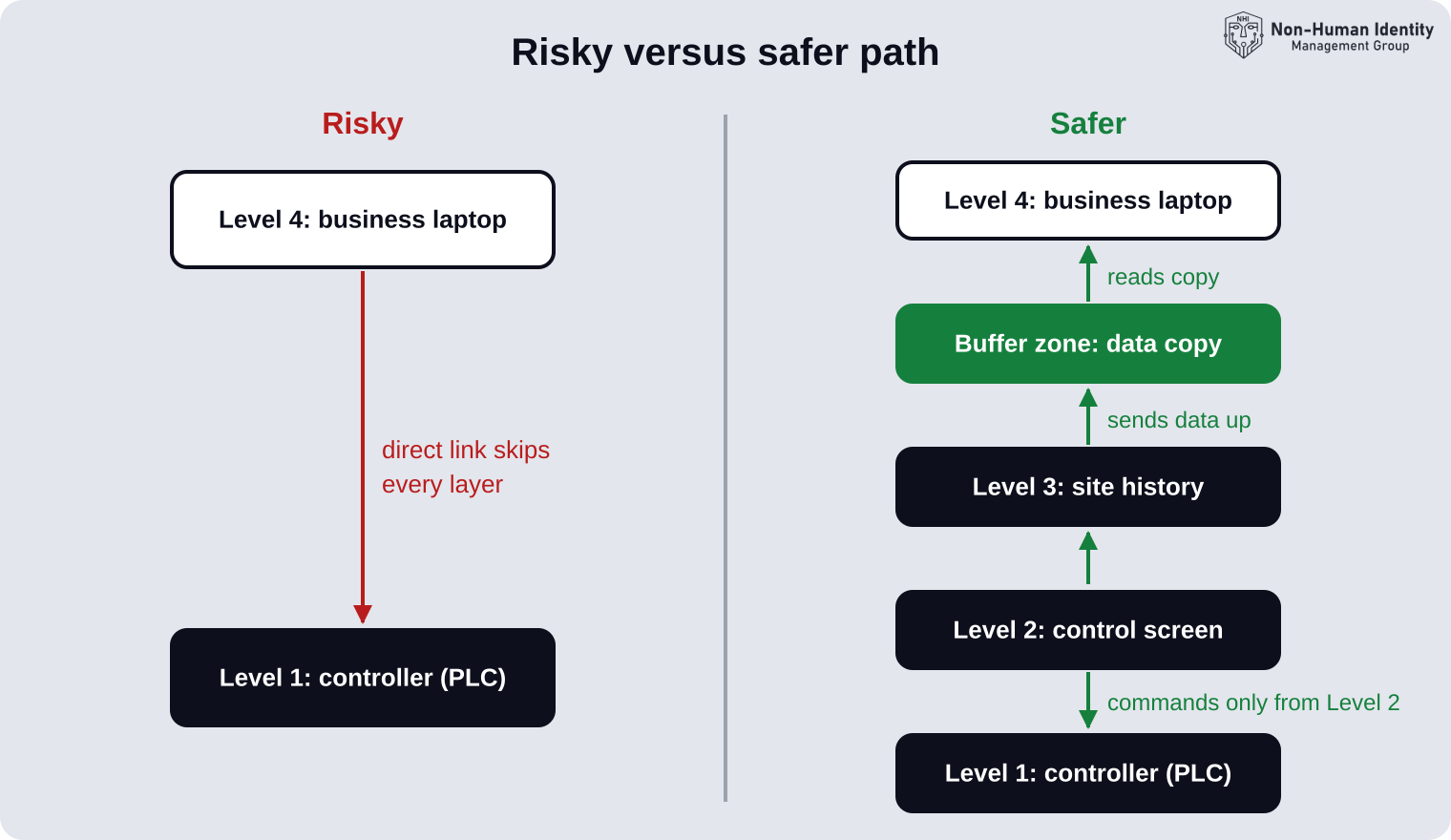
Level 4  reports-laptop-0000       talks to: PLC-filler-EXAMPLE  (2)
- A business server gets its data from a copy in the buffer zone, not from the plant itself.
- A business laptop talks straight to a filling machine's controller, skipping every layer in between.
Why this is risky: if the laptop picks up harmful software, it has a direct path to a machine controller. The layers in between can no longer help.
The safer way: the laptop reads plant data from the buffer zone copy. Only Level 2 systems send commands to the controller.
How does it work?
Teams use the model as a map, then add controls where the layers meet.
- List every device. Write down each sensor, controller, screen and server on the site.
- Give each one a level. Use the Purdue levels, so everyone describes the network the same way.
- Draw the allowed paths. Most traffic should go only to the level directly above or below.
- Add a buffer zone. Put a DMZ (demilitarised zone), a small separate network, between the business and control levels. US government guidance recommends this, so traffic does not pass directly between the two.[2][3]
- Guard the doors. Use firewalls, gatekeeper devices that allow only approved traffic, at each boundary. Then watch for anything that breaks the rules.
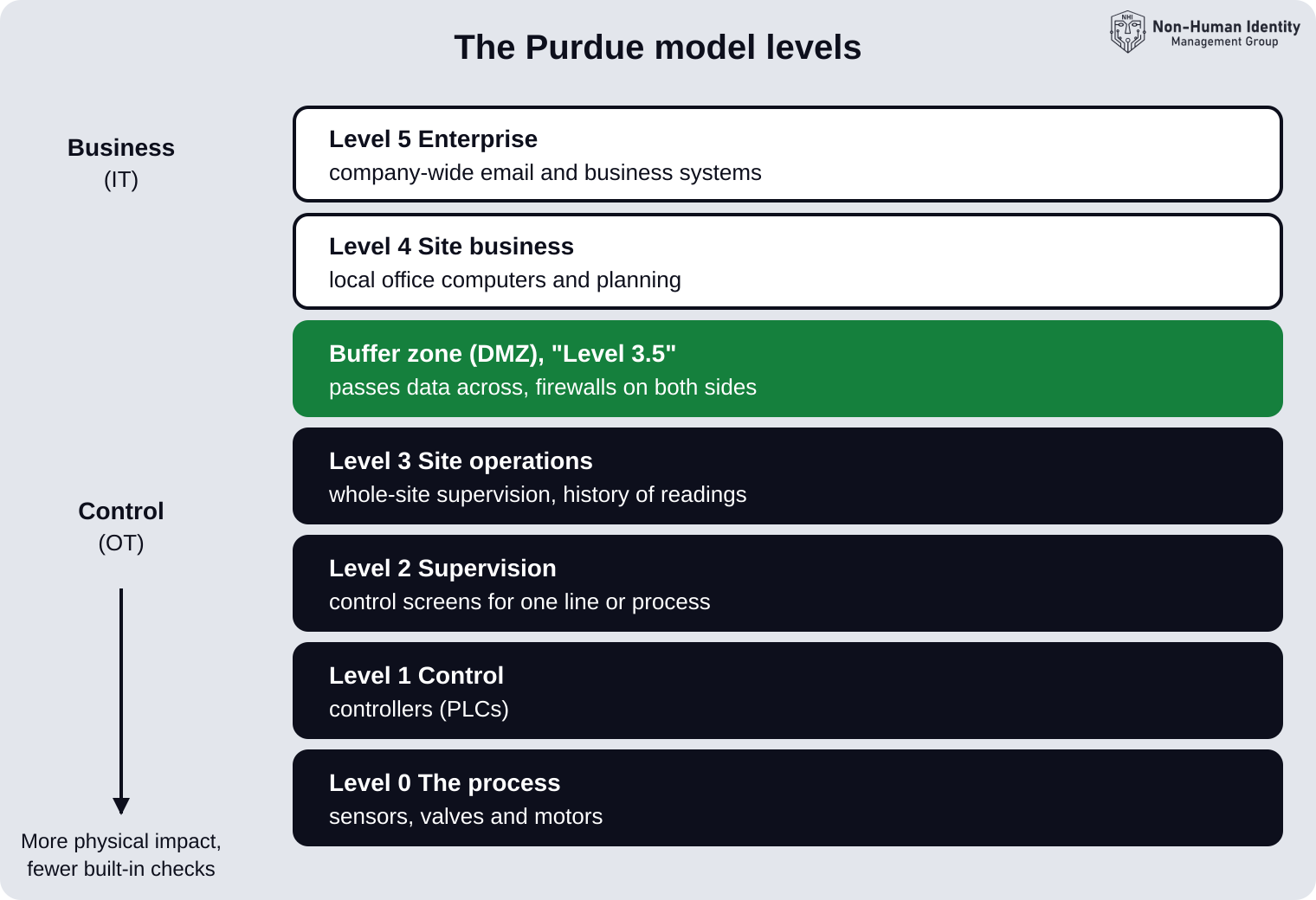
The buffer zone is not part of the original model, even though most sites use one in practice.[1] People often call it "Level 3.5" because it sits between Levels 3 and 4.
A related set of international standards, known as IEC 62443, sets requirements for securing industrial automation systems.[4] It groups systems into "zones" and controls the "conduits" between them. Many teams use the Purdue levels as a first sketch, then plan zones in more detail.
A worked example
Jonah Ulrich has just moved from the IT help desk to the plant team at a fictional food factory. His new lead is Quinn Fairweather, a control engineer.
On his first day, the finance team asks Jonah for live production numbers in their reporting tool. Jonah finds the filling line controller's address and starts to set up a direct link.
Quinn stops him and draws a stack of boxes on the whiteboard. "The reporting tool is Level 4. The controller is Level 1. If we join them, anything on the office network gets a path to the filling machine."
Jonah remembers the factory floors picture. A direct link is like a ladder from the top floor to the machines, bypassing the security desk.
So they plan it the Purdue way. The site history server at Level 3 already collects the production numbers. Quinn sets up a copy of that data in the buffer zone. The firewall lets the reporting tool read from the copy, and nothing else.
While checking the firewall rules, Jonah notices an old rule. It lets a supplier's remote link reach a Level 2 screen directly. Quinn checks the supplier contract. The link is still needed, but it should come in through the buffer zone, with approval for each session. They add the change to the next planned maintenance window.
At the end of the week, Jonah updates the device list so every item has a level. Two devices have no owner. That goes on the list too, so someone can chase it.
Myths and mistakes
| What people think | What is true |
|---|---|
| The Purdue model is a security standard. | It began as a way to describe how industrial systems fit together. It was not designed as a cyber security model.[1] |
| If we have drawn the layers, we are protected. | A diagram does nothing on its own. Firewalls, rules and monitoring at each boundary do the work. |
| Every site has exactly six neat levels. | Real sites often merge levels. Modern systems often combine Levels 0 and 1, for example.[1] |
| Cloud and smart devices fit neatly into the model. | Some smart devices send data straight to the cloud, skipping layers. These need their own controlled paths. |
| The buffer zone can pass any traffic, as long as it goes through. | The buffer zone should hold copies and approved services. Direct links through it to controllers defeat the point. |
What can I do this week?
- Ask for your site's network diagram, and find where each level sits.
- Pick five devices and say which level each belongs to.
- Ask whether the site has a buffer zone between business and control systems.
- Find out how supplier remote links enter, and at which level.
- Read the practitioner guide below before you change any plant firewall rule.
Checklist
- There is an up-to-date device list, with a level for each device.
- Each device on the list has a named owner.
- A buffer zone sits between business and control systems.
- No business device talks straight to a controller.
- Firewalls at each boundary allow only listed traffic.
- Remote and supplier links enter through the buffer zone and are approved, recorded and time-limited.
- Monitoring alerts on traffic that skips layers.
- Cloud-connected devices have their own planned, controlled paths.
Common questions
What are the Purdue model levels, in simple words?
Level 0 is the physical process: sensors, valves and motors. Level 1 is the controllers that run them. Level 2 is the screens that supervise one line. Level 3 supervises the whole site. Levels 4 and 5 are business networks, such as email and planning.[1]
What is Level 3.5?
Level 3.5 is a common nickname for the buffer zone, or DMZ, between the business levels and the control levels. It is not in the original model. Sites add it so business systems can get plant data without a direct connection to the control systems.[1]
Is the Purdue model out of date?
Partly. Cloud services, smart sensors and remote working blur the neat layers. Many experts still find it a useful shared map for describing where systems sit.[1] Most teams now combine it with zone-based planning and stronger checks on every connection.
How is the Purdue model different from IEC 62443 zones?
The Purdue model is a fixed set of levels for describing a site. IEC 62443 is a family of security standards. It asks you to group systems into zones by risk and control the paths between them. The Purdue levels are often a starting point for drawing those zones.
Does the Purdue model only apply to factories?
No. It is used across many industrial settings, including power, water, oil and gas, and building systems. Anywhere computers control physical equipment, the same layering idea can help teams describe and protect the network.
Where next?
Ready for the detail? Read the practitioner guide: OT Network Segmentation, Purdue Model and IEC 62443 Zones and Conduits Guide. It goes further into designing zones and conduits, writing firewall rules for each boundary and testing segmentation safely.
Also useful:
- Purdue Model vs Zero Trust for OT
- IEC 62443 for Beginners
- Industrial Protocols for Beginners
- Operational Technology Security for Beginners
- DMZ Design
Related NHI Mgmt Group resources: OT Network Security Monitoring Guide · OT Security Engineer for Beginners · Power Grid Cyber Security for Beginners
Key terms
- Purdue model
- A layered map that sorts industrial systems into levels, from the physical process up to business networks.
- DMZ
- A small buffer network between business and control systems that passes data across without a direct link.
- PLC
- A rugged small computer that controls one part of an industrial process, such as a pump or motor.
- IT/OT boundary
- The line between business computer systems and the systems that control physical equipment.
- Network segmentation
- Splitting a network into separate areas so trouble in one area cannot easily reach another.
- Firewall
- A gatekeeper device that allows only approved traffic between networks.
- Industrial control systems
- The controllers, sensors and software that run industrial processes.
Sources and further reading
- The Purdue Model: Introduction to ICS Security Part 2. SANS Institute (Stephen Mathezer), 16 July 2021. https://www.sans.org/blog/introduction-to-ics-security-part-2, accessed 28 Nov 2026.
- NIST SP 800-82 Rev. 3, Guide to Operational Technology (OT) Security. National Institute of Standards and Technology, September 2023 (executive summary on DMZ architecture; Purdue model example in section 5.2.3). https://csrc.nist.gov/pubs/sp/800/82/r3/final, accessed 28 Nov 2026.
- Primary Mitigations to Reduce Cyber Threats to Operational Technology. CISA and partner agencies. https://www.cisa.gov/resources-tools/resources/primary-mitigations-reduce-cyber-threats-operational-technology, accessed 28 Nov 2026.
- ISA/IEC 62443 Series of Standards. International Society of Automation. https://www.isa.org/standards-and-publications/isa-standards/isa-iec-62443-series-of-standards, accessed 28 Nov 2026.