An SEO spam hack is when someone secretly adds spam pages or links to a website for search engines.
This guide is for small business owners, charity volunteers and anyone who runs a website or pays someone to. You do not need to write code to be affected: if your site's search results suddenly show pills, fake designer goods or foreign words, this page explains what is likely going on.
In short
- Attackers break into a site and add spam that search engines see, often selling cheap medicines or fake brands.
- The spam is often hidden from you, so your site can look normal while its search results do not.
- Searching for your own site and checking a free search engine tool are good first checks.
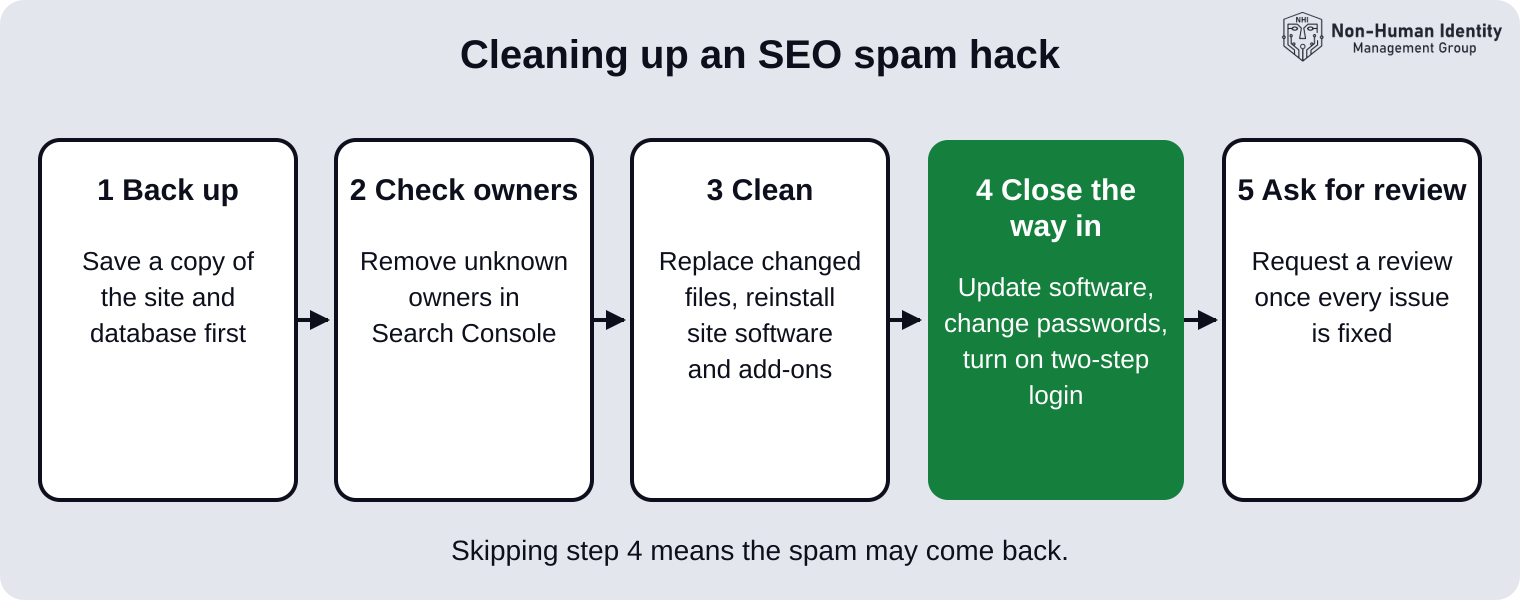
- Cleaning up means removing every change, closing the way in and asking the search engine to check again.
What you will learn
- Spot the signs of spam pages or links on your site.
- Explain why you may not see the spam yourself.
- Check your site's search results and search engine alerts.
- Ask your web supplier the right questions after a hack.
- Search ranking tricks (SEO spam)
- content added to fool search engines into ranking pages higher.
- Two faces (cloaking)
- showing one thing to search engines and something else to people.
- Hacked site (website compromise)
- a website that someone has changed without the owner's permission.
What is an SEO spam hack?
Think of someone painting adverts on the back of your shop, facing the motorway. You never see them from the front door, but thousands of drivers do.
SEO stands for search engine optimisation. It means making a website easier to find in search results. An SEO spam hack abuses that. An attacker gets into your site and adds pages, words or links that they want search engines to find. These are often adverts for cheap medicines, which is why people call it a "pharma hack". Others push fake designer goods or gambling sites.
Your site already has a good name with search engines. The attacker borrows that trust to push their own pages up the results, and may earn money from each click or sale.[2]
Where the comparison stops working: painted adverts can be seen by anyone who walks round the back. Hacked spam can be set to appear only for search engines, or only for visitors from a search. So walking round your own site may show nothing wrong.
Why does it matter?
Google says sites that break its spam rules may rank lower in results, or not appear at all.[1] Customers who see spam under your name may also stop trusting you. And spam is usually a sign that someone has a way into your site.
If you own a small business website
What could happen: customers search for your name and see listings for cheap pills, so they go to a rival.
Check this: search for your own site this week and read the first few pages of results.
If you look after websites for others
What could happen: you delete the spam pages, but the hidden way back in stays and the spam returns.
Check this: after a clean-up, look for unknown users, files and search engine owners, not only the spam.
If you run a charity or club site
What could happen: an old, rarely updated site becomes a home for spam pages nobody notices for months.
Check this: who updates the site's software, and when did they last do it?
What does it look like?
Here is a made-up set of search results for a hacked site. The owner searched for their own web address.
Example only. All values are made up.
Search: site:example.com
example.com/                     Thistle Lettings, homes to rent   (1)
example.com/about                About our team                     (2)
example.com/xq7/cheap-pills-0000 Buy FAKE-pills cheap, no prescription (3)
example.com/zz9/brand-bags-0000  EXAMPLE designer bags 90% off      (4)
example.com/xq7/0001.html        (lines of Japanese text)            (5)
- The agency's own home page looks normal.
- So do its other pages.
- In a real screen, this line would show a spam page the owner never made, often in an oddly named folder.
- Spam for fake designer goods is common too.
- Pages of foreign words, such as Japanese, are another known pattern.[2]
Why this is risky: when the owner clicks one of these pages, it may show "page not found". That can be a trick. The spam may still be there, hidden from normal visitors.[3]
The safer way: treat any strange page under your web address as a sign of a hack, even if it seems to have gone. Check the search engine's own tools, and ask your web supplier to look for how the attacker got in.
How does it work?
Most SEO spam hacks follow the same broad path.
- A way in. The attacker uses a weak spot. Out-of-date site software, an old add-on (often called a plugin) or a weak password are common examples.[3]
- The spam. They add spam pages, hidden words or hidden links. Google lists these as kinds of hacked content.[1]
- The hiding. Hidden links may be white text on a white background, or text pushed off the screen.[1] Some spam uses cloaking, which shows search engines one page and people another.[1]
- The control. Some attackers add themselves as an owner of the site in Google's free site tool, called Search Console. Then they can change settings, such as which page lists the search engine reads.[2]
- The payoff. The spam pages appear in search results, and the attacker earns money from links, sales or redirects.[3]
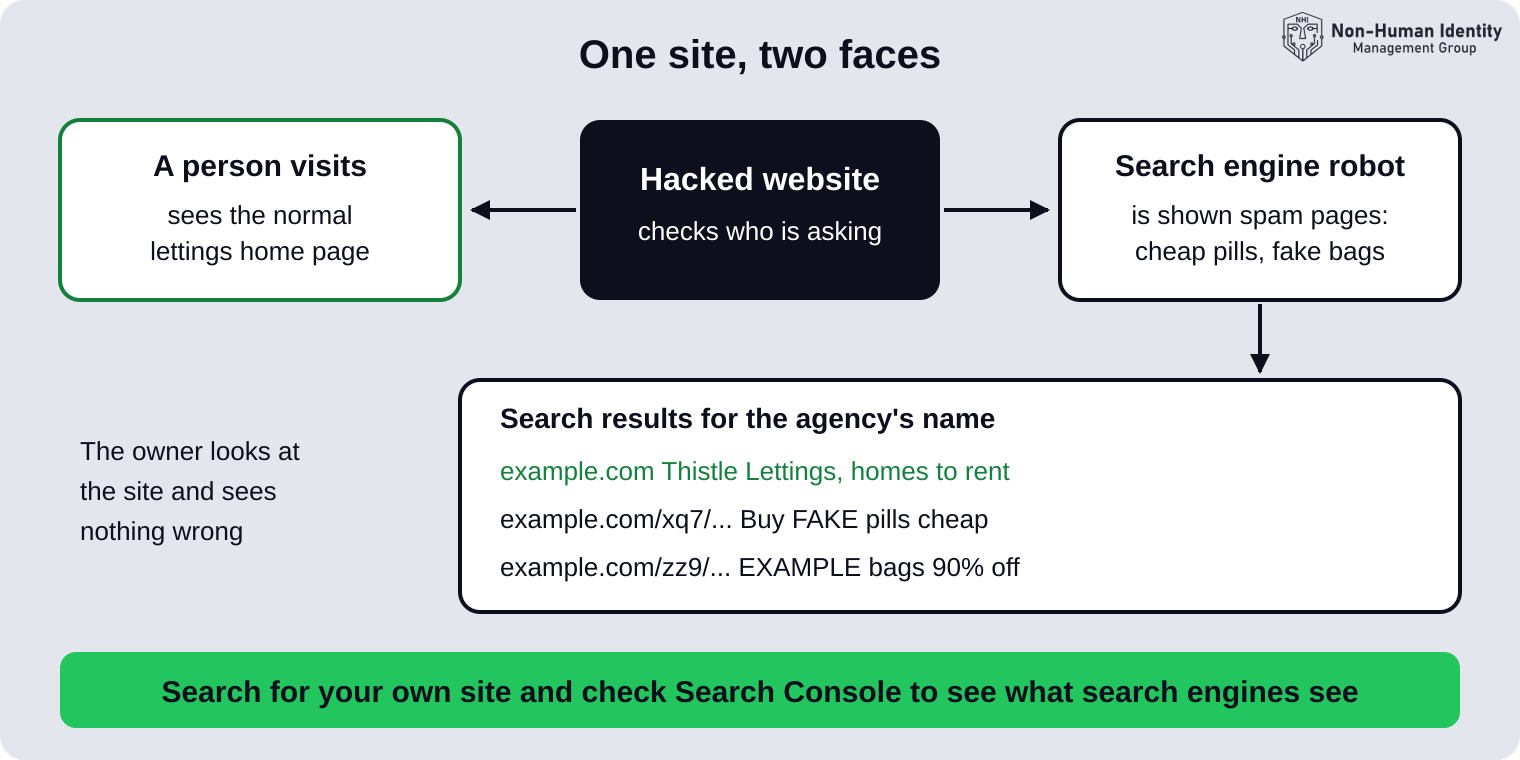
If you only fix the spam and not the way in, it may well come back. Google's guidance notes that many hacked sites are hacked again soon after.[3]
A worked example
Celia Osei runs Thistle Lettings, a small letting agency. Her website was built five years ago by a local web designer, Dario Haddad. It has not been updated much since.
One Monday, a landlord emails Celia. He searched for "Thistle Lettings" and saw a listing for cheap pills with her web address. Celia opens her website. It looks normal. She clicks around and finds nothing strange.
She remembers reading that she can search for her own address. She types site: and her web address into a search engine. The first results are her real pages. Further down, she finds dozens of pages selling medicines and handbags, all inside a folder with a random name.
Celia calls Dario. He logs in to Search Console for her site. The Security Issues report, which lists problems Google has found, shows hacked content.[4] He also finds an owner on the account that neither of them knows.
Dario makes a backup first. He removes the unknown owner, reinstalls the site software and add-ons, and replaces changed files. He finds an add-on that had not been updated for three years, which is the likely way in. He removes it, updates everything else and changes all the passwords. He also turns on two-step login, which asks for a code as well as a password.
Once the checks show no spam pages, he asks Google to review the site. A couple of weeks later, the review comes back clear. Celia adds a reminder to search for her own site each month.
Myths and mistakes
| What people think | What is true |
|---|---|
| My site looks fine, so it cannot be hacked. | Spam is often hidden from normal visitors and only shown to search engines. |
| The spam page says "not found", so it has gone. | A "not found" message can be a trick. Check with the search engine's own tools. |
| Deleting the spam pages fixes it. | Unless the way in is closed, the spam may come back. |
| Small sites are not worth hacking. | Small sites can be targets too. Any site with an old add-on or weak password can be broken into. |
| Hidden text is always spam. | Normal designs such as drop-down menus are fine. Google's concern is text hidden only to fool search engines.[1] |
What can I do this week?
- Search for
site:followed by your web address and read several pages of results. - Ask your web supplier whether your site is set up in Google Search Console, and who the owners are.
- Check that your site software and add-ons are up to date.
- Remove add-ons you no longer use.
- Make sure every login to your site uses a strong, unique password and two-step login where it is offered.
Checklist
- We search for our own site at least once a month.
- Our site is set up in Search Console, and we know every listed owner.
- Site software and add-ons are updated regularly.
- Unused add-ons and old admin accounts are removed.
- Every admin login has a strong password and two-step login where possible.
- We have a recent backup of the site and its database.
- We know who to call if we see spam under our name.
- After any clean-up, the way in is found and closed, not only the spam removed.
Common questions
Why can I not see the spam on my own site?
Because it is often hidden from you. Some hacks show spam only to search engines, or only to visitors who arrive from a search. Others hide text with tricks such as white text on a white background. Searching for your own site and using Search Console shows what search engines see.
What is a pharma hack?
It is a common name for an SEO spam hack that pushes medicines, often sold without a prescription. The attacker adds pages or links about the pills to a trusted site, hoping they rank well in search results. The same method is used for fake designer goods and gambling.
Will my site recover in search results?
Often, yes, once it is fully cleaned. Fix every issue, close the way in, then request a review in the Security Issues report. Google says reviews can take days or weeks.[4] Do not send a new request while one is still waiting, as that can slow it down.
Is an SEO spam hack the same as a malicious redirect?
They are related and often found together. A redirect sends visitors to another site. SEO spam adds pages or links for search engines to find. Some spam pages also redirect visitors who click them. See Malicious Website Redirects for Beginners.
Do I need to pay for a security service?
Not always. Free checks, such as searching for your own site and using Search Console, catch many problems. A paid monitoring service can help if you do not have time to check yourself. Keeping software updated and passwords strong matters most.
Where next?
Ready for the detail? Read the practitioner guide: How to Clean Up a Hacked Website. It goes further into finding changed files, removing hidden ways back in and requesting a search engine review.
Also useful:
- Malicious Website Redirects for Beginners
- Website Defacement for Beginners
- PHP and WordPress Security Guide
- How to Hunt for Web Shells on IIS, Apache and Nginx
Related NHI Mgmt Group resources: WordPress Security Checklist · Malvertising and SEO Poisoning Guide · Website Security for Beginners
Key terms
- Website compromise
- When someone changes a website without the owner's permission.
- Cloaking
- Showing different content to different visitors, for example spam to search engines and a normal page to people.
- Plugin
- An add-on that gives a website an extra feature, such as a booking form.
- Content management system
- The software many websites use so owners can edit pages without writing code.
- Malicious redirect
- A hidden instruction that sends visitors from a real site to a harmful one.
- Web shell
- A hidden file an attacker leaves on a website so they can get back in and control it.
Sources and further reading
- Spam policies for Google web search. Google Search Central, Google. https://developers.google.com/search/docs/essentials/spam-policies, accessed 28 Nov 2026.
- Fix the Japanese keyword hack. web.dev, Google. https://web.dev/articles/fix-the-japanese-keyword-hack, accessed 28 Nov 2026.
- Fix the cloaked keywords and links hack. web.dev, Google. https://web.dev/articles/fix-the-cloaked-keywords-hack, accessed 28 Nov 2026.
- Security issues report. Search Console Help, Google. https://support.google.com/webmasters/answer/9044101, accessed 28 Nov 2026.