A malicious redirect secretly sends visitors from a real website to a scam or harmful page instead.
This guide is for small business owners and anyone who looks after a website, or pays someone to. You do not need to write code to be affected: if customers say your site sent them somewhere strange, this page explains what is likely going on.
In short
- A malicious redirect is usually a sign that someone has changed your website without permission.
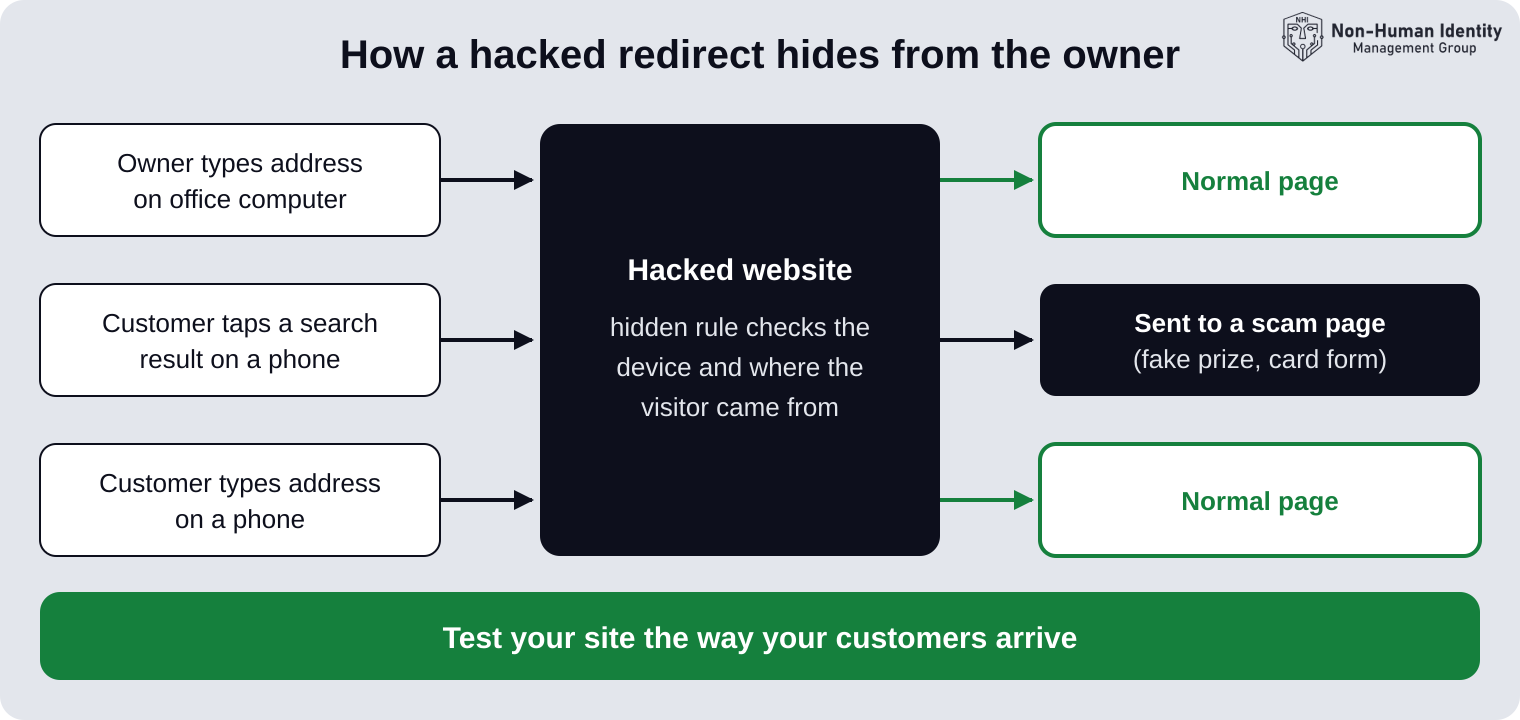
- It often hits only some visitors, such as people on phones or people arriving from a search engine, so the owner may not see it.
- Common causes are out-of-date add-ons, weak or reused passwords and changed settings files.
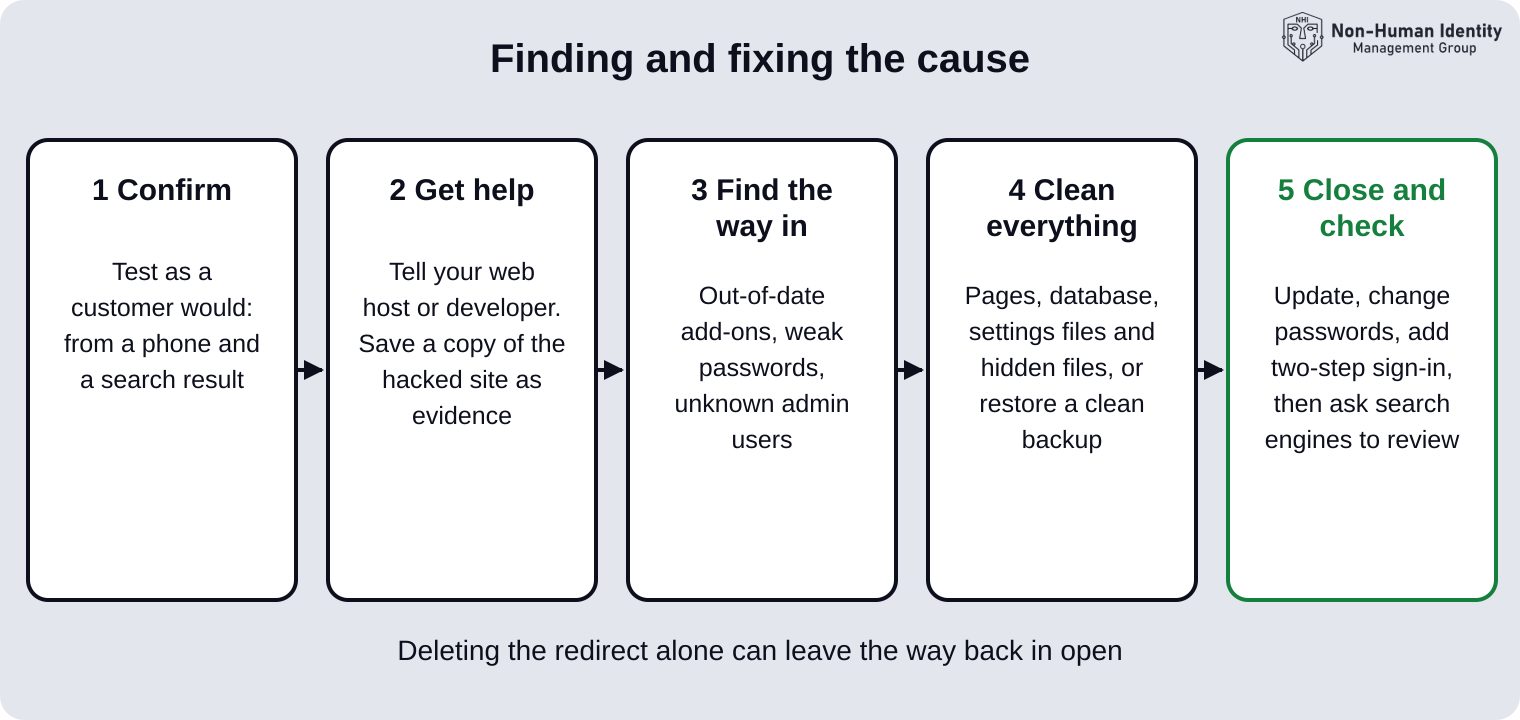
- Fixing it means finding how they got in, cleaning every change and closing that route, not only deleting one line.
What you will learn
- Spot the signs that your site is redirecting visitors.
- Explain why you may not see the problem yourself.
- Check the usual places a redirect is hidden.
- Ask your web supplier the right questions after a hack.
- Automatic forward (redirect)
- an instruction that sends a visitor from one web address to another.
- Add-on (plugin)
- an extra piece of software that adds a feature to a website, such as a contact form.
- Hacked site (website compromise)
- a website that someone has changed without the owner's permission.
What is a malicious redirect?
Think of a signpost at a road junction. Drivers trust it and follow it. Now imagine someone quietly turns it to point down a side road, but only for drivers coming from one direction.
Websites use redirects all the time for honest reasons. When a page moves, a redirect sends visitors from the old address to the new one. A malicious redirect is one an attacker adds to send your visitors somewhere harmful. That might be a fake prize page, a page that asks for card details or a page that pushes a download.
The attacker gets in through a weak spot, then adds the redirect to the site's code, its database or its settings files.[2] Your site still looks normal to you. Your visitors may see something else.
Where the comparison stops working: a turned signpost is in plain sight. A redirect can hide in files you never open, and can switch itself on only for some visitors.
Why does it matter?
Customers who land on a scam page may lose money or data, and they will remember your name. Search engines and browsers can also show a warning on a site they think is hacked.[3]
If you own a small business website
What could happen: customers on phones are sent to a fake prize page, while the site looks fine on your office computer.
Check this: who updates your site's software and add-ons, and how often?
If you build or look after sites for others
What could happen: you delete the redirect, but the hidden way back in stays, and the redirect returns a week later.
Check this: after a clean-up, look for new admin users and unknown files, not only the redirect.
If you visit a site that redirects you
What could happen: the new page asks for card details or tells you to install an "update".
Check this: look at the address bar. If it is not the site you meant to visit, close the tab.
Next: Phishing for Beginners
What does it look like?
Here is a made-up scenario card showing what different visitors see on the same hacked site.
Example only. All values are made up.
Site: www.example.com (a joinery firm)
Owner types the address on an office PC  -> normal home page    (1)
Customer clicks a search result on phone -> prize-EXAMPLE.invalid  (2)
Customer clicks the same result again    -> normal home page    (3)
Search listing title: "Cheap watches FAKE-0000"                 (4)
- Visiting directly from a desktop shows nothing wrong.
- Visitors from a search engine on a phone are sent away. In a real file, this line would contain the scam site's address.
- Some redirects fire only once per visitor, so a second try can look normal.
- Spam words in search results are another sign the site has been changed.
Why this is risky: the owner tests the site, sees nothing and thinks the customer is wrong. Google says a hacked redirect can depend on the visitor's device or where they came from.[1]
The safer way: treat any report of a strange redirect as a possible hack. Test from a phone, from a search result and from a private window. Ask the person who reported it when it happened and where they landed.
How does it work?
Most malicious redirects follow the same broad path.
- A way in. The attacker uses a weak spot, often old website software or an out-of-date add-on, or a stolen or guessed password.[4]
- The change. They add a redirect to a page, the database or a server settings file. On some web servers, that file is called
.htaccess.[2] - The hiding. The redirect is often set to fire only for some visitors, based on their device, the time of day or the site they came from.[2]
- The way back. Attackers often leave a hidden way back in, such as a new admin user or a small hidden program. That lets them return after a clean-up.
- The warnings. Search engines and browsers may spot the problem and warn visitors before the owner does.[3]
Not every unwanted redirect is a hack. A coding mistake called an open redirect lets attackers make links that start on your site and end somewhere else. A lookalike domain is a different site made to look like yours. Both need different fixes from a hacked site.
A worked example
Yusuf Erikson runs Slate Joinery, a fictional firm that makes kitchens and staircases. On Monday a customer emails: "I clicked your site on Google and got a page saying I had won a phone."
Yusuf opens the site on his laptop. It looks normal. He nearly replies that the customer must be mistaken. Then he remembers the turned signpost. It may only point the wrong way for some drivers.
He calls Zane Nakamura, the freelance developer who built the site. Zane searches for the firm on his phone and taps the result. He lands on the prize page.
Zane first saves a copy of the hacked site, so there is a record of what changed. He finds a redirect rule in the server settings file and a new admin user called "support2". One add-on had not been updated for over a year.
Rather than pick through every file, Zane restores a backup from before the add-on was last changed. Then he updates the site software and every add-on, removes the ones not in use and changes every password. He also turns on two-step sign-in for the admin pages.
Search results for the site still show a warning. Zane uses the search engine's site owner tools to request a review.[3] A few days later, the warning is gone.
Yusuf thanks the customer and asks Zane to check for updates every month.
Myths and mistakes
| What people think | What is true |
|---|---|
| The site looks fine to me, so the customer is wrong. | Many redirects only fire for some visitors. Test from a phone and from a search result.[1] |
| Deleting the redirect fixes it. | If the way in is still open, the redirect can return. Find and close the cause too. |
| Small sites are not worth hacking. | Many attacks use tools that look for any site with out-of-date software.[4] |
| Fixing a few pages is enough for the search warning to go. | Google says the problem must be fixed across the whole site before a review.[3] |
| All redirects are bad. | Redirects are a normal tool for moved pages. The problem is one you did not add. |
What can I do this week?
- Visit your own site from a phone by tapping a search result, not by typing the address.
- Ask your developer or host when the site software and add-ons were last updated.
- Remove add-ons and admin users you no longer use.
- Turn on two-step sign-in for your website's admin login.
- Check that you have a recent backup of the site stored somewhere else.
Checklist
- The site software, theme and add-ons are kept up to date.
- Unused add-ons, themes and admin users are removed.
- Every admin login is unique, strong and has two-step sign-in.
- Someone tests the site from a phone and a search result each month.
- We have a recent clean backup stored away from the site.
- We are signed up to the search engine's site owner tools, so we get warnings.
- We know who to call, and what to save, if a customer reports a redirect.
Common questions
Why can I not see the redirect on my own computer?
Because many malicious redirects are set to fire only for some visitors. They may check your device, the time or whether you came from a search engine. Owners often type the address directly, which skips the trap. Test the way customers arrive instead.
Does a redirect mean my site has malware?
Usually it means someone changed your site without permission, which is a hack. The page it sends people to may host malware or a scam. Treat it as a security incident, save a copy of the site and work out how the attacker got in.
Should I just restore a backup?
A clean backup from before the hack is often the quickest fix. Then update the software and change passwords at once, or the same weak spot can be used again. Pick a backup you are confident is from before the change.
How do I get rid of the warning in search results?
Fix the problem across the whole site, then ask the search engine to review it through its site owner tools. Google says reviews usually take days or weeks, and that sending repeat requests can slow things down.
Do I need to tell my customers?
Possibly, if customer data may have been taken, because there may be legal duties to report. We suggest asking your developer what was reached, and reading Data Breach Notification for Beginners.
Where next?
Ready for the detail? Read the practitioner guide: Website Defacement Playbook. It goes further into triage, containment, evidence to keep, clean-up of hidden files and who to notify after a website is changed by an attacker.
Also useful:
- Website Security for Beginners
- Open Redirect Guide
- Lookalike Domains for Beginners
- Incident Response for Beginners
Related NHI Mgmt Group resources: Web Shell Response Playbook · Web Application Firewalls for Beginners · Small Business Cyber Security for Beginners
Key terms
- Redirect
- An instruction that sends a visitor from one web address to another.
- Malicious redirect
- A redirect added without permission that sends visitors to a harmful or fake page.
- Website compromise
- When an attacker has enough access to change a website's content or code.
- .htaccess
- A settings file on some web servers that can hold rules, including redirects.
- Open redirect
- A coding flaw that lets anyone make a link on your site send people elsewhere.
- SEO poisoning
- Tricks that push harmful pages up search results so more people click them.
Sources and further reading
- Spam policies for Google web search (sneaky redirects; hacked content). Google Search Central, Google. https://developers.google.com/search/docs/essentials/spam-policies, accessed 28 Nov 2026.
- Hacked with malware: fixing server configuration and conditional redirects. web.dev, Google. https://web.dev/articles/hacked-with-malware, accessed 28 Nov 2026.
- Security Issues report. Search Console Help, Google. https://support.google.com/webmasters/answer/9044101, accessed 28 Nov 2026.
- Hardening WordPress. WordPress Advanced Administration Handbook, WordPress.org. https://developer.wordpress.org/advanced-administration/security/hardening/, accessed 28 Nov 2026.