Shoulder surfing is when someone watches you type a PIN, password or private details, then uses them.
This guide is for anyone who uses a phone, laptop or bank card in public. If you or your staff work on trains, in cafés or at a front desk, it applies at work too.
In short
- Shoulder surfing is simple spying: someone looks at your screen or keypad while you type.
- It works at cash machines, on phones, on laptops in public and at busy reception desks.
- A watched phone passcode is especially risky, because it can unlock the rest of your phone if the phone is then stolen.
- Cover your keypad, angle your screen, lock it when you step away and turn on your phone's theft protection.
What you will learn
- Explain what shoulder surfing is in one sentence.
- Spot the places and moments where you are most likely to be watched.
- Check that your phone and laptop are set up to limit the damage.
- Ask your workplace the right questions about screens in public.
- Peeking over your shoulder (shoulder surfing)
- watching someone type or read private details, up close or through a camera.
- Privacy filter (privacy screen)
- a thin sheet over a screen that makes it hard to read from the side.
- Screen lock
- the PIN, password, face or fingerprint check that hides your screen until you unlock it.
What is shoulder surfing?
Think of a card game where the player next to you leans over and peeks at your hand. They have not broken any rule of the table, but now they know your cards. Shoulder surfing is the same trick, played on your screen or keypad.
The person watching wants something you type or show. That might be the PIN for your bank card, the passcode for your phone or a password. It might also be private work on your laptop, such as a customer list or a payroll file.
A UK government fraud campaign describes it as criminals watching you enter information on a keyboard, computer or cash machine.[1] They may stand close behind you. They may also use a hidden camera or film you from across a room with their own phone.[2]
Where the comparison stops working: in a card game, you see who is sitting next to you. Shoulder surfing can happen from a distance or through a camera, so you may have no idea it happened.
Why does it matter?
A PIN or passcode is meant to be the one thing only you know. Once someone has seen it, it is no longer a secret, and they only need the card or the device to use it.
If you use your phone out and about
What could happen: someone watches you type your phone passcode, then snatches the phone and uses the code to get into your apps.
Check this: use a longer passcode and turn on your phone's theft protection setting.
If you work on trains or in cafés
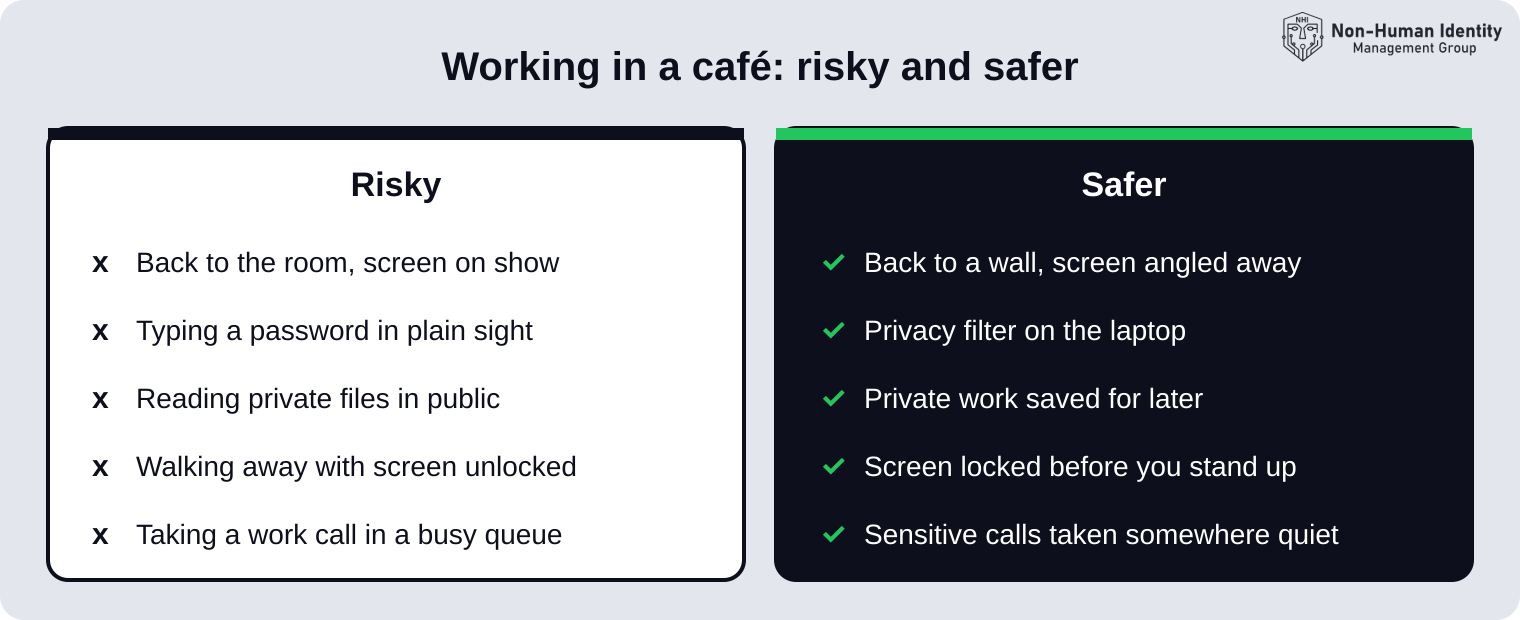
What could happen: a stranger reads a customer's details or a sign-in code off your laptop.
Check this: sit with your back to a wall and fit a privacy filter.
If you run a shop or reception desk
What could happen: a customer in the queue sees a screen of other people's bookings, or a till password typed in plain view.
Check this: turn screens away from the public side and lock them when staff step away.
What does it look like?
Example only. All values are made up.
SCENE: busy train, 08:10, seats facing each other
Laptop open, screen tilted towards the aisle     (1)
Email open: "Your sign-in code is 000000"        (2)
Spreadsheet: EXAMPLE-customers.xlsx, names and   (3)
  phone numbers in large type
Phone on the table, unlocked with code 0000      (4)
Person opposite: phone held up, camera facing you (5)
- The screen faces people walking past.
- A sign-in code can be read from the next seat.
- Private customer details are on show.
- A short phone passcode typed where others can see it.
- A raised phone may be a call. It may also be filming.
Why this is risky: each one is small. Together they give a stranger a code, a passcode and other people's details.
The safer way: turn the screen away and fit a privacy filter. Save the private file for later. Shield your phone as you unlock it.
How does it work?
This is a simple view so you can spot it. It is not a guide to doing it.
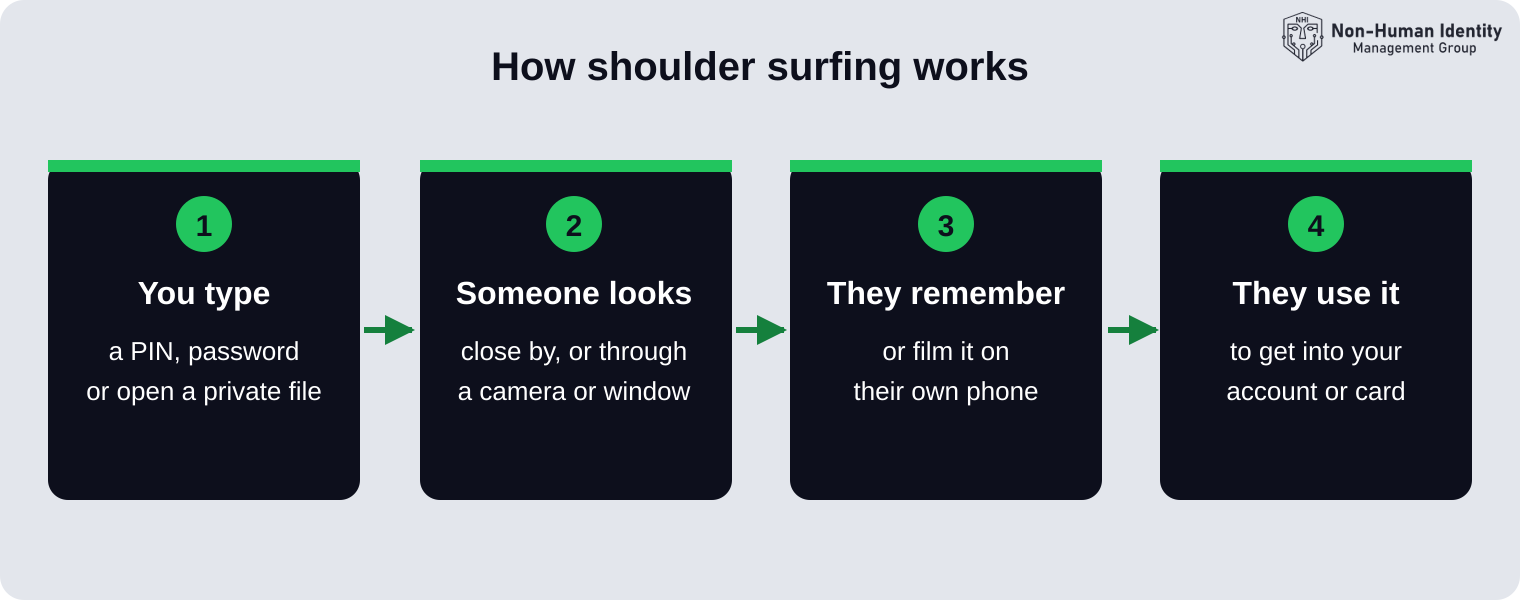
- You type or open something private. A PIN at a cash machine, a phone passcode, a password or a private file.
- Someone sees it. They stand close, look from the next seat, or use a camera. Some try to distract you while you type.[2]
- They keep it. They remember it, write it down or film it.
- They use it. With your card, your phone or your account name, the stolen detail may be enough to get in.
The phone case matters most. If a thief has watched your passcode and then takes your phone, the passcode may open saved passwords and let them change your account settings. Apple and Google now offer settings that ask for your face or fingerprint for some of these actions, so a passcode alone is not enough.[3][4]
Work screens carry a second risk. UK government guidance for staff working away from the office tells them to be aware they could be overlooked or overheard in public.[5]
A worked example
This story is made up to show how it can happen.
Georgia Pappas is a travel agent in Bristol. Twice a week she works from the train on her way to a client office. She likes the table seats, because there is room for her laptop.
One morning she opens her booking system to check a family's holiday. Their names, passport numbers and home address fill the screen. A man opposite has his phone held up at chest height. Georgia assumes he is reading the news.
Then she needs to sign in to the company email. A code arrives on her phone. She unlocks it with her four-digit passcode, reads the code and types it in. The man opposite has a clear view of both.
Later, Georgia remembers a short talk from her manager about screens in public. She feels uneasy. Nothing bad seems to have happened, but she cannot be sure what was seen.
She tells her manager that afternoon. Her manager changes her email password and checks the sign-in records. There are no strange sign-ins in the records available to them. They agree that client files with passport details should only be opened in the office or at home.
That evening Georgia changes her phone passcode to six digits and turns on her phone's theft protection. The next week she fits a privacy filter to her laptop and picks a seat with her back to the end wall.
What made the difference: Georgia spoke up straight away, so her manager could act while it was still a small worry.
Myths and mistakes
| What people think | What is true |
|---|---|
| Nobody is close enough to see my screen. | A camera or a phone held across the room can record it. Assume you could be watched in any public place. |
| Cash machine fraud is all about card readers. | Watching people enter their PIN is a common technique too. Cover the keypad with your free hand.[2] |
| Face unlock means my passcode does not matter. | Your phone falls back to the passcode. A watched passcode plus a stolen phone is a serious risk. |
| A privacy filter makes my screen completely private. | It narrows the viewing angle.[1] Someone right behind you may still see it. |
| Only paper documents need care in public. | Screens and phone calls can be seen and heard too. Save private work for a private place. |
What can I do this week?
- Change your phone passcode to at least six digits, and type it with the phone tilted towards you.
- Turn on theft protection on your phone: Stolen Device Protection on iPhone, or theft protection on Android.
- Set your laptop and phone to lock after a short time, and lock them yourself when you stand up.
- Get a privacy filter for any laptop you use in public.
- Next time you use a cash machine, cover the keypad with your free hand.
Checklist
- My phone passcode is at least six digits and not easy to guess.
- My phone's theft protection setting is turned on.
- My laptop and phone lock themselves after a short time.
- I lock my screen before I walk away, even for a minute.
- I cover the keypad when I type a PIN.
- My laptop has a privacy filter if I work in public.
- I save private files and sensitive calls for a private place.
- I tell my manager or IT team if I think someone saw a work password or file.
Common questions
What should I do if I think someone saw my PIN or password?
Change it as soon as you can. For a bank card PIN, contact your bank using the number on the back of the card. For a work password, tell your IT team, because they can check for strange sign-ins. Keep an eye on your accounts for a few weeks.
Do privacy filters really work?
Yes, for people at the side. A privacy filter narrows the angle from which a screen can be read, so the person in the next seat sees a dark screen.[1] It does less against someone directly behind you, so where you sit still matters.
Is it shoulder surfing if they use a camera?
Yes. The name comes from looking over a shoulder, but the idea is the same with a hidden camera or a phone filming you. Covering the keypad with your free hand helps against cameras as well as people.[2]
Why does my phone passcode matter if I use my face to unlock?
Because the passcode is the backup. If your face or fingerprint does not work, the phone asks for the code, and many settings can be changed with it. Theft protection settings on newer phones ask for your face or fingerprint for some of these changes.[3][4]
Is shoulder surfing a problem for businesses?
Yes. Staff who work in public or at front desks can show customer details, codes and passwords without meaning to. Simple rules help: screens facing away from the public, screen locks, privacy filters and a clear way to report a worry.
Where next?
Ready for the detail? Read the practitioner guide: Physical Security Guide for Security Teams. It goes further into workplace layout, visitor control and the physical side of a security programme.
Also useful:
- Social Engineering for Beginners
- Password Security for Beginners
- Smartphone Security for Beginners
- ATM Security Guide
Related NHI Mgmt Group resources: Remote Working Security for Staff Guide · Home Office and Remote Worker Security Guide · Public Wi-Fi Safety Guide
Key terms
- Shoulder surfing
- Watching someone type or read private details, such as a PIN or password, so you can use them later.
- Tricking a person into giving away information or doing something risky, often by distracting or rushing them.
- Screen lock
- A PIN, password, face or fingerprint check that hides a device's screen until the owner unlocks it.
- Privacy filter
- A thin sheet fitted over a screen so it is hard to read from the side.
- Tailgating
- Following someone with a pass through a door into a place you are not allowed to enter.
- Multi-factor authentication (MFA)
- Asking for two or more kinds of proof, such as a password and a code, before letting you in.
Sources and further reading
- Protecting against fraud in public places. Stop! Think Fraud (UK Government campaign). https://stopthinkfraud.campaign.gov.uk/protect-yourself/protecting-against-fraud-in-public-places, accessed 28 Nov 2026.
- Cash machine scams. Take Five to Stop Fraud, UK Finance. https://www.takefive-stopfraud.org.uk/protect-yourself/cash-machine-fraud/, accessed 28 Nov 2026.
- About Stolen Device Protection for iPhone. Apple Support. https://support.apple.com/en-us/120340, accessed 28 Nov 2026.
- Protect your personal data against theft. Android Help, Google. https://support.google.com/android/answer/15146908, accessed 28 Nov 2026.
- Guidance 1.4: Working Remotely at OFFICIAL and SECRET. UK Government, published on GOV.UK. https://assets.publishing.service.gov.uk/media/649c391dbb13dc000cb2e277/Guidance_1.4_-_Working_Remotely_at_OFFICIAL_and_SECRET.pdf, accessed 28 Nov 2026.