Smart building security means protecting the computer systems that run a building's heating, lights, doors and alarms.
This guide is for facilities managers, office managers and anyone who looks after a building. You do not need to be technical: if a supplier can log in to your heating or door system from outside, this topic affects you.
In short
- Many buildings run heating, lighting, door access and alarms from one computer system, often reachable by suppliers from outside.
- Attackers can get in through supplier logins, factory passwords or systems left open to the internet.
- A hacked building system can make rooms unusable, and may give a path into office computers.
- Know every system, control who can log in remotely, change default passwords and keep building systems apart from office networks.
What you will learn
- Explain what a building management system does in one sentence.
- Spot the three common ways attackers get in.
- Check who can log in to your building systems from outside.
- Ask your suppliers the right questions at handover and during contracts.
- The building's control computer (BMS)
- a building management system that runs heating, cooling, lighting and other services from one place.
- Factory password (default credential)
- a password set by the maker that stays the same unless someone changes it.
- Logging in from outside (remote access)
- reaching a system over the internet instead of being in the building.
What is smart building security?
Think of the building's control computer as the caretaker's master panel. From one screen, someone can turn up the heating, switch off the lights or unlock a door.
Many new buildings work this way. A building management system (BMS) is the software that runs the heating, cooling, fresh air and lights. People often call the heating and cooling part HVAC. Other linked systems run door access, fire alarms and energy use.[1][2]
These systems are a kind of operational technology. That means computers that run real things, like boilers and doors, not email and files. Smart building security means only the right people can use the master panel. It also means trouble in the panel should not spread.
Where the comparison stops working: a real panel sits in one locked room. A building system can often be reached by suppliers over the internet. So the "room" may have doors you have never seen.
Why does it matter?
Many building systems were first built to work on their own, with little security built in.[3] Now they are often linked to office networks, the internet and suppliers.
If you are a facilities manager
What could happen: someone changes the heating settings, and offices or a server room get too hot or too cold to use.
Check this: keep a list of every building system and who can log in to it.
If you are an office manager
What could happen: a supplier's stolen login is used to reach your office network, not just the heating.
Check this: ask IT whether building systems are kept apart from office computers.
If you hire building contractors
What could happen: a contractor sets up its own link from outside. It skips your security, and nobody removes it when the work ends.
Check this: write into the contract how remote access is granted, reviewed and removed.
What does it look like?
Here is a made-up handover sheet that a facilities team might receive when a new heating system is installed.
Example only. All values are made up.
BMS HANDOVER SHEET  Example House, floors 1 to 4
Control screen:   https://bms.example.invalid
Admin login:      admin / FAKE-admin-0000          (1)
Test account:     test / EXAMPLE-test              (2)
Supplier access:  mobile data box, always on      (3)
Network:          same switch as office PCs         (4)
Software version: EXAMPLE 2.1, updates: not agreed  (5)
- In a real file, this line would show the maker's factory login, unchanged.
- A test account left switched on after installation.
- A supplier link that does not pass through the office's security.
- The building system shares a network with office computers.
- Nobody owns software updates.
Why this is risky: factory and test logins are widely known or easy to guess. An always-on supplier link is a back door that may skip your normal security checks.[3] If the system shares a network with office computers, trouble in one can reach the other.[2]
The safer way: change factory passwords and switch off test accounts at handover.[2] Give each supplier its own login, switched on only when needed. Keep the building system on its own network, and agree who applies updates.
How does it work?
Attacks on building systems often follow a simple path.
- Finding a way in. The attacker uses a supplier's login, a factory password or a control screen left open to the internet.[3]
- Reaching the control screen. Once logged in, they may see and change the same settings as the building team.
- Changing the building. They may change temperatures, lighting or door settings, or lock the building team out of their own system.[2]
- Moving on. If the building system is linked to other networks, they may use it as a stepping stone to office computers or other sensitive systems.[2][3]
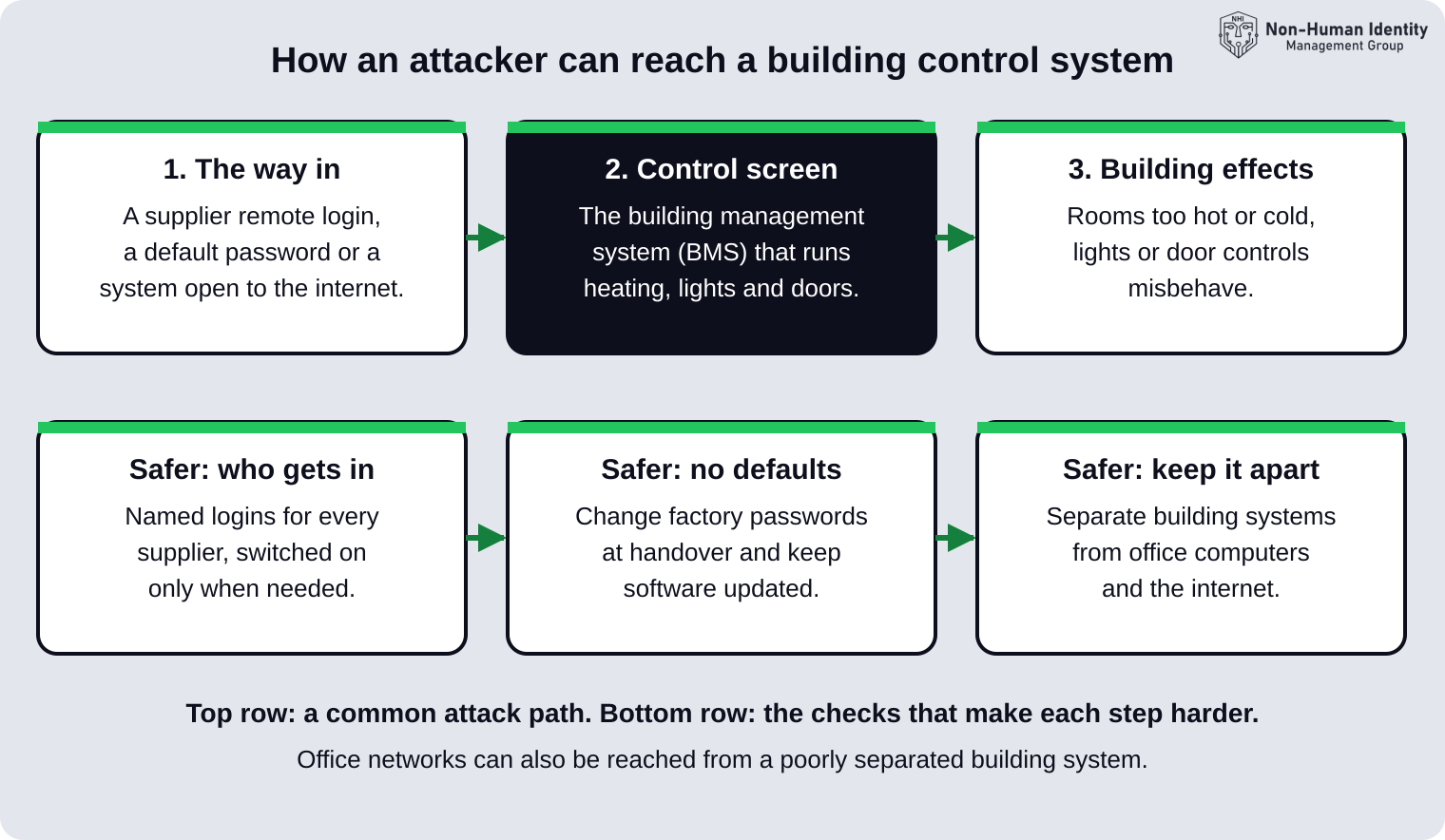
Supplier logins are a well-known risk. In the 2013 Target breach, Target said attackers first got in using network login details stolen from a third-party supplier. Reporting named the supplier as a heating and refrigeration firm, whose link to Target was for billing and project work.[4]
A worked example
Wren Okafor is the facilities manager for a fictional four-storey office. On a cold Monday, staff on the third floor complain that the heating is off. The control screen shows the heating set to its lowest level overnight, by the admin login.
Wren calls Gideon Ulrich, the contractor who installed the system. He did not make the change. Together they look at the handover sheet. The admin login still uses the maker's factory password. A mobile data box in the plant room gives Gideon's firm a link that is always on.
Wren remembers the caretaker's panel. If the master key is the same one printed in every manual, anyone who finds the panel can use it.
She asks the IT team to help. They find that the control screen was also reachable from the internet. They take it off the internet, and Gideon changes the admin password and removes the old test account.
The mobile data box is switched off. From now on, Gideon asks Wren to turn on remote access when he needs it, and it is turned off again after each visit. Each person at his firm gets their own named login.
IT also moves the building system onto its own network, so it cannot talk directly to office computers. They check the office network for signs of misuse and find nothing unusual in the records available to them.
Wren adds a line to every building contract: no factory passwords at handover, and no remote links without her approval.
Myths and mistakes
| What people think | What is true |
|---|---|
| Nobody would bother hacking a heating system. | Building systems can be a way into office networks, and changing them can disrupt a whole building.[3] |
| The supplier looks after security. | Security is shared. You decide who gets access and when it ends. |
| Our building system is not on the internet. | Supplier data boxes, cloud services and weather feeds can create links you did not know about.[2] |
| Factory passwords are fine if the screen is in a locked room. | Many systems can be reached over a network. Change factory passwords at handover. |
| This is an IT problem, not a facilities one. | Facilities teams often own these systems and their contracts, so both teams need to work together. |
What can I do this week?
- List every building system you have, such as heating, lighting, door access, fire alarms and energy meters.
- Ask each supplier how they log in from outside, and whether that link is always on.
- Check that factory passwords were changed when each system was installed.
- Ask IT whether building systems share a network with office computers.
Checklist
- We have a list of every building system, its supplier and its software version.
- Each system has a named owner in facilities and a contact in IT.
- Factory passwords and test accounts are changed or removed at handover.
- Every supplier has its own named login, used only when needed and recorded.
- Remote access is reviewed regularly and removed when a contract ends.
- Building systems are kept apart from office computers and the open internet.
- Someone is responsible for software updates, and end-of-support dates are known.
- Our incident plan covers building systems, including what to do if we are locked out.
Common questions
What is a building management system?
It is the computer system that runs a building's services from one place. It usually controls heating, ventilation, cooling and lighting, and may link to door access, fire alarms and energy meters. Facilities teams and their suppliers use it to watch and adjust the building.
Is smart building security the same as smart home security?
No, they differ in scale and ownership. A smart home has a few gadgets that one household controls. A smart building has larger shared systems, often run by contractors, and linked to an organisation's networks. See Smart Home Security for Beginners for the home side.
Who is responsible: facilities or IT?
Both, working together. Facilities usually owns the building systems and the supplier contracts. IT usually owns the networks and knows how to secure logins. Agree in writing who looks after passwords, updates, remote access and network separation for each system.
Should our building system be on the internet at all?
Usually only through a controlled route. A control screen open directly to the internet can be found and attacked. Suppliers can reach it through a secure, approved link that is switched on when needed and recorded, rather than an always-on connection.
What should we do if we lose control of the building system?
Follow your incident plan and call both your supplier and IT straight away. Keep people safe first, using manual controls where they exist. Do not simply restart everything, as evidence may be lost. See Incident Response for Beginners for the general steps.
Where next?
Ready for the detail? Read the practitioner guide: Building Management System Security Guide. It goes further into building protocols and their security features, network design for building systems and how to measure progress.
Also useful:
- Operational Technology Security for Beginners
- IoT Security for Beginners
- Default Passwords for Beginners
- Smart Home Security for Beginners
- OT Remote Access Guide
Related NHI Mgmt Group resources: IT Security vs OT Security · Network Segmentation for Beginners · Incident Response for Beginners
Key terms
- Operational technology
- Hardware and software that watch or control physical things, such as heating plant, machines or utilities.
- Default credential
- A factory-set username or password that stays unchanged after a system is installed.
- Remote access
- The ability to reach a system from outside the building or local network.
- Third-party access
- Access given to suppliers, contractors or support partners who are not your own staff.
- Network segmentation
- Splitting a network into zones with controlled traffic between them, so trouble in one zone stays there.
- Lateral movement
- An attacker moving from the first system they reach to other systems on the network.
Sources and further reading
- NIST Releases Tips and Tactics for Building Automation and Control System Cybersecurity. NIST Cybersecurity Insights blog, 19 August 2026. https://www.nist.gov/blogs/cybersecurity-insights/nist-releases-tips-tactics-building-automation-control-system, accessed 28 Nov 2026.
- Adopting a security-minded approach to building automation and control systems (BACS). National Protective Security Authority (NPSA), November 2023. https://www.npsa.gov.uk/system/files/documents/adopting-a-security-minded-approach-to-building-automation-and-control-systems.pdf, accessed 28 Nov 2026.
- Challenges and Opportunities to Secure Buildings from Cyber Threats (PNNL-29813). US Department of Energy, Building Technologies Office, March 2020. https://www.energy.gov/eere/buildings/articles/challenges-and-opportunities-secure-buildings-cyber-threats, accessed 28 Nov 2026.
- Target Hackers Broke in Via HVAC Company. KrebsOnSecurity (news report quoting Target's statement), 5 February 2014. https://krebsonsecurity.com/2014/02/target-hackers-broke-in-via-hvac-company/, accessed 28 Nov 2026.