Smart home protocols are the shared languages that smart bulbs, plugs and sensors use to talk.
This guide is for anyone setting up smart devices at home, and for students and makers who want to know what the logos on the box mean. You do not need to be technical: the protocol you pick affects which hub you need and how your devices are kept safe.
In short
- Zigbee, Z-Wave and Thread are low-power radio networks. Matter is a common language that can run over Thread or Wi-Fi.
- Many devices need a hub or bridge to join the rest of your home network.
- These protocols include encryption, but your hub, app account and updates still need care.
- Keep setup codes private, turn on updates and reset devices before you sell them.
What you will learn
- Explain the difference between Matter, Thread, Zigbee and Z-Wave in plain words.
- Spot what a setup code is and why to keep it private.
- Check that your hub and app account are protected.
- Ask the right questions before you buy a new device.
- Device language (protocol)
- an agreed set of rules that lets devices understand each other.
- Pass-it-on network (mesh)
- a network where devices pass messages along to reach ones further away.
- Home base (hub)
- a box or speaker that links your smart devices to your app and router.
What are smart home protocols?
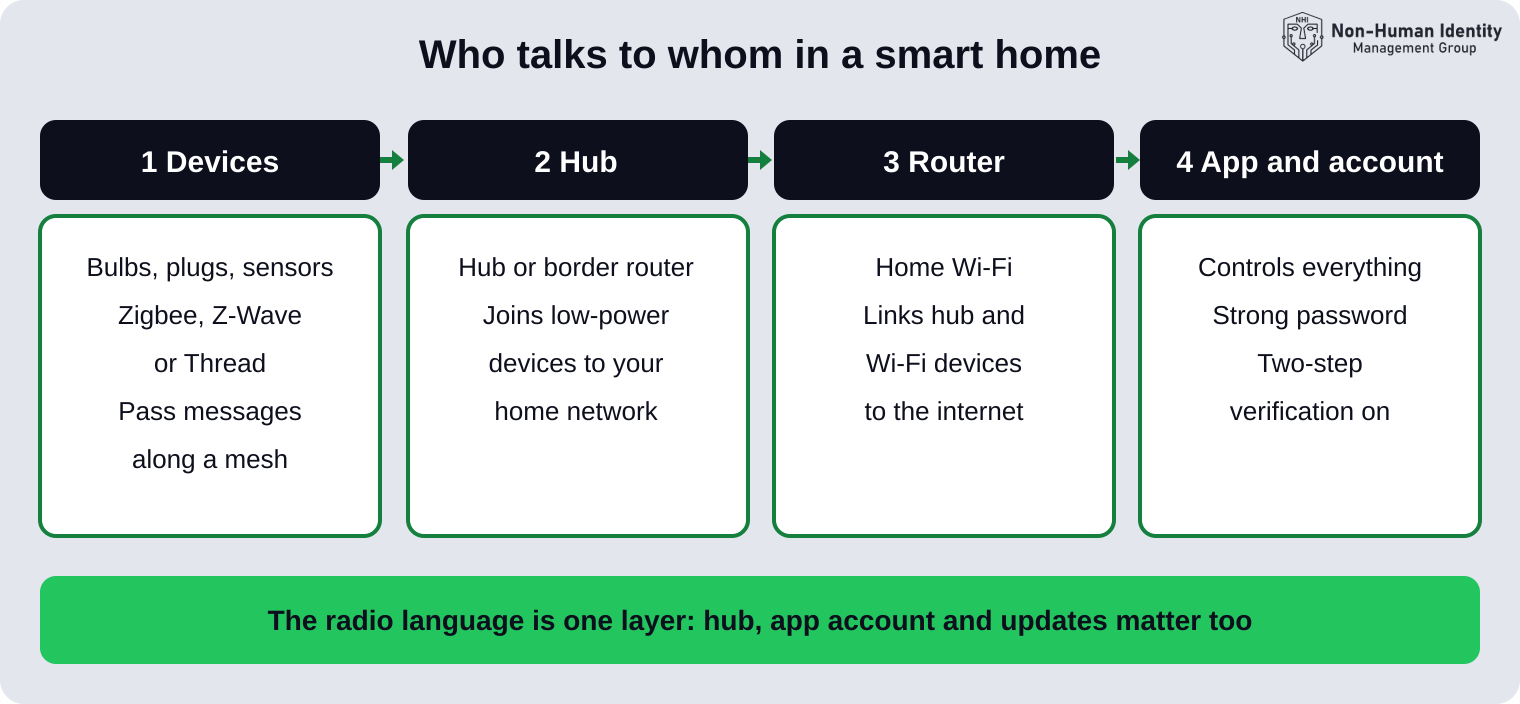
Think of a house where every room speaks a different language. The lamp speaks one, the door sensor another, and your phone a third. A protocol is the language they agree to use, so a message from one is understood by another.
Your home Wi-Fi is one way devices talk. But Wi-Fi uses a fair amount of power, which drains small batteries fast. So many sensors and bulbs use low-power radio networks instead. The best known are Zigbee, Z-Wave and Thread.
All three can form a mesh network (a network where devices pass messages along, like neighbours handing a note down the street). That lets a message reach a device at the far end of the garden.[3][4]
Matter is different. It is a shared standard backed by large smart home firms, including Apple, Amazon, Google and Samsung.[1] It is the common language on top, and it can travel over Thread or Wi-Fi.[5]
Where the comparison stops working: people who share a language can still be tricked. Devices on the same protocol also need a way to prove they belong in your home, which is what the setup step does.
Why does it matter?
A smart lock or camera that someone else controls is more than a nuisance. The protocol decides how devices join, how messages are scrambled and what hub you need. The app account and hub then decide who is allowed to control them.
If you are setting up a smart home
What could happen: you buy devices that cannot work with your hub, or a hub that no longer gets updates.
Check this: look for the protocol logos on the box and how long updates are promised.
If you rent or share a home
What could happen: a former housemate or tenant can still control lights or locks from their own app.
Check this: open the app and look at who else has access.
If you are a student or maker
What could happen: a home project sends sensor data unencrypted, or opens a port to the internet.
Check this: use the protocol's built-in encryption and keep test devices off the internet.
Next: MQTT Security Guide
What does it look like?
Here is a made-up app screen shown while adding a new smart plug.
Example only. All values are made up.
Add device
Device found: EXAMPLE Smart Plug             (1)
Works with: Matter over Thread               (2)
Setup code: 0000-000-0000 (FAKE)             (3)
Hub: Living room speaker (border router)     (4)
Also shared with: [email protected]  (5)
Firmware: update available                   (6)
- The new device the app has found nearby.
- Matter is the language. Thread is the low-power network it travels over.
- In a real screen, this line would contain the setup code from the device sticker or leaflet.
- The hub links the Thread devices to your Wi-Fi and router.
- Another person who can control the device. Check that you know them.
- An update is waiting. Updates fix security flaws.
Why this is risky: the setup code helps a device join a home. If a photo of the code is posted online, others can see it. A stranger on the sharing list can control the plug.
The safer way: keep the code with the device papers. Remove anyone you do not know, and install the update. The UK's cyber security agency, the NCSC, also says to change default passwords and turn on two-step checks for the app.[7]
How does it work?
Here is what happens when you add a new device to a Matter home with a Thread hub.
- You get a hub ready. Thread devices need a hub that works as a border router (a bridge between the Thread network and your Wi-Fi).[5]
- Your phone finds the device. For setup, phones often talk to the new device over Bluetooth.[6]
- You prove it is yours. You scan the code or type it in. Matter uses this checked setup step so only the right device joins.[1]
- The device gets the network keys. Messages between devices are then encrypted (scrambled so outsiders cannot read them).[1][3]
- Messages hop through the mesh. Each device can pass messages to the next, so the network reaches further.[2]
- Other apps can join in. Matter lets more than one app control the same device, so you can share it on purpose.[6]
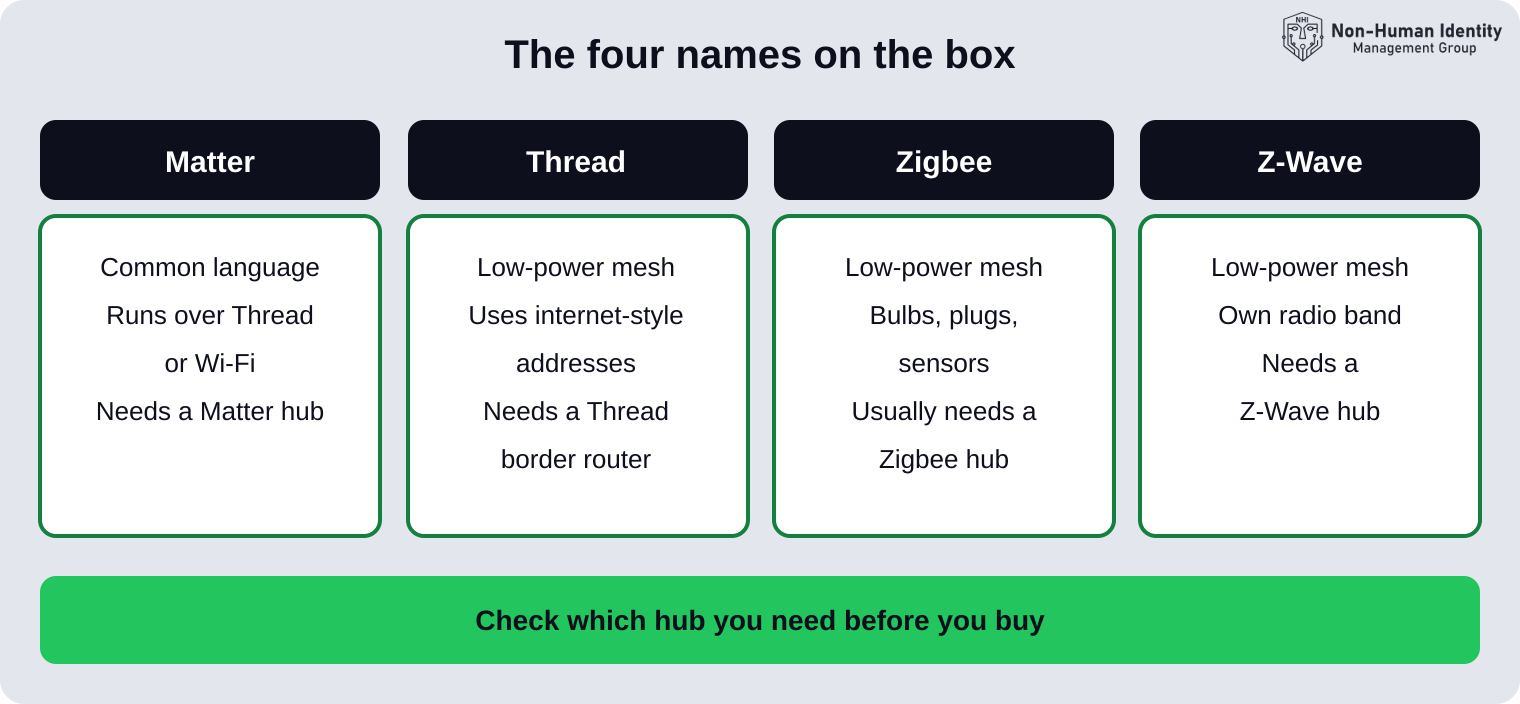
Zigbee says its networks use AES-128 encryption, a widely used way of scrambling data.[3] Its newer versions also let access be taken away from a device.[8] Z-Wave names a security mode called S2, and a set-up method that uses a QR code.[4] The detail of each is on the practitioner guide.
A worked example
Xena Zamora has just moved into a flat that came with smart bulbs and a smart door lock. The last tenant left the hub plugged in behind the television.
Her friend Mira Nakamura, a computing student, comes round to help. "First question," Mira says. "Whose app controls all this?"
They find that the hub is still linked to the old tenant's account. Xena remembers the house of many languages. The devices all understand the hub, so whoever owns the hub's account is in charge.
Mira looks up the maker's instructions and they factory reset the hub, which wipes the old settings. Xena then sets it up again in her own app, with a new password and two-step verification. The NCSC suggests both.[7]
Next they add each bulb and the lock again. Each device has its setup code on a small sticker. Xena keeps the stickers in a folder with the tenancy papers, not on the fridge.
Last, Mira checks the app's sharing list. Only Xena is on it. She turns on automatic updates for the hub.
Before Mira leaves, Xena asks why the bulbs needed a hub at all. Mira explains that they speak Zigbee, a low-power language, and the hub translates for the Wi-Fi.
The whole job takes an afternoon. Xena now knows who controls her lock: her, and nobody else on the list.
Myths and mistakes
| What people think | What is true |
|---|---|
| Matter is a kind of radio, like Wi-Fi. | Matter is a common language. It travels over networks such as Thread or Wi-Fi.[5][6] |
| Encrypted protocols make my devices safe. | Encryption protects messages. Your app account, hub updates and sharing list still need care. |
| Zigbee devices can be reached straight from the internet. | Zigbee devices do not connect to the internet directly. The hub or app is the link, so protect those.[8] |
| The setup code is just a label, so it is fine to share a photo. | The code helps a device join a home. Keep it with your paperwork. |
| A second-hand hub is ready to use. | Factory reset it first, so the old owner's settings and access are cleared.[7] |
What can I do this week?
- Open your smart home app and list every person and app that can control your devices.
- Turn on two-step verification for your smart home account.
- Turn on automatic updates for your hub and devices.
- Gather the setup codes into one private place, like a folder or password manager.
- Switch off remote access for any device you only use at home.
Checklist
- I know which protocol each of my devices uses and which hub it needs.
- My hub and devices get updates, and automatic updates are on.
- My smart home account has a strong password and two-step verification.
- Only people I trust are on the sharing list.
- Setup codes are stored privately, not posted or pinned up.
- I factory reset any device before I sell or give it away.
- Second-hand devices are reset before I add them.
Common questions
Which smart home protocol is the most secure?
There is no simple winner. Matter, Thread, Zigbee and Z-Wave all include encryption. In everyday homes, the bigger risks are weak app passwords, old hubs without updates and forgotten shared access. Pick devices that get updates and protect the account that controls them.
Do I need a hub for Matter devices?
Usually yes. Google, for example, says you need a Matter hub on your network first. If your devices use Thread, that hub must also work as a Thread border router. Many smart speakers and some routers can do this.[5]
Can my old Zigbee devices work with Matter?
Sometimes. Matter allows bridges, which are devices that sit on both a Matter network and another network such as Zigbee or Z-Wave.[6] Check whether your hub maker offers a bridge for your devices.
Is Bluetooth a smart home protocol too?
Yes, in a way. Some devices are controlled over Bluetooth, and Matter can use Bluetooth just to set new devices up. Bluetooth has its own safety points, covered in Bluetooth Security for Beginners.
What should I do before selling a smart device?
Factory reset it, using the maker's instructions. The NCSC says this should remove your personal data and return the device to its original settings. Also remove it from your app, so it no longer appears in your home.[7]
Where next?
Ready for the detail? Read the practitioner guide: Zigbee and Thread Security Guide. It goes further into network keys, how devices are allowed to join, and how to test a mesh network safely.
Also useful:
- Matter Device Attestation and Security Guide
- Smart Home Security for Beginners
- IoT Security for Beginners
- Home Router Security for Beginners
- LoRaWAN Security Guide
Related NHI Mgmt Group resources: MQTT Security Guide · IoT Security Labels and Laws for Beginners · Default Passwords for Beginners
Key terms
- Protocol
- An agreed set of rules that lets devices send and understand messages.
- Matter
- A shared smart home standard that runs over networks such as Thread or Wi-Fi.
- Thread
- A low-power mesh network for smart home devices, based on internet addressing.
- Zigbee
- A low-power mesh network often used for bulbs, plugs and sensors.
- Z-Wave
- A low-power mesh network on its own radio band, usually run through a hub.
- Border router
- A device that links a Thread network to your Wi-Fi and router.
- Factory reset
- Wiping a device back to its original settings and removing your data.
Sources and further reading
- Matter. Connectivity Standards Alliance. https://csa-iot.org/all-solutions/matter/, accessed 28 Nov 2026.
- What is Thread: Overview. Thread Group. https://www.threadgroup.org/What-is-Thread/Overview, accessed 28 Nov 2026.
- Zigbee. Connectivity Standards Alliance. https://csa-iot.org/all-solutions/zigbee/, accessed 28 Nov 2026.
- What is Z-Wave. Z-Wave Alliance. https://z-wavealliance.org/what-is-z-wave/, accessed 28 Nov 2026.
- Matter hub requirements (Google Nest Help). Google. https://support.google.com/googlenest/answer/12391458, accessed 28 Nov 2026.
- Matter primer. Google Home Developers, Google. https://developers.home.google.com/matter/primer, accessed 28 Nov 2026.
- Smart devices: using them safely in your home. National Cyber Security Centre (UK). https://www.ncsc.gov.uk/guidance/smart-devices-in-the-home, accessed 28 Nov 2026.
- Zigbee Security and Privacy Fundamentals. Connectivity Standards Alliance, May 2024. https://csa-iot.org/wp-content/uploads/2024/05/Zigbee-Security-and-Privacy-Fundamentals.pdf, accessed 28 Nov 2026.