Bluetooth security means keeping the short-range wireless links between your gadgets private and under your control.
This guide is for anyone who uses wireless headphones, a smartwatch, a car kit, contactless cards or item trackers. If your business hands out phones, card readers or door badges, the same simple habits apply to them.
In short
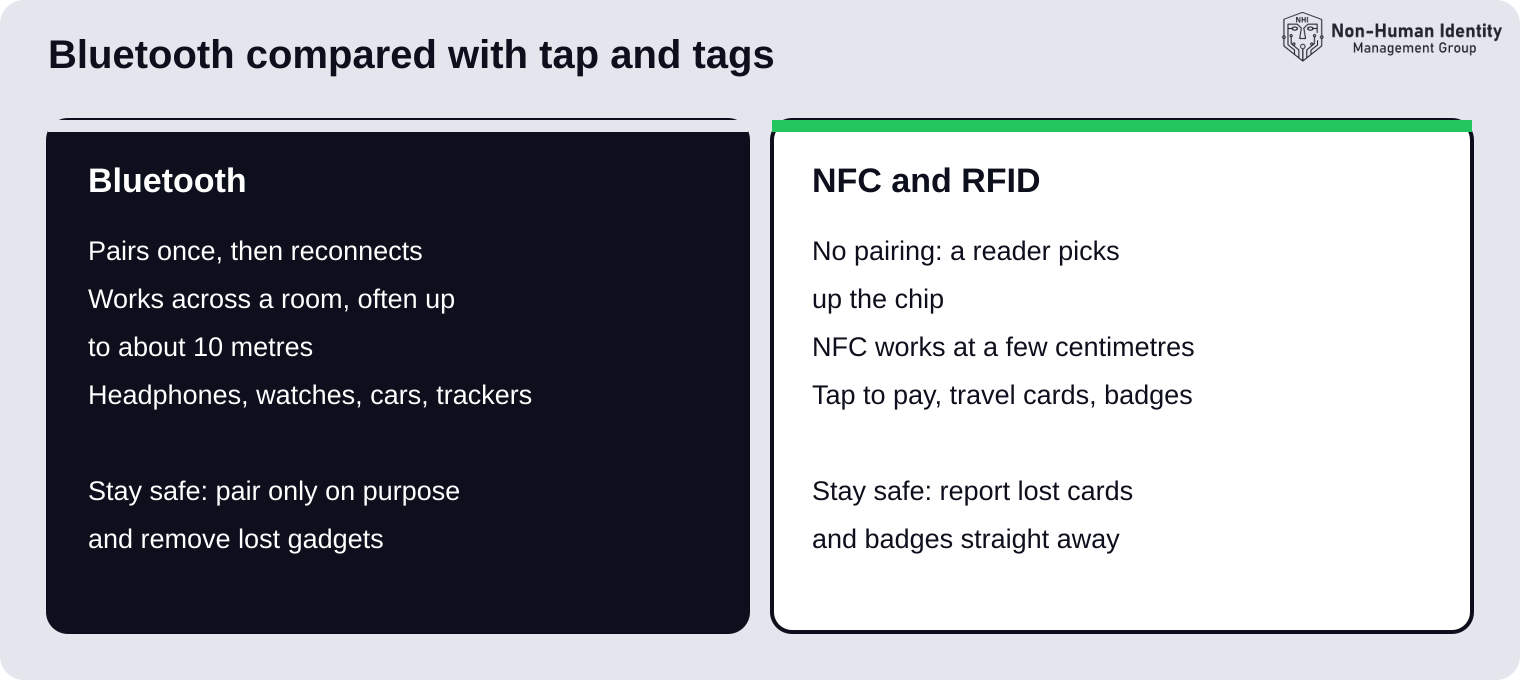
- Bluetooth links gadgets that are near each other, often within about 10 metres. NFC, used for tap to pay, works over a few centimetres.
- Most risk comes from pairing with the wrong device, leaving your phone open to strangers, or skipping updates.
- Only accept pairing requests you started, and do not leave gadgets discoverable once you have paired them.
- Remove lost gadgets from your paired list, and keep your phone and gadgets updated.
What you will learn
- Explain what Bluetooth, NFC and RFID do, in plain words.
- Spot a pairing request you should refuse.
- Check your paired devices list and tidy it.
- Know what to do if you lose a paired gadget.
- Linking two gadgets (pairing)
- the one-time set-up where two devices agree to trust each other and share a secret key.
- Tap technology (NFC)
- very short-range radio used for tap to pay, and for some door cards and phone set-ups.
- Radio tag (RFID)
- a tiny chip that a reader can pick up by radio, used in badges, travel cards and shop labels.
What is Bluetooth security?
Think of two walkie-talkies set to a private channel. You and a friend agree the channel once, then you can chat without wires. Bluetooth does the same for your phone and your headphones, watch or car.
Bluetooth is a short-range radio link. The first time two gadgets connect, they go through pairing. During pairing they agree a shared secret, called a link key, so later chats are private. After that, they reconnect on their own when they are close.
Two cousins work in a similar way. NFC, short for near field communication, is what your card or phone uses for tap to pay. It works only when the two items are almost touching.[2] RFID chips are in many door badges and travel cards. A reader picks them up by radio.
Bluetooth security is about three things. Pair only with gadgets you mean to. Keep your phone hidden from strangers when you are not pairing. Keep the software up to date.
Where the comparison stops working: you can see a person with a walkie-talkie. A Bluetooth device nearby may be in a bag or a pocket, and you only see its name on your screen.
Why does it matter?
Most Bluetooth use is safe in daily life. Problems tend to come from small slips, such as tapping "Pair" on a request you did not start.
If you use a phone and earbuds
What could happen: you accept a pairing request from a stranger's device, and it may send you files or try to connect again.
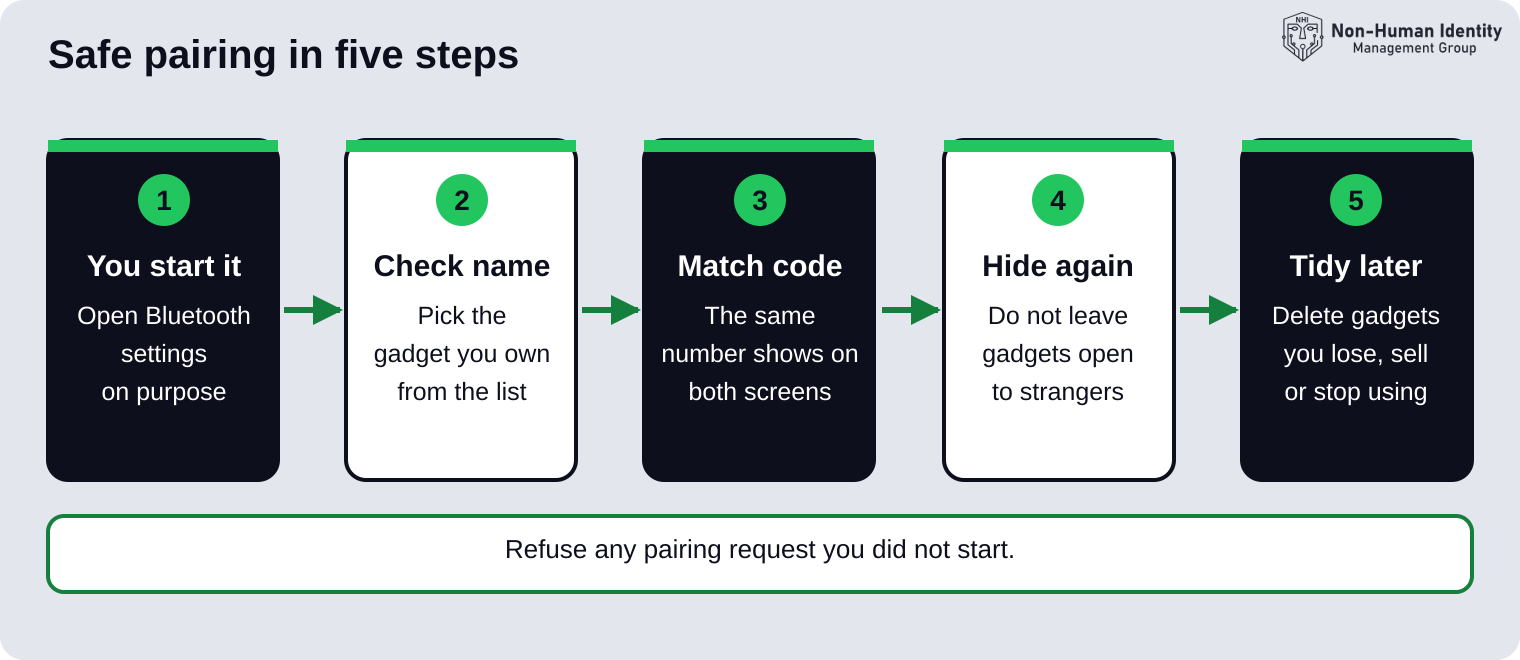
Check this: only say yes to pairing requests you started yourself.
If you drive a connected car
What could happen: you sell the car or return a hire car, and your contacts and call history stay in the car's system.
Check this: delete your phone from the car, and the car from your phone, before you hand it back.
If you run a small office
What could happen: door badges or card readers are old or poorly set up, and a lost badge is not switched off.
Check this: ask your supplier how you cancel a lost badge, and do it the same day.
What does it look like?
Here is a made-up pairing request of the kind you should refuse.
Example only. All values are made up.
Bluetooth pairing request                        (1)
"FREE-WIFI-EXAMPLE" wants to pair with your phone (2)
Code: 000000                                     (3)
Allow it to see your contacts and call history?  (4)
        [ Don't allow ]      [ Pair ]
- It popped up while you were not pairing anything.
- The name is not a gadget you own. Names are easy to fake.
- A code only helps if you check it on both screens. Here there is no second screen to check.
- It asks for your contacts, which headphones do not need.
Why this is risky: tapping Pair makes this unknown device a trusted one on your phone.
The safer way: tap "Don't allow". Pair only when you are setting up your own gadget, and check the code on both screens.
How does it work?
- Your phone looks for gadgets. To pair, devices need to find each other, which is called being discoverable. A US standards body suggests staying hidden except when you need to pair.[1]
- You choose a gadget and pair. Many gadgets show the same code on both screens. Checking that the codes match helps confirm you are pairing the right device.[1]
- The two agree a secret key. This key is kept on both devices, and it lets them reconnect privately later.
- They reconnect when close. For a phone and earbuds, this usually means within about 10 metres. Someone with special kit may pick up signals from further away.[1]
- You remove trust when it ends. If a gadget is lost, sold or given away, delete it from your paired list on your other devices. This helps stop a finder using it to reach them.[1]
NFC and RFID work differently. You do not pair them, because a reader powers up the chip and reads it when the two are very close. NFC is designed to work at a distance of up to about 2 centimetres.[2] That short range is part of what makes tap to pay practical, though it is not the only protection. Your bank and card scheme add their own checks.
A worked example
This story is made up to show how it can happen.
Bilal Chaudhry is a delivery driver in Birmingham. His phone connects to his van's hands-free kit, his earbuds and a fitness watch.
One lunchtime, sitting in a busy café, a box pops up on his phone. A device called "Free Wi-Fi Example" wants to pair. Bilal is not setting anything up, so he taps "Don't allow". He does not know whose device it is, and he does not need to.
A week later he loses one earbud case on a train. That evening he opens his phone's Bluetooth list. He sees the lost earbuds, an old speaker he gave his cousin and a hire car from last summer. He removes all three.
The hire car makes him think. He calls the hire firm and asks how to delete his phone from their cars. They point him to the car's settings menu and say staff should clear it between hires.
Last, he checks for updates. His phone has one waiting, and the watch app has an update too. He installs both.
What made the difference: Bilal treated his paired list like a set of house keys. He knows who has a copy, and he takes them back when they are no longer needed.
Myths and mistakes
| What people think | What is true |
|---|---|
| Bluetooth only reaches a metre or so, so nobody can reach my phone. | Many phones and earbuds are built for about 10 metres, and special kit can pick up signals further away.[1] |
| A device with a familiar name must be mine. | Device names are easy to copy. Pair only when you started the set-up, and check the code on both screens. |
| Leaving Bluetooth on is always dangerous. | For most people the bigger risks are accepting unknown requests and skipping updates. Turning it off when you do not need it still reduces exposure.[1] |
| Someone can empty my bank account by walking past my contactless card. | NFC is built to work at a very short range, and banks add their own checks. Report a lost card straight away.[2] |
| Once paired, I can forget about it. | Old pairings stay trusted until you remove them. Tidy your list when gadgets are lost, sold or given away. |
What can I do this week?
- Open your phone's Bluetooth list and remove any gadget you no longer own or use.
- Delete your phone from any hire car or old car you have used.
- Install waiting updates on your phone, and on watches or earbuds through their apps.
- Make one simple rule: never tap "Pair" on a request you did not start.
- Check how to report a lost bank card or work badge, and save those details.
Checklist
- I pair only gadgets I am setting up myself.
- I check the code matches on both screens when one is shown.
- My gadgets are not left discoverable once pairing is done.
- My paired list holds only gadgets I still own and use.
- My phone and gadgets are up to date.
- I remove my phone from hire cars before I return them.
- I know how to report a lost card or work badge.
Common questions
Should I turn Bluetooth off when I am not using it?
It is a sensible habit, and a US standards body suggests it. But the bigger wins for most people are refusing pairing requests you did not start and keeping devices updated. If you use a watch or earbuds all day, leaving Bluetooth on is a reasonable trade-off.
Can someone steal from my contactless card while it is in my pocket?
The risk is low. NFC is designed to work at a few centimetres, and banks add their own checks to card payments. If you lose a card, or see a payment you do not recognise, contact your bank straight away using the number on its website.
Do I need an RFID-blocking wallet?
Most people do not. A blocking sleeve can make a card harder to read. But the main protections are your bank's checks and reporting a lost card quickly. For work badges, follow your employer's advice.
What if my phone warns that an unknown tracker is moving with me?
Take it seriously. Recent iPhones and Android phones can alert you to an unknown tracker travelling with you, and can help you find it. Follow the steps from Apple's support page.[3] If you feel unsafe, contact the police.
Is it safe to pair in a public place?
It is usually fine, but a quiet place is better. A US standards body suggests pairing rarely and somewhere people cannot watch you enter codes. At home, set up new gadgets before you take them out.
Where next?
Ready for the detail? Read the practitioner guide: Bluetooth, RFID and NFC Security Guide. It covers pairing methods in depth, badge and reader weaknesses, and controls for company devices.
Also useful:
- Wi-Fi Security for Beginners
- Lost or Stolen Devices for Beginners
- Travel Cyber Safety for Beginners
- Payment Fraud for Beginners
Related NHI Mgmt Group resources: Smartphone Security for Beginners · IoT Security for Beginners · Public Wi-Fi Safety Guide
Key terms
- Bluetooth
- A short-range wireless link used to connect gadgets such as headphones, watches and car kits.
- Bluetooth pairing
- The set-up step where two devices agree to trust each other and share secret keys.
- Bluetooth discoverability
- When a device can be found and contacted by other devices nearby.
- Bluetooth link key
- The shared secret, made during pairing, that two devices use to recognise each other and keep their link private.
- NFC
- Very short-range radio used for contactless payments, door access and setting up devices.
- RFID
- Radio technology that lets a reader pick up data from a tag on an object, card or badge.
- Bluejacking
- Sending unwanted messages to a nearby Bluetooth device, usually as a nuisance.
Sources and further reading
- Guide to Bluetooth Security, NIST Special Publication 800-121 Revision 2 (range table; recommendations on discoverable mode, pairing location, numeric comparison, removing lost devices, unknown requests, updates and turning devices off when not needed). National Institute of Standards and Technology (NIST), May 2017, updated January 2022. https://nvlpubs.nist.gov/nistpubs/SpecialPublications/NIST.SP.800-121r2-upd1.pdf, accessed 28 Nov 2026.
- NFC Technology. NFC Forum. https://nfc-forum.org/learn/nfc-technology/, accessed 28 Nov 2026.
- What to do if you get an alert that an AirTag, set of AirPods or Find My network accessory is with you. Apple Support. https://support.apple.com/en-us/119874, accessed 28 Nov 2026.