An SSH key is a pair of matching cryptographic keys, one private and one public, that lets a person or a piece of software sign in to a remote computer over the Secure Shell (SSH) protocol without typing a password.
SSH keys are everywhere in IT. Administrators use them to reach servers, and scripts, backup jobs and deployment pipelines use them to connect to other systems on their own. This guide is for newcomers, students, career changers and managers who are not security specialists. It explains in plain English how key-based access works, why keys used by software count as non-human identities, how SSH keys go wrong, and what a small team can check this week.
By the end of this guide you will be able to:
- Explain what an SSH key pair is and what each half does.
- Describe how a server decides whether to let a key in.
- Identify the common ways SSH keys go wrong.
- Understand three simple first steps to bring SSH keys under control.
Key takeaways
- Every SSH key on a server is an access grant. A public key listed in a server's authorized_keys file lets whoever holds the matching private key sign in.
- The private key is the secret. Anyone who copies it can use it, from anywhere, until the public key is removed from the server or restricted.
- Plain SSH keys do not expire by default. They are static credentials, so they need an owner, a review and a planned replacement.
- Keys used by software are non-human identities. A backup script's key is an account credential just like an API key, and deserves the same care.
- Start by finding keys, not deleting them. Removing a key nobody understands can break a job; list, assign owners, then clean up.
What it is, in plain English
Secure Shell (SSH) is a protocol, a set of agreed rules, for connecting to another computer over an encrypted channel. People use it to type commands on a remote server, and programs use it to copy files or run tasks.
To connect, you need to prove who you are. You can use a password, but most teams use an SSH key pair instead. The pair has two halves that work together:
- Private key: the secret half. It stays on the computer of the person or program that connects. It should never be shared.
- Public key: the shareable half. You copy it onto every server you want to reach. On common Linux servers running OpenSSH, it goes into a file called authorized_keys in the home folder of the account you want to sign in as.[2]
An everyday comparison is a padlock and its key. You can hand out copies of an open padlock (the public key) and fix them to any door. Only the person holding the matching key (the private key) can open them. Where the analogy breaks down: with SSH, the private key never travels to the server at all. The connecting computer proves it holds the key by using it to sign a one-off challenge, and the server checks that signature with the public key.
There is a second kind of key too. Every SSH server has its own host key, which proves to you that you have reached the real server and not an impostor. Your computer remembers each server's host key in a file called known_hosts and warns you if it changes.[2]
When an SSH key is used by software rather than a person, the key is the credential for a non-human identity: an identity with an account on the server and a credential (the private key) that proves who it is. A plain SSH key is a static credential: it stays valid until someone changes or removes it.
Why it matters to you
- If you run a small business: the person or company that set up your website or servers may still have keys that work. Nobody may have checked since.
- If you are new to a security job: SSH keys are one of the most common forms of machine access you will meet, and "who can reach this server?" is a question you will be asked.
- If you are a manager: keys left behind after people leave or projects end are access you cannot see in your normal user list. They can undermine offboarding and audits.
The US National Institute of Standards and Technology (NIST) published a report on SSH access management, NIST IR 7966, in October 2015. It explains that SSH is widely used for both interactive and automated access, often with high privileges, for tasks such as file transfers, patching and disaster recovery. It also says the security of SSH key-based access had been "largely ignored" up to that point.[1]
The main reasons SSH keys go wrong are simple:
- No expiry: a plain key in authorized_keys keeps working until it is removed or restricted.[2]
- Copies spread: private keys get copied between laptops, servers and scripts, and sometimes end up in code repositories. See Secrets in Code for Beginners.
- Nobody owns them: keys outlive the people and projects that created them. Security teams call this SSH key sprawl.
- Too much power: keys for automated jobs are often added to powerful accounts, so a stolen key can do far more than the job needs.
Attackers know this. MITRE ATT&CK, a public catalogue of attacker behaviour, lists adding a key to authorized_keys as a way to keep access (T1098.004 SSH Authorized Keys) and stealing private key files as a way to obtain credentials (T1552.004 Private Keys).[5][6]
Host keys matter too. In March 2023 GitHub said the private half of its RSA SSH host key had been briefly exposed in a public repository. GitHub replaced the key at about 05:00 UTC on 24 March 2023, said it had no reason to believe the key had been abused and that the key did not grant access to its infrastructure or customer data, and asked RSA users to update their known_hosts entry.[4] Read the lessons on the GitHub RSA SSH Host Key Exposure 2023 page.[4]
How it works, step by step
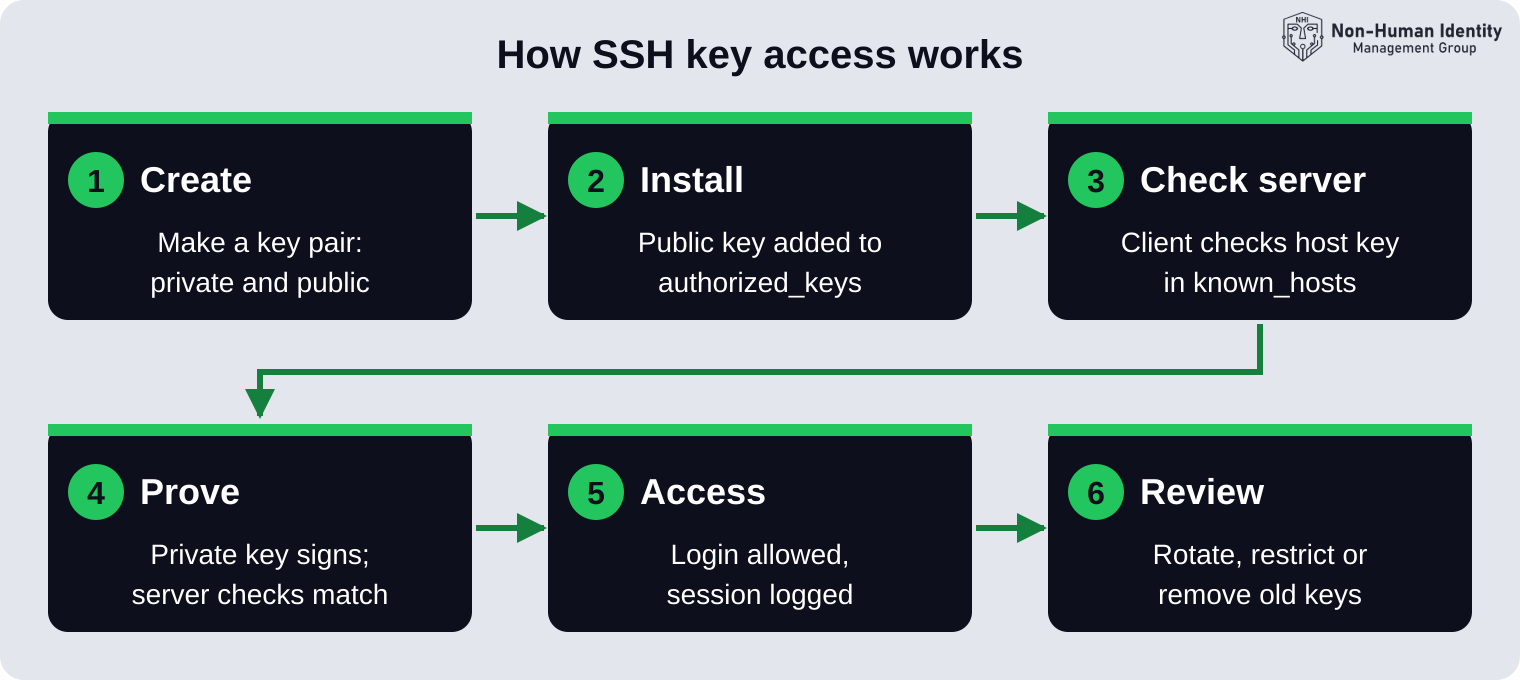
This is how a typical key-based sign-in works with OpenSSH, the most widely used SSH software on Linux and macOS.
- Create a key pair. The user or the team running a script creates a pair, usually with the ssh-keygen tool. Recent versions create an Ed25519 key if you do not choose a type.[3] A person's private key can be protected with a passphrase, which encrypts the key file on disk.[3]
- Install the public key. An administrator adds the public key as one line in the authorized_keys file of the account on the server. That line is now an access grant.[2]
- Connect and check the server. When the client connects, the server presents its host key. The client compares it with the copy in known_hosts and warns if it has changed.[2]
- Prove possession of the private key. The client offers the public key. The server checks it against authorized_keys, and the client proves it holds the private key by signing data the server can verify.
- Access is granted and logged. If the key matches, the login is allowed and any options on that authorized_keys line apply. The server's logs record the sign-in.[2]
- Review, rotate or remove. Over time someone must check each key is still needed, replace it on a schedule or after exposure, and remove it when its job ends. This is the step most often skipped.[1]
Ways to make a key less dangerous
OpenSSH lets an administrator add options to the start of an authorized_keys line. These are useful for keys used by scripts.[2]
| Option | What it does | Why it helps |
|---|---|---|
| from="..." | Only accepts the key from listed addresses or networks. | A copied key is harder to use from somewhere else. |
| command="..." | Runs one fixed command whenever the key is used, whatever the client asks for. | A backup key can only run the backup. |
| restrict | Turns off forwarding and terminal features in one go. | Removes extras a script does not need. |
| expiry-time="..." | Stops accepting the key after a set date and time. | Gives a key a built-in end date. |
Useful distinctions
- User keys and host keys are different. A user key proves who is connecting; a host key proves which server you reached. Both need protecting.
- A passphrase protects the file, not the access grant. It makes a stolen key file harder to use, but keys used by unattended scripts usually have no passphrase, and host keys must not have one.[3]
- SSH certificates are a different model. A certificate is a public key signed by a trusted certificate authority. Servers trust the authority instead of listing every key, and certificates can carry a validity period. They are not short-lived automatically: ssh-keygen documents that a certificate with no validity interval set is valid from 1970 to the distant future.[3] See SSH Keys vs SSH Certificates.
- Static keys are rotated; short-lived credentials are scoped. A plain key should be replaced on a schedule and when exposed. For short-lived certificates, the control that matters most is who can obtain one and what it allows.
A worked example
Harbour Print is a fictional printing firm with 25 staff and three Linux servers: a website, a file server and a database. Ade looks after IT part-time. A contractor, Jo, built the website two years ago.
Ade reads about SSH key sprawl and spends an afternoon looking. On each server Ade lists the authorized_keys files for every account, not just the obvious ones. The result surprises Ade:
- Eleven keys across the three servers, for only two current admins.
- Two keys with a comment that names Jo, on the root account of the web server.
- One key used by a nightly backup script, with no restrictions, on an account that can read everything.
- Three keys nobody can identify.
Ade does not delete everything at once. Ade checks the server logs to see which keys have been used recently, confirms with Jo that the contract has ended, and removes Jo's keys. For the backup key, Ade adds from= and command= options so it only works from the backup server and only runs the backup command, then watches the next night's job succeed. The three unknown keys are disabled one at a time, with a note and a date, so they can be put back quickly through a recorded change if something breaks. Nothing does.
Harbour Print is not now "secure". It still uses static keys, and Ade still has to decide how often to replace the backup key and who reviews the list each quarter. But the firm now knows who can reach its servers, and the most powerful forgotten access has gone.
Myths and misunderstandings
| What people think | What is true |
|---|---|
| SSH keys are safer than passwords, so they look after themselves. | Keys resist guessing far better than passwords, but a plain key never expires and can be copied. It still needs an owner and a review. |
| Removing someone's user account removes their access. | Not always. Their public key may sit in another account's authorized_keys file, such as a shared admin or root account. |
| A passphrase means a stolen key is harmless. | A passphrase makes a stolen file harder to use. Keys for unattended scripts usually have none. |
| The host key warning is just noise. | It can mean the server was rebuilt, or that someone is impersonating it. Check the new fingerprint with the server owner before accepting it. |
| SSH certificates expire on their own. | Only if a validity period is set when they are signed. Without one, a certificate stays valid indefinitely. |
Key terms
- Secure Shell (SSH)
- A protocol for securely connecting to remote systems over an encrypted channel, used for logins, commands and file transfer.
- SSH key
- A cryptographic key pair used to authenticate to servers and services over SSH.
- Private key
- The secret half of a key pair, used to prove identity; if it is exposed, the trust it carries is broken.
- Public key
- The openly shared half of a key pair, used to check that the holder of the private key is who they claim to be.
- The server-side list of public keys allowed to sign in to an account; stale entries keep access alive after the need has ended.
- Host key
- A key that identifies a specific server to clients, so they can tell the real server from an impostor.
- Passphrase
- A longer secret made of several words; with SSH it is used to encrypt a private key file.
- SSH certificate
- A public key signed by a trusted authority, so servers can trust it without listing every key; it can carry a validity period.
- SSH key sprawl
- The uncontrolled growth of keys across servers and teams, usually without a reliable owner or expiry.
- Key rotation
- Replacing a key with a new one, on a schedule or after suspected exposure, and moving use over to the new key.
- Non-human identity (NHI)
- An identity used by software or a machine, with an account and credentials, that authenticates without a person.
Common questions
Is an SSH key the same as a password?
No. A password is a secret you type and send to the server. With an SSH key the private key stays on your computer and is used to sign a challenge, so the secret itself is not sent.
Where are SSH keys kept?
On a typical OpenSSH setup, your private and public keys sit in the .ssh folder in your home directory, and a server lists the public keys it accepts in each account's authorized_keys file.[2]
Do SSH keys expire?
Plain keys do not, unless an administrator adds an expiry-time option to the authorized_keys line or the key is removed.[2] SSH certificates can carry a validity period if one is set when they are signed.[3]
Which key type should I create?
Recent OpenSSH versions create Ed25519 keys by default, which is a sensible choice for most new keys.[3] For detail on types and sizes, see the SSH Key Types Reference.
What should I do if a private key leaks?
Treat it as an incident. Remove or disable the matching public key everywhere it is installed, issue a new key, and check the logs for use you do not recognise. The SSH Key Compromise Response Playbook sets out the steps.
Why are SSH keys counted as non-human identities?
When a script, pipeline or AI agent uses a key, that key is the credential for an account the software uses on its own. It is an identity with an account and credentials, so it needs an owner, limited access and a planned end, like any other NHI.
First steps
Three things you can do this week:
- List the keys on your most important server. Check the authorized_keys file for every account, including root and service accounts, and write down each key's comment and what you think it is for.
- Give every key an owner. For each key, name a person who can say why it exists. Mark any key with no owner for review.
- Restrict or remove one risky key. Pick a key used by a script and add from= and command= options, or disable a key that belongs to someone who has left. Make the change through your normal change process and note how to put the key back if something breaks, so any rollback is short, approved and recorded.
Checklist
- We know which servers accept SSH keys and have listed the keys on each one.
- Every key has a named owner and a known purpose.
- Keys belonging to people who have left, or to finished projects, have been removed.
- Keys used by scripts are restricted with options such as from= and command= where possible.
- No private keys are stored in code repositories or shared folders.
- People protect their personal private keys with a passphrase.
- We have a schedule for replacing static keys, and replace any key straight away if it may have been exposed.
- We check host key warnings before accepting a changed key.
- Someone reviews the key list at least once a quarter.
Check your understanding
1. Which half of an SSH key pair goes on the server?
Answer: the public key, added to the authorized_keys file. The private key stays with the person or program that connects.
2. Why does deleting a leaver's user account not always remove their SSH access?
Answer: their public key may also be listed in another account's authorized_keys file, such as a shared admin account, and it keeps working there until removed.
3. What is the difference between a user key and a host key?
Answer: a user key proves who is connecting; a host key proves to the client that it has reached the real server.
4. Is a backup script's SSH key a non-human identity?
Answer: yes. It is the credential for an account the script uses on its own, so it needs an owner, limited access and review.
Suggested learning pathway
- Start with Non-Human Identities for Beginners for the bigger picture.
- For accounts that scripts and services use, read Service Accounts for Beginners.
- For how to store and protect secrets such as private keys, read Secrets Management for Beginners.
- For replacing credentials safely, read Secrets Rotation for Beginners.
- For the full practitioner approach to discovery, certificates and hardening, see the SSH Key Management Guide.
- For the certificate model in depth, see the SSH Protocol and Certificate Authority Guide.
- For writing down your rules, see the SSH Key Management Policy Template.
- NHI Foundation Level Training
Standards and references
- NIST IR 7966, Security of Interactive and Automated Access Management Using Secure Shell (SSH). National Institute of Standards and Technology (NIST), October 2015. https://csrc.nist.gov/pubs/ir/7966/final.
- sshd(8) manual page, including the authorized_keys and known_hosts file formats. OpenBSD / OpenSSH project. https://man.openbsd.org/sshd, accessed 27 Nov 2026.
- ssh-keygen(1) manual page. OpenBSD / OpenSSH project. https://man.openbsd.org/ssh-keygen, accessed 27 Nov 2026.
- We updated our RSA SSH host key. GitHub Blog, GitHub, 23 March 2023. https://github.blog/2023-03-23-we-updated-our-rsa-ssh-host-key/, accessed 27 Nov 2026.
- T1098.004 Account Manipulation: SSH Authorized Keys. MITRE ATT&CK, The MITRE Corporation. https://attack.mitre.org/techniques/T1098/004/, accessed 27 Nov 2026.
- T1552.004 Unsecured Credentials: Private Keys. MITRE ATT&CK, The MITRE Corporation. https://attack.mitre.org/techniques/T1552/004/, accessed 27 Nov 2026.
Related NHI Mgmt Group resources: SSH Keys vs SSH Certificates · Service Account Security Guide · Linux Server Hardening Guide