A data breach alert is a message saying a company has lost or exposed your personal details.
This guide is for anyone who has had an email or letter like this and wants to know what to do next. You do not need to be good with computers: a few calm steps cover most of the risk.
In short
- Check the alert is genuine by going to the company's website yourself, not through links in the message.
- Find out which details leaked. That decides what you do next.
- If a password leaked, change it, and change it anywhere else you used the same one.
- Expect scam messages that mention the breach, and never give codes or bank details to anyone who contacts you.
What you will learn
- Explain what a data breach alert means for you.
- Check whether an alert is genuine or a scam.
- Match each kind of leaked detail to the right next step.
- Spot the follow-up scams that often come after a breach.
- Data leak (data breach)
- when personal details held by a company are lost, stolen or seen by people who should not see them.
- Breach checker
- a free website that tells you which known breaches included your email address.
What is a data breach alert?
Think of a smoke alarm going off in the flat next door. The fire is not in your home, but it is a good moment to check your own doors and windows. A data breach alert works the same way.
A company you use has had a data breach. That means some of the details it held about you have been lost, stolen or exposed. The alert tells you it happened and, ideally, which details were involved.
The details might be your name and email address. They might include a password, your date of birth, your address or part of a bank card number. Each kind of detail carries a different risk, so the first job is to find out which ones leaked.
Where the comparison stops working: a fire next door is over once it is put out. Leaked details can be copied, sold and reused by criminals for a long time afterwards, so the care you take now still matters later.
Why does it matter?
Most breach alerts do not mean money has been taken. They do mean criminals may now know enough about you to try a scam or guess their way into an account. Criminals also send fake breach alerts, so you may be targeted even if your details were not stolen.[1]
If you use the same password on several sites
What could happen: criminals try the leaked email and password on other sites, such as your email or online shop. This is called credential stuffing.
Check this: list the sites where you used the leaked password and change each one.
If your email address or phone number leaked
What could happen: you get convincing scam emails, texts or calls that mention the company by name.
Check this: treat any message about the breach with care, and contact the company through its own website instead.
Next: Phishing for Beginners
If you look after money or accounts for a relative
What could happen: an older relative gets a call from a "fraud team" who use the leaked details to sound genuine.
Check this: agree together that you always hang up and call the bank back on the number on the card.
If you run a small business
What could happen: staff reuse a leaked work password, or your business has to tell its own customers about a breach.
Check this: make sure work accounts use their own passwords and a second sign-in step.
What does it look like?
Example only. All values are made up.
From: FakeShop Security (example.com)
Subject: Important: a security incident    (1)
We found that someone accessed part of
our customer records on 1 March.           (2)
Details involved: name, email, phone,
and an older copy of your password.        (3)
Payment card numbers were not involved.    (4)
Reset your password now: [link]            (5)
- A plain subject line. Genuine alerts are usually factual, not dramatic.
- It says what happened and roughly when.
- It lists the details involved. In a real message, this line tells you what to act on.
- It says what was not involved, which helps you judge the risk.
- A link. Even in a genuine alert, it is safer to go to the website yourself.
Why this is risky: criminals copy genuine alerts. A fake version looks almost the same, but the link leads to a page that steals your password or bank details.
The safer way: type the company's web address yourself, or use its app, and look for the breach notice there. The UK cyber security agency gives the same advice.[1]
How does it work?
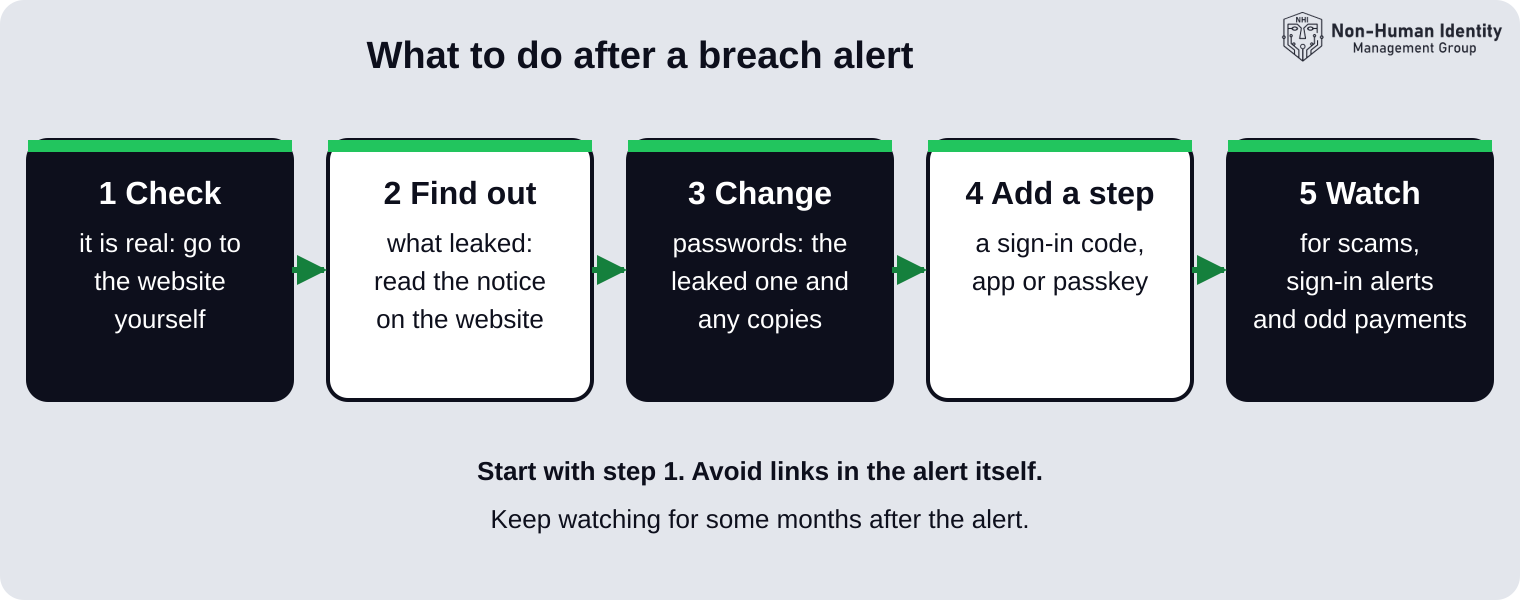
Here is what usually happens after a breach, and what you can do at each step.
- The company finds the breach. It works out which records were affected and then contacts the people involved.
- You check it is real. Go to the company's website or app yourself. Confirm the breach and read which details were taken.[1]
- You act on what leaked. Change a leaked password, and any other account that shares it. Turn on a second sign-in step, or switch to a passkey if the site offers one.[1]
- You check for other breaches. A breach checker such as Have I Been Pwned shows which known breaches included your email address. A clean result does not prove your details are safe.[2]
- You watch for misuse. Look out for scam messages, sign-in alerts and payments you do not recognise, for some months after the alert.
Which details leaked decides how much more you need to do. Figure 2 matches each kind of detail to a next step.
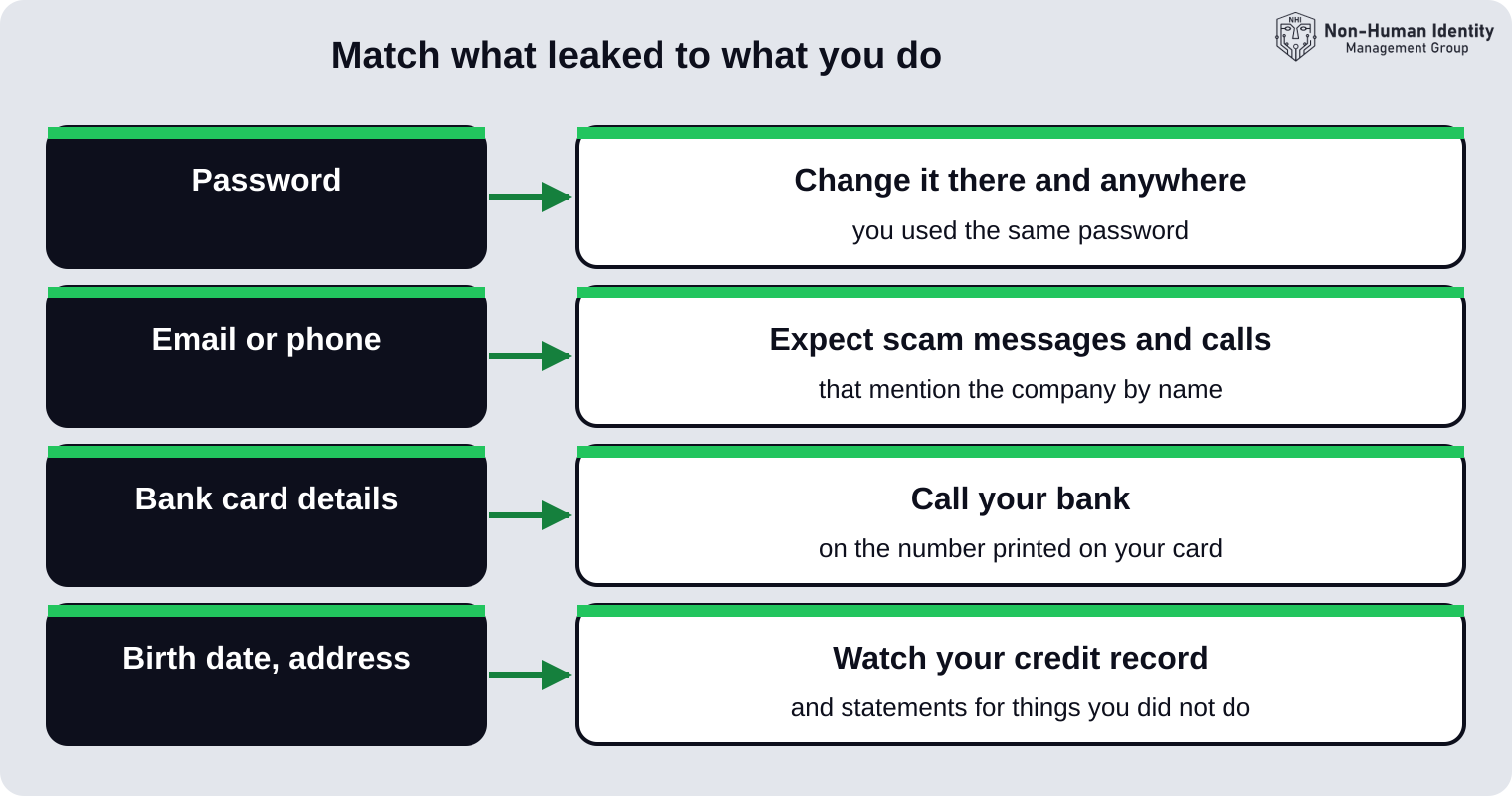
If your date of birth, address or ID details leaked, someone may try to open accounts in your name. In the US, you can ask the credit bureaus for a free fraud alert or a credit freeze. A freeze blocks new credit in your name while it is in place.[3]
A worked example
This story is made up to show how it can happen.
Fatima Begum is a teaching assistant in Bradford. One evening she gets an email from an online clothes shop she used last year. It says someone accessed its customer records. Her name, email address, phone number and an old copy of her password were involved.
The email has a big "Reset your password" button. Fatima does not press it. She opens the shop's app instead and finds the same notice on its help page. So the alert is genuine.
She thinks about the password. She used it for the shop, and also for her email and a food delivery app. She changes all three, giving each a different password. She saves them in the password manager on her phone so she does not have to remember them.
Her email account offers a second sign-in step with an app, so she turns it on. Then she types her email address into a breach checker. It shows two older breaches from sites she had forgotten. She changes those passwords too.
Three days later, a text arrives. It says it is from the shop's "fraud team" and asks her to confirm her card number to get a refund. Fatima knows the shop said cards were not involved. She forwards it to the free UK scam-text reporting number, then deletes it.[1]
What made the difference: Fatima checked the alert in the shop's own app. She changed every copy of the leaked password, and she was ready for the scam that followed.
Myths and mistakes
| What people think | What is true |
|---|---|
| A breach alert means my bank account has been emptied. | Usually it does not. It means some details were exposed. Act on the ones that leaked, and check your statements. |
| I can click the link in the alert to sort it out. | Go to the website or app yourself. Fake alerts copy real ones.[1] |
| Changing the password on the breached site is enough. | Change it anywhere else you used the same password too.[4] |
| The breach checker found nothing, so I am fine. | A checker only knows about breaches it has been told about. Keep good habits anyway.[2] |
| If a caller knows my details, they must be from the company. | Leaked details make scam calls sound real. Hang up and call back on a number you find yourself. |
What can I do this week?
- Check your email address on a breach checker and note any old accounts it finds.
- Change any password you have used on more than one site, starting with your email.
- Turn on a second sign-in step for your email and bank.
- Try a password manager so each site can have its own password.
- Agree with your family that nobody gives codes or bank details to anyone who calls them.
Checklist
- I check breach alerts on the company's own website or app, not through links.
- I know which of my details were in the breach.
- I have changed the leaked password everywhere I used it.
- My email account has a second sign-in step.
- I use a different password for each important account.
- I look out for scam messages that mention the breach.
- I know where to report fraud if I lose money.
Common questions
How do I know if a breach alert is real?
Check it on the company's own website or app, which you open yourself. If the breach is real, the company will usually post a notice there. Do not use links, phone numbers or reply addresses from the message itself, because a fake alert can copy all of them.
Do I need to cancel my bank card?
Only if card details were involved, or you see payments you did not make. In that case, call your bank on the number printed on your card. If the notice says cards were not involved, keep an eye on your statements instead.
Is it safe to use a breach checker?
Yes, a well-known one is generally safe to use. Have I Been Pwned, for example, asks only for your email address. It says it does not store passwords next to email addresses and will not send exposed passwords to anyone.[2]
Where do I report it if I lose money?
Tell your bank straight away. In England, Wales and Northern Ireland, report it to Report Fraud. In Scotland, contact Police Scotland. In the US, report identity theft at IdentityTheft.gov, which gives you a recovery plan.[3][5]
The company says my password was scrambled. Do I still need to change it?
Yes, it is still the safer choice. The UK cyber security agency advises changing a leaked password if you still use it, along with any other account that shares it. It takes a few minutes and means the old copy should no longer open anything.[1]
Where next?
Ready for the detail? Read the practitioner guide: What to Do After a Data Breach Guide. It goes further into a first hour, first day and first week plan, credit protection, and the signs of breach-related scams.
Also useful:
- Password Security for Beginners
- Multi-Factor Authentication for Beginners
- Phishing for Beginners
- Account Takeover for Beginners
Related NHI Mgmt Group resources: Password Managers Explained for Everyone Guide · Two-Factor Authentication for Everyone Guide · Data Loss vs Data Breach vs Data Leak
Key terms
- Data breach
- When personal data is lost, stolen or exposed to people who should not have it.
- Phishing
- A fake message that tries to trick you into giving away passwords, codes or money.
- Password reuse
- Using the same password on more than one site, so one leak can open several accounts.
- Credential stuffing
- Trying stolen usernames and passwords from one breach on many other websites.
- Multi-factor authentication (MFA)
- Asking for two or more kinds of proof, such as a password and a code, before letting you in.
- Passkey
- A way to sign in without a password, where a secret key stays on your device and the website keeps only a matching public key.
- Password manager
- An app that creates and stores a different strong password for each of your accounts.
- Identity theft
- When someone uses your personal details to pretend to be you, often to borrow money or open accounts.
Sources and further reading
- Data breaches: guidance for individuals and families. National Cyber Security Centre (NCSC), 28 January 2021. https://www.ncsc.gov.uk/guidance/data-breaches, accessed 28 Nov 2026.
- Frequently Asked Questions. Have I Been Pwned. https://haveibeenpwned.com/FAQs, accessed 28 Nov 2026.
- What To Know About Identity Theft. US Federal Trade Commission (FTC), Consumer Advice. https://consumer.ftc.gov/articles/what-know-about-identity-theft, accessed 28 Nov 2026.
- Recovering a hacked account. National Cyber Security Centre (NCSC), reviewed 24 August 2022. https://www.ncsc.gov.uk/guidance/recovering-a-hacked-account, accessed 28 Nov 2026.
- Report Fraud service goes live. Report Fraud (City of London Police), 4 December 2025. https://www.reportfraud.police.uk/news/report-fraud-service-goes-live/, accessed 27 Nov 2026.