A subdomain takeover is when a stranger takes control of a part of your web address you forgot about.
This guide is for website owners, people new to IT work and junior developers. You do not need to manage servers to be affected: if your firm ever set up a web address for a campaign, shop or test site, an old one may still be pointing somewhere.
In short
- A subdomain like shop.example.com often points to an outside service that hosts the content.
- If that service is closed but the pointer is left in place, a stranger may be able to claim the service and put up their own content under your name.
- Visitors, browsers and even email may then trust that content because it sits on your web address.
- The fix is simple housekeeping: remove the pointer first when you close a service, and keep a list of every subdomain and who owns it.
What you will learn
- Explain how a forgotten pointer leads to a takeover.
- Spot a risky record in a list of web address settings.
- Check the right order for closing down a website or service.
- Ask your web supplier who owns each subdomain.
- Part of a web address (subdomain)
- a name in front of your main address, such as blog. or shop.
- Web address phone book (DNS)
- the internet system that turns a name into the place where the site lives.
- Forgotten pointer (dangling record)
- a setting that still points to a service you no longer use.
What is subdomain takeover?
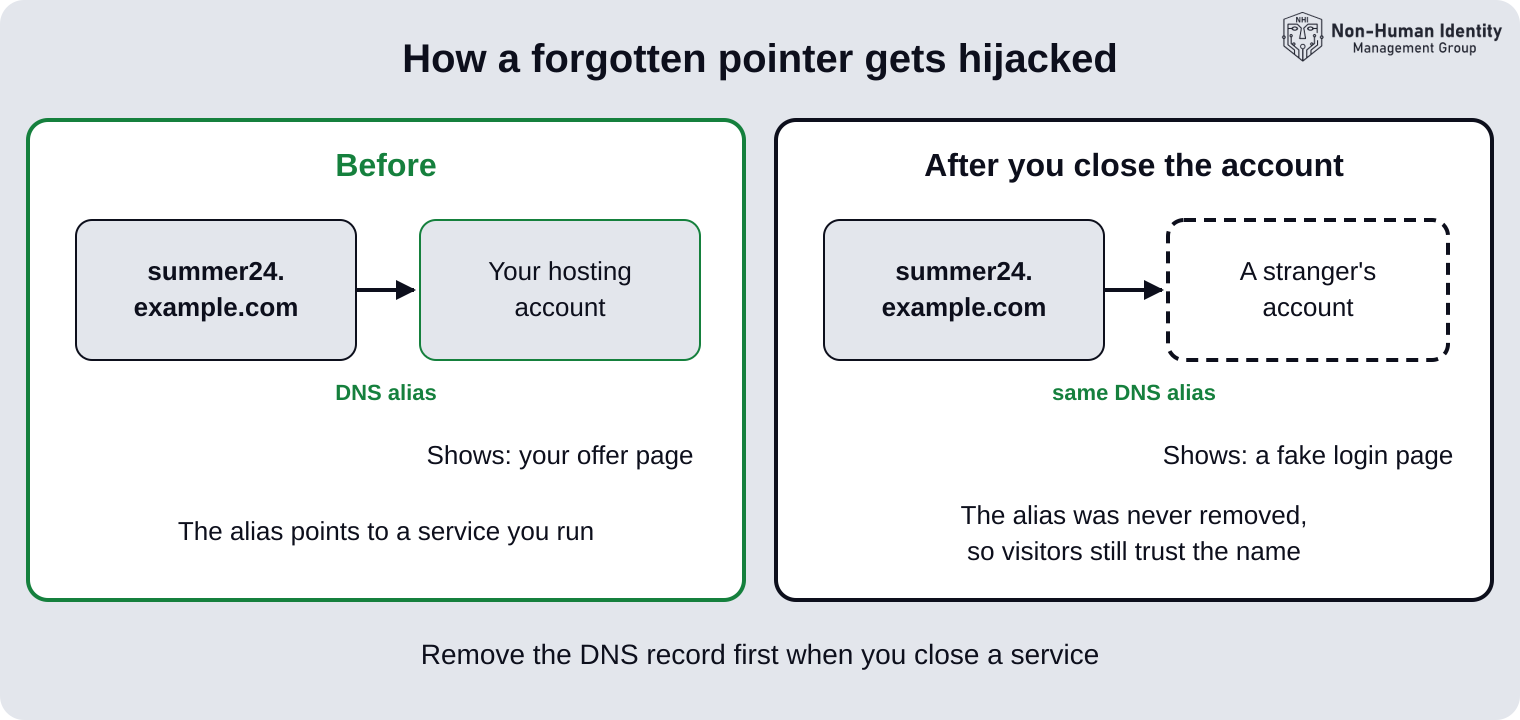
Think of a shop sign that still hangs over an empty unit after you have moved out. A stranger rents the empty unit. Now they trade under your sign, and passers-by think it is you.
Web addresses work in a similar way. Your firm owns a main name, such as example.com. You can add named parts in front of it, such as shop.example.com. Each part has a setting in the DNS, the internet's phone book, that says where to send visitors.
Often that setting is an alias, called a CNAME record, that points to an outside service. When the service is closed but the alias stays, it becomes a dangling DNS record.[1] A stranger may then set up a new service with the same name and serve their own content on your subdomain.[2]
Where the comparison stops working: you would notice a stranger trading under your shop sign. A hijacked subdomain may sit unnoticed, because nobody at your firm visits an old campaign page.
Why does it matter?
People trust a web address that ends in your name. That trust is what a takeover borrows.
If you own a business website
What could happen: an old offer page under your name starts showing a fake login or scam page.
Check this: ask your web supplier for a list of every subdomain and what each one points to.
If you are a junior developer
What could happen: you delete a test site in the cloud but leave its name in the DNS.
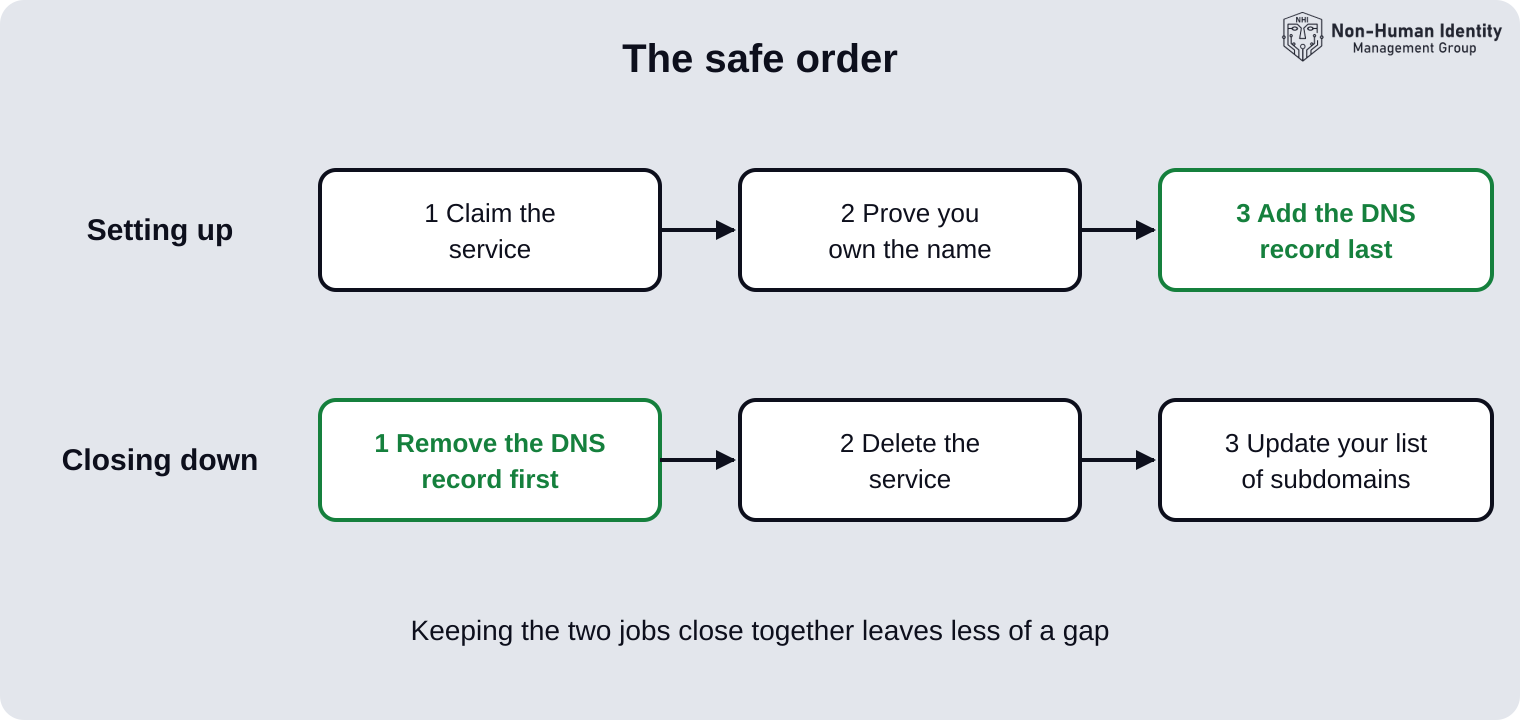
Check this: when you close a service, remove the DNS record first, then delete the service.
If you are new to IT work
What could happen: a stranger gets a valid security certificate for your subdomain, so the padlock shows and the page looks safe.[1]
Check this: include subdomains in the list of things your team owns and reviews.
What does it look like?
Here is a made-up list of DNS settings for a small firm, with one risky line.
Example only. All values are made up.
Name                     Type    Points to
www.example.com          CNAME   site.host-EXAMPLE.invalid        (1)
shop.example.com         CNAME   shop.cart-EXAMPLE.invalid        (2)
summer24.example.com     CNAME   promo-0000.pages-FAKE.invalid    (3)
mail.example.com         MX      mail.example.com                 (4)
- The main site. It points to a hosting service the firm still pays for.
- The online shop. Still in use, with a named owner.
- An old summer offer page. The hosting account was closed. This line was left behind. In a real file, this line would contain the name of a closed service.
- Email settings can be at risk too. This happens if they point to a mail service you no longer use.[1]
Why this is risky: line 3 still sends visitors to a closed service. Nobody at the firm controls it now. If a stranger can claim that name, they control what shows on summer24.example.com.
The safer way: delete the line when the offer ends, and keep a list of every subdomain with an owner and an end date.
How does it work?
A takeover usually needs a gap between two jobs that should happen together.
- Set up. A team creates a site on an outside service and adds a DNS alias so shop.example.com points to it.[1]
- Close down. Later the site is deleted, but the DNS alias is left in place. It is now dangling.[1] A similar gap can open when a subdomain is handed to another DNS service that is later closed.[3]
- Discover. Someone looking for mistakes finds that the alias points to a name nobody holds.
- Claim. They create a new account on the same service and claim that name. If the service does not check who owns the subdomain, it accepts them.[2]
- Misuse. Visitors to the subdomain now see the stranger's content. It may be a fake login page, a scam or harmful downloads.
The order of the jobs matters. When you set up a new service, claim the service first and add the DNS record last. When you close one down, remove the DNS record first.[2] Some services also let you prove you own the name with an extra DNS record, which helps stop others claiming it.[4]
A worked example
Pia Zamora runs marketing at Fern Bakery, a fictional bakery chain with six shops. Two summers ago, an agency built a page for a cake competition at cakes.example.com.
When the competition ended, the agency closed its hosting account to save money. Nobody asked about the DNS setting. It stayed in place and pointed to the closed account.
This spring, a customer emails a photo. The cakes page is back, but now it asks people to "sign in with your email to claim a prize". Pia knows the bakery has no prize running.
She calls Fen Ilic, who looks after the bakery's IT. Fen checks the DNS settings and finds the old alias still pointing at the closed account. Someone else has claimed that account name and put up the fake page.
Fen removes the DNS line that morning. Once the change has spread, cakes.example.com should no longer reach the stranger's page. He takes screenshots first, so there is a record of what visitors saw.
Fen then asks the agency for a list of every subdomain they set up. He finds two more old lines and removes them. He creates a simple sheet with each subdomain, what it points to, who owns it and when it should end.
Pia posts a short note on the bakery's social pages telling customers to ignore the prize page. Fen adds "remove DNS record first" to the checklist for closing any web service.
Myths and mistakes
| What people think | What is true |
|---|---|
| We closed the service, so the subdomain is gone. | The DNS record is separate. It stays until someone removes it.[1] |
| The padlock means the page is ours. | A stranger who controls the subdomain may be able to get a valid certificate for it.[1] |
| Only big firms get targeted. | People search for dangling records across many sites. Any firm that uses outside services can leave one behind. |
| Our main website is fine, so we are fine. | A takeover hits the forgotten parts, not the main site. Check every subdomain. |
| Deleting the service first is the tidy way. | Remove the DNS record first, then delete the service.[2] |
What can I do this week?
- Ask whoever runs your DNS for a list of every subdomain and where each one points.
- Mark any line that points to a service you no longer use, and ask for it to be removed.
- Give each subdomain a named owner.
- Add "remove DNS record first" to your steps for closing a website or campaign page.
- Ask your agencies and suppliers which subdomains they have set up for you.
Checklist
- We have a list of every subdomain we own.
- Each subdomain has a named owner and a purpose.
- Every DNS alias points to a service we still control.
- When we close a service, the DNS record is removed first.
- When we set up a service, we claim it and prove ownership before adding the DNS record.
- Only a few named people can change our DNS settings.
- We review the list at least twice a year, and after any big website change.
Common questions
Can someone take over my main website this way?
Usually the risk is to subdomains, such as shop.example.com, that point to outside services. Your main address can be at risk in other ways, for example if someone gets into your domain account. Our DNS Security for Beginners guide covers those.
How would I know if it has happened?
Often a customer or a security researcher tells you. You can also visit each subdomain on your list. If one shows content you do not recognise, or an error from a service you stopped using, look at its DNS record at once.
Is this the same as a lookalike domain?
No. A lookalike domain is a different name made to look like yours, such as examp1e.com. A subdomain takeover uses your real name. That makes it more convincing, because the address really does belong to you.
What should I do first if I find one?
Take screenshots, then remove or fix the DNS record so it no longer points to the stranger. Then ask whether any visitors typed in passwords or other details. If so, treat it as a security incident and get help from your IT supplier.
Does this affect email?
It can. Microsoft warns that the risk extends to mail settings, called MX records. If one points to a mail service you no longer control, a stranger might be able to receive email sent to that subdomain.[1]
Where next?
Ready for the detail? Read the practitioner guide: Subdomain Takeover and Dangling DNS Guide. It goes further into how to detect dangling records at scale, cloud-specific protections and lessons from real incidents.
Also useful:
- DNS Security for Beginners
- Attack Surface for Beginners
- Lookalike Domains for Beginners
- Domain and DNS Management Policy Template
Related NHI Mgmt Group resources: Attack Surface Management for Beginners · Asset Inventory for Beginners · Website Security for Beginners
Key terms
- Subdomain
- A named part of a main web address, such as shop.example.com.
- DNS
- The internet system that turns names into the places where services live.
- CNAME record
- A DNS setting that makes one name point to another name.
- Dangling DNS record
- A DNS setting that still points to something you no longer control.
- Subdomain takeover
- When someone claims the service behind a dangling subdomain and uses your name to show their content.
- MX record
- A DNS setting that says which service receives email for a name.
Sources and further reading
- Prevent dangling DNS entries and avoid subdomain takeover. Microsoft Learn, Microsoft. https://learn.microsoft.com/en-us/azure/security/fundamentals/subdomain-takeover, accessed 28 Nov 2026.
- Subdomain takeovers. MDN Web Docs, Mozilla. https://developer.mozilla.org/en-US/docs/Web/Security/Attacks/Subdomain_takeover, accessed 28 Nov 2026.
- Protecting against dangling delegation records in Route 53. Amazon Route 53 Developer Guide, Amazon Web Services. https://docs.aws.amazon.com/Route53/latest/DeveloperGuide/protection-from-dangling-dns.html, accessed 28 Nov 2026.
- Verifying your custom domain for GitHub Pages. GitHub Docs, GitHub. https://docs.github.com/en/pages/configuring-a-custom-domain-for-your-github-pages-site/verifying-your-custom-domain-for-github-pages, accessed 28 Nov 2026.