A lookalike domain is a web address made to look like a trusted one, so people trust a fake site.
This guide is for anyone who clicks links, shops online or runs a business with a website. You do not need to be technical to be affected: if your customers know your name, a criminal can copy it.
In short
- A lookalike domain copies a real web address with a small change, such as a swapped letter or an extra word.
- Criminals use these addresses for fake shops, fake login pages and fake emails.
- The part of the address that matters is the main name just before the first single slash. Read it slowly.
- Go to important sites by typing the address or using a saved bookmark, not by clicking links in messages.
What you will learn
- Explain what a lookalike domain is in one sentence.
- Spot the small changes that turn a real address into a fake one.
- Check which part of a web address shows who really owns the site.
- Ask the right questions if your own business name is being copied.
- Web address (domain name)
- the name of a website, such as example.com, that you type or click to reach it.
- Typing slip trick (typosquatting)
- buying an address that is one small mistake away from a real one.
What is a lookalike domain?
Think of a fake shop on the high street with a sign that is almost the same as a famous one. From across the road it looks right. Only when you read the sign closely do you see one letter is different.
A lookalike domain works the same way online. The domain name is the name part of a web address, like the name over a shop door. A criminal buys a name that is very close to a real one and puts a fake site behind it.
The changes are small on purpose. A letter may be doubled, swapped or missing. A word such as "login" or "secure" may be added. Some addresses use letters from other alphabets that look the same as ours, called homoglyphs.[2]
Where the comparison stops working: a fake shop stays in one place, so people can warn each other about it. A fake web address costs little to set up and can be replaced with a new one quickly.
Why does it matter?
Lookalike addresses are a common part of scam emails, texts and fake shops. Who is affected depends on whether you are the visitor or the brand being copied.
If you shop or bank online
What could happen: you type your password or card details into a fake page, and a criminal uses them.
Check this: use a bookmark for your bank and favourite shops, and sign in from there.
If you run a small business
What could happen: a criminal emails your customers from an address like yours and asks them to pay a new bank account.
Check this: tell customers you will not change bank details by email alone.
If you work in a finance or office team
What could happen: an invoice arrives from a supplier name that is one letter off, and you pay it.
Check this: compare the sender address with the one in your records before you act.
Next: Phishing for Beginners
If you look after your firm's website
What could happen: someone registers names close to yours and uses them for months before anyone notices.
Check this: list the web addresses your firm owns, and who renews each one.
What does it look like?
Example only. All values are made up.
Real address:  https://www.fakebank.example/login
Fake 1:        https://www.fakebakn.example/login            (1)
Fake 2:        https://www.fakebank-secure.example/login     (2)
Fake 3:        https://fakebank.example.account-check.invalid (3)
Fake 4:        https://www.fakebank.example-help.invalid     (4)
Email from:    "FakeBank" <[email protected]> (5)
- Two letters are swapped. Read quickly, it looks right.
- An extra word is added. The bank does not own this name.
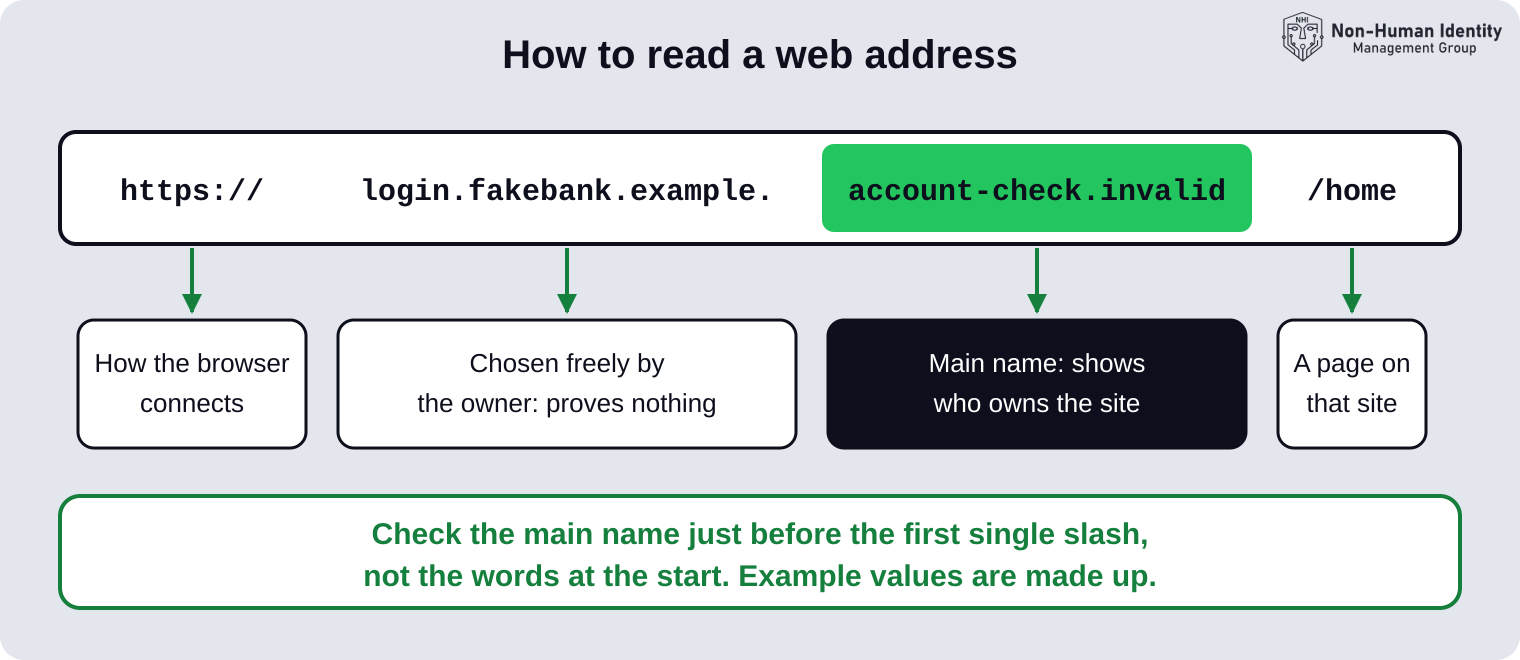
- The bank's name comes first, but the address belongs to the last part, account-check.invalid.
- A hyphen joins the bank's name to another word, making a different address.
- The display name says FakeBank, but the address after it is not the bank's.
Why this is risky: each fake looks close enough to pass a quick glance on a small phone screen.
The safer way: find the main name just before the first single slash and check it matches the address you already know.
How does it work?
This is a simple view so you can spot it. It is not a guide to doing it.
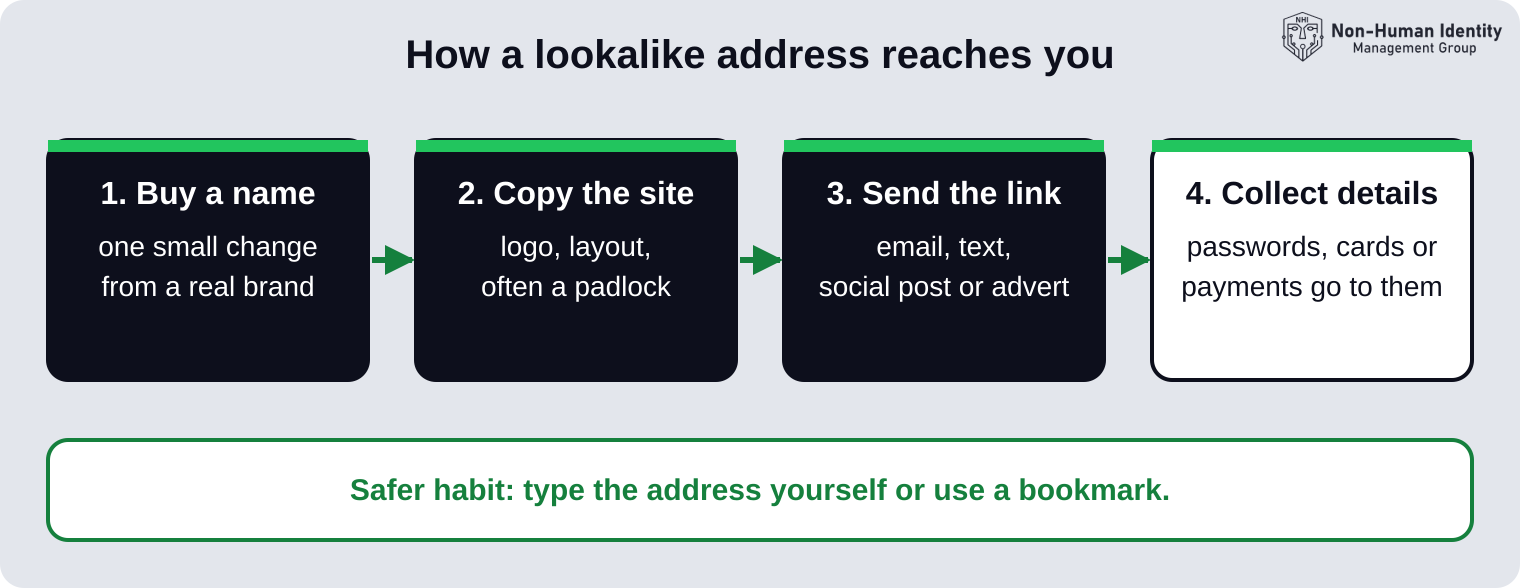
- They pick a brand. The criminal chooses a name people trust, such as a bank, a delivery firm or a local business.
- They buy a close name. Anyone can buy a web address from a company that sells them, called a registrar. The criminal picks one that is a small change from the real name.
- They build a copy. They copy the real site's logo and layout. Many add a padlock, because padlock certificates are easy to get, and the padlock does not prove the site is honest.[1]
- They send people there. Links go out in emails, texts, social media posts or paid search adverts.
- They collect what you type. Passwords, card numbers or payments go to the criminal, not the brand.
Some web browsers try to help. For example, Google Chrome may show an address in a coded form starting "xn--" when it mixes alphabets in a suspicious way.[2] This helps with some tricks, but not with simple swapped or added letters.
A worked example
This story is made up to show how it can happen.
Dara Zamora runs Crestwell Print Works, a small print business in Bristol. Her website and email use the address crestwellprint.example.
One Monday a regular customer phones her. He has an email from "Dara at Crestwell" with an invoice. It says the business has a new bank, and asks him to pay there today.
Dara did not send it. She asks him to read out the sender's address. It is [email protected]. There is an extra hyphen and an extra "s". On his phone, the email app showed only "Dara at Crestwell", so he had not seen the address at all.
Dara tells him not to pay and to delete nothing yet. She then does three things. She emails all her customers from her real address. She tells them her bank details have not changed, and that she will always confirm any change by phone.
Next she asks her web supplier to check who owns the lookalike name. The supplier helps her report the fake address to the company that sold it. She also reports it to the UK's national cyber agency, which takes reports of scam sites.[3]
Finally, she adds a line to her invoices: "We will never change our bank details by email."
What made the difference: the customer checked with Dara on a number he already had, before he paid.
Myths and mistakes
| What people think | What is true |
|---|---|
| A padlock in the address bar means the site is safe. | A padlock means the connection is private. It does not tell you who runs the site. Scam sites often have one.[1] |
| If the brand name is in the address, it is the brand's site. | Only the main name before the first single slash shows the owner. A brand name at the start can be decoration. |
| I would notice a fake address. | Small changes are easy to miss, especially on a phone where the address may be cut short. |
| The name shown on an email is the sender. | Anyone can type any display name. Tap or hover on it to see the full address. |
| Only big brands get copied. | Small firms are copied too, often to send fake invoices to their customers. |
What can I do this week?
- Save bookmarks for your bank, email and the shops you use most, and sign in from those.
- Practise finding the main name in five web addresses you use every day.
- Turn on the setting in your email app that shows the full sender address, if it has one.
- If you run a business, tell customers how you will, and will not, ask for payment.
- Report a fake site or email you receive, using the link in the Common questions section below.
Checklist
- I know which part of a web address shows who owns the site.
- I use bookmarks or type the address for my bank and email.
- I do not treat a padlock as proof that a site is genuine.
- I check the full sender address, not just the display name.
- I confirm any change of bank details on a phone number I already have.
- My business has a list of the web addresses it owns and who renews them.
- I know where to report a scam website or email.
Common questions
How do I find the part of the address that matters?
Look for the first single slash after the "https://" part. The words just before it, such as fakebank.example, are the main name. That shows who owns the site. Anything before that main name can be chosen freely by the owner, so it proves nothing.
Is a lookalike domain illegal?
Not always. Buying a similar name is not a crime in itself, and some are bought by mistake or by the brand itself for protection. Using one to trick people out of money or passwords is fraud. Brand owners can also use a formal dispute process to try to get a copied name back.[4]
Where do I report a fake website in the UK?
You can report a suspicious website to the National Cyber Security Centre, which investigates the reports it gets. If you lost money, tell your bank straight away and report it to the fraud reporting service where you live.[3]
Can my business stop people copying our name?
Not completely, but you can make it harder and spot it sooner. Watching for new names that look like yours is a recommended habit for brand owners.[6] Email checks on your own address make it harder to fake exactly.[5] Some firms also buy the most obvious close names.
I typed my password into a fake page. What now?
Change that password straight away on the real site, reached by typing its address or using a bookmark. Change it anywhere else you used the same one. Turn on two-step sign-in if you have not, and tell your bank if you entered card details.
Where next?
Ready for the detail? Read the practitioner guide: Domain Portfolio and Lookalike Domain Management Guide. It goes further into which names to register, how to monitor new registrations, and how to get copied names taken down.
Also useful:
- Typosquatting and Lookalike Domains Guide
- Email Spoofing vs Lookalike Domains
- Phishing for Beginners
- Online Scams for Beginners
Related NHI Mgmt Group resources: Disinformation and Brand Impersonation Guide · Safe Online Shopping Guide · Email Security for Beginners
Key terms
- Lookalike domain
- A web address made to look like a trusted brand's, so people believe a fake site or email is real.
- Typosquatting
- Registering a web address that is one typing slip away from a real one, to catch people who mistype.
- Homoglyph domain
- A web address that uses letters from another alphabet which look the same as ours.
- Domain name
- The name of a website, such as example.com, that people type or click to reach it.
- Domain registrar
- A company that sells and manages web addresses on behalf of the people who buy them.
- Brand impersonation
- Pretending to be a known company, using its name, logo or look, to win people's trust.
- Phishing
- Using fake messages or websites to trick people into giving away passwords, money or access.
Sources and further reading
- Cyber Actors Exploit 'Secure' Websites in Phishing Campaigns (PSA I-061019-PSA). Federal Bureau of Investigation, Internet Crime Complaint Center (IC3), 10 June 2019. https://www.ic3.gov/PSA/2019/PSA190610, accessed 28 Nov 2026.
- IDN in Google Chrome. The Chromium Projects. https://chromium.googlesource.com/chromium/src/+/main/docs/idn.md, accessed 28 Nov 2026.
- Report a suspicious website. National Cyber Security Centre (NCSC). https://www.ncsc.gov.uk/section/about-this-website/report-scam-website, accessed 28 Nov 2026.
- Uniform Domain-Name Dispute-Resolution Policy. Internet Corporation for Assigned Names and Numbers (ICANN). https://www.icann.org/resources/pages/help/dndr/udrp-en, accessed 28 Nov 2026.
- Managing public domain names. National Cyber Security Centre (NCSC). https://www.ncsc.gov.uk/guidance/managing-public-domain-names, accessed 28 Nov 2026.
- Best Practices for Use of Look-Alike Domains for Security Purposes. Messaging, Malware and Mobile Anti-Abuse Working Group (M3AAWG), September 2025. https://www.m3aawg.org/sites/default/files/doc_files/best_practices_for_use_of_look-alike_domains_for_security_purposes_sept_2025.pdf, accessed 28 Nov 2026.