DNS security is the set of practices that keep the Domain Name System, the service that turns names like example.com into internet addresses, accurate, available and hard to misuse.
Almost everything you do online starts with a DNS lookup, so when DNS is tampered with, people can be sent to fake websites, email can be redirected and services can disappear. This guide is for newcomers, students, career changers and managers who are not security specialists. It explains how DNS works, the main ways it is attacked, the protections that exist and the first steps a small team can take this week.
By the end of this guide you will be able to:
- Explain what DNS does and why attackers target it.
- Describe the main DNS threats in plain words.
- Understand what DNSSEC, encrypted DNS and protective DNS each do, and what they do not do.
- Identify three practical steps to protect your own domain.
Key takeaways
- DNS is a hidden dependency. Websites, email and many sign-in services rely on it, so a DNS problem can look like everything breaking at once.
- Your domain account is a high-value target. Anyone who can change your DNS records can redirect your website and email, so protect registrar and DNS hosting accounts with strong sign-in.
- Different tools solve different problems. DNSSEC proves answers are genuine, encrypted DNS hides lookups from eavesdroppers, and protective DNS blocks known bad sites. None does all three.
- Old records cause real risk. A record that still points to a deleted cloud service can let someone else take over your subdomain.
- DNS logs help defenders. Lookups reveal which sites and services devices are trying to reach, which helps spot malware and phishing.
What it is, in plain English
Computers find each other using numeric IP addresses, but people remember names. The Domain Name System (DNS) translates human-readable names into the IP addresses browsers use, and is often called the phone book of the internet.[1] DNS security means protecting three things: that the answers are correct, that the service stays available, and that DNS is not misused to hide attacks.
The phone book comparison helps. If someone could secretly change the number listed for your bank, you would ring a criminal while believing you were calling the bank. That is what DNS tampering does to web and email traffic. Where the analogy breaks down: a printed phone book is one copy that changes once a year, while DNS answers are fetched and stored ("cached") millions of times a second by many computers around the world, so a false answer can spread fast and also linger for a while after it is fixed.
The US standards body NIST says DNS is so central to enterprise networks that an attack on it can disrupt nearly every network function. Its main DNS guidance, SP 800-81 Revision 3, Secure Domain Name System (DNS) Deployment Guide, was published as final on 19 March 2026.[7]
Why it matters to you
- If you run a small business: your domain name is part of your identity. If the account at your domain registrar (the company you bought the name from) is taken over, an attacker can redirect your website and email.
- If you are new to a security job: DNS logs are one of the most useful sources for spotting infected devices, and DNS questions come up in almost every network investigation.
- If you are a manager: domains often sit in one person's account, sometimes a former employee or agency. Knowing who controls them, and that renewals will not lapse, is a governance task.
Real attacks show the risk. In January 2019 the US Cybersecurity and Infrastructure Security Agency (CISA) issued Emergency Directive 19-01 after attackers obtained the credentials of accounts that could change DNS records and altered records to point services at infrastructure they controlled. Because they controlled DNS, they could also obtain valid certificates for the targets' domains, so users saw no browser warnings.[3]
How it works, step by step
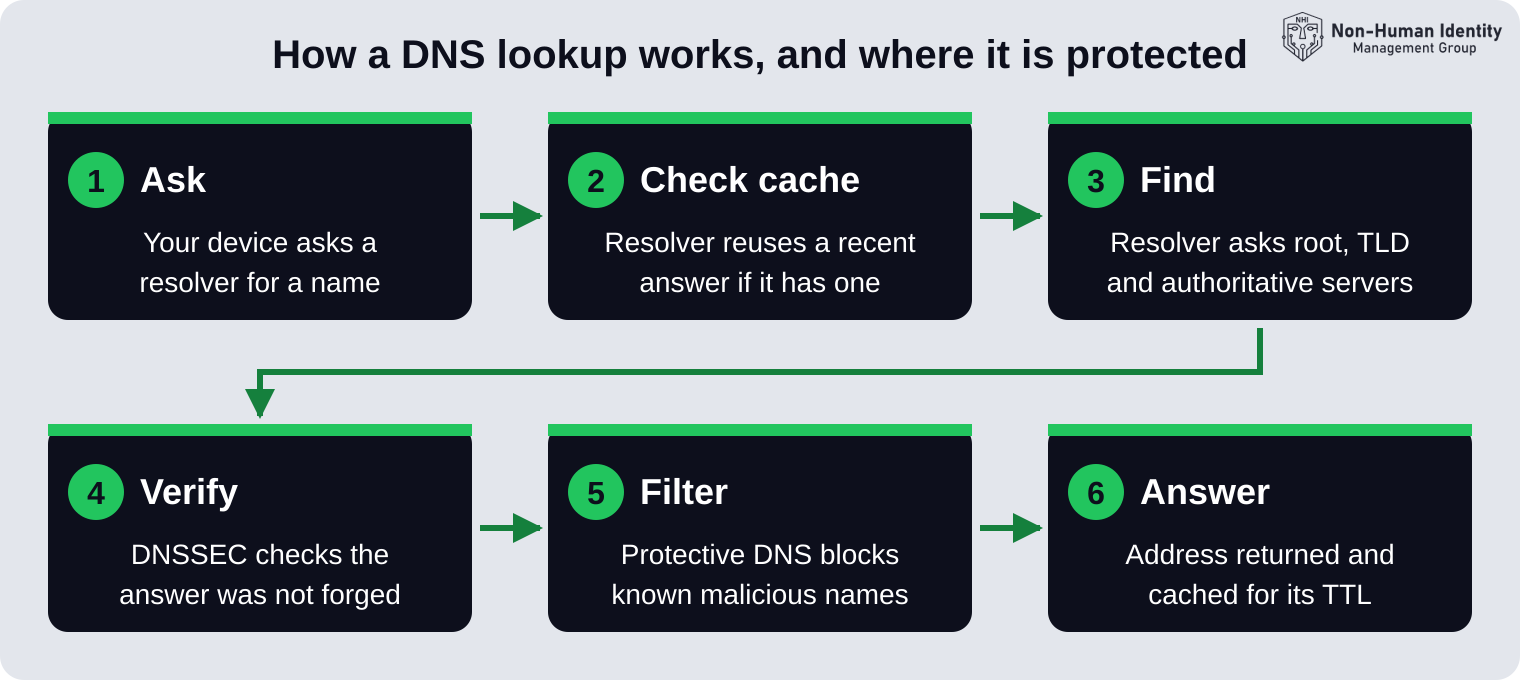
Here is what happens when you type a website name, and where protections fit in.
- Ask. Your device asks a recursive resolver (usually run by your internet provider, employer or a public DNS service) for the address of the name.[1]
- Check the cache. If the resolver looked up the same name recently, it reuses the stored answer. Each record says how long it may be kept, called its time to live (TTL).[1]
- Find. Otherwise the resolver works down the hierarchy: the root servers, then the servers for the ending (such as .com or .uk), then the authoritative server that holds the domain's actual records.[1]
- Verify. If the domain is signed with DNSSEC and the resolver validates, the resolver checks a digital signature on the answer. If the check fails, it throws the answer away and returns an error instead.[2]
- Filter. A protective DNS resolver also compares the name with lists of known malicious domains and refuses to answer for them.[4]
- Answer. The resolver returns the address to your device, which connects to the website. The answer is cached for its TTL.
The main threats
| Threat | What happens | Main protection |
|---|---|---|
| DNS hijacking (record tampering) | Someone with access to your registrar or DNS account changes records to send traffic elsewhere[3] | Strong, phishing-resistant MFA on DNS accounts, registrar lock, record audits[3] |
| Cache poisoning (spoofing) | A forged answer is accepted by a resolver and handed to everyone who asks[2] | DNSSEC signing and validation[2] |
| Subdomain takeover | A record still points to a deleted cloud resource, and someone else claims it[8] | Remove DNS records when services are retired; regular zone reviews[8] |
| Malicious domains | Users or malware look up phishing and malware sites | Protective DNS filtering[4] |
| DNS used to hide traffic | Malware uses DNS lookups for command and control (MITRE ATT&CK T1071.004)[9] | DNS logging and monitoring |
| Eavesdropping | Lookups sent in plain text can be seen or altered on the network[6] | Encrypted DNS (DoT or DoH)[5][6] |
| Denial of service | DNS servers are flooded so names stop resolving | Resilient providers, more than one name server location |
Three protections that are easy to confuse
| Protection | What it does | What it does not do |
|---|---|---|
| DNSSEC | Adds signatures so a resolver can check an answer came from the real zone and was not changed[2] | It does not hide lookups, and it does not help if an attacker logs in to your DNS account and changes records |
| Encrypted DNS | DNS over TLS (RFC 7858, port 853) and DNS over HTTPS (RFC 8484) encrypt lookups between your device and the resolver[5][6] | It does not prove the answer is genuine, and it can bypass company DNS controls if devices use outside resolvers |
| Protective DNS | A resolver that refuses to resolve domains known to be malicious and shows a block page instead[4] | It only blocks domains it knows about, and devices that use a different resolver are not covered |
Where identity fits
The most damaging DNS attacks often start with a stolen login, not clever network tricks. CISA's directive required agencies to change passwords on every account that can change DNS records, add multi-factor authentication to them and watch Certificate Transparency logs (public records of issued certificates) for certificates they did not request. It recommended phishing-resistant factors and advised against text-message codes.[3] Scripts and tools that update DNS automatically hold credentials too, such as API keys, and need the same care. See the Secrets Management for Beginners guide.
A worked example
Oakfield Dental is a fictional practice group with four clinics and 50 staff. Its website and email use the domain oakfielddental.example. Marcus, the practice manager, looks after IT with help from an outside agency.
After reading about domain hijacking, Marcus checks who controls the domain. He finds the registrar account is in the name of a web designer who left two years ago, protected only by a password. He works with the registrar to move the account to a shared practice mailbox owned by the business, turns on multi-factor authentication with an authenticator app and asks the registrar to apply a registrar lock, so transfers and some changes need extra confirmation. He sets the domain to auto-renew.
Next, Marcus and the agency list every DNS record. They find a record for booking.oakfielddental.example that still points to a cloud service the practice stopped using last year. They delete it, because anyone who claimed that old cloud name could have served content on the practice's subdomain.
Finally, the agency points the clinics' office network at a protective DNS service, so staff who click a phishing link are more likely to see a block page. A month later, a receptionist clicks a link in a fake delivery email and sees the block page. She reports it, and Marcus warns other staff. Protective DNS did not catch every bad link that month, so the practice still relies on staff awareness and email filtering as well.
Myths and misunderstandings
| What people think | What is true |
|---|---|
| DNSSEC encrypts DNS. | DNSSEC signs answers so they can be checked; it does not hide them. Encryption comes from DNS over TLS or HTTPS. |
| DNS is just plumbing; security does not apply. | DNS changes can redirect web and email traffic and even help attackers obtain valid certificates. |
| Once a domain is set up, you can forget it. | Old records, lapsed renewals and forgotten accounts are common weak points. Review them regularly. |
| Encrypted DNS always improves security. | It protects privacy on the network, but on a company network it can also let devices bypass protective DNS and logging if not managed. |
| Protective DNS blocks all phishing. | It blocks domains on its lists. New or unknown sites can get through, so other controls are still needed. |
Key terms
- Domain Name System (DNS)
- The naming service that translates human-readable domain names into network addresses.
- Recursive resolver
- The DNS server that receives your query, finds the answer and returns it, caching results for later.
- DNSSEC
- DNS Security Extensions: digital signatures on DNS data that let resolvers check an answer came from the signed zone and was not altered. It does not encrypt.
- DNS cache poisoning
- Inserting forged records into a resolver's cache so later lookups return the wrong address.
- DNS hijacking
- Manipulating DNS records, resolution paths or upstream infrastructure so traffic goes to an unintended destination.
- DNS over HTTPS (DoH)
- Sending DNS lookups inside encrypted HTTPS requests, which improves privacy but can hide lookups from defenders who only watch classic DNS.
- Protective DNS
- Using DNS policy and threat intelligence to stop access to harmful destinations.
- Domain registrar
- The organisation that sells and manages domain names for their owners, controlling renewal and administrative access.
- Registrar lock
- A protective status on a domain that blocks unauthorised transfer, update or deletion until it is deliberately released.
- Subdomain takeover
- An attack in which someone claims the service behind a stale DNS record and uses your trusted name to serve their content.
Common questions
Do I need DNSSEC for my small business domain?
It adds protection against forged answers. ICANN notes the protection only applies when the zone is signed and the resolver validates, and it does not protect a stolen registrar login, so secure the account first. Check whether your DNS host offers DNSSEC signing.[2]
What is the difference between my registrar and my DNS host?
The registrar is where you bought and renew the name. The DNS host runs the authoritative servers that hold your records. They can be the same company or different ones, and both accounts need protecting.
Is DNS over HTTPS good or bad for a company?
Both. It protects lookups from eavesdropping, but if browsers send lookups to outside resolvers, the company's own DNS filtering and logs can be bypassed. Many organisations point encrypted DNS at their own approved resolver.
What is protective DNS, and who offers it?
It is a resolver that blocks known malicious domains. In the UK, the NCSC runs a free Protective DNS service for eligible organisations, mandated by the Cabinet Office for central government departments; commercial services also exist.[4]
How would I know if my DNS was hijacked?
Warning signs include records you did not change, unexpected certificates for your domain in Certificate Transparency logs, and email or web traffic going missing. CISA's directive asked agencies to audit their records and monitor those logs.[3]
Is there a formal standard I can point to?
NIST SP 800-53 includes controls SC-20, SC-21 and SC-22 for secure name resolution, and NIST SP 800-81 Revision 3 gives detailed deployment advice.[10][7]
First steps
Three things you can do this week:
- Find and secure your domain accounts. List every domain you own, who controls the registrar and DNS hosting accounts, and turn on multi-factor authentication for each. Make sure the account belongs to the organisation, not one person.
- Turn on registrar lock and auto-renew, where your registrar offers them, and check the renewal contact details are current.
- Review your records. Export your DNS records and delete any that point to services you no longer use. If a change goes wrong, roll back from the export in a controlled, recorded way.
Checklist
- We know every domain we own and when each one renews.
- Registrar and DNS hosting accounts belong to the organisation and use multi-factor authentication.
- Registrar lock is on for important domains, where available.
- Only a small number of people and tools can change DNS records, and their credentials are stored securely.
- We remove DNS records when a service or cloud resource is retired.
- Office and remote devices use a filtering or protective DNS resolver.
- DNS query logs are kept and can be searched during an investigation.
- We have checked whether our DNS host supports DNSSEC and made a decision about it.
Simple measures that show progress: the number of domains with MFA and registrar lock, the number of stale records removed, and how often the record list is reviewed.
Check your understanding
1. What does DNSSEC protect against, and what does it not do?
Answer: it helps a resolver detect forged or altered answers, such as cache poisoning. It does not encrypt lookups, and it does not stop someone who has logged in to your DNS account from changing records.
2. Why is the registrar account so important?
Answer: whoever controls it can change where your website and email go, and may be able to obtain valid certificates for your domain.
3. What is a dangling DNS record?
Answer: a record that still points to a service that has been deleted, which someone else may be able to claim.
4. Why might encrypted DNS cause problems on a company network?
Answer: if devices send encrypted lookups to outside resolvers, they can bypass the company's protective DNS and logging.
Suggested learning pathway
- Start with the basics in Networking Fundamentals for Beginners.
- See the wider picture in Network Security for Beginners.
- Learn how certificates and encryption protect web traffic in TLS and HTTPS for Beginners.
- Understand the phishing sites DNS filtering helps block in Phishing for Beginners.
- For the full practitioner view, see the DNS Security Guide.
- For signing your zones, see the DNSSEC Deployment Guide.
- For encrypted lookups at work, see the Encrypted DNS Enterprise Guide.
- For using DNS to catch attackers, see the DNS Logging and Detection Guide.
Standards and references
- What is DNS? How DNS works. Cloudflare Learning Center, Cloudflare. https://www.cloudflare.com/learning/dns/what-is-dns/, accessed 27 Nov 2026.
- DNSSEC: What Is It and Why Is It Important? ICANN. https://www.icann.org/resources/pages/dnssec-what-is-it-why-important-2019-03-05-en, accessed 27 Nov 2026.
- Emergency Directive 19-01: Mitigate DNS Infrastructure Tampering. Cybersecurity and Infrastructure Security Agency (CISA), January 2019. https://www.cisa.gov/news-events/directives/ed-19-01-mitigate-dns-infrastructure-tampering, accessed 27 Nov 2026.
- Protective Domain Name Service (PDNS). National Cyber Security Centre (NCSC), published 17 Aug 2017, reviewed 17 Sep 2024. https://www.ncsc.gov.uk/information/pdns, accessed 27 Nov 2026.
- RFC 8484: DNS Queries over HTTPS (DoH). IETF, October 2018. https://www.rfc-editor.org/rfc/rfc8484.
- RFC 7858: Specification for DNS over Transport Layer Security (TLS). IETF, May 2016. https://www.rfc-editor.org/rfc/rfc7858.
- SP 800-81 Rev. 3, Secure Domain Name System (DNS) Deployment Guide. National Institute of Standards and Technology (NIST), 19 Mar 2026. https://csrc.nist.gov/pubs/sp/800/81/r3/final, accessed 27 Nov 2026.
- Prevent dangling DNS entries and avoid subdomain takeover. Microsoft Learn, Microsoft, last updated 24 Jul 2026. https://learn.microsoft.com/en-us/azure/security/fundamentals/subdomain-takeover, accessed 27 Nov 2026.
- Application Layer Protocol: DNS, Technique T1071.004. MITRE ATT&CK Enterprise, v20. https://attack.mitre.org/techniques/T1071/004/, accessed 27 Nov 2026.
- SP 800-53 Rev. 5, Security and Privacy Controls for Information Systems and Organizations (controls SC-20, SC-21, SC-22). National Institute of Standards and Technology (NIST). https://csrc.nist.gov/pubs/sp/800/53/r5/upd1/final.
Related NHI Mgmt Group resources: DNS Security Checklist, DNS Hijack Playbook and DDoS Attacks for Beginners.